
Valitse kieli

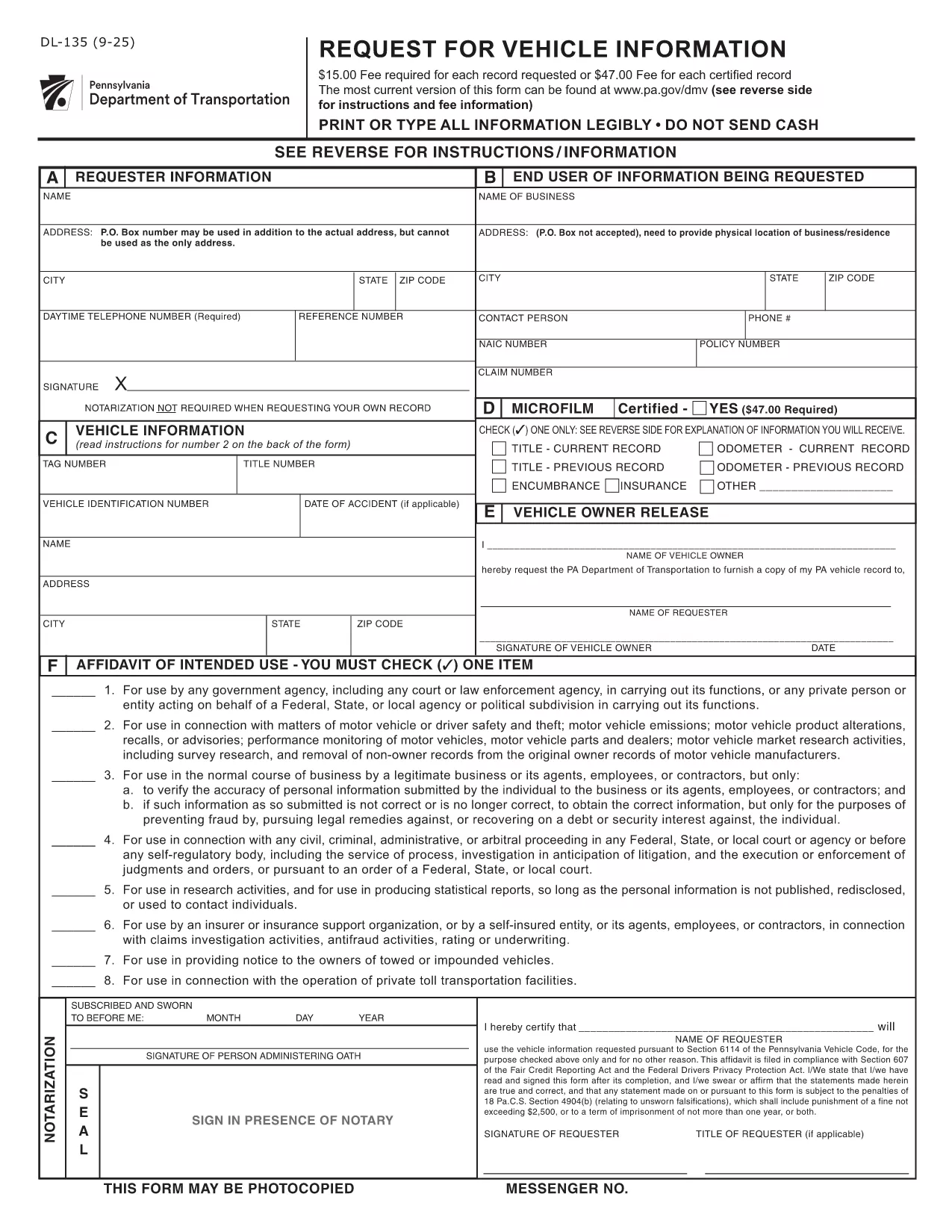
DL-135 – Pennsylvania Request for Vehicle Information (Fillable PDF)

  1. Kieli Englanti
  2. Maa USA
  3. Toiminta Ajokortti
  4. Osavaltio Pennsylvania
DL-135 – Pennsylvania Request for Vehicle Information (Fillable PDF)

What Is the DL-135 Form?

The DL‑135, also known as the “Request for Vehicle Information” form, is issued by the Pennsylvania Department of Transportation (PennDOT). It allows individuals, businesses, and law‑enforcement agencies to request detailed records about a vehicle registered in Pennsylvania, such as ownership history, title status, and lien information.

Why Use a Fillable PDF with Formize?

Formize turns the static DL‑135 PDF into an interactive, fillable document that you can complete directly in your browser. No Adobe Acrobat or other PDF editor is required. Your data is saved automatically, and you can download a completed copy for printing or e‑submission.

Step‑by‑Step Guide to Complete DL‑135

Follow these simple steps to finish your request in minutes:

  1. Click the “Fill out this form” button on the page.
  2. Wait for the Formize PDF Filler app to load (usually a few seconds).
  3. Enter the required information: vehicle VIN or plate number, your name, address, and the purpose of the request.
  4. Review the entered data for accuracy.
  5. Click “Submit” to generate a completed PDF you can download or print.

Common Mistakes to Avoid

  • Leaving fields blank: The PennDOT system rejects incomplete requests.
  • Incorrect VIN or plate number: Double‑check the characters; a single typo can delay the search.
  • Using the wrong purpose code: Choose the option that best matches your need (e.g., “Legal/Insurance” vs. “Personal Inquiry”).

Where to Submit Your Request

After completing the form, you can either:

  • Print the filled PDF and mail it to the PennDOT Vehicle Information Services Center.
  • Submit the PDF electronically through the PennDOT online portal if you have an account.

For the most up‑to‑date submission address, refer to the official PennDOT website.

FAQ
  • What information do I need to fill out DL‑135?

    You’ll need the vehicle’s VIN or license plate number, your full name, mailing address, and the reason you’re requesting the records.

  • Can I submit the DL‑135 form electronically?

    Yes. After completing the fillable PDF, you can upload it to the PennDOT online portal if you have an account, or email it to the designated address.

  • Is there a fee to request vehicle information with DL‑135?

    PennDOT may charge a processing fee depending on the type of request. Check the latest fee schedule on the PennDOT website.

  • How long does it take to receive the vehicle information?

    Processing time varies, but most standard requests are fulfilled within 5‑10 business days after PennDOT receives the completed form.

  • Can I use the DL‑135 form for out‑of‑state vehicles?

    The DL‑135 is specific to Pennsylvania‑registered vehicles. For out‑of‑state requests, contact the corresponding state’s DMV.

  • What should I do if I make a mistake on the form?

    Simply edit the field in the fillable PDF before submitting. If you have already submitted, you’ll need to complete a new form with the correct information.

  • Do I need a signature on the DL‑135?

    Yes. The form requires a handwritten signature. After downloading the completed PDF, print it, sign, and then mail or upload as instructed.

MITEN

Kuinka täyttää DL-135 ilmaiseksi verkossa 3 helpon vaiheen avulla:

  1. 1
    Open the Fillable Form
    Click the “Fill out this form” button on the page. The Formize PDF Filler will open in a new tab.
  2. 2
    Enter Your Information
    Type the required details (VIN, name, address, purpose) into the interactive fields. The app saves your entries automatically.
  3. 3
    Review and Download
    Check all fields for accuracy, then click “Submit” to generate a completed PDF. Download it for printing or email submission.
Muotoile PDF Filler -sovellus
NOIN

Ajokortin hakulomakkeet

Useimmissa maissa ajokortti on pakollinen, ennen kuin voit lähteä tielle. Ajokortin saaminen on tärkeä virstanpylväs jokaiselle, joka haluaa ajaa autoa.

DL-135 on yksi ajokorttihakemuslomakkeista, joita käytetään keräämään tietoja ihmisiltä, ​​jotka haluavat hakea ajokorttia. Siinä on yleensä kentät hakijan nimi, syntymäaika, henkilöllisyystodistus, yhteystiedot sekä ajokorttihistoria ja -kokemus.

OMINAISUUDET

PDF-täyttö

Helpoin tapa täyttää DL-135 verkossa

  • Täytä nopeasti DL-135
    Etsitkö tapaa täyttää DL-135 nopeasti verkossa? Online-maksuttoman PDF-lomakkeen täyttösovelluksemme avulla tiedät kuinka muokata ja täyttää tämä pdf-dokumentti alle minuutissa.
  • Helppokäyttöinen PDF-editori verkossa
    Oletko kyllästynyt tulostamaan PDF-tiedostoja, jotta voit muokata niitä, ennen kuin skannaat uudelleen ja lähetät ne takaisin? Muokkaa PDF-dokumentteja ilmaiseksi verkossa. Käytä online-pdf-editoriamme säästääksesi aikaa ja paperia.
  • Upeita työkaluja, kaikki alustat
    Mietitkö, kuinka DL-135 täytetään Macilla tai kuinka käyttää PDF-täyttöä ilmaiseksi? Online PDF-työkalumme toimivat kaikilla alustoilla.
  • Suojattu tiedostojen tallennus
    Valmiit "DL-135"-tiedostot tallennetaan suojattuun tietokantaan, jota hallinnoi Amazon Cloud hosting. Voit poistaa tiedostosi järjestelmästämme milloin tahansa. Joka tapauksessa nämä tiedostot poistetaan automaattisesti 24 tunnin kuluttua.
  • Keskustele käyttäjän DL-135 kanssa
    Keskustele käyttäjän "DL-135" kanssa Chatizessa, joka on ilmainen PDF-lukija-apuohjelma. Esitä kysymyksiä ja hanki vastauksia käyttäjältä "DL-135". Napsauta yllä olevaa Chat With Document -painiketta.

Poista täyttöistunto

Poistetaanko valittu täyttöistunto? Tässä tapauksessa edistymisesi lomakkeen täyttämisessä menetetään.

Poista muokkausistunto

Poistetaanko valittu muokkausistunto? Tässä tapauksessa etenemisesi lomakkeen luomisessa ja muokkaamisessa menetetään.