
Valitse kieli

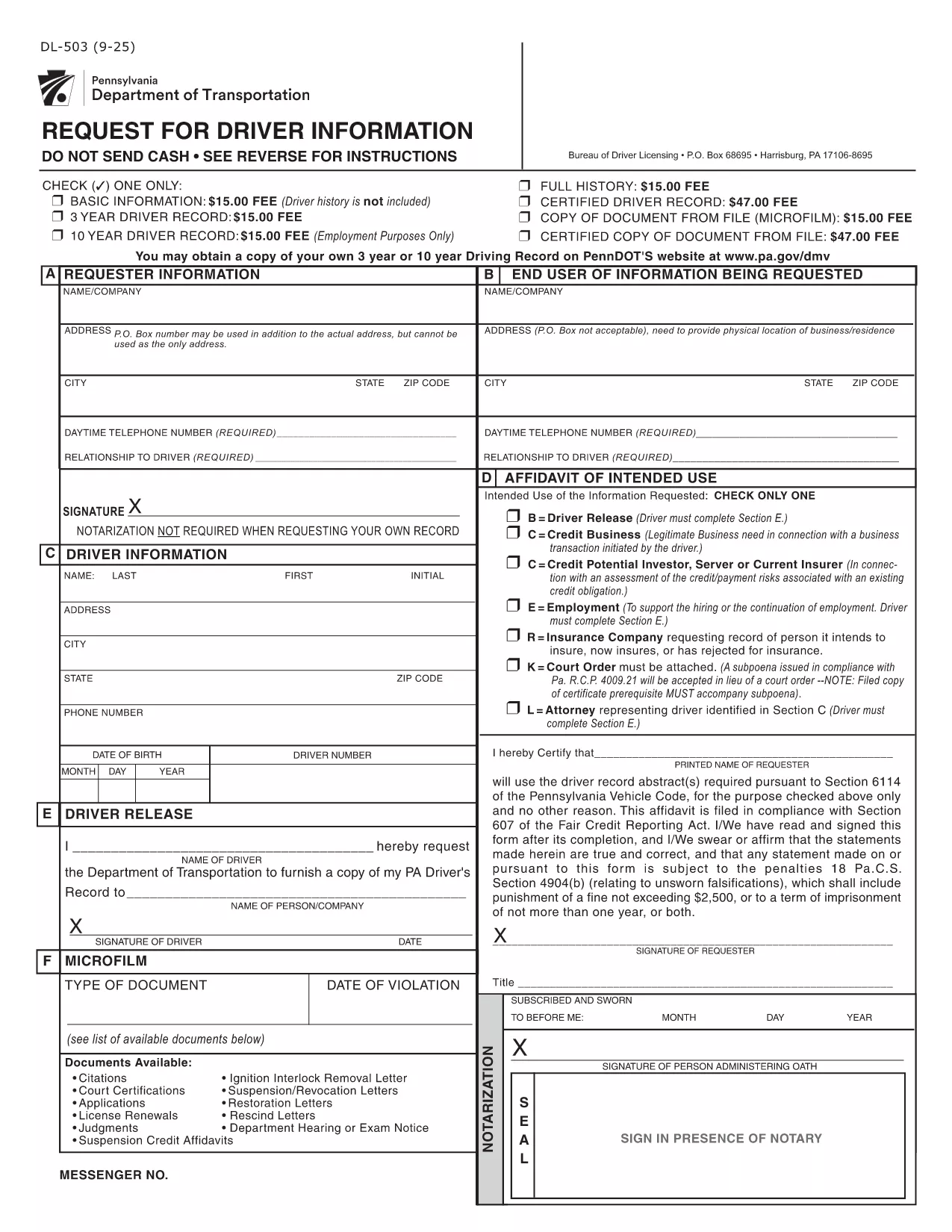
DL-503 – Pennsylvania Driver Information Request Form (Fillable PDF)

  1. Kieli Englanti
  2. Maa USA
  3. Toiminta Ajokortti
  4. Osavaltio Pennsylvania
DL-503 – Pennsylvania Driver Information Request Form (Fillable PDF)

The DL-503 is the official Pennsylvania Department of Transportation (PennDOT) form used to request driver record information. Whether you need your own driving history or an authorized record for an employee, this fillable PDF lets you submit a request quickly and securely.

What Is the DL-503 Form?

The DL-503 collects basic identifying details, the purpose of the request, and the signature of the requester. It is commonly used by employers, insurance companies, and individuals who need a Motor Vehicle Record (MVR) for verification.

How to Complete the DL-503 Online

Instead of downloading, printing, and scanning, you can fill the form directly in your browser using Formize’s PDF Filler app. Follow the simple steps below.

Common Mistakes to Avoid

  • Leaving Section E unsigned when required – the driver’s signature is mandatory if any of the checkboxes in Section D are selected.
  • Providing an incorrect ZIP code – PennDOT will reject the request if the address does not match the driver’s records.
  • Omitting the purpose code – PennDOT requires a clear reason (e.g., employment, insurance) for the record request.

Where to Submit the Completed Form

After you finish filling out the DL-503, print the completed PDF and mail it to:

Bureau of Driver Licensing
P.O. Box 68695
Harrisburg, PA 17106‑8695

Alternatively, you may submit a scanned copy via fax if your organization has an established PennDOT fax line.

Frequently Used Keywords

Keywords such as "DL-503", "Pennsylvania driver record request", and "fillable PDF" help you find the right form quickly. Use them when searching online or when naming your saved file.

FAQ
  • Can I submit the DL-503 electronically?

    PennDOT currently requires a printed and signed copy. The online filler only speeds up data entry; you still need to mail the final form.

  • Do I need a notary for my own record request?

    No. For personal requests, notarization is not required. Only third‑party requests may need additional verification.

  • How long does it take to receive the driver record?

    Processing typically takes 7‑10 business days after PennDOT receives the completed and signed form.

  • What fees are associated with the DL-503 request?

    PennDOT charges a nominal fee per request (check the latest schedule on the PennDOT website). Payment details are included on the form.

  • Can I request records for multiple drivers on one form?

    Each driver requires a separate DL-503. Submit one form per individual to avoid processing delays.

  • What should I do if I make a mistake on the form?

    Correct the error by striking through the mistake, initialing the change, and re‑signing the affected sections before mailing.

  • Is the Formize filler compatible with mobile devices?

    Yes, the filler works on most modern smartphones and tablets, but printing the final document is recommended for a clean submission.

MITEN

Kuinka täyttää DL-503 ilmaiseksi verkossa 3 helpon vaiheen avulla:

  1. 1
    Click the Fill‑out Button
    On this page, click the bright “Fill out this form” button. The Formize PDF Filler app will open in a new tab.
  2. 2
    Wait for the PDF Filler to Load
    The app loads the DL-503 PDF automatically. No download or extra software is required.
  3. 3
    Complete and Submit
    Enter all required information, sign electronically if allowed, then print and mail the form as instructed.
Muotoile PDF Filler -sovellus
NOIN

Ajokortin hakulomakkeet

Useimmissa maissa ajokortti on pakollinen, ennen kuin voit lähteä tielle. Ajokortin saaminen on tärkeä virstanpylväs jokaiselle, joka haluaa ajaa autoa.

DL-503 on yksi ajokorttihakemuslomakkeista, joita käytetään keräämään tietoja ihmisiltä, ​​jotka haluavat hakea ajokorttia. Siinä on yleensä kentät hakijan nimi, syntymäaika, henkilöllisyystodistus, yhteystiedot sekä ajokorttihistoria ja -kokemus.

OMINAISUUDET

PDF-täyttö

Helpoin tapa täyttää DL-503 verkossa

  • Täytä nopeasti DL-503
    Etsitkö tapaa täyttää DL-503 nopeasti verkossa? Online-maksuttoman PDF-lomakkeen täyttösovelluksemme avulla tiedät kuinka muokata ja täyttää tämä pdf-dokumentti alle minuutissa.
  • Helppokäyttöinen PDF-editori verkossa
    Oletko kyllästynyt tulostamaan PDF-tiedostoja, jotta voit muokata niitä, ennen kuin skannaat uudelleen ja lähetät ne takaisin? Muokkaa PDF-dokumentteja ilmaiseksi verkossa. Käytä online-pdf-editoriamme säästääksesi aikaa ja paperia.
  • Upeita työkaluja, kaikki alustat
    Mietitkö, kuinka DL-503 täytetään Macilla tai kuinka käyttää PDF-täyttöä ilmaiseksi? Online PDF-työkalumme toimivat kaikilla alustoilla.
  • Suojattu tiedostojen tallennus
    Valmiit "DL-503"-tiedostot tallennetaan suojattuun tietokantaan, jota hallinnoi Amazon Cloud hosting. Voit poistaa tiedostosi järjestelmästämme milloin tahansa. Joka tapauksessa nämä tiedostot poistetaan automaattisesti 24 tunnin kuluttua.
  • Keskustele käyttäjän DL-503 kanssa
    Keskustele käyttäjän "DL-503" kanssa Chatizessa, joka on ilmainen PDF-lukija-apuohjelma. Esitä kysymyksiä ja hanki vastauksia käyttäjältä "DL-503". Napsauta yllä olevaa Chat With Document -painiketta.

Poista täyttöistunto

Poistetaanko valittu täyttöistunto? Tässä tapauksessa edistymisesi lomakkeen täyttämisessä menetetään.

Poista muokkausistunto

Poistetaanko valittu muokkausistunto? Tässä tapauksessa etenemisesi lomakkeen luomisessa ja muokkaamisessa menetetään.