
Valitse kieli

Pennsylvania DL-82 Out‑of‑State Address & Photo Exemption Form (Fillable PDF)

  1. Kieli Englanti
  2. Maa USA
  3. Toiminta Ajokortti
  4. Osavaltio Pennsylvania
Pennsylvania DL-82 Out‑of‑State Address & Photo Exemption Form (Fillable PDF)

What Is the DL-82 Form?

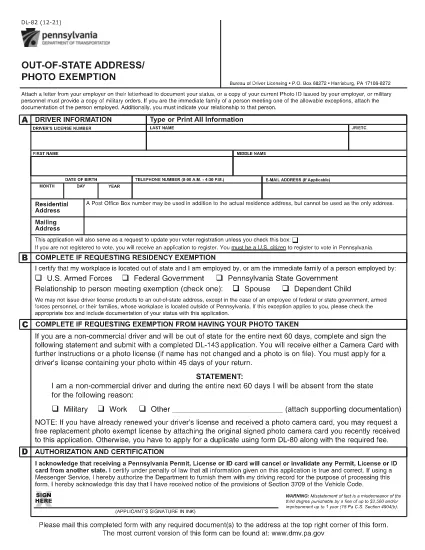
The DL-82 is the Pennsylvania Department of Transportation (PennDOT) form used to request an out‑of‑state address and photo exemption for a driver’s license. It allows military members, federal or state employees, and their immediate families to keep a valid PA license while stationed outside the Commonwealth.

Who Is Eligible for the Exemption?

  • U.S. Armed Forces personnel stationed outside Pennsylvania
  • Federal, state, or local government employees working out of state
  • Immediate family members of the above qualifying applicants
  • Non‑commercial drivers who need a photo exemption while away from Pennsylvania

How to Complete the DL-82 Online with Formize

Instead of downloading the PDF and editing it manually, simply click the “Fill out this form” button on this page. The Formize PDF Filler app will load in your browser, letting you:

  1. Enter your driver’s license number, name, and date of birth.
  2. Select the appropriate exemption check‑boxes.
  3. Upload supporting documents (military orders, employment verification, etc.).
  4. Apply an electronic signature.
  5. Save, print, or submit the completed form directly from the app.

Common Mistakes to Avoid

  • Leaving required fields blank – the form will be rejected.
  • Using an outdated version of the DL-82 – always use the latest PDF linked below.
  • Failing to attach proof of military or employment status.
  • Signing with a handwritten image instead of the built‑in e‑signature tool.

Where to Submit Your Completed Form

After completing the form, you can:

  • Mail it to the PennDOT Bureau of Driver Licensing, Harrisburg, PA.
  • Deliver it in person at any Pennsylvania DMV office.
  • If your employer’s human‑resources department accepts electronic submissions, you may forward the PDF directly.

Processing typically takes 7‑10 business days. Keep a copy of the submitted PDF for your records.

FAQ
  • What is the purpose of the DL-82 form?

    It allows qualified individuals to request an exemption from providing a new address and photo on their Pennsylvania driver’s license while they are stationed or employed out of state.

  • Can I submit the DL-82 electronically?

    Yes. With Formize you can fill, sign, and download the completed PDF. You still need to mail or deliver the printed form to PennDOT unless your agency accepts electronic copies.

  • How long is the exemption valid?

    The exemption is typically valid for one year, after which you must submit a new DL-82 if you remain out of state.

  • Do I need to provide a new photo if I move back to Pennsylvania?

    When you return to Pennsylvania and renew your license, you must provide a current photo. The DL-82 exemption only applies while you are out of state.

  • What supporting documents are required?

    Proof of military orders, federal or state employment letters, or a spouse’s employment verification if you are a family member. Attach clear copies when you upload them in Formize.

  • Is there a fee to file the DL-82?

    There is no separate fee for the exemption itself, but standard driver’s license renewal or replacement fees still apply.

MITEN

Kuinka täyttää DL-82 ilmaiseksi verkossa 4 helpon vaiheen avulla:

  1. 1
    Open the Fillable Form
    Click the “Fill out this form” button on the page. The Formize PDF Filler will launch in a new tab.
  2. 2
    Enter Your Information
    Fill in your driver’s license number, name, date of birth, and select the exemption boxes that apply to you.
  3. 3
    Upload Supporting Documents
    Use the upload field to attach military orders, employment verification letters, or any other required proof.
  4. 4
    Sign and Submit
    Add your electronic signature, review all entries, then click “Save” or “Print” to finalize. You can mail the PDF or keep a digital copy.
Muotoile PDF Filler -sovellus
NOIN

Ajokortin hakulomakkeet

Useimmissa maissa ajokortti on pakollinen, ennen kuin voit lähteä tielle. Ajokortin saaminen on tärkeä virstanpylväs jokaiselle, joka haluaa ajaa autoa.

DL-82 on yksi ajokorttihakemuslomakkeista, joita käytetään keräämään tietoja ihmisiltä, ​​jotka haluavat hakea ajokorttia. Siinä on yleensä kentät hakijan nimi, syntymäaika, henkilöllisyystodistus, yhteystiedot sekä ajokorttihistoria ja -kokemus.

OMINAISUUDET

PDF-täyttö

Helpoin tapa täyttää DL-82 verkossa

  • Täytä nopeasti DL-82
    Etsitkö tapaa täyttää DL-82 nopeasti verkossa? Online-maksuttoman PDF-lomakkeen täyttösovelluksemme avulla tiedät kuinka muokata ja täyttää tämä pdf-dokumentti alle minuutissa.
  • Helppokäyttöinen PDF-editori verkossa
    Oletko kyllästynyt tulostamaan PDF-tiedostoja, jotta voit muokata niitä, ennen kuin skannaat uudelleen ja lähetät ne takaisin? Muokkaa PDF-dokumentteja ilmaiseksi verkossa. Käytä online-pdf-editoriamme säästääksesi aikaa ja paperia.
  • Upeita työkaluja, kaikki alustat
    Mietitkö, kuinka DL-82 täytetään Macilla tai kuinka käyttää PDF-täyttöä ilmaiseksi? Online PDF-työkalumme toimivat kaikilla alustoilla.
  • Suojattu tiedostojen tallennus
    Valmiit "DL-82"-tiedostot tallennetaan suojattuun tietokantaan, jota hallinnoi Amazon Cloud hosting. Voit poistaa tiedostosi järjestelmästämme milloin tahansa. Joka tapauksessa nämä tiedostot poistetaan automaattisesti 24 tunnin kuluttua.
  • Keskustele käyttäjän DL-82 kanssa
    Keskustele käyttäjän "DL-82" kanssa Chatizessa, joka on ilmainen PDF-lukija-apuohjelma. Esitä kysymyksiä ja hanki vastauksia käyttäjältä "DL-82". Napsauta yllä olevaa Chat With Document -painiketta.

Poista täyttöistunto

Poistetaanko valittu täyttöistunto? Tässä tapauksessa edistymisesi lomakkeen täyttämisessä menetetään.

Poista muokkausistunto

Poistetaanko valittu muokkausistunto? Tässä tapauksessa etenemisesi lomakkeen luomisessa ja muokkaamisessa menetetään.