
Valitse kieli

DL-14C – Texas Election Identification Certificate (Fillable PDF)

  1. Kieli Englanti
  2. Maa USA
  3. Toiminta Ajokortti
  4. Osavaltio Texas
DL-14C – Texas Election Identification Certificate (Fillable PDF)

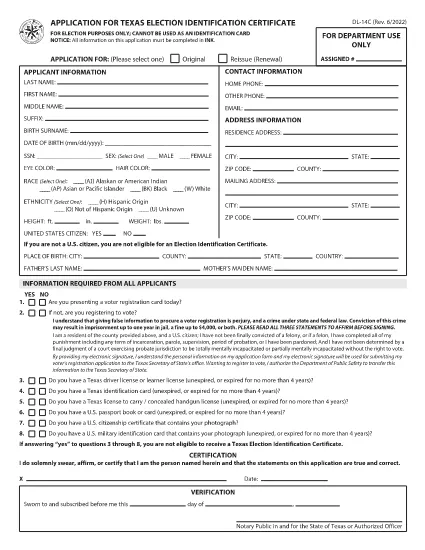
The DL-14C is the official Application for a Texas Election Identification Certificate (EIC). This card allows eligible voters to prove their identity at the polls without a driver’s license or state ID. Our fillable PDF version lets you complete the form quickly, securely, and without printing.

What Is the DL-14C Form?

The DL-14C is issued by the Texas Department of Public Safety (DPS) in partnership with the Texas Secretary of State. It is available to any Texas resident who does not have a driver’s license or state ID but needs a valid photo ID for voting.

How to Fill Out the DL-14C Online

Instead of downloading the PDF and opening a separate editor, simply click the "Fill out this form" button on this page. The Formize PDF Filler app will load the document directly in your browser, allowing you to enter data, add signatures, and save a completed copy.

  • Step 1 – Open the Form: Click the blue "Fill out this form" button.
  • Step 2 – Enter Your Information: Fill in personal details, address, and citizenship status. All fields are searchable and auto‑validated.
  • Step 3 – Upload Supporting Documents: Attach a copy of your birth certificate, passport, or other accepted ID.
  • Step 4 – Sign Electronically: Use your mouse or touchscreen to add a digital signature.
  • Step 5 – Save & Submit: Download the completed PDF or email it directly to the Texas DPS office.

Common Mistakes to Avoid

  • Leaving the SSN field blank when it is optional – you can write “N/A” to avoid processing delays.
  • Providing an outdated address – the DPS requires a current residential address.
  • Uploading non‑PDF supporting documents – convert images to PDF before attaching.
  • Forgetting to sign – an unsigned form is rejected.

Where to Submit Your Completed Form

After you have saved the filled PDF, mail it to the address listed on the last page of the form or submit it in person at any Texas Department of Public Safety office. You can also upload the file through the DPS online portal if you have an account.

Frequently Asked Questions

Below are quick answers to the most common queries about the DL-14C.

FAQ
  • Do I have to provide my Social Security Number on the DL-14C?

    No. The SSN field is optional for Election Identification Certificate applicants. You can write “N/A” if you prefer not to disclose it.

  • Can I use a driver’s license number on this form?

    Only if you already have a Texas driver’s license. The DL-14C is intended for residents who do NOT have a driver’s license or state ID.

  • How long does it take to receive the Election ID after submitting the form?

    Processing typically takes 7‑10 business days after the DPS receives a complete application and supporting documents.

  • What documents are accepted as proof of identity?

    A certified birth certificate, valid U.S. passport, or an out‑of‑state driver’s license with a translation are accepted.

  • Is there a fee to obtain the Election Identification Certificate?

    No. The DL-14C application for an Election ID is free of charge.

  • Can I fill out the DL-14C on a mobile device?

    Yes. The Formize PDF Filler works on smartphones and tablets, allowing you to complete the form on the go.

MITEN

Kuinka täyttää DL-14C ilmaiseksi verkossa 4 helpon vaiheen avulla:

  1. 1
    Open the Fillable Form
    Click the "Fill out this form" button on the page. The Formize PDF Filler will load the DL-14C directly in your browser.
  2. 2
    Complete All Required Fields
    Enter your personal information, address, and citizenship details. Use the built‑in validation to avoid errors.
  3. 3
    Add Supporting Documents and Sign
    Upload PDFs of your birth certificate or passport, then add an electronic signature. Save the completed form to your device.
  4. 4
    Submit the Application
    Print and mail, deliver in person to a DPS office, or upload the PDF through the DPS online portal.
Muotoile PDF Filler -sovellus
NOIN

Ajokortin hakulomakkeet

Useimmissa maissa ajokortti on pakollinen, ennen kuin voit lähteä tielle. Ajokortin saaminen on tärkeä virstanpylväs jokaiselle, joka haluaa ajaa autoa.

DL-14C on yksi ajokorttihakemuslomakkeista, joita käytetään keräämään tietoja ihmisiltä, ​​jotka haluavat hakea ajokorttia. Siinä on yleensä kentät hakijan nimi, syntymäaika, henkilöllisyystodistus, yhteystiedot sekä ajokorttihistoria ja -kokemus.

OMINAISUUDET

PDF-täyttö

Helpoin tapa täyttää DL-14C verkossa

  • Täytä nopeasti DL-14C
    Etsitkö tapaa täyttää DL-14C nopeasti verkossa? Online-maksuttoman PDF-lomakkeen täyttösovelluksemme avulla tiedät kuinka muokata ja täyttää tämä pdf-dokumentti alle minuutissa.
  • Helppokäyttöinen PDF-editori verkossa
    Oletko kyllästynyt tulostamaan PDF-tiedostoja, jotta voit muokata niitä, ennen kuin skannaat uudelleen ja lähetät ne takaisin? Muokkaa PDF-dokumentteja ilmaiseksi verkossa. Käytä online-pdf-editoriamme säästääksesi aikaa ja paperia.
  • Upeita työkaluja, kaikki alustat
    Mietitkö, kuinka DL-14C täytetään Macilla tai kuinka käyttää PDF-täyttöä ilmaiseksi? Online PDF-työkalumme toimivat kaikilla alustoilla.
  • Suojattu tiedostojen tallennus
    Valmiit "DL-14C"-tiedostot tallennetaan suojattuun tietokantaan, jota hallinnoi Amazon Cloud hosting. Voit poistaa tiedostosi järjestelmästämme milloin tahansa. Joka tapauksessa nämä tiedostot poistetaan automaattisesti 24 tunnin kuluttua.
  • Keskustele käyttäjän DL-14C kanssa
    Keskustele käyttäjän "DL-14C" kanssa Chatizessa, joka on ilmainen PDF-lukija-apuohjelma. Esitä kysymyksiä ja hanki vastauksia käyttäjältä "DL-14C". Napsauta yllä olevaa Chat With Document -painiketta.

Poista täyttöistunto

Poistetaanko valittu täyttöistunto? Tässä tapauksessa edistymisesi lomakkeen täyttämisessä menetetään.

Poista muokkausistunto

Poistetaanko valittu muokkausistunto? Tässä tapauksessa etenemisesi lomakkeen luomisessa ja muokkaamisessa menetetään.