
Valitse kieli

Fillable DTS-60 Driver Training School Agreement PDF

  1. Maa USA
  2. Kieli Englanti
  3. Toiminta Ajokortti
  4. Osavaltio Virginia
Fillable DTS-60 Driver Training School Agreement PDF

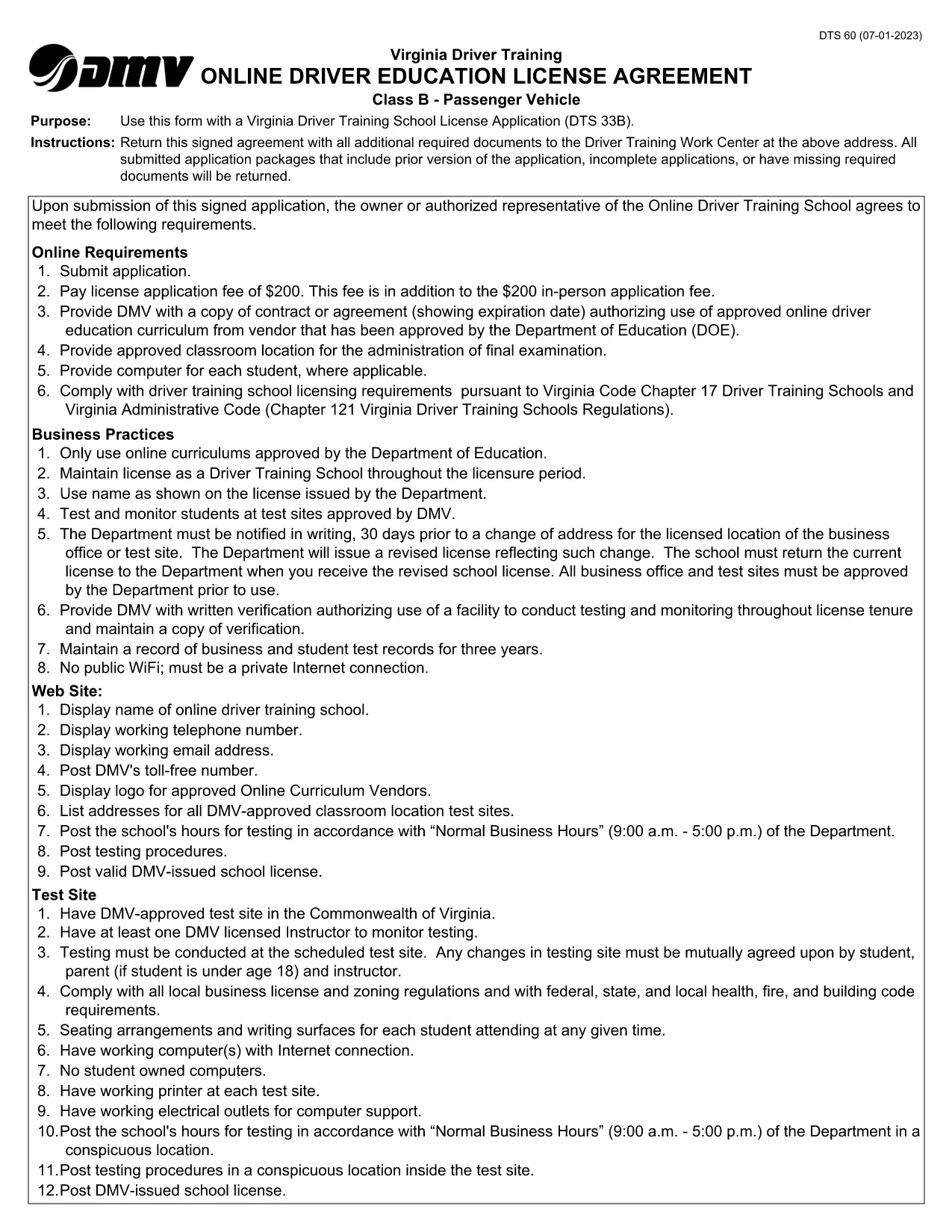
The DTS-60 Driver Training School Agreement is required by the Virginia Department of Motor Vehicles (DMV) when a student enrolls in a driver‑education program. This fillable PDF lets you complete the form online, print it, and submit it without manual paperwork.

What is the DTS-60 Form?

The DTS-60 captures essential details about the student, parent/guardian, and the driving school. It confirms that the student meets eligibility criteria and that the school agrees to provide the required curriculum.

How to Fill the DTS-60 Online with Formize

Instead of downloading and editing the PDF in a separate editor, simply click the “Fill out this form” button below. Formize’s PDF Filler loads instantly, allowing you to type directly into each field.

Key Sections and Required Information

  • Student Information: Name, date of birth, Virginia driver’s license number (if any).
  • Parent/Guardian Consent: Signature, contact phone, and email.
  • Driving School Details: School name, address, instructor certification.
  • Course Completion Dates: Start and end dates of the driver‑education program.

Common Mistakes to Avoid

  • Leaving any required field blank – the form will not submit.
  • Using an illegible handwritten signature – type your name or use a digital signature.
  • Entering an incorrect driver’s license number – double‑check the digits.
  • Submitting the form before the school signs – both parties must sign.

When you’re ready, click the button, fill the form, download the completed PDF, and submit it to your local Virginia DMV office.

FAQ
  • What is the purpose of the DTS-60 form?

    The DTS-60 confirms that a student is enrolled in an approved driver‑education program and records parental consent and school information for the Virginia DMV.

  • Can I fill out the DTS-60 on a mobile device?

    Yes. Formize’s PDF Filler works on smartphones and tablets, letting you complete the form on any modern browser.

  • Do I need a PDF editor to use this form?

    No. Simply click the “Fill out this form” button and the Formize app provides a fully fillable interface.

  • Is the completed form accepted electronically?

    Most Virginia DMV offices require a printed copy with signatures, but check with your driving school – some accept the digital PDF.

  • How long does it take to complete the DTS-60?

    Typical completion takes 5‑10 minutes if you have all required information on hand.

  • What if I make a mistake after downloading?

    Open the downloaded PDF again with Formize’s filler to edit, or re‑fill the form from the start using the online version.

MITEN

Kuinka täyttää DTS-60 ilmaiseksi verkossa 5 helpon vaiheen avulla:

  1. 1
    Start the Fillable Form
    Click the “Fill out this form” button on this page. Formize’s PDF Filler will open in a new tab.
  2. 2
    Enter All Required Data
    Type directly into each field – student details, parent consent, and school information. The interface validates required fields in real time.
  3. 3
    Add Your Signature
    Use the built‑in signature tool to type or draw your signature. No need for a scanned image.
  4. 4
    Download and Print
    When the form is complete, click “Download PDF”. Print a hard copy if your DMV requires a physical submission.
  5. 5
    Submit to the DMV
    Bring the printed form to your local Virginia DMV office or follow any electronic submission instructions provided by your driving school.
Muotoile PDF Filler -sovellus
NOIN

Ajokortin hakulomakkeet

Useimmissa maissa ajokortti on pakollinen, ennen kuin voit lähteä tielle. Ajokortin saaminen on tärkeä virstanpylväs jokaiselle, joka haluaa ajaa autoa.

DTS-60 on yksi ajokorttihakemuslomakkeista, joita käytetään keräämään tietoja ihmisiltä, ​​jotka haluavat hakea ajokorttia. Siinä on yleensä kentät hakijan nimi, syntymäaika, henkilöllisyystodistus, yhteystiedot sekä ajokorttihistoria ja -kokemus.

OMINAISUUDET

PDF-täyttö

Helpoin tapa täyttää DTS-60 verkossa

  • Täytä nopeasti DTS-60
    Etsitkö tapaa täyttää DTS-60 nopeasti verkossa? Online-maksuttoman PDF-lomakkeen täyttösovelluksemme avulla tiedät kuinka muokata ja täyttää tämä pdf-dokumentti alle minuutissa.
  • Helppokäyttöinen PDF-editori verkossa
    Oletko kyllästynyt tulostamaan PDF-tiedostoja, jotta voit muokata niitä, ennen kuin skannaat uudelleen ja lähetät ne takaisin? Muokkaa PDF-dokumentteja ilmaiseksi verkossa. Käytä online-pdf-editoriamme säästääksesi aikaa ja paperia.
  • Upeita työkaluja, kaikki alustat
    Mietitkö, kuinka DTS-60 täytetään Macilla tai kuinka käyttää PDF-täyttöä ilmaiseksi? Online PDF-työkalumme toimivat kaikilla alustoilla.
  • Suojattu tiedostojen tallennus
    Valmiit "DTS-60"-tiedostot tallennetaan suojattuun tietokantaan, jota hallinnoi Amazon Cloud hosting. Voit poistaa tiedostosi järjestelmästämme milloin tahansa. Joka tapauksessa nämä tiedostot poistetaan automaattisesti 24 tunnin kuluttua.
  • Keskustele käyttäjän DTS-60 kanssa
    Keskustele käyttäjän "DTS-60" kanssa Chatizessa, joka on ilmainen PDF-lukija-apuohjelma. Esitä kysymyksiä ja hanki vastauksia käyttäjältä "DTS-60". Napsauta yllä olevaa Chat With Document -painiketta.

Poista täyttöistunto

Poistetaanko valittu täyttöistunto? Tässä tapauksessa edistymisesi lomakkeen täyttämisessä menetetään.

Poista muokkausistunto

Poistetaanko valittu muokkausistunto? Tässä tapauksessa etenemisesi lomakkeen luomisessa ja muokkaamisessa menetetään.