
Valitse kieli

Visual Examination Report – Fillable PDF for Washington State Drivers

  1. Kieli Englanti
  2. Maa USA
  3. Toiminta Ajokortti
  4. Osavaltio Washington
Visual Examination Report – Fillable PDF for Washington State Drivers

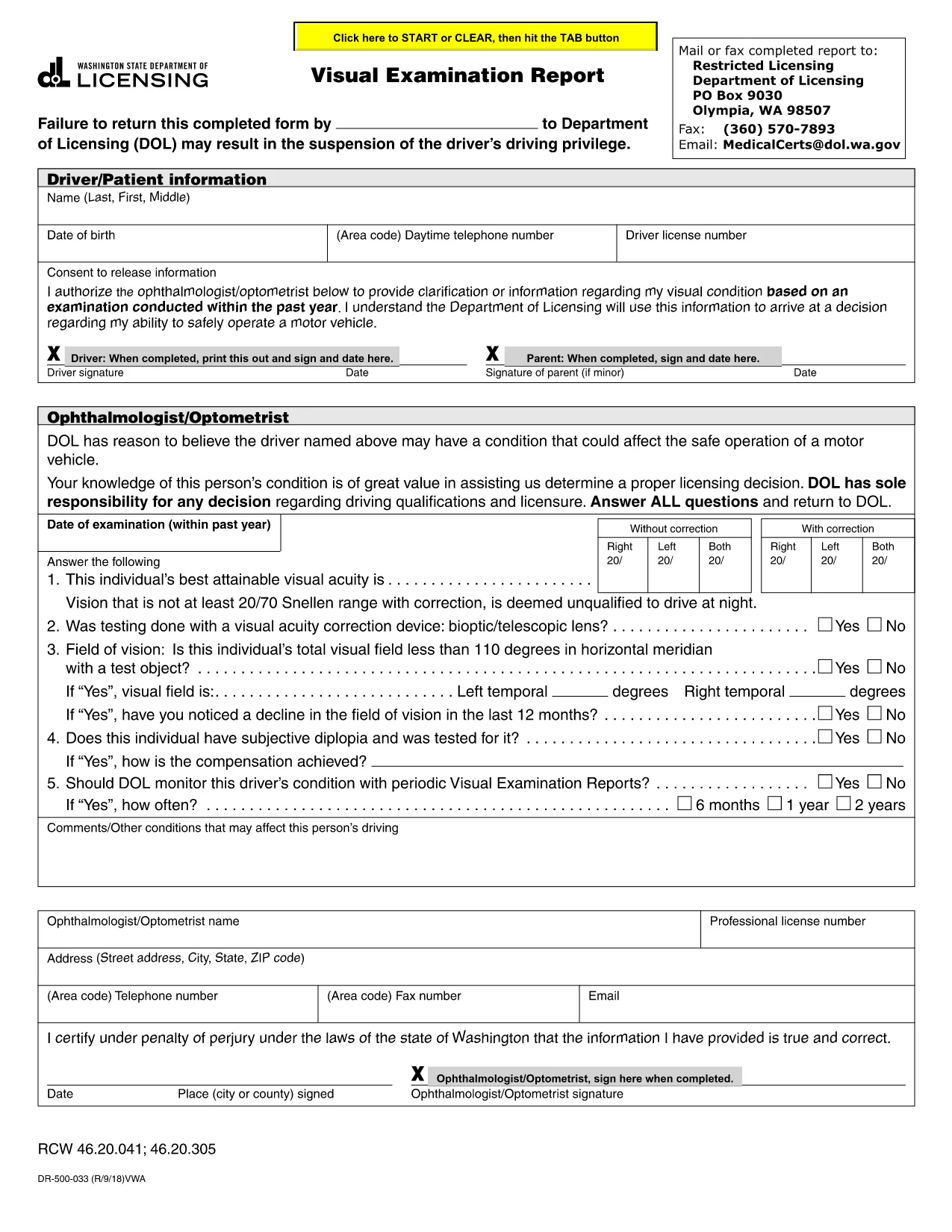
The Visual Examination Report is a mandatory medical form used by the Washington State Department of Licensing (DOL) to verify that a driver meets the vision standards required for a valid driver’s license. Historically, drivers had to print, fill out by hand, and mail the form, but with Formize’s fillable PDF you can complete it online in minutes.

What Is the Visual Examination Report?

This form collects essential information about a driver’s visual acuity, field of vision, and any corrective lenses required. A licensed physician, optometrist, or ophthalmologist must sign the report, confirming that the driver meets the state’s vision requirements.

Why Use a Fillable PDF Form?

  • Fast & secure: No printing or scanning required.
  • Auto‑save: Your progress is saved as you type.
  • Built‑in validation: Prevents missing or incorrect entries.
  • Direct submission: Download the completed PDF and upload it to the DOL portal or attach it to an email.

Step‑by‑Step Guide to Completing the Report

Follow the simple steps below to finish the Visual Examination Report using Formize’s PDF filler.

Common Mistakes to Avoid

  • Leaving the physician’s signature section blank.
  • Entering vision numbers without the required units (e.g., 20/40 instead of 20/40).
  • Submitting an outdated form version – always use the latest PDF provided below.

Where to Submit Your Completed Form

After you download the filled PDF, you can:

  • Upload it directly to the Washington DOL online portal.
  • Mail it to the address listed on the form.
  • Bring a printed copy to your nearest licensing office.

Need help? Review the FAQs below or contact your eye‑care professional for clarification.

FAQ
  • Who can complete the Visual Examination Report?

    Only a licensed physician, optometrist, or ophthalmologist authorized to practice in Washington can fill out and sign the report.

  • Do I need to print the form after filling it online?

    No. You can download the completed PDF and upload it directly to the DOL website, or email it to the licensing office.

  • What vision standards must I meet?

    Washington requires a visual acuity of at least 20/40 in each eye, with or without corrective lenses, and a normal field of vision.

  • Can I use a scanned copy of a handwritten form?

    A scanned handwritten form is accepted but may cause processing delays. Using the fillable PDF ensures faster review.

  • How long is the Visual Examination Report valid?

    The report is valid for 12 months from the date of the physician’s signature. After that, a new exam is required.

  • What should I do if I make a mistake while filling the form?

    Use the “Reset” button in the Formize filler to clear the field, or simply edit the incorrect entry before downloading.

  • Is there a fee to submit the Visual Examination Report?

    There is no separate fee for the report itself, but the Washington DOL may charge a processing fee for license renewal or replacement.

MITEN

Kuinka täyttää visual examination report ilmaiseksi verkossa 5 helpon vaiheen avulla:

  1. 1
    Open the Fillable Form
    Click the “Fill out this form” button on the page. The Formize PDF Filler app will open in a new tab.
  2. 2
    Wait for the Filler to Load
    The app loads the visual examination report automatically. This may take a few seconds depending on your connection.
  3. 3
    Enter the Required Information
    Complete each field – driver details, vision test results, and physician’s certification. Use the drop‑down menus where provided.
  4. 4
    Review and Sign
    Double‑check all entries for accuracy. The physician can add a digital signature directly in the filler.
  5. 5
    Download or Submit
    When finished, click “Download PDF” to save a copy or use the “Submit” button to send it straight to the Washington DOL portal.
Muotoile PDF Filler -sovellus
NOIN

Ajokortin hakulomakkeet

Useimmissa maissa ajokortti on pakollinen, ennen kuin voit lähteä tielle. Ajokortin saaminen on tärkeä virstanpylväs jokaiselle, joka haluaa ajaa autoa.

visual examination report on yksi ajokorttihakemuslomakkeista, joita käytetään keräämään tietoja ihmisiltä, ​​jotka haluavat hakea ajokorttia. Siinä on yleensä kentät hakijan nimi, syntymäaika, henkilöllisyystodistus, yhteystiedot sekä ajokorttihistoria ja -kokemus.

OMINAISUUDET

PDF-täyttö

Helpoin tapa täyttää visual examination report verkossa

  • Täytä nopeasti visual examination report
    Etsitkö tapaa täyttää visual examination report nopeasti verkossa? Online-maksuttoman PDF-lomakkeen täyttösovelluksemme avulla tiedät kuinka muokata ja täyttää tämä pdf-dokumentti alle minuutissa.
  • Helppokäyttöinen PDF-editori verkossa
    Oletko kyllästynyt tulostamaan PDF-tiedostoja, jotta voit muokata niitä, ennen kuin skannaat uudelleen ja lähetät ne takaisin? Muokkaa PDF-dokumentteja ilmaiseksi verkossa. Käytä online-pdf-editoriamme säästääksesi aikaa ja paperia.
  • Upeita työkaluja, kaikki alustat
    Mietitkö, kuinka visual examination report täytetään Macilla tai kuinka käyttää PDF-täyttöä ilmaiseksi? Online PDF-työkalumme toimivat kaikilla alustoilla.
  • Suojattu tiedostojen tallennus
    Valmiit "visual examination report"-tiedostot tallennetaan suojattuun tietokantaan, jota hallinnoi Amazon Cloud hosting. Voit poistaa tiedostosi järjestelmästämme milloin tahansa. Joka tapauksessa nämä tiedostot poistetaan automaattisesti 24 tunnin kuluttua.
  • Keskustele käyttäjän visual examination report kanssa
    Keskustele käyttäjän "visual examination report" kanssa Chatizessa, joka on ilmainen PDF-lukija-apuohjelma. Esitä kysymyksiä ja hanki vastauksia käyttäjältä "visual examination report". Napsauta yllä olevaa Chat With Document -painiketta.

Poista täyttöistunto

Poistetaanko valittu täyttöistunto? Tässä tapauksessa edistymisesi lomakkeen täyttämisessä menetetään.

Poista muokkausistunto

Poistetaanko valittu muokkausistunto? Tässä tapauksessa etenemisesi lomakkeen luomisessa ja muokkaamisessa menetetään.