
Valitse kieli

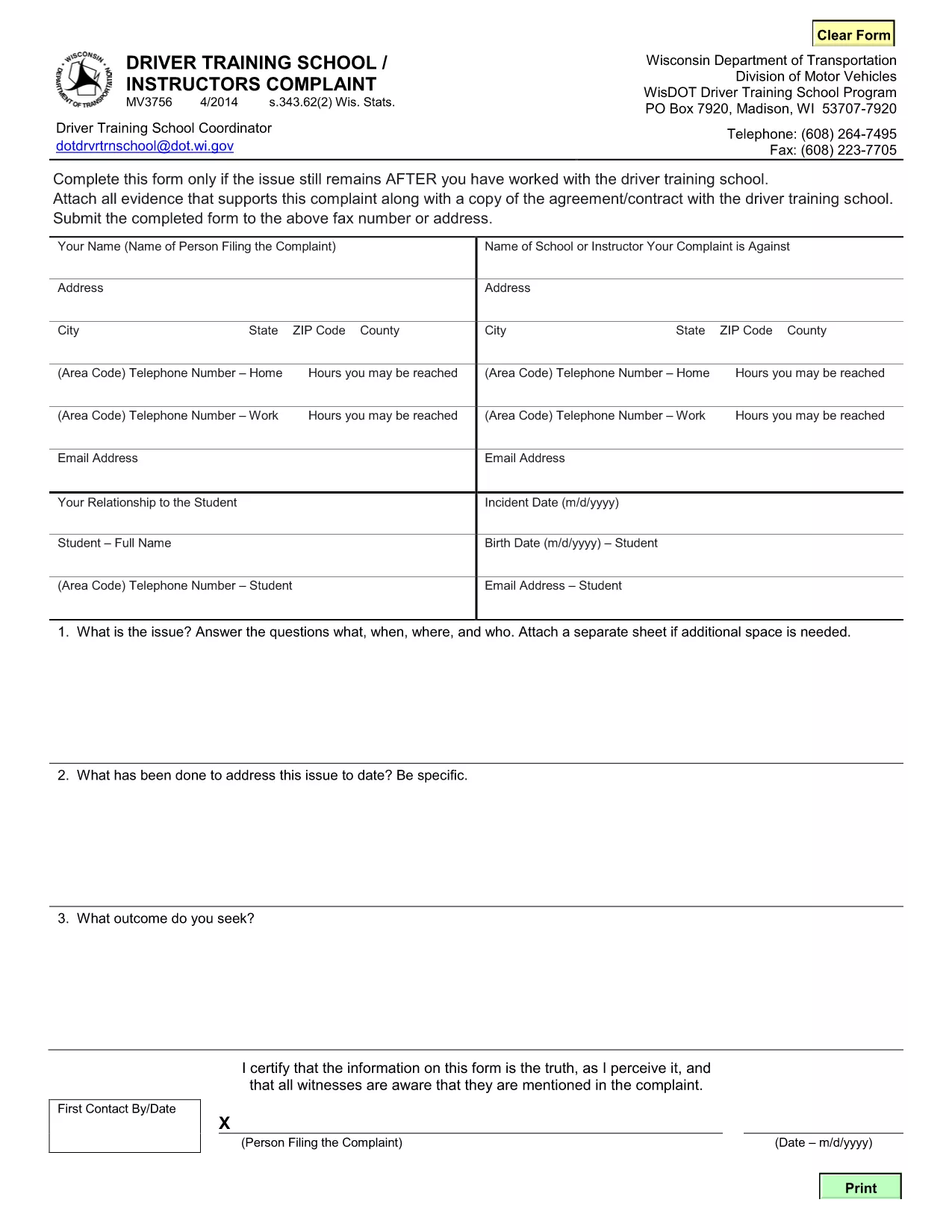
MV3756 Driver Training School & Instructor Complaint Form

  1. Kieli Englanti
  2. Maa USA
  3. Toiminta Ajokortti
  4. Osavaltio Wisconsin
MV3756 Driver Training School & Instructor Complaint Form

The MV3756 is the official Wisconsin Department of Transportation (WisDOT) complaint form used to report issues with driver training schools or instructors. Whether you experienced inadequate instruction, contract violations, or safety concerns, this fillable PDF lets you submit a detailed complaint quickly.

Formize hosts a secure, browser‑based PDF filler so you never need to download, print, or scan the document. Just click the button, fill the fields, and submit the completed form directly to WisDOT.

Below you’ll find step‑by‑step instructions, common pitfalls to watch out for, and answers to the most frequently asked questions about the MV3756 form.

FAQ
  • What type of issues can I report with MV3756?

    The form covers any misconduct by a driver‑training school or instructor, including contract breaches, unsafe training practices, or failure to provide promised services.

  • Do I need a Wisconsin address to use this form?

    No. The MV3756 can be submitted by anyone who has taken a driver‑training course in Wisconsin, regardless of where you currently reside.

  • Can I submit the form without attachments?

    While attachments are optional, providing copies of agreements, receipts, or photos greatly strengthens your complaint and speeds up processing.

  • How long does it take for WisDOT to respond?

    WisDOT typically acknowledges receipt within 5‑7 business days and may request additional information before taking action.

  • Is there a fee to file an MV3756 complaint?

    No. Filing the MV3756 form is completely free.

  • What if I make a mistake after submitting?

    Contact the WisDOT Complaint Unit directly (phone or email) and reference your submission ID. They can guide you on amending the complaint.

  • Can I save my progress and finish later?

    Yes. The Formize PDF filler allows you to save a draft locally on your device and reload it when you’re ready to finish.

  • Is my personal information secure?

    Formize uses SSL encryption, and the PDF is stored only for the duration of the session. No data is retained after you submit the form.

MITEN

Kuinka täyttää MV3756 ilmaiseksi verkossa 5 helpon vaiheen avulla:

  1. 1
    Open the Fillable Form
    Click the **Fill out this form** button on the page. Formize will load the MV3756 PDF directly in your browser.
  2. 2
    Enter Your Information
    Complete each required field—your name, contact details, school name, and a clear description of the issue.
  3. 3
    Attach Supporting Documents
    Use the attachment fields to upload copies of contracts, receipts, or any evidence that supports your complaint.
  4. 4
    Review & Sign
    Double‑check all entries for accuracy, then add your electronic signature using the built‑in signing tool.
  5. 5
    Submit the Form
    Press **Submit**. The completed MV3756 will be securely sent to the Wisconsin DOT’s complaint processing center.
Muotoile PDF Filler -sovellus
NOIN

Ajokortin hakulomakkeet

Useimmissa maissa ajokortti on pakollinen, ennen kuin voit lähteä tielle. Ajokortin saaminen on tärkeä virstanpylväs jokaiselle, joka haluaa ajaa autoa.

MV3756 on yksi ajokorttihakemuslomakkeista, joita käytetään keräämään tietoja ihmisiltä, ​​jotka haluavat hakea ajokorttia. Siinä on yleensä kentät hakijan nimi, syntymäaika, henkilöllisyystodistus, yhteystiedot sekä ajokorttihistoria ja -kokemus.

OMINAISUUDET

PDF-täyttö

Helpoin tapa täyttää MV3756 verkossa

  • Täytä nopeasti MV3756
    Etsitkö tapaa täyttää MV3756 nopeasti verkossa? Online-maksuttoman PDF-lomakkeen täyttösovelluksemme avulla tiedät kuinka muokata ja täyttää tämä pdf-dokumentti alle minuutissa.
  • Helppokäyttöinen PDF-editori verkossa
    Oletko kyllästynyt tulostamaan PDF-tiedostoja, jotta voit muokata niitä, ennen kuin skannaat uudelleen ja lähetät ne takaisin? Muokkaa PDF-dokumentteja ilmaiseksi verkossa. Käytä online-pdf-editoriamme säästääksesi aikaa ja paperia.
  • Upeita työkaluja, kaikki alustat
    Mietitkö, kuinka MV3756 täytetään Macilla tai kuinka käyttää PDF-täyttöä ilmaiseksi? Online PDF-työkalumme toimivat kaikilla alustoilla.
  • Suojattu tiedostojen tallennus
    Valmiit "MV3756"-tiedostot tallennetaan suojattuun tietokantaan, jota hallinnoi Amazon Cloud hosting. Voit poistaa tiedostosi järjestelmästämme milloin tahansa. Joka tapauksessa nämä tiedostot poistetaan automaattisesti 24 tunnin kuluttua.
  • Keskustele käyttäjän MV3756 kanssa
    Keskustele käyttäjän "MV3756" kanssa Chatizessa, joka on ilmainen PDF-lukija-apuohjelma. Esitä kysymyksiä ja hanki vastauksia käyttäjältä "MV3756". Napsauta yllä olevaa Chat With Document -painiketta.

Poista täyttöistunto

Poistetaanko valittu täyttöistunto? Tässä tapauksessa edistymisesi lomakkeen täyttämisessä menetetään.

Poista muokkausistunto

Poistetaanko valittu muokkausistunto? Tässä tapauksessa etenemisesi lomakkeen luomisessa ja muokkaamisessa menetetään.