
Valitse kieli

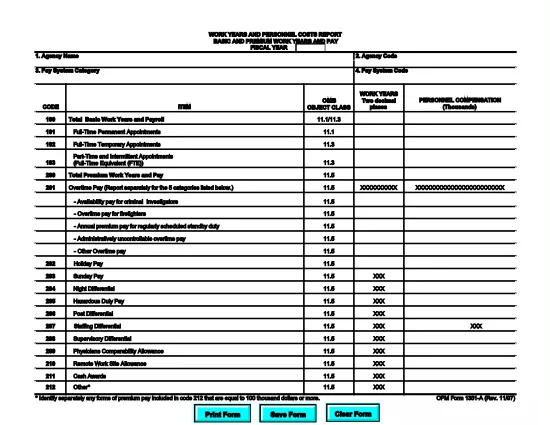
OPM Form 1351A – Work Years and Personnel Costs Report (Fillable PDF)

  1. Kieli Englanti
  2. Maa USA
  3. osasto Henkilöstöhallinnon toimisto
  4. sektori OPM-lomakkeet
OPM Form 1351A – Work Years and Personnel Costs Report (Fillable PDF)

The OPM Form 1351A (Work Years and Personnel Costs Report – Basic and Premium Work Years and Pay) is a mandatory annual report for federal agencies. It captures the number of work years, basic salary, and premium pay for all employees in a fiscal year. Accurate completion supports workforce analysis, budgeting, and compliance with Office of Personnel Management (OPM) guidelines.

What Is OPM Form 1351A?

This form collects detailed payroll data for each employee, including:

  • Basic work years
  • Premium work years (e.g., overtime, hazard pay)
  • Total basic pay and premium pay
  • Fiscal year covered

Agencies submit the data to OPM for the annual Federal Workforce Report.

How to Complete the Form Using Formize PDF Filler

Our online Formize PDF Filler turns the static PDF into an interactive form. No extra software is required—just a web browser.

  1. Click the **"Fill out this form"** button below.
  2. Wait a few seconds while the Formize PDF Filler app loads the fillable version of OPM Form 1351A.
  3. Enter the required data in each field. Navigation tabs let you jump between sections quickly.
  4. Use the **Validate** button to check for missing or incorrectly formatted entries.
  5. When finished, click **Save & Download** to get a completed PDF you can upload to OPM’s portal.

Common Mistakes to Avoid When Filing 1351A

  • Incorrect fiscal year: Verify the FY matches the reporting period.
  • Missing premium pay codes: Ensure all premium pay types (e.g., overtime, night differential) are included.
  • Rounding errors: Use the exact figures from your payroll system; do not round up or down.
  • Duplicate entries: Each employee should appear only once per fiscal year.

Download the Fillable PDF Instantly

Click the button below to open the fillable version of OPM Form 1351A. The file is hosted by the official OPM website, guaranteeing the latest version.

Helpful Resources & FAQs

Below you’ll find answers to the most common questions about OPM Form 1351A and using our PDF filler.

FAQ
  • What is the purpose of OPM Form 1351A?

    Form 1351A collects annual data on basic and premium work years and pay for all federal employees, helping OPM analyze workforce costs and trends.

  • Do I need a special PDF editor to fill out Form 1351A?

    No. Our Formize PDF Filler turns the PDF into an interactive web form, so you can complete it directly in your browser.

  • Can I save my progress and return later?

    Yes. Use the "Save" button at any time to download a partially completed PDF, then reload it later in the Formize filler to continue.

  • What fiscal year should I report?

    Report the fiscal year that matches the data you are submitting (e.g., FY 2024 for the period October 1 2023 – September 30 2024).

  • Where do I submit the completed Form 1351A?

    After downloading the completed PDF, upload it to the OPM reporting portal or follow your agency’s internal submission process.

  • Is the PDF version on Formize the official OPM form?

    Yes. The file is linked directly from the official OPM website, ensuring you have the most current version.

  • What if I make a mistake after downloading?

    Open the saved PDF again with Formize, correct the errors, re‑validate, and download the updated version.

MITEN

Kuinka täyttää OPM Form 1351A ilmaiseksi verkossa 4 helpon vaiheen avulla:

  1. 1
    Open the Fillable Form
    Click the "Fill out this form" button on the page. The Formize PDF Filler will load the OPM Form 1351A automatically.
  2. 2
    Enter Your Data
    Complete each section—basic work years, premium work years, pay amounts, and fiscal year—using the on‑screen fields.
  3. 3
    Validate & Review
    Use the built‑in validation tool to catch missing or mismatched entries, then review the entire form for accuracy.
  4. 4
    Save and Download
    When all data is correct, click "Save & Download" to obtain a completed PDF ready for submission to OPM.
Muotoile PDF Filler -sovellus
NOIN

Office of Personnel Management (OPM) -lomakkeet

OPM Form 1351A on yksi virallisista lomakkeista, joita käyttää Yhdysvaltain henkilöstöhallinnon virasto, joka on liittovaltion hallituksen itsenäinen virasto, joka vastaa virkamieskunnan työvoiman hallinnasta ja liittovaltion työntekijäetuuksista. OPM vahvistaa liittovaltion työllisyyteen liittyviä käytäntöjä ja määräyksiä, hallinnoi erilaisia ​​henkilöstöohjelmia ja tarjoaa palveluita liittovaltion työntekijöille, eläkeläisille ja työnhakijoille.

Tässä on esimerkkejä Office of Personal Management -lomakkeista:

Vakiolomake 86 (SF-86) : Tätä lomaketta käytetään taustatutkintaprosessiin henkilöille, jotka hakevat turvallisuusselvitystä. Se kerää kattavat henkilö-, työ-, koulutus- ja taloustiedot sekä tiedot ulkomaisista kontakteista ja toiminnasta.

Vakiolomake 2809 (SF-2809) : Tätä lomaketta käytetään rekisteröitymiseen Federal Employees Health Benefits (FEHB) -ohjelmaan, joka tarjoaa sairausvakuutuksen liittovaltion työntekijöille, eläkeläisille ja heidän oikeutetuille perheenjäsenilleen.

Vakiolomake 2817 (SF-2817): Tällä lomakkeella haetaan FEDVIP:n (Federal Employees Dental and Vision Insurance Programme) vakuutusturvan jatkamista eläkkeelle siirtymisen tai liittovaltion palveluksesta eron jälkeen.

Vakiolomake 3107 (SF-3107) : Tätä lomaketta käytetään haettaessa eläke-etuuksia Civil Service Retirement Systemin (CSRS) mukaisesti.

Vakiolomake 2801 (SF-2801) : Tätä lomaketta käytetään eläke-etuuksien hakemiseen Federal Employees Retirement System (FERS) -järjestelmän mukaisesti.

Vakiolomake 15 (SF-15) : Tätä lomaketta käytetään hakemaan veteraanien etusijaa liittovaltion työssä. Sen ovat jättäneet veteraanit tai heidän kelvolliset perheenjäsenensä, jotka etsivät työmahdollisuuksia liittovaltion hallituksesta.

Nämä esimerkit edustavat joitain yleisiä OPM-lomakkeita, joita käytetään liittovaltion työsuhteen ja työsuhde-etuuksien yhteydessä. OPM:llä on kuitenkin joukko muita muotoja, jotka liittyvät erilaisiin henkilöstöohjelmiin, eläkkeelle, vakuutuksiin ja muihin liittovaltion työllisyyden näkökohtiin. Vaaditut erityislomakkeet voivat vaihdella haetun tapahtuman, ohjelman tai edun luonteen mukaan. On suositeltavaa tutustua Yhdysvaltain henkilöstöhallinnon toimiston viralliseen verkkosivustoon (www.opm.gov) tai pyytää ohjeita OPM:ltä tai asiaankuuluvalta henkilöstöhenkilöstöltä saadaksesi tarkat ja ajantasaiset tiedot. ajantasaiset tiedot erityisistä OPM-lomakkeista, jotka liittyvät liittovaltion työhön tai etuihin liittyviin tarpeisiisi.

OMINAISUUDET

PDF-täyttö

Helpoin tapa täyttää OPM Form 1351A verkossa

  • Täytä nopeasti OPM Form 1351A
    Etsitkö tapaa täyttää OPM Form 1351A nopeasti verkossa? Online-maksuttoman PDF-lomakkeen täyttösovelluksemme avulla tiedät kuinka muokata ja täyttää tämä pdf-dokumentti alle minuutissa.
  • Helppokäyttöinen PDF-editori verkossa
    Oletko kyllästynyt tulostamaan PDF-tiedostoja, jotta voit muokata niitä, ennen kuin skannaat uudelleen ja lähetät ne takaisin? Muokkaa PDF-dokumentteja ilmaiseksi verkossa. Käytä online-pdf-editoriamme säästääksesi aikaa ja paperia.
  • Upeita työkaluja, kaikki alustat
    Mietitkö, kuinka OPM Form 1351A täytetään Macilla tai kuinka käyttää PDF-täyttöä ilmaiseksi? Online PDF-työkalumme toimivat kaikilla alustoilla.
  • Suojattu tiedostojen tallennus
    Valmiit "OPM Form 1351A"-tiedostot tallennetaan suojattuun tietokantaan, jota hallinnoi Amazon Cloud hosting. Voit poistaa tiedostosi järjestelmästämme milloin tahansa. Joka tapauksessa nämä tiedostot poistetaan automaattisesti 24 tunnin kuluttua.
  • Keskustele käyttäjän OPM Form 1351A kanssa
    Keskustele käyttäjän "OPM Form 1351A" kanssa Chatizessa, joka on ilmainen PDF-lukija-apuohjelma. Esitä kysymyksiä ja hanki vastauksia käyttäjältä "OPM Form 1351A". Napsauta yllä olevaa Chat With Document -painiketta.

Poista täyttöistunto

Poistetaanko valittu täyttöistunto? Tässä tapauksessa edistymisesi lomakkeen täyttämisessä menetetään.

Poista muokkausistunto

Poistetaanko valittu muokkausistunto? Tässä tapauksessa etenemisesi lomakkeen luomisessa ja muokkaamisessa menetetään.