
Valitse kieli

RI 20-97 – Military Earnings Request Form (Fillable PDF)

  1. Maa USA
  2. Kieli Englanti
  3. osasto Henkilöstöhallinnon toimisto
  4. sektori Eläke- ja vakuutuslomakkeet
RI 20-97 – Military Earnings Request Form (Fillable PDF)

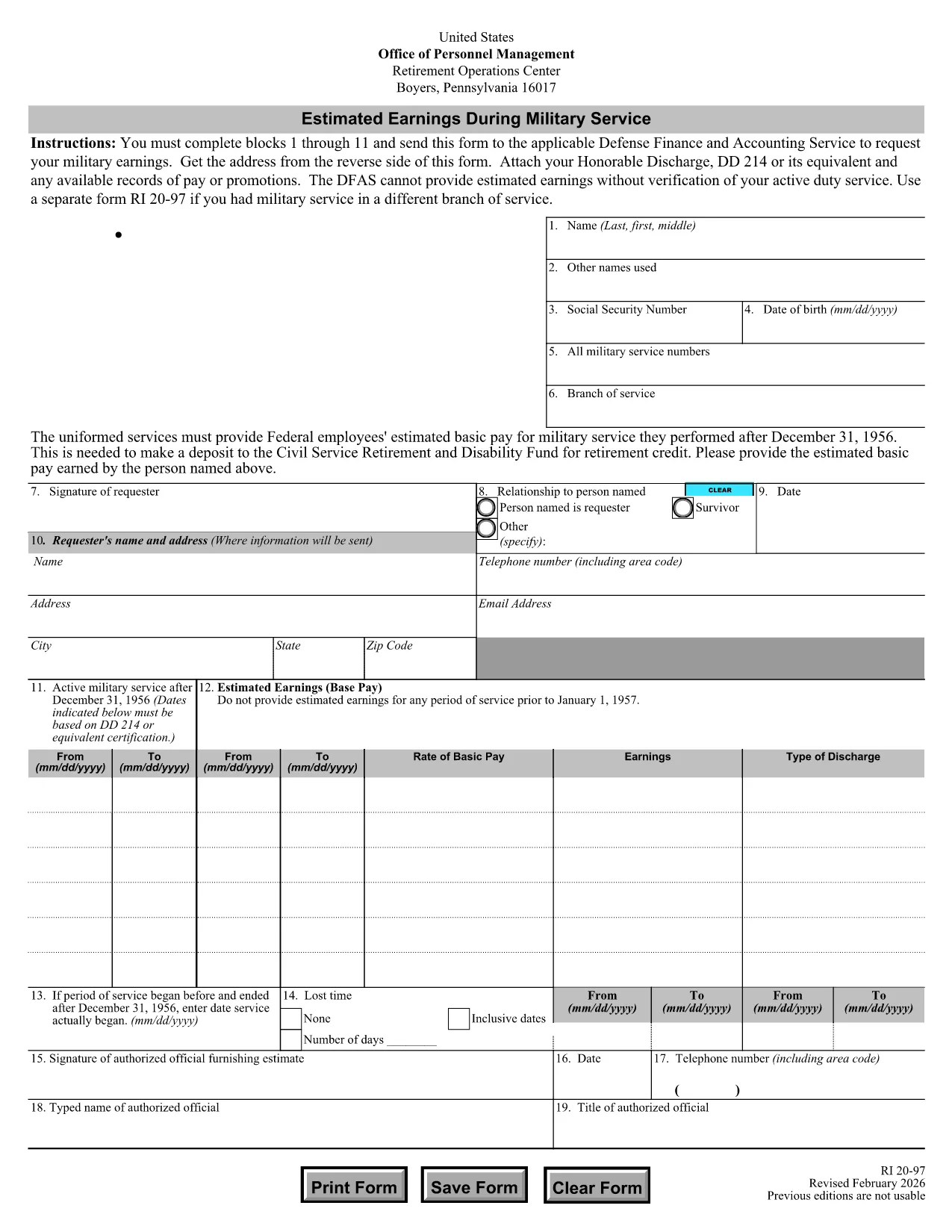
The RI 20-97 is the U.S. Office of Personnel Management (OPM) form used to request an estimate of your military earnings for retirement credit. Federal employees who have served in the armed forces use this form to ensure their service pay is counted toward their civil service pension.

What Is the RI 20-97 Form?

This official PDF, provided by OPM, captures personal details, service dates, pay grade, and any special pay received. Once completed, the form is sent to the Defense Finance and Accounting Service (DFAS) for calculation.

How to Complete the RI 20-97 Online with Formize

Instead of downloading, printing, and scanning, you can fill out the form directly on our site:

  1. Click the "Fill out this form" button below.
  2. The Formize PDF Filler app loads the fillable RI 20-97 template.
  3. Enter your information in each field (blocks 1‑11).
  4. Upload supporting documents such as your DD‑214.
  5. Review, e‑sign, and submit the form securely.

Common Mistakes & Tips for a Successful Submission

  • Missing DD‑214: The form will be rejected if you don’t attach a copy of your discharge papers.
  • Incorrect Service Dates: Double‑check start and end dates; even a one‑day error can delay processing.
  • Skipping Optional Fields: Fill in all optional fields when applicable; they help DFAS calculate a more accurate estimate.
  • Signature Errors: Both electronic and wet signatures are accepted – make sure the signature field is not left blank.

Supporting Documents You’ll Need

Prepare these items before you start:

  • DD‑214 or official military service record
  • Pay statements or promotion orders (if available)
  • Any previous RI 20‑97 submissions for reference

Where to Send Your Completed Form

After you finish the online fill, the Formize app will give you two options:

  • Download a PDF copy to mail to DFAS
  • Securely upload the completed form directly to DFAS through the provided portal link

Following these steps ensures your military earnings are counted toward your federal retirement benefits.

FAQ
  • Who needs to fill out the RI 20-97 form?

    Any current or former federal employee who served in the U.S. military and wants their service earnings counted toward their civil service retirement credit.

  • Can I use a wet signature on the RI 20-97?

    Yes. Both electronic and wet signatures are accepted. If you print the form, sign it, and mail it, DFAS will process it without issue.

  • What if I don’t have my DD‑214?

    The DD‑214 is required for verification. If it’s lost, request a replacement from the National Archives before submitting the RI 20‑97.

  • How long does DFAS take to calculate my earnings?

    Processing typically takes 2‑4 weeks after receipt of a complete, correctly signed RI 20‑97 with all supporting documents.

  • Is the Formize filler secure?

    Yes. Formize uses SSL encryption and complies with federal data‑privacy standards, ensuring your personal and military information is protected.

  • Do I need to fill out every field?

    All mandatory fields (blocks 1‑11) must be completed. Optional fields should be filled when applicable to improve accuracy.

  • Can I submit the form directly to DFAS from Formize?

    After completing the form, you can either download a PDF to mail or use the secure upload link provided by Formize to send it directly to DFAS.

  • What is the difference between the RI 20‑97 and the RI‑20‑97‑2023 version?

    The content is the same; the year in the file name reflects the most recent revision. All versions are accepted by DFAS as long as they are the official OPM form.

MITEN

Kuinka täyttää RI 20-97 ilmaiseksi verkossa 5 helpon vaiheen avulla:

  1. 1
    Open the Fillable Form
    Click the "Fill out this form" button on the page. The Formize PDF Filler will load the RI 20-97 template instantly.
  2. 2
    Enter Your Information
    Complete fields 1 through 11 with accurate personal and service details. Use dropdowns and date pickers for consistency.
  3. 3
    Attach Supporting Documents
    Upload your DD‑214 and any pay records using the attachment area. The system validates file types before you proceed.
  4. 4
    Review and Sign
    Double‑check every entry, then add an electronic signature or upload a scanned wet signature as required.
  5. 5
    Submit or Download
    Choose to submit directly to DFAS through the secure portal, or download the completed PDF to mail it yourself.
Muotoile PDF Filler -sovellus
NOIN

Office of Personnel Management (OPM) -lomakkeet

RI 20-97 on yksi virallisista lomakkeista, joita käyttää Yhdysvaltain henkilöstöhallinnon virasto, joka on liittovaltion hallituksen itsenäinen virasto, joka vastaa virkamieskunnan työvoiman hallinnasta ja liittovaltion työntekijäetuuksista. OPM vahvistaa liittovaltion työllisyyteen liittyviä käytäntöjä ja määräyksiä, hallinnoi erilaisia ​​henkilöstöohjelmia ja tarjoaa palveluita liittovaltion työntekijöille, eläkeläisille ja työnhakijoille.

Tässä on esimerkkejä Office of Personal Management -lomakkeista:

Vakiolomake 86 (SF-86) : Tätä lomaketta käytetään taustatutkintaprosessiin henkilöille, jotka hakevat turvallisuusselvitystä. Se kerää kattavat henkilö-, työ-, koulutus- ja taloustiedot sekä tiedot ulkomaisista kontakteista ja toiminnasta.

Vakiolomake 2809 (SF-2809) : Tätä lomaketta käytetään rekisteröitymiseen Federal Employees Health Benefits (FEHB) -ohjelmaan, joka tarjoaa sairausvakuutuksen liittovaltion työntekijöille, eläkeläisille ja heidän oikeutetuille perheenjäsenilleen.

Vakiolomake 2817 (SF-2817): Tällä lomakkeella haetaan FEDVIP:n (Federal Employees Dental and Vision Insurance Programme) vakuutusturvan jatkamista eläkkeelle siirtymisen tai liittovaltion palveluksesta eron jälkeen.

Vakiolomake 3107 (SF-3107) : Tätä lomaketta käytetään haettaessa eläke-etuuksia Civil Service Retirement Systemin (CSRS) mukaisesti.

Vakiolomake 2801 (SF-2801) : Tätä lomaketta käytetään eläke-etuuksien hakemiseen Federal Employees Retirement System (FERS) -järjestelmän mukaisesti.

Vakiolomake 15 (SF-15) : Tätä lomaketta käytetään hakemaan veteraanien etusijaa liittovaltion työssä. Sen ovat jättäneet veteraanit tai heidän kelvolliset perheenjäsenensä, jotka etsivät työmahdollisuuksia liittovaltion hallituksesta.

Nämä esimerkit edustavat joitain yleisiä OPM-lomakkeita, joita käytetään liittovaltion työsuhteen ja työsuhde-etuuksien yhteydessä. OPM:llä on kuitenkin joukko muita muotoja, jotka liittyvät erilaisiin henkilöstöohjelmiin, eläkkeelle, vakuutuksiin ja muihin liittovaltion työllisyyden näkökohtiin. Vaaditut erityislomakkeet voivat vaihdella haetun tapahtuman, ohjelman tai edun luonteen mukaan. On suositeltavaa tutustua Yhdysvaltain henkilöstöhallinnon toimiston viralliseen verkkosivustoon (www.opm.gov) tai pyytää ohjeita OPM:ltä tai asiaankuuluvalta henkilöstöhenkilöstöltä saadaksesi tarkat ja ajantasaiset tiedot. ajantasaiset tiedot erityisistä OPM-lomakkeista, jotka liittyvät liittovaltion työhön tai etuihin liittyviin tarpeisiisi.

OMINAISUUDET

PDF-täyttö

Helpoin tapa täyttää RI 20-97 verkossa

  • Täytä nopeasti RI 20-97
    Etsitkö tapaa täyttää RI 20-97 nopeasti verkossa? Online-maksuttoman PDF-lomakkeen täyttösovelluksemme avulla tiedät kuinka muokata ja täyttää tämä pdf-dokumentti alle minuutissa.
  • Helppokäyttöinen PDF-editori verkossa
    Oletko kyllästynyt tulostamaan PDF-tiedostoja, jotta voit muokata niitä, ennen kuin skannaat uudelleen ja lähetät ne takaisin? Muokkaa PDF-dokumentteja ilmaiseksi verkossa. Käytä online-pdf-editoriamme säästääksesi aikaa ja paperia.
  • Upeita työkaluja, kaikki alustat
    Mietitkö, kuinka RI 20-97 täytetään Macilla tai kuinka käyttää PDF-täyttöä ilmaiseksi? Online PDF-työkalumme toimivat kaikilla alustoilla.
  • Suojattu tiedostojen tallennus
    Valmiit "RI 20-97"-tiedostot tallennetaan suojattuun tietokantaan, jota hallinnoi Amazon Cloud hosting. Voit poistaa tiedostosi järjestelmästämme milloin tahansa. Joka tapauksessa nämä tiedostot poistetaan automaattisesti 24 tunnin kuluttua.
  • Keskustele käyttäjän RI 20-97 kanssa
    Keskustele käyttäjän "RI 20-97" kanssa Chatizessa, joka on ilmainen PDF-lukija-apuohjelma. Esitä kysymyksiä ja hanki vastauksia käyttäjältä "RI 20-97". Napsauta yllä olevaa Chat With Document -painiketta.

Poista täyttöistunto

Poistetaanko valittu täyttöistunto? Tässä tapauksessa edistymisesi lomakkeen täyttämisessä menetetään.

Poista muokkausistunto

Poistetaanko valittu muokkausistunto? Tässä tapauksessa etenemisesi lomakkeen luomisessa ja muokkaamisessa menetetään.