
Valitse kieli

SF 3103 Register of Separations and Transfers – Fillable PDF

  1. Kieli Englanti
  2. Maa USA
  3. osasto Henkilöstöhallinnon toimisto
  4. sektori Vakiolomakkeet
SF 3103 Register of Separations and Transfers – Fillable PDF

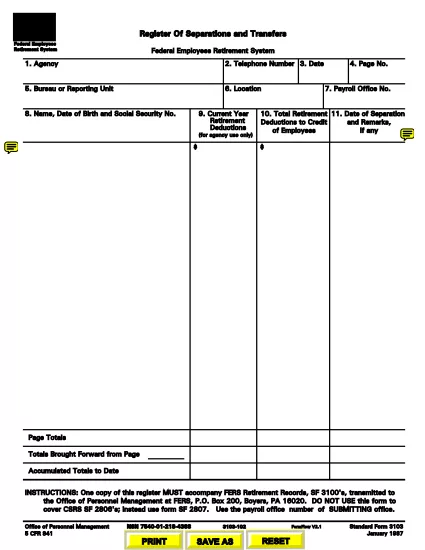
The SF 3103 Register of Separations and Transfers is the official United States Office of Personnel Management (OPM) form used to record federal employee separations, transfers, retirements, and related actions. This page provides a direct link to the fillable PDF, step‑by‑step instructions for completing it online, and answers to the most common questions.

What Is the SF 3103 Form?

SF 3103 is required whenever a federal employee leaves an agency, changes positions, or is transferred to another department. The form captures essential data such as employee name, Social Security number, dates of service, and the type of action (retirement, resignation, death, etc.). Accurate completion is critical for payroll processing, benefits administration, and official personnel records.

How to Complete the SF 3103 Online with Formize

Instead of printing, scanning, or using a separate PDF editor, you can fill out the form directly on our site using the Formize PDF Filler app. Follow the simple steps below:

  1. Click the green "Fill out this form" button on this page.
  2. The Formize PDF Filler loads the SF 3103 PDF in your browser.
  3. Enter the required information into each fillable field. The interface validates dates and numeric entries to reduce errors.
  4. When you finish, click Save & Download to get a completed PDF copy.
  5. Print the PDF (if a hard copy is required) and mail it to the address listed on the form, or submit electronically according to your agency’s policy.

Common Mistakes to Avoid

  • Incorrect SSN or DOB: Double‑check these numbers; a typo can delay benefits.
  • Leaving required fields blank: The Formize validator will highlight missing data before you can save.
  • Using the wrong form version: Ensure you are using the latest SF 3103 (PDF link provided below).
  • Not signing the form: After downloading, print and sign the designated signature block before submission.

Where to Submit the Completed Form

Submit the signed SF 3103 to the Office of Personnel Management at:

U.S. Office of Personnel Management
FERS Retirement Records, SF3100’s
P.O. Box 200
Boyers, PA 16020

Alternatively, follow any agency‑specific electronic submission instructions.

FAQs About SF 3103

Below are answers to the most frequently asked questions about this form.

FAQ
  • Do I need to print the SF 3103 after filling it online?

    Yes. The form must be signed in ink. After using Formize, download, print, and sign before mailing it to OPM.

  • Can I submit the SF 3103 electronically?

    Some agencies accept an electronic PDF with a digital signature. Check your agency’s policy; otherwise, mail the hard‑copy.

  • What happens if I enter the wrong Social Security number?

    An incorrect SSN can delay retirement benefits and payroll adjustments. Verify the number before saving the form.

  • Is there a fee to use the Formize PDF Filler?

    No. Formize provides the fillable PDF free of charge for all federal forms.

  • How often is the SF 3103 updated?

    OPM releases revisions as needed. The link on this page always points to the latest official version.

  • Can I save my progress and return later?

    Yes. Formize lets you download a partially completed PDF, which you can reopen and finish later.

  • What should I do if I make a mistake after signing?

    Correct the error on a new copy of the form, sign again, and submit the revised version.

MITEN

Kuinka täyttää SF 3103 ilmaiseksi verkossa 5 helpon vaiheen avulla:

  1. 1
    Open the Fillable Form
    Click the "Fill out this form" button to launch the Formize PDF Filler app.
  2. 2
    Enter Your Information
    Complete each highlighted field. The app checks for required data and correct formats.
  3. 3
    Save and Download
    When all fields are filled, click "Save & Download" to get a completed PDF copy.
  4. 4
    Print and Sign
    Print the downloaded PDF, sign the signature block, and attach any required attachments.
  5. 5
    Submit to OPM
    Mail the signed form to the OPM address provided, or follow your agency’s electronic submission process.
Muotoile PDF Filler -sovellus
NOIN

Office of Personnel Management (OPM) -lomakkeet

SF 3103 on yksi virallisista lomakkeista, joita käyttää Yhdysvaltain henkilöstöhallinnon virasto, joka on liittovaltion hallituksen itsenäinen virasto, joka vastaa virkamieskunnan työvoiman hallinnasta ja liittovaltion työntekijäetuuksista. OPM vahvistaa liittovaltion työllisyyteen liittyviä käytäntöjä ja määräyksiä, hallinnoi erilaisia ​​henkilöstöohjelmia ja tarjoaa palveluita liittovaltion työntekijöille, eläkeläisille ja työnhakijoille.

Tässä on esimerkkejä Office of Personal Management -lomakkeista:

Vakiolomake 86 (SF-86) : Tätä lomaketta käytetään taustatutkintaprosessiin henkilöille, jotka hakevat turvallisuusselvitystä. Se kerää kattavat henkilö-, työ-, koulutus- ja taloustiedot sekä tiedot ulkomaisista kontakteista ja toiminnasta.

Vakiolomake 2809 (SF-2809) : Tätä lomaketta käytetään rekisteröitymiseen Federal Employees Health Benefits (FEHB) -ohjelmaan, joka tarjoaa sairausvakuutuksen liittovaltion työntekijöille, eläkeläisille ja heidän oikeutetuille perheenjäsenilleen.

Vakiolomake 2817 (SF-2817): Tällä lomakkeella haetaan FEDVIP:n (Federal Employees Dental and Vision Insurance Programme) vakuutusturvan jatkamista eläkkeelle siirtymisen tai liittovaltion palveluksesta eron jälkeen.

Vakiolomake 3107 (SF-3107) : Tätä lomaketta käytetään haettaessa eläke-etuuksia Civil Service Retirement Systemin (CSRS) mukaisesti.

Vakiolomake 2801 (SF-2801) : Tätä lomaketta käytetään eläke-etuuksien hakemiseen Federal Employees Retirement System (FERS) -järjestelmän mukaisesti.

Vakiolomake 15 (SF-15) : Tätä lomaketta käytetään hakemaan veteraanien etusijaa liittovaltion työssä. Sen ovat jättäneet veteraanit tai heidän kelvolliset perheenjäsenensä, jotka etsivät työmahdollisuuksia liittovaltion hallituksesta.

Nämä esimerkit edustavat joitain yleisiä OPM-lomakkeita, joita käytetään liittovaltion työsuhteen ja työsuhde-etuuksien yhteydessä. OPM:llä on kuitenkin joukko muita muotoja, jotka liittyvät erilaisiin henkilöstöohjelmiin, eläkkeelle, vakuutuksiin ja muihin liittovaltion työllisyyden näkökohtiin. Vaaditut erityislomakkeet voivat vaihdella haetun tapahtuman, ohjelman tai edun luonteen mukaan. On suositeltavaa tutustua Yhdysvaltain henkilöstöhallinnon toimiston viralliseen verkkosivustoon (www.opm.gov) tai pyytää ohjeita OPM:ltä tai asiaankuuluvalta henkilöstöhenkilöstöltä saadaksesi tarkat ja ajantasaiset tiedot. ajantasaiset tiedot erityisistä OPM-lomakkeista, jotka liittyvät liittovaltion työhön tai etuihin liittyviin tarpeisiisi.

OMINAISUUDET

PDF-täyttö

Helpoin tapa täyttää SF 3103 verkossa

  • Täytä nopeasti SF 3103
    Etsitkö tapaa täyttää SF 3103 nopeasti verkossa? Online-maksuttoman PDF-lomakkeen täyttösovelluksemme avulla tiedät kuinka muokata ja täyttää tämä pdf-dokumentti alle minuutissa.
  • Helppokäyttöinen PDF-editori verkossa
    Oletko kyllästynyt tulostamaan PDF-tiedostoja, jotta voit muokata niitä, ennen kuin skannaat uudelleen ja lähetät ne takaisin? Muokkaa PDF-dokumentteja ilmaiseksi verkossa. Käytä online-pdf-editoriamme säästääksesi aikaa ja paperia.
  • Upeita työkaluja, kaikki alustat
    Mietitkö, kuinka SF 3103 täytetään Macilla tai kuinka käyttää PDF-täyttöä ilmaiseksi? Online PDF-työkalumme toimivat kaikilla alustoilla.
  • Suojattu tiedostojen tallennus
    Valmiit "SF 3103"-tiedostot tallennetaan suojattuun tietokantaan, jota hallinnoi Amazon Cloud hosting. Voit poistaa tiedostosi järjestelmästämme milloin tahansa. Joka tapauksessa nämä tiedostot poistetaan automaattisesti 24 tunnin kuluttua.
  • Keskustele käyttäjän SF 3103 kanssa
    Keskustele käyttäjän "SF 3103" kanssa Chatizessa, joka on ilmainen PDF-lukija-apuohjelma. Esitä kysymyksiä ja hanki vastauksia käyttäjältä "SF 3103". Napsauta yllä olevaa Chat With Document -painiketta.

Poista täyttöistunto

Poistetaanko valittu täyttöistunto? Tässä tapauksessa edistymisesi lomakkeen täyttämisessä menetetään.

Poista muokkausistunto

Poistetaanko valittu muokkausistunto? Tässä tapauksessa etenemisesi lomakkeen luomisessa ja muokkaamisessa menetetään.