
Valitse kieli

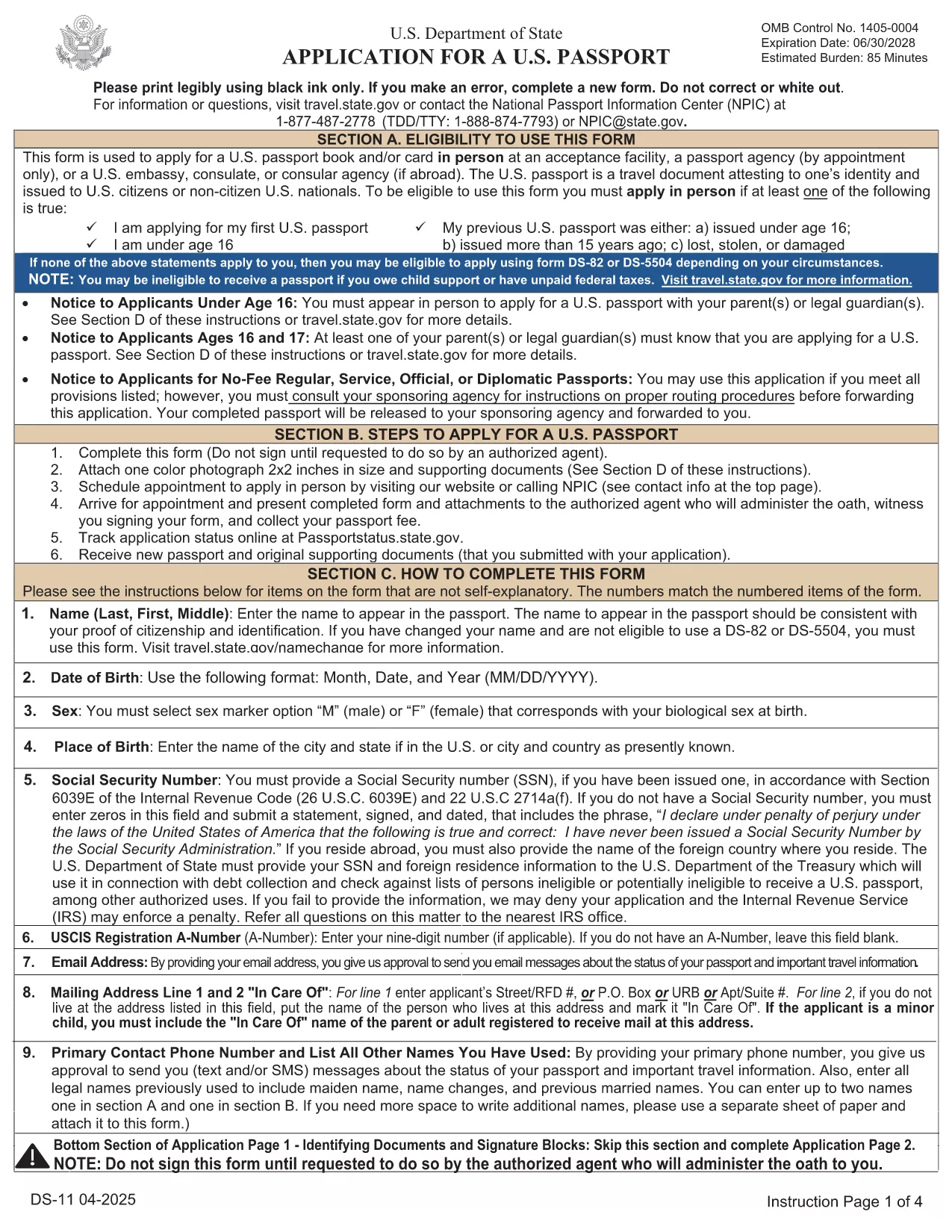
DS-11 U.S. Passport Application – Fillable PDF

  1. Kieli Englanti
  2. Maa USA
  3. Toiminta Passi
DS-11 U.S. Passport Application – Fillable PDF

The DS-11 is the official application for first‑time U.S. passports, passports for minors, and replacement of lost or damaged passports. Using Formize’s built‑in PDF filler, you can complete the form online, avoid manual errors, and print a clean, one‑sided copy ready for submission.

What Is the DS-11 Form?

DS-11 is issued by the U.S. Department of State. It collects personal information, citizenship proof, and travel details. You must present the unsigned, completed form at a passport acceptance facility along with supporting documents.

How to Complete the DS-11 with Formize

Follow these simple steps to fill the form directly in your browser—no PDF editor required.

  • Click “Fill out this form” on the page.
  • Wait a few seconds while the Formize PDF Filler loads the official DS-11.
  • Enter your information in each field using the on‑screen keyboard.
  • Use the navigation arrows to move between pages.
  • When finished, click Print to produce a one‑sided copy.

Common Mistakes to Avoid

  • Using colored ink – print in black ink only.
  • Leaving any required box empty – the filler will highlight missing fields.
  • Signing the form before you reach the acceptance facility – sign only on the printed copy.
  • Altering a printed form by hand – any corrections require a new form.

Where to Submit Your Completed Form

Take the printed, unsigned DS-11, your proof of citizenship, a government‑issued photo ID, and a passport‑size photo to any passport acceptance facility (post offices, libraries, or designated clerks). If you need expedited service, schedule an appointment at a regional passport agency.

Download the Official Fillable PDF

For offline use, you can download the original PDF from the U.S. Department of State. The online filler provides the same official form, but the download link is included for reference.

Download DS-11 PDF (official)

FAQ
  • Who must use the DS-11 form?

    First‑time applicants, minors under 16, and anyone replacing a lost, stolen, or damaged passport that is more than 5 years old must use DS‑11.

  • Can I submit a signed DS-11 online?

    No. The DS‑11 must be presented unsigned to a passport acceptance agent, who will witness your signature.

  • Do I need a passport photo?

    Yes. Provide one recent, 2×2 inch color photo that meets State Department requirements.

  • How long does processing take?

    Standard processing is 4‑6 weeks after the acceptance facility receives your application. Expedited service reduces this to 2‑3 weeks.

  • Is the Formize filler free?

    Formize offers a free online filler for the DS‑11. No download or software installation is required.

  • What documents accompany the DS‑11?

    You need proof of U.S. citizenship (birth certificate or naturalization certificate), a government‑issued photo ID, a passport‑size photo, and the applicable fee.

  • Can I correct errors after printing?

    If you discover an error, you must fill out a new DS‑11. Hand‑written corrections are not accepted.

MITEN

Kuinka täyttää DS-11 ilmaiseksi verkossa 5 helpon vaiheen avulla:

  1. 1
    Open the Formizer Fillable DS-11
    Click the “Fill out this form” button on the page. The Formize PDF Filler will load the official DS-11 automatically.
  2. 2
    Enter Your Information
    Use the on‑screen fields to type your name, date of birth, address, and other required details. The filler validates each entry.
  3. 3
    Review and Print
    After completing all pages, click the Print button. Print a single‑sided copy on white paper using black ink.
  4. 4
    Sign at the Acceptance Facility
    Do NOT sign the printed form until you are in front of a passport acceptance agent.
  5. 5
    Submit Your Package
    Take the printed DS-11, your supporting documents, and payment to the nearest passport acceptance facility.
Muotoile PDF Filler -sovellus
NOIN

Passilomakkeet

DS-11 on yksi passilomakkeista, joita käytetään passin hakemiseen. Passi on matkustusasiakirja, joka todistaa haltijan henkilöllisyyden ja kansalaisuuden ja mahdollistaa matkustamisen kansainvälisesti. Passilomakkeet voivat vaihdella passin myöntävän maan mukaan, mutta yleensä ne sisältävät hakijan henkilötietoja, kuten nimen, syntymäajan ja syntymäpaikan sekä tiedot hakijan vanhemmista ja mahdollisista aikaisemmista passeista tai matkustusasiakirjoista. .

Yhdysvalloissa kaksi yleisintä passilomaketta ovat DS-11 ja DS-82. DS-11-lomaketta käytetään ensimmäistä kertaa hakijoille, alaikäisille tai henkilöille, jotka eivät ole oikeutettuja käyttämään DS-82-lomaketta. DS-82-lomaketta käytetään passin uusimiseen postitse kelvollisille hakijoille. Molemmissa lomakkeissa hakijan on toimitettava henkilötiedot ja asiakirjat, kuten passikuva ja todistus kansalaisuudesta.

Muissa maissa voi olla erilaiset passilomakkeet ja -vaatimukset, mutta perusprosessiin kuuluu tyypillisesti passihakemuksen täyttäminen, tukiasiakirjojen toimittaminen ja osallistuminen passivirkailijan haastatteluun valtion laitoksessa tai suurlähetystössä. On tärkeää huomata, että passin hakuprosessi voi kestää useita viikkoja tai jopa kuukausia, joten on suositeltavaa tehdä hakemus hyvissä ajoin ennen suunniteltua matkaa.

OMINAISUUDET

PDF-täyttö

Helpoin tapa täyttää DS-11 verkossa

  • Täytä nopeasti DS-11
    Etsitkö tapaa täyttää DS-11 nopeasti verkossa? Online-maksuttoman PDF-lomakkeen täyttösovelluksemme avulla tiedät kuinka muokata ja täyttää tämä pdf-dokumentti alle minuutissa.
  • Helppokäyttöinen PDF-editori verkossa
    Oletko kyllästynyt tulostamaan PDF-tiedostoja, jotta voit muokata niitä, ennen kuin skannaat uudelleen ja lähetät ne takaisin? Muokkaa PDF-dokumentteja ilmaiseksi verkossa. Käytä online-pdf-editoriamme säästääksesi aikaa ja paperia.
  • Upeita työkaluja, kaikki alustat
    Mietitkö, kuinka DS-11 täytetään Macilla tai kuinka käyttää PDF-täyttöä ilmaiseksi? Online PDF-työkalumme toimivat kaikilla alustoilla.
  • Suojattu tiedostojen tallennus
    Valmiit "DS-11"-tiedostot tallennetaan suojattuun tietokantaan, jota hallinnoi Amazon Cloud hosting. Voit poistaa tiedostosi järjestelmästämme milloin tahansa. Joka tapauksessa nämä tiedostot poistetaan automaattisesti 24 tunnin kuluttua.
  • Keskustele käyttäjän DS-11 kanssa
    Keskustele käyttäjän "DS-11" kanssa Chatizessa, joka on ilmainen PDF-lukija-apuohjelma. Esitä kysymyksiä ja hanki vastauksia käyttäjältä "DS-11". Napsauta yllä olevaa Chat With Document -painiketta.

Poista täyttöistunto

Poistetaanko valittu täyttöistunto? Tässä tapauksessa edistymisesi lomakkeen täyttämisessä menetetään.

Poista muokkausistunto

Poistetaanko valittu muokkausistunto? Tässä tapauksessa etenemisesi lomakkeen luomisessa ja muokkaamisessa menetetään.