
Valitse kieli

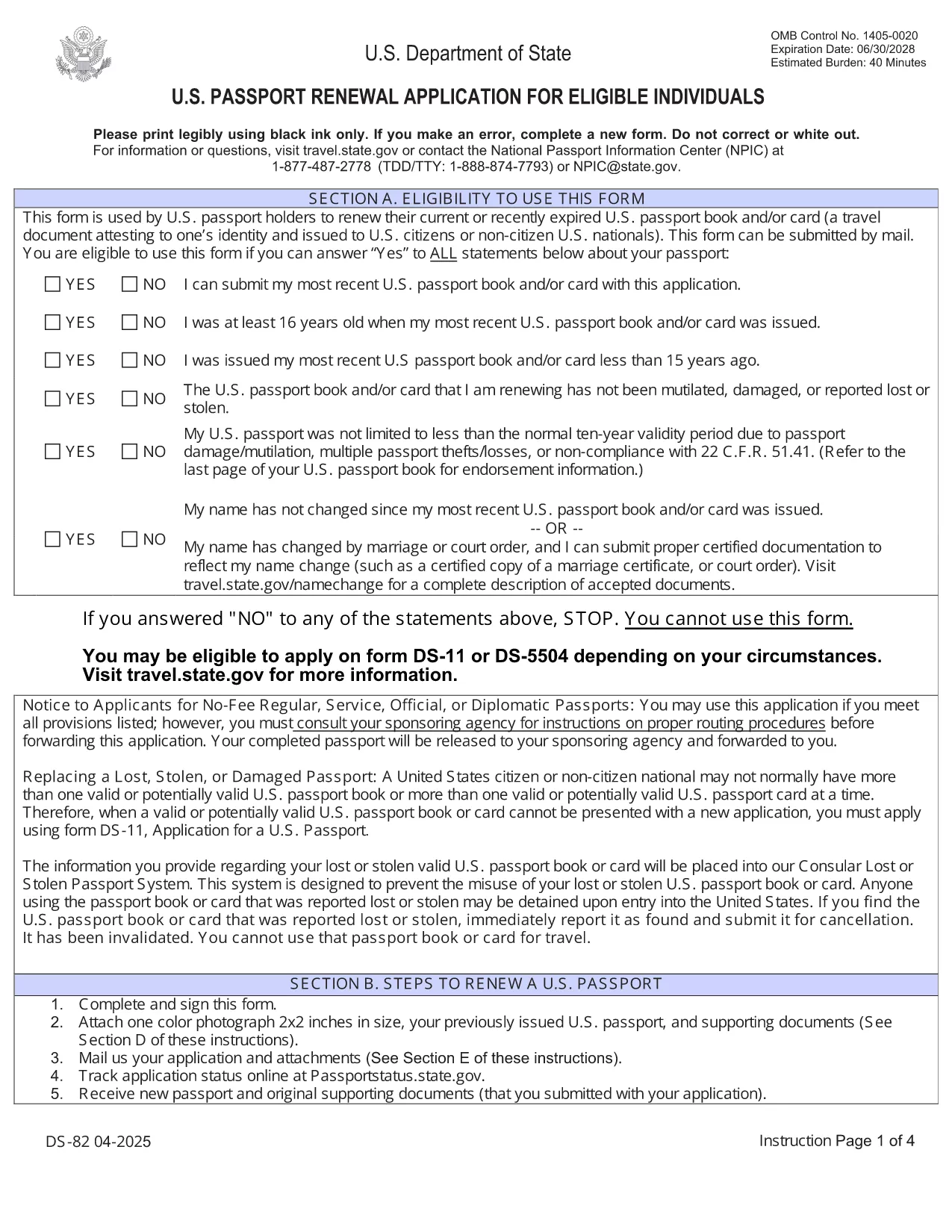
U.S. Passport Renewal Application (Form DS‑82) – Fillable PDF

  1. Kieli Englanti
  2. Maa USA
  3. Toiminta Passi
U.S. Passport Renewal Application (Form DS‑82) – Fillable PDF

Need to renew your U.S. passport quickly and without errors? The DS‑82 is the official application for eligible individuals. Our fillable PDF, powered by the Formize PDF Filler, lets you complete the form directly in your browser, save a copy, and print it ready for submission.

Why Use the Fillable DS‑82 Form

  • Instant online editing: No need to print, write, scan, or fax.
  • Auto‑validation: Formize checks required fields and formatting as you type.
  • Secure storage: Save a digital copy for future reference.
  • Time‑saving: Complete the entire application in minutes.

How to Complete the DS‑82 Online with Formize

Just click the "Fill out this form" button below and wait for the Formize PDF Filler app to load. The interface mirrors the official DS‑82 layout, so you’ll know exactly where each piece of information belongs.

Common Mistakes to Avoid

  • Leaving the Middle Name field blank when you have one – it must match your current legal name.
  • Submitting an expired passport photo (must be taken within the last 6 months).
  • Forgetting to sign the form – an unsigned DS‑82 is rejected.
  • Using a non‑U.S. mailing address without a proper explanation.

Where to Submit Your Renewal

After completing and printing the form, mail it with your current passport, a new passport photo, and the renewal fee to the address listed on the U.S. Department of State website. If you’re using a passport acceptance facility, bring the printed form and supporting documents.

Frequently Asked Questions

Explore the most common questions below. If you need more help, the State Department’s official site has detailed guidance.

FAQ
  • Who can use the DS‑82 form?

    U.S. citizens with a passport that is still valid or expired less than 5 years ago, and who can submit the same name and personal data as on the current passport.

  • Can I renew my passport if my name changed?

    Yes, but you must also submit a legal name‑change document (marriage certificate, court order, etc.) along with the DS‑82.

  • How long does the renewal process take?

    Standard processing is about 8‑11 weeks. Expedited service (for an additional fee) reduces the time to 5‑7 weeks.

  • Do I need to bring my old passport?

    Yes. Your current passport must be submitted with the DS‑82; it will be returned to you after processing.

  • What photo requirements apply?

    The photo must be 2×2 inches, taken within the last 6 months, on a plain white background, and show a full‑face view.

  • Is the Formize filler secure?

    Yes. Formize uses HTTPS encryption and does not store any personal data after you download or print the completed PDF.

MITEN

Kuinka täyttää DS-82 ilmaiseksi verkossa 5 helpon vaiheen avulla:

  1. 1
    Open the Fillable Form
    Click the "Fill out this form" button on the page. The Formize PDF Filler will open in a new tab.
  2. 2
    Wait for the Filler to Load
    Allow a few seconds for the app to initialize. You’ll see the DS‑82 layout with editable fields.
  3. 3
    Enter Your Information
    Fill in each field exactly as it appears on your current passport and supporting documents. Required fields are marked with an asterisk.
  4. 4
    Review and Validate
    Use the built‑in validation to check for missing or incorrectly formatted entries. Correct any highlighted issues.
  5. 5
    Save, Print, and Submit
    Save a digital copy, then print the completed form. Mail it with your passport, photo, and fee to the address provided by the U.S. Department of State.
Muotoile PDF Filler -sovellus
NOIN

Passilomakkeet

DS-82 on yksi passilomakkeista, joita käytetään passin hakemiseen. Passi on matkustusasiakirja, joka todistaa haltijan henkilöllisyyden ja kansalaisuuden ja mahdollistaa matkustamisen kansainvälisesti. Passilomakkeet voivat vaihdella passin myöntävän maan mukaan, mutta yleensä ne sisältävät hakijan henkilötietoja, kuten nimen, syntymäajan ja syntymäpaikan sekä tiedot hakijan vanhemmista ja mahdollisista aikaisemmista passeista tai matkustusasiakirjoista. .

Yhdysvalloissa kaksi yleisintä passilomaketta ovat DS-11 ja DS-82. DS-11-lomaketta käytetään ensimmäistä kertaa hakijoille, alaikäisille tai henkilöille, jotka eivät ole oikeutettuja käyttämään DS-82-lomaketta. DS-82-lomaketta käytetään passin uusimiseen postitse kelvollisille hakijoille. Molemmissa lomakkeissa hakijan on toimitettava henkilötiedot ja asiakirjat, kuten passikuva ja todistus kansalaisuudesta.

Muissa maissa voi olla erilaiset passilomakkeet ja -vaatimukset, mutta perusprosessiin kuuluu tyypillisesti passihakemuksen täyttäminen, tukiasiakirjojen toimittaminen ja osallistuminen passivirkailijan haastatteluun valtion laitoksessa tai suurlähetystössä. On tärkeää huomata, että passin hakuprosessi voi kestää useita viikkoja tai jopa kuukausia, joten on suositeltavaa tehdä hakemus hyvissä ajoin ennen suunniteltua matkaa.

OMINAISUUDET

PDF-täyttö

Helpoin tapa täyttää DS-82 verkossa

  • Täytä nopeasti DS-82
    Etsitkö tapaa täyttää DS-82 nopeasti verkossa? Online-maksuttoman PDF-lomakkeen täyttösovelluksemme avulla tiedät kuinka muokata ja täyttää tämä pdf-dokumentti alle minuutissa.
  • Helppokäyttöinen PDF-editori verkossa
    Oletko kyllästynyt tulostamaan PDF-tiedostoja, jotta voit muokata niitä, ennen kuin skannaat uudelleen ja lähetät ne takaisin? Muokkaa PDF-dokumentteja ilmaiseksi verkossa. Käytä online-pdf-editoriamme säästääksesi aikaa ja paperia.
  • Upeita työkaluja, kaikki alustat
    Mietitkö, kuinka DS-82 täytetään Macilla tai kuinka käyttää PDF-täyttöä ilmaiseksi? Online PDF-työkalumme toimivat kaikilla alustoilla.
  • Suojattu tiedostojen tallennus
    Valmiit "DS-82"-tiedostot tallennetaan suojattuun tietokantaan, jota hallinnoi Amazon Cloud hosting. Voit poistaa tiedostosi järjestelmästämme milloin tahansa. Joka tapauksessa nämä tiedostot poistetaan automaattisesti 24 tunnin kuluttua.
  • Keskustele käyttäjän DS-82 kanssa
    Keskustele käyttäjän "DS-82" kanssa Chatizessa, joka on ilmainen PDF-lukija-apuohjelma. Esitä kysymyksiä ja hanki vastauksia käyttäjältä "DS-82". Napsauta yllä olevaa Chat With Document -painiketta.

Poista täyttöistunto

Poistetaanko valittu täyttöistunto? Tässä tapauksessa edistymisesi lomakkeen täyttämisessä menetetään.

Poista muokkausistunto

Poistetaanko valittu muokkausistunto? Tässä tapauksessa etenemisesi lomakkeen luomisessa ja muokkaamisessa menetetään.