
Valitse kieli

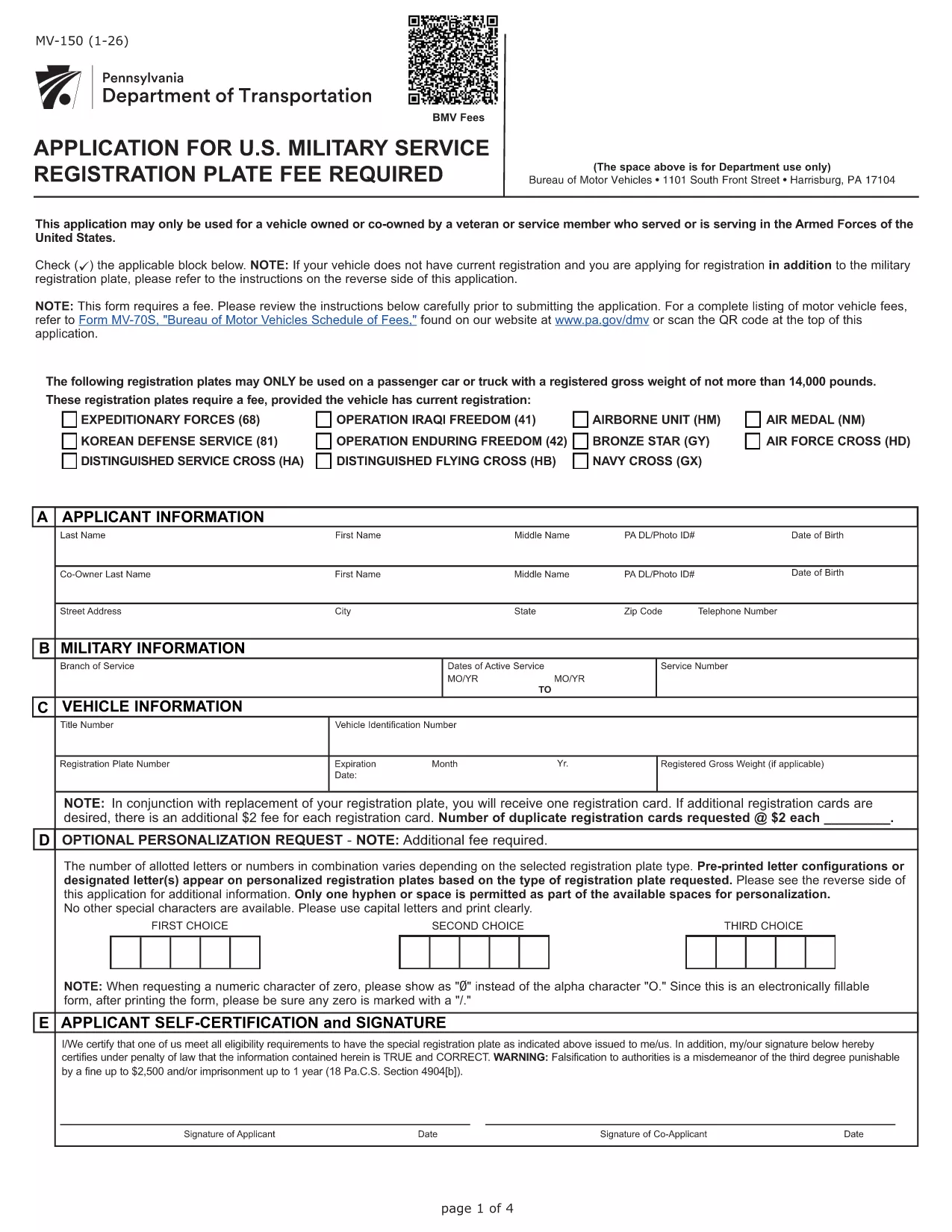
Pennsylvania MV-150 Vehicle Registration Form – Fillable PDF

  1. Kieli Englanti
  2. Maa USA
  3. osasto PennDOT
  4. Toiminta Ajoneuvon rekisteröinti
Pennsylvania MV-150 Vehicle Registration Form – Fillable PDF

The MV-150 is Pennsylvania’s official vehicle registration application used by the Department of Transportation (PennDOT). Whether you are registering a new vehicle, renewing a plate, or updating ownership information, the MV-150 must be completed accurately and submitted with the appropriate fee.

What Is the MV-150 Form?

The MV-150 collects essential details about the vehicle, the owner, and any lienholders. It is required for:

  • Initial registration of a newly purchased vehicle
  • Renewal of an existing registration
  • Transfer of ownership
  • Adding or removing a license plate

How to Complete the MV-150 Online with Formize

Instead of downloading the PDF and editing it with a separate program, you can fill it out directly on our page using the Formize PDF Filler app:

  1. Click the "Fill out this form" button below the description.
  2. Wait a few seconds while the Formize PDF Filler loads the MV-150.
  3. Enter your information in each fillable field – the interface is intuitive and saves your progress automatically.
  4. Review the entered data, then click Submit to download the completed PDF.
  5. Print the filled PDF and attach it to your payment (check or money order) before mailing it to PennDOT.

Common Mistakes & Tips for a Smooth Submission

  • Incorrect VIN or Plate Number: Double‑check the Vehicle Identification Number (VIN) and license plate details before submitting.
  • Missing Signature: The owner’s signature is required; use the signature field in Formize or print and sign the downloaded PDF.
  • Wrong Fee Amount: Verify the current registration fee on the PennDOT website; attaching an incorrect payment may delay processing.
  • Incomplete Owner Information: Provide full name, address, and phone number; partial entries cause the form to be returned.

Where to Submit Your Completed MV-150

After filling out the form, mail the printed PDF together with your payment to:

Pennsylvania Department of Transportation
Bureau of Motor Vehicles
1101 North Front Street
Harrisburg, PA 17120

For faster processing, you may also take the completed form to any PennDOT Driver & Vehicle Service Center.

Frequently Asked Questions

Below are answers to the most common questions about the MV-150.

FAQ
  • Do I need a PennDOT account to use the Formize filler?

    No. The Formize filler works directly in your browser without any login or account.

  • Can I save my progress and finish the form later?

    Yes. The filler automatically stores your entries locally. When you return, click "Load saved data" to continue.

  • Is the MV-150 form free to download?

    The PDF itself is provided by PennDOT at no cost. You only pay the registration fee when you submit the form.

  • What if I make a mistake after downloading the PDF?

    Print a new copy using the Formize filler, correct the error, and submit the updated version. Avoid hand‑editing the PDF with external editors.

  • How long does it take for PennDOT to process my MV-150?

    Processing typically takes 7‑10 business days after receipt, provided all information and payment are correct.

  • Can I submit the MV-150 electronically?

    PennDOT currently requires a printed, signed form with payment. Electronic submission is not accepted for this form.

  • What fee should I include with my MV-150?

    Visit the PennDOT fee schedule page for the latest registration fees based on vehicle type and weight.

  • Do I need to attach the MV-140 with the MV-150?

    If you are renewing registration, you must also submit the MV-140 (Request for Registration) along with the MV-150.

MITEN

Kuinka täyttää MV-150 ilmaiseksi verkossa 5 helpon vaiheen avulla:

  1. 1
    Open the Fillable Form
    Click the "Fill out this form" button on the page. The Formize PDF Filler will load the MV-150 automatically.
  2. 2
    Enter Your Information
    Fill in each field – owner details, vehicle data, and lienholder information if applicable. The app saves your entries in real time.
  3. 3
    Review and Download
    Check all entries for accuracy, then click the "Download Completed PDF" button to get a printable version of the filled form.
  4. 4
    Print and Sign
    Print the completed PDF, sign where required, and attach it to your payment.
  5. 5
    Mail to PennDOT
    Send the package to the PennDOT address listed on the page or bring it to a local Driver & Vehicle Service Center.
Muotoile PDF Filler -sovellus
NOIN

Ajoneuvojen rekisteröintilomakkeet

Jos omistat tai vuokraat moottoriajoneuvon, perävaunun tai veneen, sinun on täytettävä tietyt velvoitteet pitääksesi ajoneuvosi laillisesti rekisteröitynä ja turvassa.

MV-150 on yksi ajoneuvojen rekisteröintilomakkeista, jotka ovat asiakirjoja, joita käytetään moottoriajoneuvon rekisteröintiin asianomaisessa osavaltion tai maakunnan viranomaisessa. Näitä lomakkeita tarvitaan yleensä, kun henkilö ostaa uuden tai käytetyn ajoneuvon tai kun hän muuttaa ajoneuvon kanssa uuteen osavaltioon tai maakuntaan.

Ajoneuvon rekisteröintiin vaadittavat tarkat vaatimukset ja lomakkeet voivat vaihdella paikkakunnittain, mutta yleensä prosessiin kuuluu tiedot ajoneuvosta, omistajasta ja mahdollisista ajoneuvon panttioikeuksista.

Kun rekisteröintilomakkeet ja maksut on toimitettu, valtion tai läänin viranomainen antaa ajoneuvon omistajalle rekisteröintitodistuksen tai rekisterikilven. Tämä rekisteröinti mahdollistaa ajoneuvon laillisen käytön yleisillä teillä ja moottoriteillä.

OMINAISUUDET

PDF-täyttö

Helpoin tapa täyttää MV-150 verkossa

  • Täytä nopeasti MV-150
    Etsitkö tapaa täyttää MV-150 nopeasti verkossa? Online-maksuttoman PDF-lomakkeen täyttösovelluksemme avulla tiedät kuinka muokata ja täyttää tämä pdf-dokumentti alle minuutissa.
  • Helppokäyttöinen PDF-editori verkossa
    Oletko kyllästynyt tulostamaan PDF-tiedostoja, jotta voit muokata niitä, ennen kuin skannaat uudelleen ja lähetät ne takaisin? Muokkaa PDF-dokumentteja ilmaiseksi verkossa. Käytä online-pdf-editoriamme säästääksesi aikaa ja paperia.
  • Upeita työkaluja, kaikki alustat
    Mietitkö, kuinka MV-150 täytetään Macilla tai kuinka käyttää PDF-täyttöä ilmaiseksi? Online PDF-työkalumme toimivat kaikilla alustoilla.
  • Suojattu tiedostojen tallennus
    Valmiit "MV-150"-tiedostot tallennetaan suojattuun tietokantaan, jota hallinnoi Amazon Cloud hosting. Voit poistaa tiedostosi järjestelmästämme milloin tahansa. Joka tapauksessa nämä tiedostot poistetaan automaattisesti 24 tunnin kuluttua.
  • Keskustele käyttäjän MV-150 kanssa
    Keskustele käyttäjän "MV-150" kanssa Chatizessa, joka on ilmainen PDF-lukija-apuohjelma. Esitä kysymyksiä ja hanki vastauksia käyttäjältä "MV-150". Napsauta yllä olevaa Chat With Document -painiketta.

Poista täyttöistunto

Poistetaanko valittu täyttöistunto? Tässä tapauksessa edistymisesi lomakkeen täyttämisessä menetetään.

Poista muokkausistunto

Poistetaanko valittu muokkausistunto? Tässä tapauksessa etenemisesi lomakkeen luomisessa ja muokkaamisessa menetetään.