
Valitse kieli

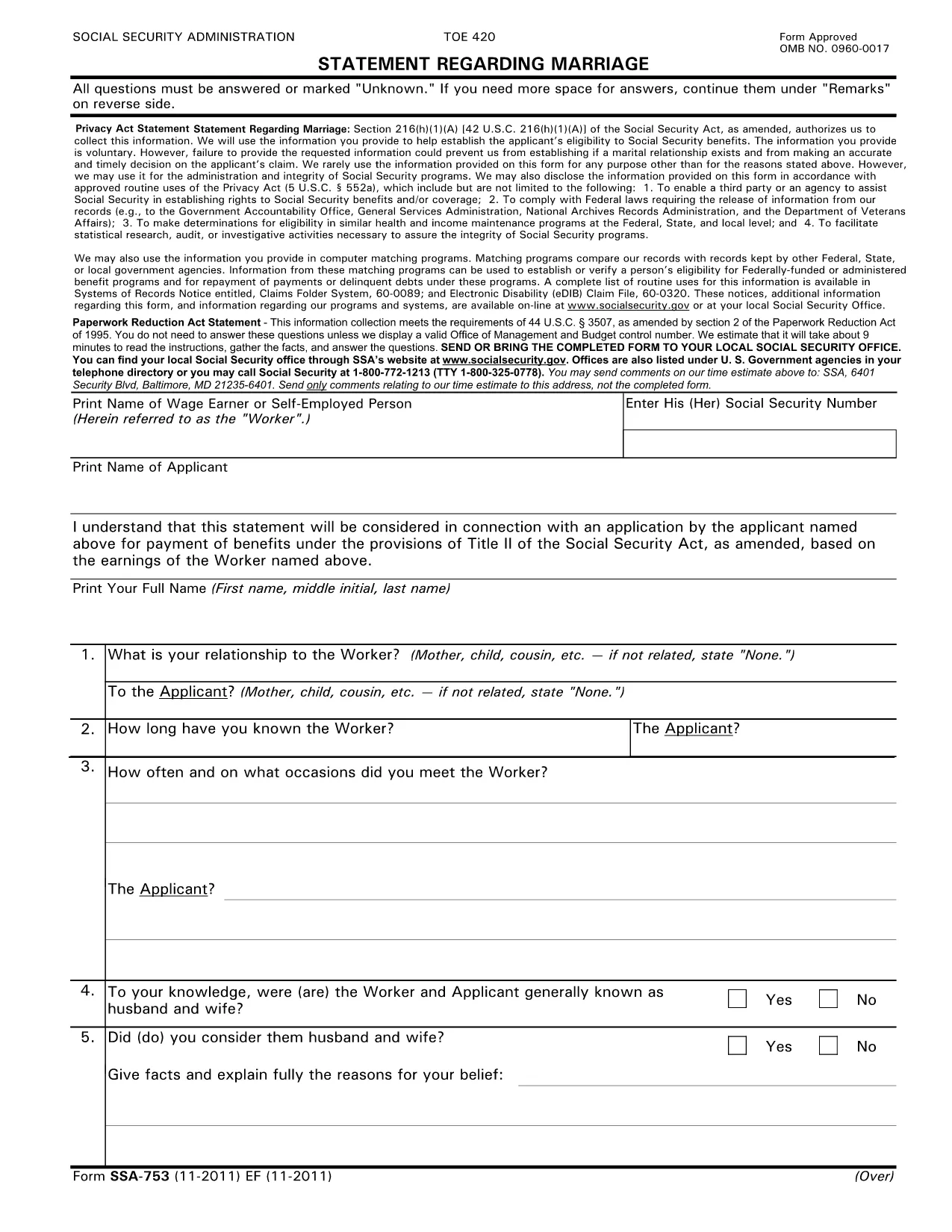
SSA-753 Statement Regarding Marriage – Fillable PDF

  1. Kieli Englanti
  2. Maa USA
  3. Toiminta Sosiaaliturva
Täytä tämä lomake
SSA-753 Statement Regarding Marriage – Fillable PDF

The SSA-753 Statement Regarding Marriage is the Social Security Administration’s official form used to report a change in marital status. Whether you’re getting married, divorced, or widowed, this form helps the SSA determine your eligibility for benefits.

What Is the SSA-753 Form?

The SSA-753 collects basic personal information, details about the marriage, and the impact on Social Security benefits. It is required for:

  • Applying for spousal or survivor benefits
  • Updating your existing benefit record
  • Confirming eligibility for a spouse’s retirement or disability benefits

How to Complete the SSA-753 Online

Instead of printing and scanning, you can fill the form directly on our site using the Formize PDF Filler. The process is quick, secure, and saves you a trip to the post office.

Common Mistakes to Avoid

  • Leaving required fields blank – the form will not submit if any required field is empty.
  • Incorrect dates – double‑check the marriage or divorce date; errors can delay benefit processing.
  • Mismatched signatures – the applicant and spouse (if applicable) must sign exactly as shown on the Social Security card.

Where to Submit the Completed Form

After you finish, you can:

  • Download the completed PDF and mail it to your local Social Security office.
  • Print and bring it in person during your next SSA appointment.

Download the Official PDF

If you prefer the original document, you can download the official SSA‑753 PDF directly from the Social Security Administration’s archive.

FAQ
  • Do I need a PDF editor to fill out SSA-753?

    No. With Formize you can fill the form online in your browser—no additional software required.

  • Is the online filler secure?

    Yes. All data is encrypted in transit and processed on a secure server before you download or print the completed form.

  • Can I save my progress and return later?

    The Formize filler auto‑saves your entries, but you must download the PDF before closing the browser to keep a permanent copy.

  • What if I make a mistake?

    You can edit any field at any time before you submit. Simply click the field and correct the information.

  • Where do I mail the completed SSA-753?

    Send the finished form to your local Social Security office. Addresses are listed on the SSA website under “Contact Us.”

  • Is there a fee to use the Formize PDF Filler?

    No. Filling out the SSA-753 with Formize is completely free.

  • Do I need to print the form after filling it online?

    Printing is recommended if you plan to mail the form. You can also present the printed copy at an SSA office.

MITEN

Kuinka täyttää SSA-753 ilmaiseksi verkossa 4 helpon vaiheen avulla:

  1. 1
    Click the Fill‑out Button
    Press the “Fill out this form” button below to launch the Formize PDF Filler.
  2. 2
    Wait for the Filler to Load
    A few seconds will pass while the secure online editor initializes.
  3. 3
    Complete Each Field
    Enter your information directly into the fillable fields. The app saves your changes automatically.
  4. 4
    Submit or Download
    When finished, either submit the form to the SSA via mail or download the completed PDF for your records.
Muotoile PDF Filler -sovellus
NOIN

Sosiaaliturvalomakkeet

SSA-753 on yksi sosiaaliturvalomakkeista, joita käytetään hakemaan erilaisia ​​Yhdysvaltain sosiaaliturvahallinnon (SSA) etuuksia ja palveluita. SSA on liittovaltion virasto, joka hallinnoi ohjelmia, jotka on suunniteltu tarjoamaan taloudellista apua tukikelpoisille henkilöille ja perheille, mukaan lukien eläke-etuudet, työkyvyttömyysetuudet, perhe-etuudet ja lisäturvatulot (SSI).

Joitakin yleisiä sosiaaliturvalomakkeita ovat:

Sosiaaliturvan eläkehakemus: Tällä lomakkeella haetaan eläke-etuuksia henkilön työhistorian ja ansioiden perusteella.

Sosiaaliturvan työkyvyttömyysetuuksien hakemus: Tätä lomaketta käytetään työkyvyttömyysetuuksien hakemiseen, jos henkilön fyysinen tai henkinen tila estää häntä tekemästä työtä.

Sosiaaliturvan jälkeenjääneiden etuuksien hakemus: Tätä lomaketta käytetään perhe-etuuksien hakemiseen, jos henkilön puoliso tai vanhempi on kuollut ja he ovat oikeutettuja perhe-etuuksiin.

Medicare-ilmoittautumishakemus: Tätä lomaketta käytetään rekisteröitymiseen Medicareen, liittovaltion sairausvakuutusohjelmaan yli 65-vuotiaille henkilöille ja henkilöille, joilla on tietty vamma tai sairaus.

Osoitteenmuutoslomake: Tätä lomaketta käytetään henkilön osoitteen päivittämiseen SSA:lla.

Ansiotietopyyntölomake: Tällä lomakkeella pyydetään kopio henkilön tulotiedoista, jota käytetään sosiaaliturvaetuuksien laskemiseen.

Nämä lomakkeet voidaan täyttää verkossa, postitse tai henkilökohtaisesti paikallisessa sosiaaliturvatoimistossa. On tärkeää tarkistaa ja täyttää huolellisesti kaikki tarvittavat lomakkeet varmistaakseen sosiaaliturvaetuuksien oikea-aikaisen ja tarkan käsittelyn.

OMINAISUUDET

PDF-täyttö

Helpoin tapa täyttää SSA-753 verkossa

  • Täytä nopeasti SSA-753
    Etsitkö tapaa täyttää SSA-753 nopeasti verkossa? Online-maksuttoman PDF-lomakkeen täyttösovelluksemme avulla tiedät kuinka muokata ja täyttää tämä pdf-dokumentti alle minuutissa.
  • Helppokäyttöinen PDF-editori verkossa
    Oletko kyllästynyt tulostamaan PDF-tiedostoja, jotta voit muokata niitä, ennen kuin skannaat uudelleen ja lähetät ne takaisin? Muokkaa PDF-dokumentteja ilmaiseksi verkossa. Käytä online-pdf-editoriamme säästääksesi aikaa ja paperia.
  • Upeita työkaluja, kaikki alustat
    Mietitkö, kuinka SSA-753 täytetään Macilla tai kuinka käyttää PDF-täyttöä ilmaiseksi? Online PDF-työkalumme toimivat kaikilla alustoilla.
  • Suojattu tiedostojen tallennus
    Valmiit "SSA-753"-tiedostot tallennetaan suojattuun tietokantaan, jota hallinnoi Amazon Cloud hosting. Voit poistaa tiedostosi järjestelmästämme milloin tahansa. Joka tapauksessa nämä tiedostot poistetaan automaattisesti 24 tunnin kuluttua.
  • Keskustele käyttäjän SSA-753 kanssa
    Keskustele käyttäjän "SSA-753" kanssa Chatizessa, joka on ilmainen PDF-lukija-apuohjelma. Esitä kysymyksiä ja hanki vastauksia käyttäjältä "SSA-753". Napsauta yllä olevaa Chat With Document -painiketta.

Poista täyttöistunto

Poistetaanko valittu täyttöistunto? Tässä tapauksessa edistymisesi lomakkeen täyttämisessä menetetään.

Poista muokkausistunto

Poistetaanko valittu muokkausistunto? Tässä tapauksessa etenemisesi lomakkeen luomisessa ja muokkaamisessa menetetään.