Valitse kieli

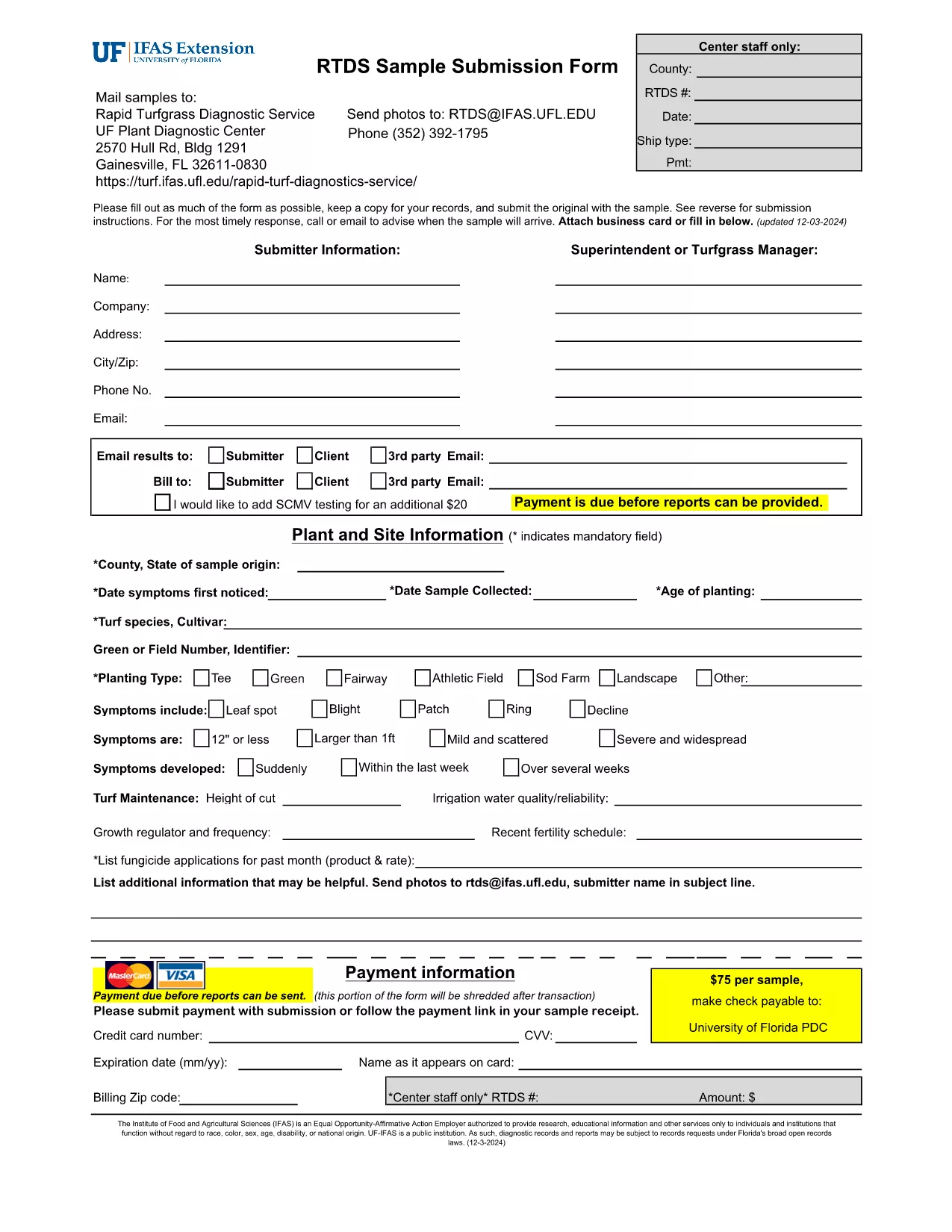
RTDS Form 54 – Fillable PDF for Instant Completion

  1. Kieli Englanti
  2. Maa USA
  3. osasto University of Florida
  4. Toiminta Research Forms
RTDS Form 54 – Fillable PDF for Instant Completion

What Is RTDS Form 54?

RTDS Form 54 is the standard submission template used by researchers and engineers when providing sample data to the Real‑Time Digital Simulation (RTDS) laboratory. The form captures essential project details, simulation parameters, and contact information required for a successful RTDS test.

How to Complete the Form Online

Formize makes the RTDS Form 54 completely fillable in your browser. Follow these simple steps:

  1. Click the "Fill out this form" button on this page.
  2. Wait a few seconds while the Formize PDF Filler app loads the document.
  3. Enter your information in each field – the interface highlights required fields automatically.
  4. Use the toolbar to add a digital signature or checkboxes where needed.
  5. When finished, click Save & Download to get a copy or Submit to send it directly to the RTDS lab.

Common Mistakes to Avoid

  • Leaving required fields blank: The form will not save until all mandatory sections are completed.
  • Incorrect date format: Use MM/DD/YYYY as specified in the form header.
  • Misspelling project titles: Verify spelling before saving – the RTDS team uses the exact title for data matching.
  • Forgetting the digital signature: A signed form is required for acceptance; use the built‑in signature tool.

Download the Original PDF

If you prefer the classic PDF version, you can download the official document directly from the University of Florida Plant Pathology archive:

Download RTDS Form 54 (PDF)

Why Use Formize’s PDF Filler?

Formize provides a secure, browser‑based environment that eliminates the need for Adobe Acrobat or other desktop editors. Your data stays encrypted, the interface is mobile‑friendly, and you can save progress at any time.

FAQ
  • What is the purpose of RTDS Form 54?

    It collects the essential project and simulation details needed by the Real‑Time Digital Simulation laboratory to run and validate your test scenario.

  • Do I need Adobe Acrobat to fill out this form?

    No. Formize’s online PDF filler lets you complete the form directly in any modern web browser without additional software.

  • Is there a cost to use the Formize filler?

    Filling out the RTDS Form 54 on Formize is completely free.

  • Can I print the completed form?

    Yes. After saving, you can download the PDF and print it using any standard printer.

  • How do I know my data is secure?

    Formize uses SSL encryption for all data transmission and does not store your completed form on our servers unless you choose to save it.

  • What should I do if I make a mistake?

    You can edit any field at any time before you click the final "Submit" button. Just click the field, correct the information, and save again.

  • Where can I find the original, non‑fillable PDF?

    The official PDF is available for download from the University of Florida Plant Pathology website – see the link in the "Download the Original PDF" section.

MITEN

Kuinka täyttää RTDS Form 54 ilmaiseksi verkossa 4 helpon vaiheen avulla:

  1. 1
    Open the Fillable Form
    Click the "Fill out this form" button on the page. The Formize PDF Filler will load the RTDS Form 54 directly in your browser.
  2. 2
    Enter Your Information
    Type into each field. Required fields are marked with an asterisk. Use the date picker for all date entries.
  3. 3
    Add a Digital Signature
    Select the signature tool, draw or type your name, and place it in the signature box.
  4. 4
    Save or Submit
    When all sections are complete, click "Save & Download" to keep a copy, or click "Submit" to send the form to the RTDS laboratory.
Muotoile PDF Filler -sovellus
NOIN

RTDS Form 54 malli

Perinteisten PDF-dokumenttien katseluun ja täyttämiseen tarkoitettujen ominaisuuksien sekä verkkosovelluksen ja responsiivisen asettelun etujen avulla voit suorittaa RTDS Form 54 muutamassa minuutissa.

OMINAISUUDET

PDF-täyttö

Helpoin tapa täyttää RTDS Form 54 verkossa

  • Täytä nopeasti RTDS Form 54
    Etsitkö tapaa täyttää RTDS Form 54 nopeasti verkossa? Online-maksuttoman PDF-lomakkeen täyttösovelluksemme avulla tiedät kuinka muokata ja täyttää tämä pdf-dokumentti alle minuutissa.
  • Helppokäyttöinen PDF-editori verkossa
    Oletko kyllästynyt tulostamaan PDF-tiedostoja, jotta voit muokata niitä, ennen kuin skannaat uudelleen ja lähetät ne takaisin? Muokkaa PDF-dokumentteja ilmaiseksi verkossa. Käytä online-pdf-editoriamme säästääksesi aikaa ja paperia.
  • Upeita työkaluja, kaikki alustat
    Mietitkö, kuinka RTDS Form 54 täytetään Macilla tai kuinka käyttää PDF-täyttöä ilmaiseksi? Online PDF-työkalumme toimivat kaikilla alustoilla.
  • Suojattu tiedostojen tallennus
    Valmiit "RTDS Form 54"-tiedostot tallennetaan suojattuun tietokantaan, jota hallinnoi Amazon Cloud hosting. Voit poistaa tiedostosi järjestelmästämme milloin tahansa. Joka tapauksessa nämä tiedostot poistetaan automaattisesti 24 tunnin kuluttua.
  • Keskustele käyttäjän RTDS Form 54 kanssa
    Keskustele käyttäjän "RTDS Form 54" kanssa Chatizessa, joka on ilmainen PDF-lukija-apuohjelma. Esitä kysymyksiä ja hanki vastauksia käyttäjältä "RTDS Form 54". Napsauta yllä olevaa Chat With Document -painiketta.

Poista täyttöistunto

Poistetaanko valittu täyttöistunto? Tässä tapauksessa edistymisesi lomakkeen täyttämisessä menetetään.

Poista muokkausistunto

Poistetaanko valittu muokkausistunto? Tässä tapauksessa etenemisesi lomakkeen luomisessa ja muokkaamisessa menetetään.