Valitse kieli

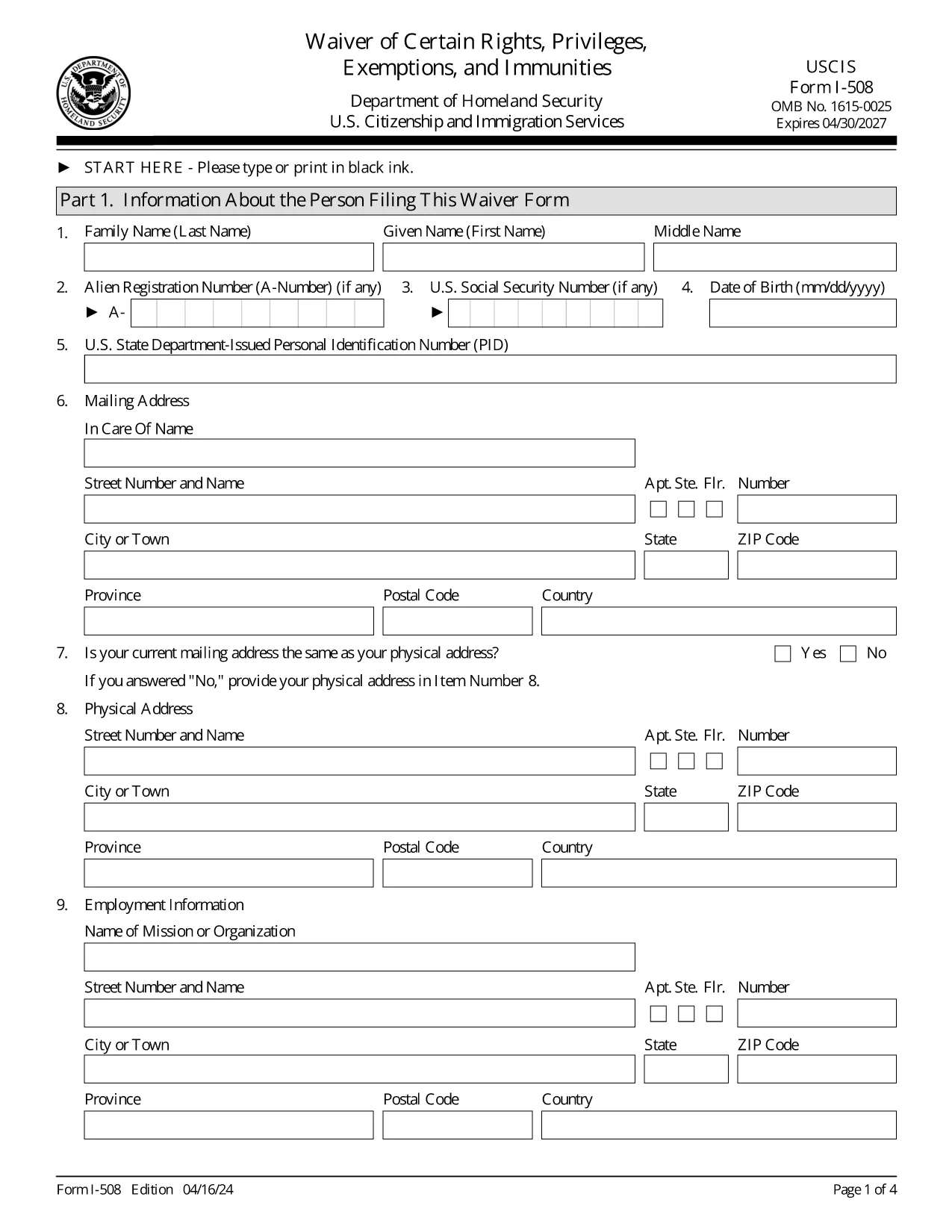
Form I-508 – Waiver of Rights, Privileges, Exemptions & Immunities

  1. Maa USA
  2. Kieli Englanti
  3. osasto Yhdysvaltain kansalaisuus- ja maahanmuuttovirasto
Form I-508 – Waiver of Rights, Privileges, Exemptions & Immunities

The USCIS Form I-508 is a request to waive diplomatic rights, privileges, exemptions, and immunities for non‑U.S. citizens employed by foreign governments or international organizations. It is required when you hold an occupational status that would otherwise qualify you for A, G, or E nonimmigrant status.

What Is Form I-508?

This waiver allows you to retain your current immigration status (e.g., lawful permanent resident) while working for a foreign mission. It is mandated by Section 247(b) of the Immigration and Nationality Act (INA). If you do not submit a signed I‑508, USCIS may automatically convert your status to the appropriate diplomatic category.

How to Fill Out I-508 Using Formize

Instead of downloading, printing, and editing a PDF, simply click the “Fill out this form” button on our page. The Formize PDF Filler app loads the official USCIS document and lets you complete every field online.

Common Mistakes to Avoid

  • Leaving any required field blank – the form will not submit.
  • Using the wrong edition date – make sure the bottom of each page shows the 04/16/24 edition.
  • Forgetting to sign the certification section – an unsigned form is rejected.
  • Uploading a PDF from a different edition – only the official USCIS version works.

Where to File the Completed Waiver

File the completed I‑508 with the USCIS office handling your primary immigration application:

  • If you are filing with Form I‑131 (Travel Document), submit I‑508 to the same office.
  • If you are adjusting status (Form I‑485), file I‑508 with that office.

Need More Help?

Review USCIS filing tips, double‑check the edition date, and ensure every page is included. The Formize platform saves your progress, so you can review before final submission.

FAQ
  • Who must file Form I-508?

    Anyone who is a non‑U.S. citizen working for a foreign government mission or international organization and who would otherwise qualify for A, G, or E nonimmigrant status.

  • Can I submit I-508 electronically?

    USCIS currently requires a printed and signed PDF. Use Formize to fill the form, then print and sign before mailing.

  • What happens if I don’t file I-508?

    USCIS will automatically convert your status to the appropriate diplomatic category, which may affect your eligibility for adjustment of status.

  • Is there a filing fee for Form I-508?

    No separate fee is listed for I-508; any applicable fees are covered under the primary application (e.g., I‑131 or I‑485).

  • How do I know I have the correct edition of the form?

    The bottom of each page shows the edition date. The latest edition (04/16/24) is the one provided by USCIS and used by Formize.

  • Can I edit a saved Formize I-508 later?

    Yes. Your work is saved in your Formize account, allowing you to return, edit, and re‑download the form at any time before final submission.

MITEN

Kuinka täyttää I-508 ilmaiseksi verkossa 5 helpon vaiheen avulla:

  1. 1
    Open the Fillable Form
    Click the “Fill out this form” button on the page. The Formize PDF Filler app will load the official I-508 document.
  2. 2
    Complete Each Section
    Enter your personal information, employment details, and waiver statements. All fields are required; the app highlights any missing data.
  3. 3
    Review & Sign
    Use the built‑in review mode to verify every answer. Add your electronic signature in the certification box.
  4. 4
    Save or Download
    When you’re satisfied, click “Save” to store the filled form in your account or “Download” to get a PDF copy for filing.
  5. 5
    Submit to USCIS
    Print the final PDF (if required) and mail it to the USCIS office handling your case, following the filing instructions on the form.
Muotoile PDF Filler -sovellus
NOIN

I-508 malli

Perinteisten PDF-dokumenttien katseluun ja täyttämiseen tarkoitettujen ominaisuuksien sekä verkkosovelluksen ja responsiivisen asettelun etujen avulla voit suorittaa I-508 muutamassa minuutissa.

OMINAISUUDET

PDF-täyttö

Helpoin tapa täyttää I-508 verkossa

  • Täytä nopeasti I-508
    Etsitkö tapaa täyttää I-508 nopeasti verkossa? Online-maksuttoman PDF-lomakkeen täyttösovelluksemme avulla tiedät kuinka muokata ja täyttää tämä pdf-dokumentti alle minuutissa.
  • Helppokäyttöinen PDF-editori verkossa
    Oletko kyllästynyt tulostamaan PDF-tiedostoja, jotta voit muokata niitä, ennen kuin skannaat uudelleen ja lähetät ne takaisin? Muokkaa PDF-dokumentteja ilmaiseksi verkossa. Käytä online-pdf-editoriamme säästääksesi aikaa ja paperia.
  • Upeita työkaluja, kaikki alustat
    Mietitkö, kuinka I-508 täytetään Macilla tai kuinka käyttää PDF-täyttöä ilmaiseksi? Online PDF-työkalumme toimivat kaikilla alustoilla.
  • Suojattu tiedostojen tallennus
    Valmiit "I-508"-tiedostot tallennetaan suojattuun tietokantaan, jota hallinnoi Amazon Cloud hosting. Voit poistaa tiedostosi järjestelmästämme milloin tahansa. Joka tapauksessa nämä tiedostot poistetaan automaattisesti 24 tunnin kuluttua.
  • Keskustele käyttäjän I-508 kanssa
    Keskustele käyttäjän "I-508" kanssa Chatizessa, joka on ilmainen PDF-lukija-apuohjelma. Esitä kysymyksiä ja hanki vastauksia käyttäjältä "I-508". Napsauta yllä olevaa Chat With Document -painiketta.

Poista täyttöistunto

Poistetaanko valittu täyttöistunto? Tässä tapauksessa edistymisesi lomakkeen täyttämisessä menetetään.

Poista muokkausistunto

Poistetaanko valittu muokkausistunto? Tässä tapauksessa etenemisesi lomakkeen luomisessa ja muokkaamisessa menetetään.