Valitse kieli

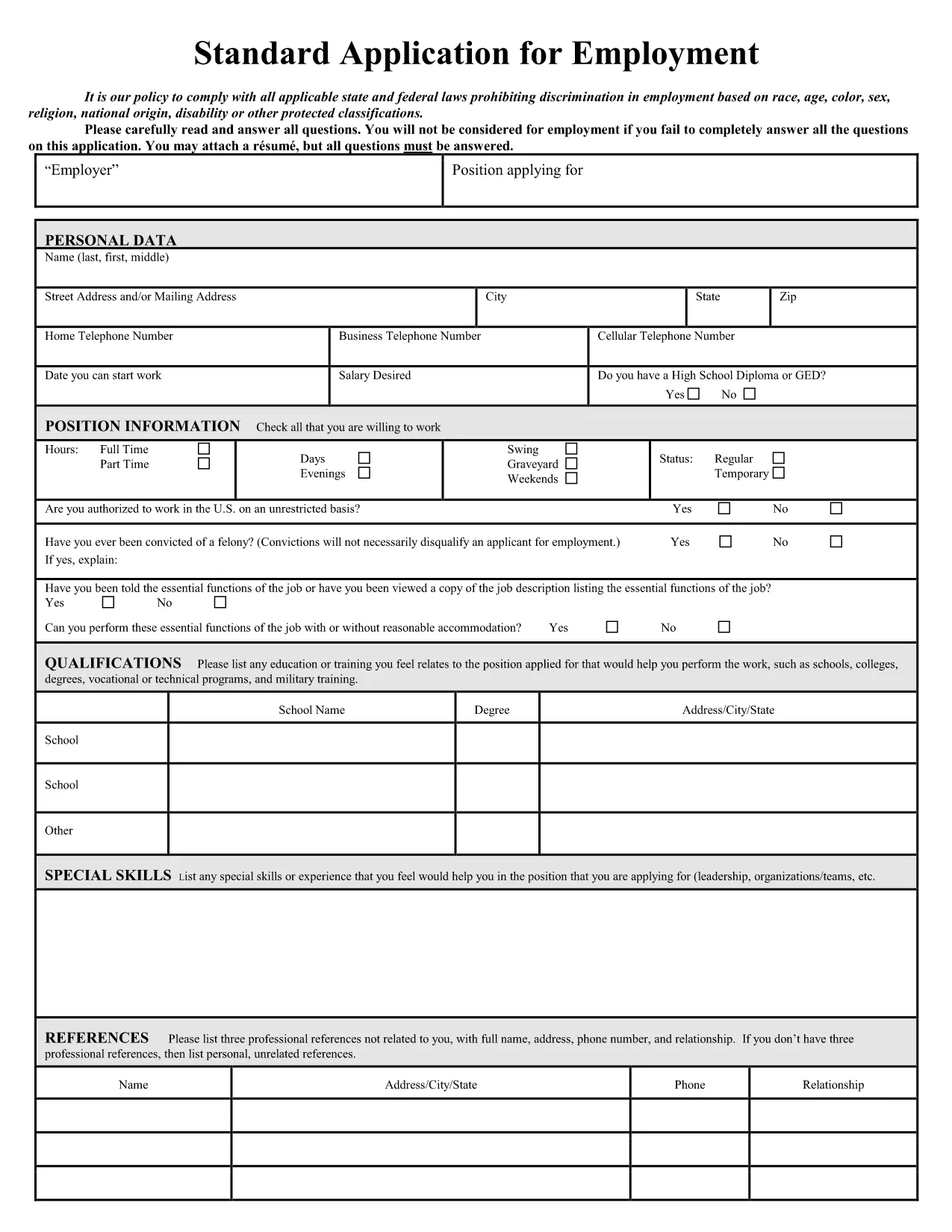
Application Form Sample – Fillable PDF Online

  1. Kieli Englanti
  2. Maa USA
  3. Toiminta Maahanmuutto
  4. osasto USCIS
Application Form Sample – Fillable PDF Online

Looking for a professional application form sample that you can edit instantly? Our free fillable PDF lets you complete a job‑application style form without installing any software. Simply click the button, let Formize load the PDF filler, and start typing.

Why Choose a Fillable Application Form?

Fillable PDFs eliminate the hassle of printing, scanning, or re‑typing. They preserve the original layout, keep your data secure, and work on any device – desktop, tablet, or phone.

How to Complete the Form in Seconds

Follow the step‑by‑step guide below. The process takes less than two minutes, even for first‑time users.

Common Mistakes to Avoid

  • Leaving required fields blank – the filler will highlight them.
  • Using special characters in name fields – stick to letters, hyphens, and apostrophes.
  • Skipping the final review – errors can be costly for employers.

Download vs. Fill Online – Which Is Best?

Downloading gives you an offline copy, but filling online guarantees you always have the latest version and automatic saving.

Legal Compliance & Privacy Guarantees

Our PDF filler complies with U.S. data‑protection standards. Your information never leaves the secure Formize environment unless you choose to submit it.

Ready to start? Click the button below and experience a smooth, paper‑less application process.

FAQ
  • Do I need a PDF reader to fill the form?

    No. The Formize online filler works in any modern browser, so you don’t need Adobe Acrobat or any other software.

  • Can I edit the form after I download it?

    Yes. The saved PDF remains fully editable with any standard PDF editor if you need to make changes later.

  • Is my personal data safe?

    Absolutely. All data is processed in a secure, encrypted session and never stored on our servers unless you choose to save it.

  • What if I make a mistake while filling?

    You can simply click back into the field and correct it. The filler also offers an “Undo” button for quick fixes.

  • Can I print the completed form?

    Yes. After you save the filled PDF, you can print it using any standard printer.

  • Is the form compatible with mobile devices?

    The online filler is responsive and works on smartphones and tablets as well as desktops.

  • Do I need to create an account?

    No account is required. The filler is free and anonymous; you only need to click the button to start.

  • Can I use this form for any job application?

    The sample follows standard U.S. employment‑application conventions and works for most entry‑level and professional positions.

MITEN

Kuinka täyttää application form sample ilmaiseksi verkossa 4 helpon vaiheen avulla:

  1. 1
    Click the Fill‑out Button
    Press the “Fill out this form” button on the page. The Formize PDF Filler app will open in a new tab.
  2. 2
    Wait for the Filler to Load
    The app loads the fillable PDF automatically. No download or installation is required.
  3. 3
    Enter Your Information
    Type directly into each field. Required fields are marked with a red asterisk.
  4. 4
    Review and Save
    Use the “Preview” button to check for errors, then click “Save” to download a completed copy or submit it directly to the employer.
Muotoile PDF Filler -sovellus
NOIN

application form sample malli

Perinteisten PDF-dokumenttien katseluun ja täyttämiseen tarkoitettujen ominaisuuksien sekä verkkosovelluksen ja responsiivisen asettelun etujen avulla voit suorittaa application form sample muutamassa minuutissa.

OMINAISUUDET

PDF-täyttö

Helpoin tapa täyttää application form sample verkossa

  • Täytä nopeasti application form sample
    Etsitkö tapaa täyttää application form sample nopeasti verkossa? Online-maksuttoman PDF-lomakkeen täyttösovelluksemme avulla tiedät kuinka muokata ja täyttää tämä pdf-dokumentti alle minuutissa.
  • Helppokäyttöinen PDF-editori verkossa
    Oletko kyllästynyt tulostamaan PDF-tiedostoja, jotta voit muokata niitä, ennen kuin skannaat uudelleen ja lähetät ne takaisin? Muokkaa PDF-dokumentteja ilmaiseksi verkossa. Käytä online-pdf-editoriamme säästääksesi aikaa ja paperia.
  • Upeita työkaluja, kaikki alustat
    Mietitkö, kuinka application form sample täytetään Macilla tai kuinka käyttää PDF-täyttöä ilmaiseksi? Online PDF-työkalumme toimivat kaikilla alustoilla.
  • Suojattu tiedostojen tallennus
    Valmiit "application form sample"-tiedostot tallennetaan suojattuun tietokantaan, jota hallinnoi Amazon Cloud hosting. Voit poistaa tiedostosi järjestelmästämme milloin tahansa. Joka tapauksessa nämä tiedostot poistetaan automaattisesti 24 tunnin kuluttua.
  • Keskustele käyttäjän application form sample kanssa
    Keskustele käyttäjän "application form sample" kanssa Chatizessa, joka on ilmainen PDF-lukija-apuohjelma. Esitä kysymyksiä ja hanki vastauksia käyttäjältä "application form sample". Napsauta yllä olevaa Chat With Document -painiketta.

Poista täyttöistunto

Poistetaanko valittu täyttöistunto? Tässä tapauksessa edistymisesi lomakkeen täyttämisessä menetetään.

Poista muokkausistunto

Poistetaanko valittu muokkausistunto? Tässä tapauksessa etenemisesi lomakkeen luomisessa ja muokkaamisessa menetetään.