
Valitse kieli

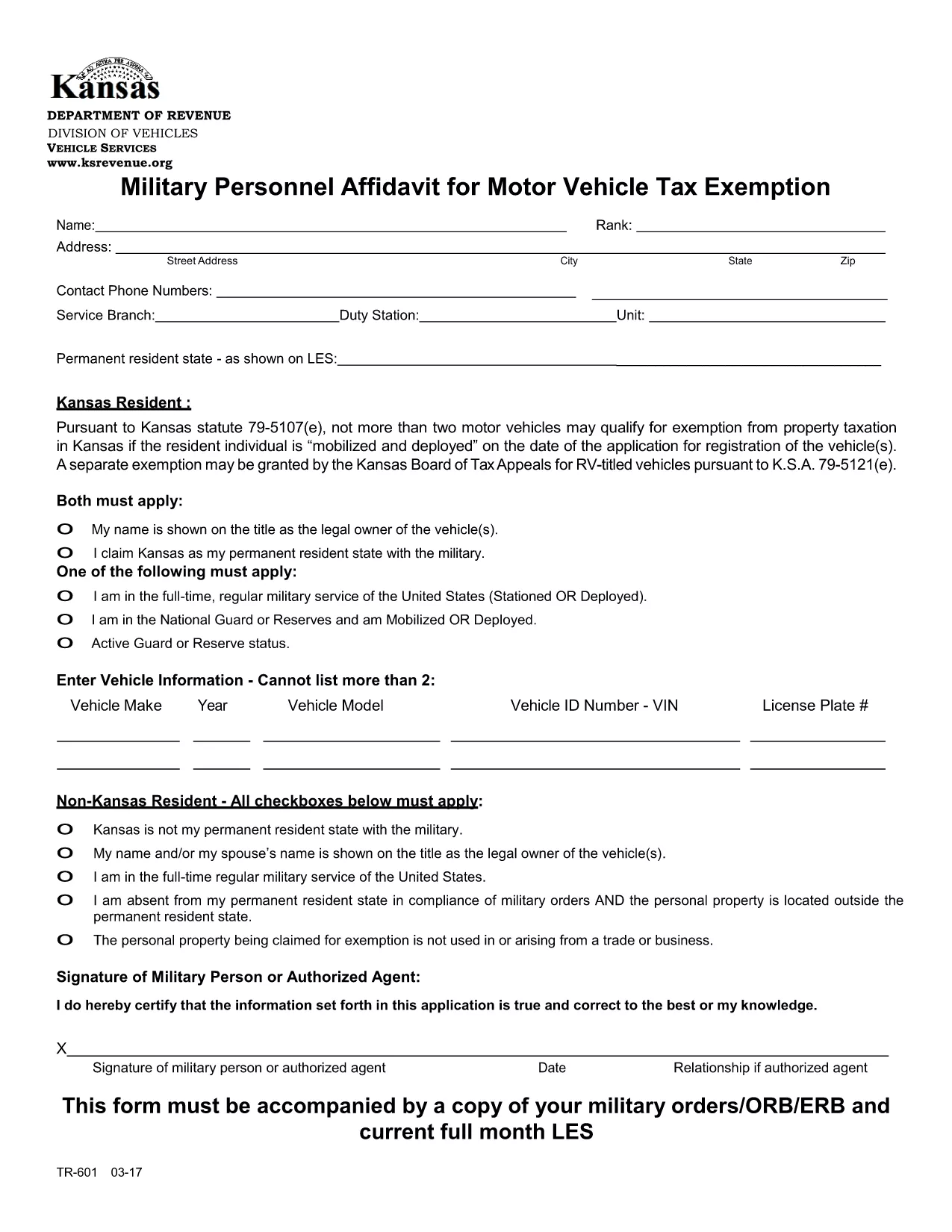
TR‑601 Kansas Military Personnel Affidavit (Fillable PDF)

  1. Maa USA
  2. Kieli Englanti
  3. Toiminta Ajoneuvon rekisteröinti
  4. Osavaltio Kansas
TR‑601 Kansas Military Personnel Affidavit (Fillable PDF)

The TR‑601 Military Personnel Affidavit is the official Kansas form used by active‑duty service members to claim exemption from motor vehicle property tax. The form must be filed with the Kansas Department of Revenue (or your local county clerk) together with a copy of your military orders.

What Is the TR‑601 Affidavit?

This affidavit verifies that you are a member of the United States Armed Forces and that the vehicle(s) you own qualify for the two‑vehicle exemption under Kansas Statute 79‑5107(e)(1). The form requests basic personal information, vehicle details, and a copy of your orders (ORB/ERB).

How to Complete the Form in Seconds

Instead of downloading, printing, and hand‑filling the PDF, use the Formize fillable PDF feature:

  1. Click the Fill out this form button on this page.
  2. Wait a few seconds for the Formize PDF Filler app to load.
  3. Enter your information directly into the on‑screen fields.
  4. Upload a scanned copy of your military orders.
  5. Review, then click Submit to download a completed PDF you can print or email.

Common Mistakes & Tips for a Smooth Submission

  • Missing orders: The affidavit is invalid without a current copy of your ORB/ERB.
  • Vehicle count: Kansas only allows exemption for up to two qualifying vehicles.
  • Signature: Use an electronic signature in Formize or sign the printed copy before submission.
  • Incorrect VIN: Double‑check the Vehicle Identification Number; a typo will delay processing.

Where to Submit Your Completed Affidavit

After completing the form, you can:

  • Mail the PDF to your county treasurer’s office.
  • Upload it through the Kansas Department of Revenue’s online portal.
  • Deliver a printed copy in person at the local county clerk.

Keep a copy for your records in case the agency requests additional documentation.

FAQ
  • Who is eligible to use the TR‑601 affidavit?

    Active‑duty members of the U.S. Armed Forces who own up to two motor vehicles that are registered in Kansas.

  • Do I need to attach my military orders?

    Yes. A current copy of your ORB/ERB (or other official orders) must accompany the affidavit.

  • Can I claim exemption for more than two vehicles?

    No. Kansas law limits the exemption to a maximum of two qualifying vehicles per service member.

  • Is an electronic signature accepted?

    Yes. The Formize PDF Filler lets you add an electronic signature, which is accepted by the Kansas Department of Revenue.

  • How long does it take for the county to process the affidavit?

    Processing times vary by county, but most offices review the submission within 7‑10 business days.

  • What if I make a mistake after submitting?

    Contact your county treasurer’s office immediately. You may need to submit a corrected affidavit with a new signature.

  • Do I need to re‑file the affidavit each year?

    Yes. The exemption must be renewed annually, and you must provide updated orders if your status changes.

  • Can I file the form online without printing?

    Yes. Once you complete the form in Formize, you can download the PDF and email it directly to the appropriate agency.

MITEN

Kuinka täyttää TR-601 ilmaiseksi verkossa 5 helpon vaiheen avulla:

  1. 1
    Open the Fillable Form
    Click the "Fill out this form" button on this page to launch the Formize PDF Filler.
  2. 2
    Load the PDF Filler
    Wait a few seconds while the Formize app loads the TR‑601 PDF in your browser.
  3. 3
    Enter Your Information
    Type your personal details, vehicle information, and upload a scanned copy of your military orders.
  4. 4
    Review and Sign
    Check all fields for accuracy, add an electronic signature, and click "Submit" to generate the completed PDF.
  5. 5
    Download or Print
    Save the finished affidavit to your device, print it, and send it to the appropriate Kansas agency.
Muotoile PDF Filler -sovellus
NOIN

Ajoneuvojen rekisteröintilomakkeet

Jos omistat tai vuokraat moottoriajoneuvon, perävaunun tai veneen, sinun on täytettävä tietyt velvoitteet pitääksesi ajoneuvosi laillisesti rekisteröitynä ja turvassa.

TR-601 on yksi ajoneuvojen rekisteröintilomakkeista, jotka ovat asiakirjoja, joita käytetään moottoriajoneuvon rekisteröintiin asianomaisessa osavaltion tai maakunnan viranomaisessa. Näitä lomakkeita tarvitaan yleensä, kun henkilö ostaa uuden tai käytetyn ajoneuvon tai kun hän muuttaa ajoneuvon kanssa uuteen osavaltioon tai maakuntaan.

Ajoneuvon rekisteröintiin vaadittavat tarkat vaatimukset ja lomakkeet voivat vaihdella paikkakunnittain, mutta yleensä prosessiin kuuluu tiedot ajoneuvosta, omistajasta ja mahdollisista ajoneuvon panttioikeuksista.

Kun rekisteröintilomakkeet ja maksut on toimitettu, valtion tai läänin viranomainen antaa ajoneuvon omistajalle rekisteröintitodistuksen tai rekisterikilven. Tämä rekisteröinti mahdollistaa ajoneuvon laillisen käytön yleisillä teillä ja moottoriteillä.

OMINAISUUDET

PDF-täyttö

Helpoin tapa täyttää TR-601 verkossa

  • Täytä nopeasti TR-601
    Etsitkö tapaa täyttää TR-601 nopeasti verkossa? Online-maksuttoman PDF-lomakkeen täyttösovelluksemme avulla tiedät kuinka muokata ja täyttää tämä pdf-dokumentti alle minuutissa.
  • Helppokäyttöinen PDF-editori verkossa
    Oletko kyllästynyt tulostamaan PDF-tiedostoja, jotta voit muokata niitä, ennen kuin skannaat uudelleen ja lähetät ne takaisin? Muokkaa PDF-dokumentteja ilmaiseksi verkossa. Käytä online-pdf-editoriamme säästääksesi aikaa ja paperia.
  • Upeita työkaluja, kaikki alustat
    Mietitkö, kuinka TR-601 täytetään Macilla tai kuinka käyttää PDF-täyttöä ilmaiseksi? Online PDF-työkalumme toimivat kaikilla alustoilla.
  • Suojattu tiedostojen tallennus
    Valmiit "TR-601"-tiedostot tallennetaan suojattuun tietokantaan, jota hallinnoi Amazon Cloud hosting. Voit poistaa tiedostosi järjestelmästämme milloin tahansa. Joka tapauksessa nämä tiedostot poistetaan automaattisesti 24 tunnin kuluttua.
  • Keskustele käyttäjän TR-601 kanssa
    Keskustele käyttäjän "TR-601" kanssa Chatizessa, joka on ilmainen PDF-lukija-apuohjelma. Esitä kysymyksiä ja hanki vastauksia käyttäjältä "TR-601". Napsauta yllä olevaa Chat With Document -painiketta.

Poista täyttöistunto

Poistetaanko valittu täyttöistunto? Tässä tapauksessa edistymisesi lomakkeen täyttämisessä menetetään.

Poista muokkausistunto

Poistetaanko valittu muokkausistunto? Tässä tapauksessa etenemisesi lomakkeen luomisessa ja muokkaamisessa menetetään.