
Valitse kieli

Missouri Form 4601 – Fillable PDF for Military Personalized License Plates

  1. Kieli Englanti
  2. Maa USA
  3. Toiminta Ajoneuvon rekisteröinti
  4. Osavaltio Missouri
Missouri Form 4601 – Fillable PDF for Military Personalized License Plates

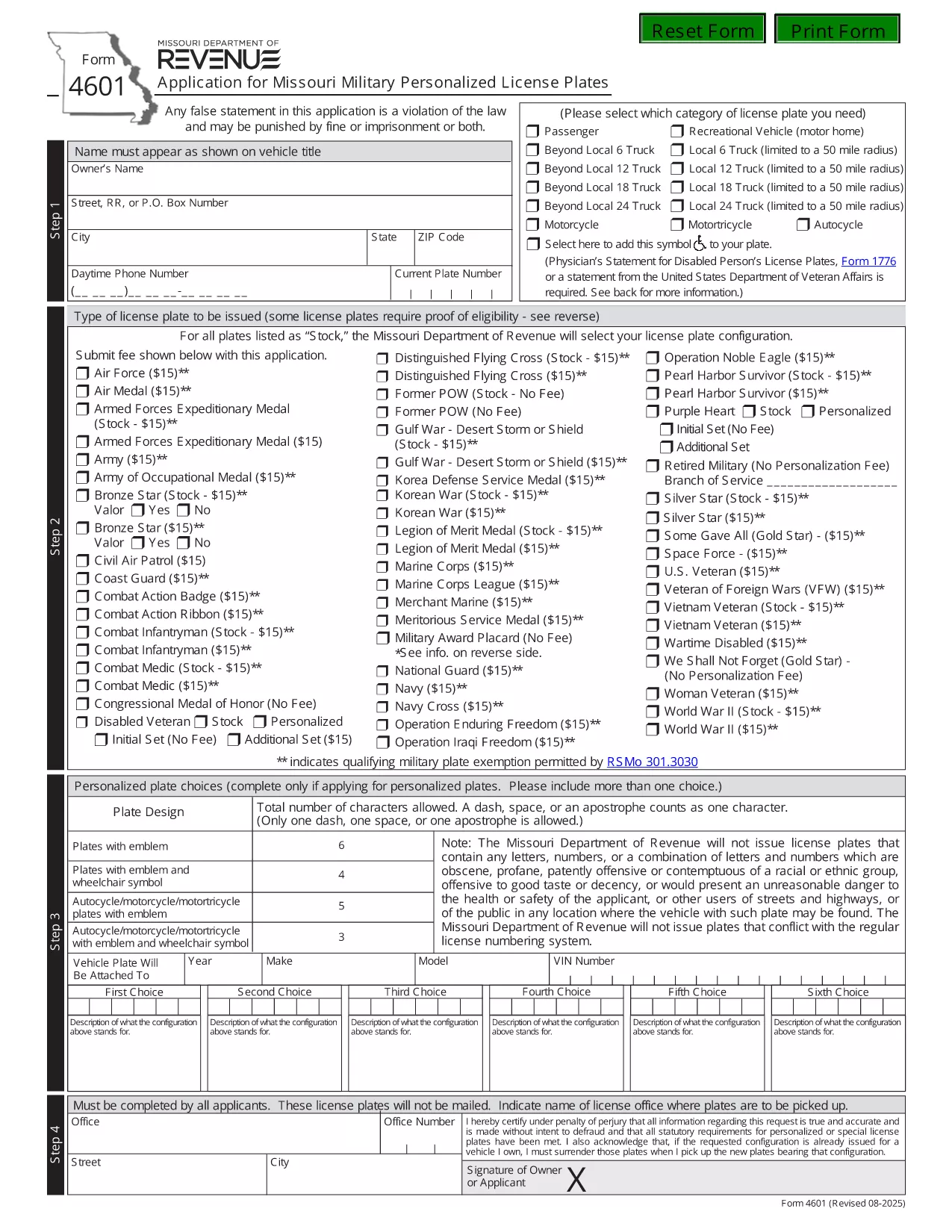
Form 4601 is the official Application for Missouri Military Personalized License Plates issued by the Missouri Department of Revenue. This fillable PDF lets eligible veterans, active‑duty service members, and qualified family members request a custom military‑themed plate for their vehicle.

What Is Form 4601?

Form 4601 collects personal information, vehicle details, and proof of military service. The form is required for any of the following plate designs:

  • U.S. Army, Navy, Air Force, Marine Corps, Coast Guard
  • Veterans of specific campaigns or decorations
  • Active‑duty personnel requesting a temporary plate

How to Complete the Fillable Form 4601 Online

With Formize’s PDF Filler you can fill out the form directly in your browser—no download, print, or third‑party editor needed.

  1. Click the "Fill out this form" button on this page.
  2. Wait a few seconds while the Formize PDF Filler loads the fillable version of Form 4601.
  3. Enter your information in each highlighted field. The filler automatically validates dates, ZIP codes, and required fields.
  4. Upload a scanned copy of your discharge papers or award certificate when prompted.
  5. Review the completed form, then click Submit to download the filled PDF or to email it directly to the Missouri Department of Revenue.

Common Mistakes to Avoid

  • Leaving the "Signature" field blank—use the electronic signature tool provided.
  • Entering an incorrect VIN; double‑check the 17‑character vehicle identification number.
  • Submitting an outdated or non‑honorable discharge document.
  • Choosing a plate configuration longer than six characters (or five with an emblem).

Where to Submit Your Application

After completing the fillable PDF, mail it with the $15 application fee to:

Motor Vehicle Bureau
301 West High Street – Room 370
PO Box 569
Jefferson City, MO 65105‑0569

Or bring the printed form to any Missouri license office. The Department will process the request within 6‑8 weeks.

Download the Official PDF

If you prefer the original, non‑fillable version, you can download it directly from the Missouri Department of Revenue:

Download Form 4601 (PDF)

Using Formize’s fillable version saves time, reduces errors, and keeps a digital copy for your records.

FAQ
  • Who is eligible to use Form 4601?

    Veterans with an honorable discharge, active‑duty service members, and surviving spouses of eligible veterans may apply for a military personalized plate.

  • Is there a fee to submit Form 4601?

    Yes, a $15 application fee is required for each military plate request. The fee is paid to the Missouri Department of Revenue when you mail the form.

  • Can I submit Form 4601 electronically?

    The Missouri Department of Revenue currently requires a printed, signed PDF with the fee. However, you can fill it out online using Formize, then print and mail it.

  • How long does it take to receive the plates?

    Processing typically takes 6‑8 weeks after the Department receives your completed form and payment.

  • What proof of service do I need to attach?

    Attach a copy of your DD‑214, discharge certificate, or the official award documentation that qualifies you for the specific military plate.

  • What if my desired plate configuration is unavailable?

    You may submit up to three alternative configurations on the same form. If none are available, you can request a refund of the $15 fee.

  • Do I need to renew the military plate each year?

    Yes. Renewal requires the same $15 fee and a current proof of service if your status has changed.

MITEN

Kuinka täyttää Form 4601 ilmaiseksi verkossa 3 helpon vaiheen avulla:

  1. 1
    Open the Fillable Form
    Click the "Fill out this form" button on the page. The Formize PDF Filler will open the fillable version of Form 4601 in your browser.
  2. 2
    Enter Your Information
    Complete each highlighted field—personal details, vehicle info, and military service proof. Use the upload button for your discharge documents.
  3. 3
    Validate and Submit
    Review the completed form for any errors. Click the Submit button to download the finished PDF or to email it directly to the Missouri Department of Revenue.
Muotoile PDF Filler -sovellus
NOIN

Ajoneuvojen rekisteröintilomakkeet

Form 4601 on yksi DMV-lomakkeista, joka tunnetaan myös nimellä Department of Motor Vehicles -lomakkeet ja jotka ovat asiakirjoja, joita käytetään erilaisissa moottoriajoneuvoihin liittyvissä tapahtumissa ja prosesseissa. DMV on valtion virasto, joka vastaa ajokorttien myöntämisestä, ajoneuvojen rekisteröinnistä ja moottoriajoneuvojen lakien täytäntöönpanosta. Tietyt saatavilla olevat DMV-lomakkeet voivat vaihdella lainkäyttöalueen mukaan, mutta tässä on joitain yleisiä esimerkkejä:

Ajokorttilomakkeet: Näitä lomakkeita käytetään ajokortin hakemiseen tai muutosten tai uusien pyytämiseen. Ne edellyttävät yleensä henkilökohtaisia ​​tietoja, henkilöllisyystodistusta ja voivat sisältää lääketieteellisiä tietoja tai ajohistoriaa koskevia osioita.

Ajoneuvon rekisteröintilomakkeet: Näitä lomakkeita käytetään moottoriajoneuvon rekisteröintiin DMV:ssä. He vaativat ajoneuvon tiedot, omistustiedot ja vakuutuksen.

Omistusoikeuden siirtolomakkeet: Kun ajoneuvoa ostetaan tai myydään, näitä lomakkeita käytetään omistusoikeuden siirtämiseen osapuolelta toiselle. Ne vaativat tietoja ostajasta, myyjästä, ajoneuvon tiedoista ja voivat sisältää kauppalaskun.

Ajoneuvon vastuuvapauslomakkeet: Kun ajoneuvoa myydään tai siirretään, nämä lomakkeet ilmoittavat DMV:lle, että myyjä ei ole enää vastuussa ajoneuvosta. Se auttaa suojaamaan myyjää vastuulta ajoneuvoon liittyvistä onnettomuuksista tai tapahtumista myynnin jälkeen.

Rekisterikilpi ja rekisteröinnin uusimislomakkeet: näitä lomakkeita käytetään ajoneuvon rekisteröinnin uusimiseen tai uusien rekisterikilpien pyytämiseen. Ne vaativat yleensä tietoja rekisteröidystä omistajasta, nykyiset rekisteröintitiedot ja sovellettavien maksujen maksamisen.

Ajotietojen pyyntölomakkeet: Näiden lomakkeiden avulla henkilöt voivat pyytää DMV:ltä ajotietojaan, jotka sisältävät tietoja ajorikkomuksista, ajokortin tilasta ja muista asiaan liittyvistä tiedoista.

Erikois- tai henkilökohtaiset rekisterikilpilomakkeet: näitä lomakkeita käytetään henkilökohtaisten tai erikoisrekisterikilpien hakemiseen, joiden avulla henkilöt voivat muokata rekisterikilpiään tietyillä merkeillä tai kuvioilla.

Nämä ovat vain muutamia esimerkkejä monista lomakkeista, jotka voivat olla saatavilla DMV:n kautta. Tietyt lomakkeet ja vaatimukset voivat vaihdella lainkäyttöalueen mukaan, joten on tärkeää tutustua paikalliseen DMV-verkkosivustoon tai käydä DMV:n toimistossa saadaksesi oikeat lomakkeet tarpeisiisi.

OMINAISUUDET

PDF-täyttö

Helpoin tapa täyttää Form 4601 verkossa

  • Täytä nopeasti Form 4601
    Etsitkö tapaa täyttää Form 4601 nopeasti verkossa? Online-maksuttoman PDF-lomakkeen täyttösovelluksemme avulla tiedät kuinka muokata ja täyttää tämä pdf-dokumentti alle minuutissa.
  • Helppokäyttöinen PDF-editori verkossa
    Oletko kyllästynyt tulostamaan PDF-tiedostoja, jotta voit muokata niitä, ennen kuin skannaat uudelleen ja lähetät ne takaisin? Muokkaa PDF-dokumentteja ilmaiseksi verkossa. Käytä online-pdf-editoriamme säästääksesi aikaa ja paperia.
  • Upeita työkaluja, kaikki alustat
    Mietitkö, kuinka Form 4601 täytetään Macilla tai kuinka käyttää PDF-täyttöä ilmaiseksi? Online PDF-työkalumme toimivat kaikilla alustoilla.
  • Suojattu tiedostojen tallennus
    Valmiit "Form 4601"-tiedostot tallennetaan suojattuun tietokantaan, jota hallinnoi Amazon Cloud hosting. Voit poistaa tiedostosi järjestelmästämme milloin tahansa. Joka tapauksessa nämä tiedostot poistetaan automaattisesti 24 tunnin kuluttua.
  • Keskustele käyttäjän Form 4601 kanssa
    Keskustele käyttäjän "Form 4601" kanssa Chatizessa, joka on ilmainen PDF-lukija-apuohjelma. Esitä kysymyksiä ja hanki vastauksia käyttäjältä "Form 4601". Napsauta yllä olevaa Chat With Document -painiketta.

Poista täyttöistunto

Poistetaanko valittu täyttöistunto? Tässä tapauksessa edistymisesi lomakkeen täyttämisessä menetetään.

Poista muokkausistunto

Poistetaanko valittu muokkausistunto? Tässä tapauksessa etenemisesi lomakkeen luomisessa ja muokkaamisessa menetetään.