
Valitse kieli

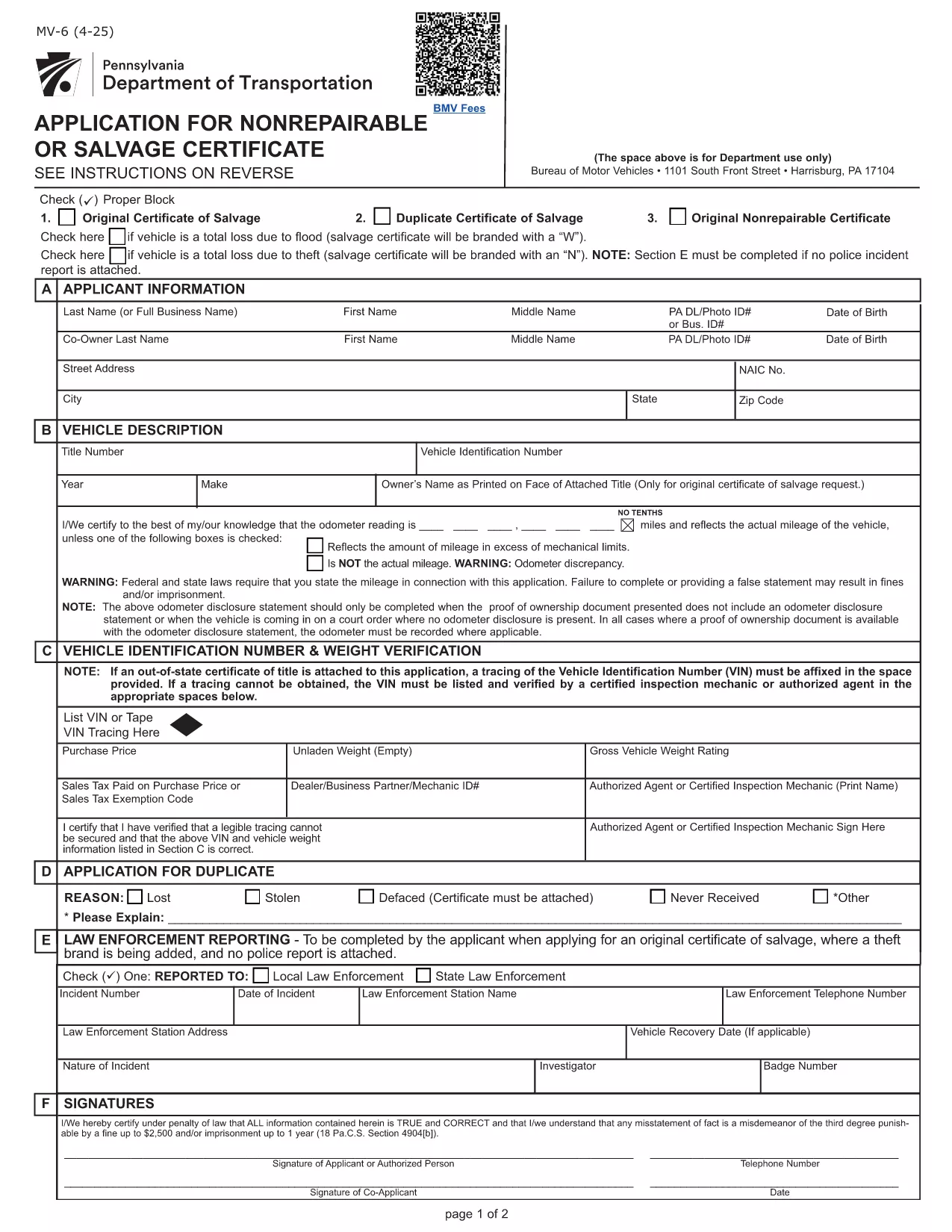
Pennsylvania MV-6 Non‑Repairable / Salvage Certificate Form

  1. Kieli Englanti
  2. Maa USA
  3. Toiminta Ajoneuvon rekisteröinti
  4. Osavaltio Pennsylvania
Pennsylvania MV-6 Non‑Repairable / Salvage Certificate Form

The Pennsylvania MV-6 is the official Bureau of Motor Vehicles (BMV) application for a non‑repairable or salvage certificate. Whether your vehicle has been totaled, stolen, or otherwise deemed a total loss, you’ll need this form to legally transfer or surrender the title.

What Is the MV-6 Form and When Is It Needed?

The MV-6 is required when you:

  • Declare a vehicle as non‑repairable after an accident or flood.
  • Apply for a salvage certificate to sell the wrecked vehicle.
  • Need to release liability after a total loss.

It is a Pennsylvania BMV document, so it must be completed in English and signed by the vehicle owner (or authorized representative).

How to Complete the MV-6 Online with Formize

Instead of downloading the PDF and editing it with a separate editor, simply click the “Fill out this form” button on this page. The Formize PDF Filler will load in your browser, letting you type directly into each field, add signatures, and save a completed copy.

  1. Click “Fill out this form” – the Formize app launches instantly.
  2. Enter all required information (owner details, vehicle identification number, reason for salvage, etc.).
  3. Use the built‑in signature tool to sign where indicated.
  4. When finished, click Save & Download to get a PDF you can print or email to the BMV.

Common Mistakes to Avoid on the MV-6

  • Incorrect VIN – double‑check the Vehicle Identification Number; a single digit error can delay processing.
  • Missing signatures – both the owner and, if applicable, the lienholder must sign.
  • Wrong date format – use MM/DD/YYYY as required by the BMV.
  • Leaving “N/A” fields blank – write “N/A” or “None” to show the field was considered.

Where to Submit Your Completed MV-6

After saving the completed PDF, you can:

  • Mail it to your local PennDOT BMV office.
  • Take it in person to a PennDOT Driver & Vehicle Services Center.
  • Attach it to an online title‑transfer request if your county offers e‑services.

Always include any required supporting documents (e.g., accident report, proof of ownership) to avoid return of the form.

FAQ
  • Do I need a notary for the MV-6 form?

    No. The MV-6 does not require notarization, but all signatures must be original and legible.

  • Can I submit the MV-6 electronically?

    Pennsylvania BMV currently accepts only paper copies for salvage certificates. You can email a PDF for internal review, but the final submission must be a printed document.

  • What if my vehicle has a lien?

    The lienholder must sign the MV-6 in the designated section. If the lienholder refuses, you may need to obtain a lien release before the BMV will process the form.

  • How long does it take for the BMV to process a salvage certificate?

    Processing typically takes 7‑10 business days after the BMV receives a complete MV-6 and any supporting documents.

  • Is there a fee for filing the MV-6?

    Yes. The fee varies by county. Refer to the PennDOT Schedule of Fees (Form MV‑70S) for the exact amount.

  • Can I use the MV-6 form for a vehicle that was stolen?

    Yes, the MV-6 can be used to declare a stolen vehicle as non‑repairable, but you must also provide a police report or theft affidavit.

  • What should I do if I make a mistake on the form?

    Cross out the error with a single line, initial it, and correct the information in the adjacent space. For major errors, it’s best to start a new form.

  • Do insurance companies need to fill out a different form?

    Insurance companies should use Form MV‑6IS or MV‑6SV when applying for a salvage certificate on behalf of a policyholder.

MITEN

Kuinka täyttää MV-6 form ilmaiseksi verkossa 4 helpon vaiheen avulla:

  1. 1
    Open the Fillable MV-6 Form
    Click the “Fill out this form” button on this page. The Formize PDF Filler loads directly in your browser.
  2. 2
    Enter Required Information
    Type your name, address, VIN, and the reason for the salvage certificate into the highlighted fields.
  3. 3
    Add Your Signature
    Use the built‑in signature tool to sign where the form requires a signature. If a lienholder is listed, they must also sign.
  4. 4
    Save and Download
    When all fields are completed, click “Save & Download” to get a PDF copy you can print or email to the BMV.
Muotoile PDF Filler -sovellus
NOIN

Ajoneuvojen rekisteröintilomakkeet

MV-6 form on yksi DMV-lomakkeista, joka tunnetaan myös nimellä Department of Motor Vehicles -lomakkeet ja jotka ovat asiakirjoja, joita käytetään erilaisissa moottoriajoneuvoihin liittyvissä tapahtumissa ja prosesseissa. DMV on valtion virasto, joka vastaa ajokorttien myöntämisestä, ajoneuvojen rekisteröinnistä ja moottoriajoneuvojen lakien täytäntöönpanosta. Tietyt saatavilla olevat DMV-lomakkeet voivat vaihdella lainkäyttöalueen mukaan, mutta tässä on joitain yleisiä esimerkkejä:

Ajokorttilomakkeet: Näitä lomakkeita käytetään ajokortin hakemiseen tai muutosten tai uusien pyytämiseen. Ne edellyttävät yleensä henkilökohtaisia ​​tietoja, henkilöllisyystodistusta ja voivat sisältää lääketieteellisiä tietoja tai ajohistoriaa koskevia osioita.

Ajoneuvon rekisteröintilomakkeet: Näitä lomakkeita käytetään moottoriajoneuvon rekisteröintiin DMV:ssä. He vaativat ajoneuvon tiedot, omistustiedot ja vakuutuksen.

Omistusoikeuden siirtolomakkeet: Kun ajoneuvoa ostetaan tai myydään, näitä lomakkeita käytetään omistusoikeuden siirtämiseen osapuolelta toiselle. Ne vaativat tietoja ostajasta, myyjästä, ajoneuvon tiedoista ja voivat sisältää kauppalaskun.

Ajoneuvon vastuuvapauslomakkeet: Kun ajoneuvoa myydään tai siirretään, nämä lomakkeet ilmoittavat DMV:lle, että myyjä ei ole enää vastuussa ajoneuvosta. Se auttaa suojaamaan myyjää vastuulta ajoneuvoon liittyvistä onnettomuuksista tai tapahtumista myynnin jälkeen.

Rekisterikilpi ja rekisteröinnin uusimislomakkeet: näitä lomakkeita käytetään ajoneuvon rekisteröinnin uusimiseen tai uusien rekisterikilpien pyytämiseen. Ne vaativat yleensä tietoja rekisteröidystä omistajasta, nykyiset rekisteröintitiedot ja sovellettavien maksujen maksamisen.

Ajotietojen pyyntölomakkeet: Näiden lomakkeiden avulla henkilöt voivat pyytää DMV:ltä ajotietojaan, jotka sisältävät tietoja ajorikkomuksista, ajokortin tilasta ja muista asiaan liittyvistä tiedoista.

Erikois- tai henkilökohtaiset rekisterikilpilomakkeet: näitä lomakkeita käytetään henkilökohtaisten tai erikoisrekisterikilpien hakemiseen, joiden avulla henkilöt voivat muokata rekisterikilpiään tietyillä merkeillä tai kuvioilla.

Nämä ovat vain muutamia esimerkkejä monista lomakkeista, jotka voivat olla saatavilla DMV:n kautta. Tietyt lomakkeet ja vaatimukset voivat vaihdella lainkäyttöalueen mukaan, joten on tärkeää tutustua paikalliseen DMV-verkkosivustoon tai käydä DMV:n toimistossa saadaksesi oikeat lomakkeet tarpeisiisi.

OMINAISUUDET

PDF-täyttö

Helpoin tapa täyttää MV-6 form verkossa

  • Täytä nopeasti MV-6 form
    Etsitkö tapaa täyttää MV-6 form nopeasti verkossa? Online-maksuttoman PDF-lomakkeen täyttösovelluksemme avulla tiedät kuinka muokata ja täyttää tämä pdf-dokumentti alle minuutissa.
  • Helppokäyttöinen PDF-editori verkossa
    Oletko kyllästynyt tulostamaan PDF-tiedostoja, jotta voit muokata niitä, ennen kuin skannaat uudelleen ja lähetät ne takaisin? Muokkaa PDF-dokumentteja ilmaiseksi verkossa. Käytä online-pdf-editoriamme säästääksesi aikaa ja paperia.
  • Upeita työkaluja, kaikki alustat
    Mietitkö, kuinka MV-6 form täytetään Macilla tai kuinka käyttää PDF-täyttöä ilmaiseksi? Online PDF-työkalumme toimivat kaikilla alustoilla.
  • Suojattu tiedostojen tallennus
    Valmiit "MV-6 form"-tiedostot tallennetaan suojattuun tietokantaan, jota hallinnoi Amazon Cloud hosting. Voit poistaa tiedostosi järjestelmästämme milloin tahansa. Joka tapauksessa nämä tiedostot poistetaan automaattisesti 24 tunnin kuluttua.
  • Keskustele käyttäjän MV-6 form kanssa
    Keskustele käyttäjän "MV-6 form" kanssa Chatizessa, joka on ilmainen PDF-lukija-apuohjelma. Esitä kysymyksiä ja hanki vastauksia käyttäjältä "MV-6 form". Napsauta yllä olevaa Chat With Document -painiketta.

Poista täyttöistunto

Poistetaanko valittu täyttöistunto? Tässä tapauksessa edistymisesi lomakkeen täyttämisessä menetetään.

Poista muokkausistunto

Poistetaanko valittu muokkausistunto? Tässä tapauksessa etenemisesi lomakkeen luomisessa ja muokkaamisessa menetetään.