
Valitse kieli

Request Texas Motor Vehicle Information – Form VTR‑275

  1. Kieli Englanti
  2. Maa USA
  3. Toiminta Ajoneuvon rekisteröinti
  4. Osavaltio Texas
Request Texas Motor Vehicle Information – Form VTR‑275

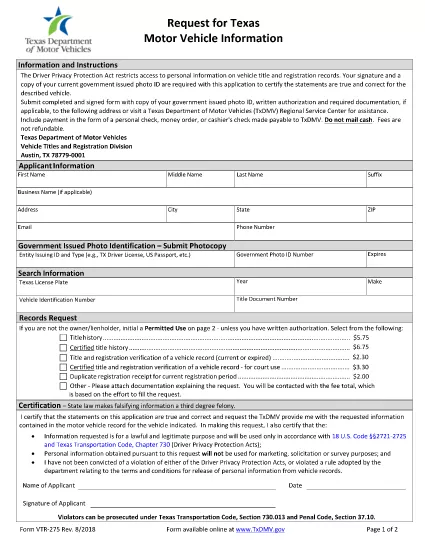
The Texas VTR‑275 (Request for Motor Vehicle Information) is the official form used to obtain vehicle records from the Texas Department of Motor Vehicles (TxDMV). Whether you need a title search, lien information, or ownership history, this fillable PDF lets you request the data quickly and securely.

What Is Form VTR‑275?

Form VTR‑275 is a state‑approved request that specifies the permitted uses of Texas motor‑vehicle information. It requires your signature (or printed initials) and a valid government‑issued photo ID. The form is accepted by the TxDMV, local county clerks, and authorized third‑party agencies.

How to Fill Out VTR‑275 with Formize

Instead of downloading the PDF and opening a separate editor, simply click the "Fill out this form" button on this page. The Formize PDF Filler app will load automatically, allowing you to complete every field online.

  • Step 1: Click the blue “Fill out this form” button.
  • Step 2: Wait a few seconds for the Formize PDF Filler to appear.
  • Step 3: Enter your personal details, vehicle information, and the specific reason for the request.
  • Step 4: Upload a scanned copy of your photo ID (if required).
  • Step 5: Review the completed form, then click “Submit” to download the finished PDF or send it directly to the TxDMV.

Common Mistakes to Avoid

Even a small error can delay processing. Keep these tips in mind:

  • Use the exact VIN or license‑plate number as it appears on the title.
  • Do not leave any required field blank; use “N/A” only when the form explicitly allows it.
  • Make sure your signature matches the name on your ID.
  • Attach a clear, legible copy of your photo ID; blurry images are rejected.

Where to Submit the Completed Form

After filling out VTR‑275, you have two options:

  • Mail: Send the signed form, copy of your ID, and any required authorization to:
    TxDMV – Vehicle Titles and Registration Division, Austin, TX 78779‑0001.
  • In‑Person: Visit any TxDMV Regional Service Center or participating county clerk office.

Electronic submission is not currently accepted, so a printed copy is required for mailing or in‑person delivery.

Frequently Asked Questions

Below are answers to the most common queries about Form VTR‑275.

FAQ
  • Do I need a notary for Form VTR‑275?

    No. The form only requires your signature and a copy of a valid government‑issued photo ID. A notary is not required.

  • Can I submit the form electronically?

    The TxDMV currently accepts only paper copies. After filling the form online, print it and mail or deliver it in person.

  • What types of vehicle information can I request?

    You can request title history, lien status, registration details, and ownership records, provided the request falls under a permitted use.

  • How long does it take to receive the requested information?

    Processing typically takes 5‑10 business days after the TxDMV receives a complete and correctly signed form.

  • Is there a fee for using Form VTR‑275?

    Yes. A standard processing fee applies; check the TxDMV fee schedule for the most current amount.

  • Can I request information on a vehicle I don’t own?

    Only if you qualify under a permitted use (e.g., legal, insurance, or lien holder). The form requires you to specify the purpose.

  • What should I do if my ID copy is rejected?

    Resubmit a clearer, full‑face scan of a valid driver’s license, state ID, or passport. Ensure the image is not blurry and all edges are visible.

  • Is there a deadline for submitting the request?

    There is no statutory deadline, but the sooner you submit a complete form, the faster you’ll receive the records.

MITEN

Kuinka täyttää VTR-275 ilmaiseksi verkossa 5 helpon vaiheen avulla:

  1. 1
    Open the Fillable Form
    Click the "Fill out this form" button on the page. The Formize PDF Filler will open in a new window.
  2. 2
    Enter Required Information
    Complete each field: requestor details, vehicle VIN or plate, purpose of request, and sign electronically.
  3. 3
    Upload Supporting Documents
    Attach a clear scan or photo of your government‑issued ID and any required authorization letters.
  4. 4
    Review and Download
    Double‑check all entries, then click "Submit" to download the completed PDF ready for mailing or in‑person delivery.
  5. 5
    Send the Form
    Print the PDF, attach the ID copy, and mail it to the TxDMV address or bring it to a regional service center.
Muotoile PDF Filler -sovellus
NOIN

Ajoneuvojen rekisteröintilomakkeet

VTR-275 on yksi ajoneuvojen rekisteröintilomakkeista, joita käytetään moottoriajoneuvon rekisteröintiin asianomaisessa viranomaisessa, yleensä Department of Motor Vehicles (DMV) tai vastaavassa virastossa. Näitä lomakkeita tarvitaan, kun henkilö ostaa uuden tai käytetyn ajoneuvon, siirtää ajoneuvon omistusoikeuden tai muuttaa uudelle lainkäyttöalueelle ajoneuvon kanssa.

Tietyt ajoneuvojen rekisteröintilomakkeet voivat vaihdella lainkäyttöalueen mukaan, mutta ne edellyttävät yleensä seuraavat tiedot:

Ajoneuvon tiedot: Tämä sisältää tietoja ajoneuvosta, kuten merkki, malli, vuosi, ajoneuvon tunnusnumero (VIN) ja matkamittarin lukema.

Omistajan tiedot: Lomake vaatii tietoja ajoneuvon omistajasta, mukaan lukien hänen nimensä, osoitteensa, yhteystiedot ja ajokortin numero.

Omistustodistus: Olosuhteista riippuen saatetaan vaatia todisteita omistajuudesta, kuten omistusoikeustodistus, kauppakirja tai valmistajan alkuperätodistus (uusille ajoneuvoille).

Vakuutustiedot: Yleensä vaaditaan todiste voimassa olevasta ajoneuvovakuutuksesta. Tämä voi sisältää vakuutusnumeron, kattavuuspäivämäärien ja vakuutusyhtiön tietojen ilmoittamisen.

Maksujen maksaminen: Ajoneuvon rekisteröinti sisältää erilaisten maksujen, kuten rekisteröintimaksujen, verojen ja mahdollisesti muiden lainkäyttöaluekohtaisten maksujen, maksamisen.

Näiden perusvaatimusten lisäksi joillakin lainkäyttöalueilla voi olla muita lomakkeita tai asiakirjoja koskevia vaatimuksia. Esimerkiksi päästötestien tulokset, turvallisuustarkastukset tai asuintodistus voivat olla tarpeen tietyillä alueilla.

Kun ajoneuvon rekisteröintilomakkeet on täytetty ja lähetetty, viranomainen myöntää rekisteröintitodistuksen, rekisterikilvet ja rekisteröintitarrat. Nämä asiakirjat osoittavat, että ajoneuvo on laillisesti rekisteröity ja hyväksytty käytettäväksi yleisillä teillä.

On tärkeää huomata, että ajoneuvojen rekisteröintivaatimukset voivat vaihdella huomattavasti lainkäyttöalueen mukaan. Siksi on suositeltavaa kysyä paikalliselta DMV:ltä tai vastaavalta virastolta sijaintiasi sovellettavista erityisistä lomakkeista ja menettelyistä.

OMINAISUUDET

PDF-täyttö

Helpoin tapa täyttää VTR-275 verkossa

  • Täytä nopeasti VTR-275
    Etsitkö tapaa täyttää VTR-275 nopeasti verkossa? Online-maksuttoman PDF-lomakkeen täyttösovelluksemme avulla tiedät kuinka muokata ja täyttää tämä pdf-dokumentti alle minuutissa.
  • Helppokäyttöinen PDF-editori verkossa
    Oletko kyllästynyt tulostamaan PDF-tiedostoja, jotta voit muokata niitä, ennen kuin skannaat uudelleen ja lähetät ne takaisin? Muokkaa PDF-dokumentteja ilmaiseksi verkossa. Käytä online-pdf-editoriamme säästääksesi aikaa ja paperia.
  • Upeita työkaluja, kaikki alustat
    Mietitkö, kuinka VTR-275 täytetään Macilla tai kuinka käyttää PDF-täyttöä ilmaiseksi? Online PDF-työkalumme toimivat kaikilla alustoilla.
  • Suojattu tiedostojen tallennus
    Valmiit "VTR-275"-tiedostot tallennetaan suojattuun tietokantaan, jota hallinnoi Amazon Cloud hosting. Voit poistaa tiedostosi järjestelmästämme milloin tahansa. Joka tapauksessa nämä tiedostot poistetaan automaattisesti 24 tunnin kuluttua.
  • Keskustele käyttäjän VTR-275 kanssa
    Keskustele käyttäjän "VTR-275" kanssa Chatizessa, joka on ilmainen PDF-lukija-apuohjelma. Esitä kysymyksiä ja hanki vastauksia käyttäjältä "VTR-275". Napsauta yllä olevaa Chat With Document -painiketta.

Poista täyttöistunto

Poistetaanko valittu täyttöistunto? Tässä tapauksessa edistymisesi lomakkeen täyttämisessä menetetään.

Poista muokkausistunto

Poistetaanko valittu muokkausistunto? Tässä tapauksessa etenemisesi lomakkeen luomisessa ja muokkaamisessa menetetään.