Choisir la langue

Tax File Number (TFN) Declaration Form – Fillable PDF

  1. De campagne Australie
  2. Langue Anglais
  3. Activité Impôts
  4. département Australian Taxation Office
Remplissez ce formulaire
Tax File Number (TFN) Declaration Form – Fillable PDF

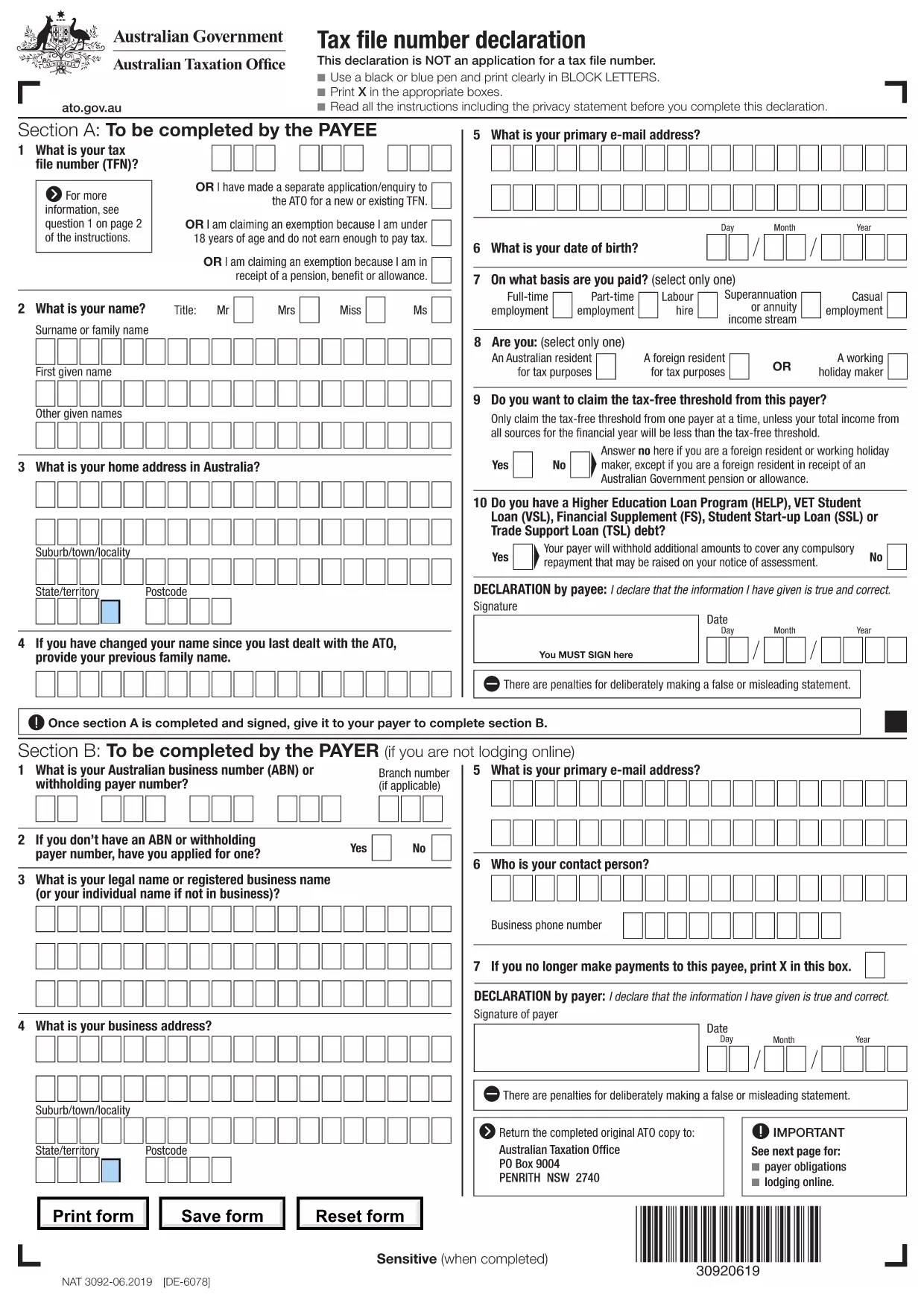
The Tax File Number (TFN) Declaration is a mandatory Australian tax form used by employers, banks, and government agencies to determine the correct amount of tax to withhold from payments. Our page provides a fillable PDF version of the official TFN Declaration, so you can complete it quickly and accurately.

What is the TFN Declaration?

The TFN Declaration collects essential information about the payee, including their TFN, residency status, and any tax offsets. The data is used for PAYG (Pay As You Go) withholding calculations and must be provided before the first payment is made.

How to Fill Out the TFN Declaration Form Online

Instead of downloading the PDF and opening it in a separate editor, simply click the "Fill out this form" button on this page. The Formize PDF Filler app will load in your browser, letting you type directly into each field, select check‑boxes, and save your changes.

Common Mistakes to Avoid

  • Using a pen or stylus on the downloaded PDF – the online filler eliminates this risk.
  • Leaving the "Residency status" box blank – the ATO requires a clear selection.
  • Entering an incorrect TFN format – double‑check the 9‑digit number.
  • Forgetting to sign the declaration – the digital signature field is required.

Where to Submit the Completed Form

Once you have filled and saved the form, you can either:

  • Download the completed PDF and email it to your employer or financial institution.
  • Print the form and hand‑deliver it to the requesting party.

All submissions must be made before the first payment to ensure correct tax withholding.

Need more help? Review the ATO instructions linked at the bottom of the PDF for detailed guidance.

FAQ
  • What is a TFN Declaration used for?

    It tells employers and payers your Tax File Number and residency status so they can calculate the correct PAYG withholding amount.

  • Do I need to submit a signed TFN Declaration?

    Yes. The form requires a signature (digital or handwritten) to be valid.

  • Can I edit the form after I have saved it?

    Absolutely. The Formize PDF Filler lets you reopen the saved PDF and make changes before final submission.

  • Is the online filler secure?

    Formize uses SSL encryption, and the PDF never leaves your browser unless you choose to download or email it.

  • What if I don’t have a TFN yet?

    Leave the TFN field blank and tick the box indicating you are applying for a TFN. The payer will withhold tax at the highest rate until your number is issued.

  • Do I need to print the form after filling it online?

    No, you can submit the completed PDF electronically. Printing is only required if the recipient specifically asks for a hard copy.

  • How long is the TFN Declaration valid?

    It remains valid until your TFN or residency status changes. Update the form whenever there is a change.

COMMENT

Comment remplir tax form declaration pdf gratuitement, en ligne en 4 étapes simples :

  1. 1
    Click the Fill‑out Button
    Press the "Fill out this form" button on this page to launch the Formize PDF Filler.
  2. 2
    Wait for the Filler to Load
    The browser will open the fillable PDF; the app loads in a few seconds.
  3. 3
    Complete All Required Fields
    Enter your TFN, personal details, and select the appropriate residency and tax offset options.
  4. 4
    Save or Download the Completed Form
    When finished, click "Save" to store the PDF in your device or download it to send to your employer.
Formize l'application PDF Filler
À PROPOS

Les formulaires d'impôt

tax form declaration pdf est l'un des formulaires fiscaux qui sont des documents utilisés pour déclarer des informations relatives aux impôts à l'autorité fiscale compétente. Il existe différents types de formulaires fiscaux, y compris les formulaires fiscaux fédéraux, étatiques et locaux, qui peuvent varier en fonction de la situation et de l'emplacement du contribuable.

CARACTÉRISTIQUES

Remplisseur de PDF

Le moyen le plus simple de remplir des formulaires PDF en ligne

  • Remplissez rapidement tax form declaration pdf
    Vous cherchez un moyen de remplir rapidement tax form declaration pdf en ligne ? Avec notre remplisseur de formulaire PDF gratuit en ligne, vous saurez comment éditer et remplir ce document pdf en moins d'une minute.
  • Éditeur PDF en ligne facile à utiliser
    Vous en avez assez d'imprimer des fichiers PDF pour pouvoir les modifier avant de les renumériser et de les renvoyer ? Modifiez des documents PDF gratuitement en ligne. Utilisez notre éditeur de pdf en ligne pour gagner du temps et du papier.
  • Excellents outils, toutes plateformes
    Vous vous demandez comment remplir tax form declaration pdf sur un Mac, ou peut-être comment utiliser un remplisseur PDF gratuit ? Nos outils PDF en ligne fonctionnent sur toutes les plateformes.
  • Stockage de fichiers sécurisé
    Les fichiers "tax form declaration pdf" terminés sont stockés dans une base de données sécurisée gérée par l'hébergement Amazon Cloud. Vous pouvez supprimer vos fichiers de notre système à tout moment. Dans tous les cas, ces fichiers sont automatiquement supprimés après 24 heures.
  • Discutez avec tax form declaration pdf
    Discutez avec "tax form declaration pdf" sur Chatize qui est un assistant de lecture PDF gratuit. Posez des questions et obtenez des réponses de "tax form declaration pdf". Cliquez simplement sur le bouton Discuter avec un document ci-dessus.

Supprimer la session de remplissage

Supprimer la session de remplissage sélectionnée ? Dans ce cas, votre progression dans le remplissage du formulaire sera perdue.

Supprimer la session d'édition

Supprimer la session de modification sélectionnée ? Dans ce cas, votre progression dans la création et la modification du formulaire sera perdue.