
Choisir la langue

Application Form B – Inborn Errors of Metabolism (Fillable PDF)

  1. Langue Anglais
  2. De campagne Australie
  3. Activité Health Assistance
  4. département Ministère de la Santé et du Bien-être familial
Remplissez ce formulaire
Application Form B – Inborn Errors of Metabolism (Fillable PDF)

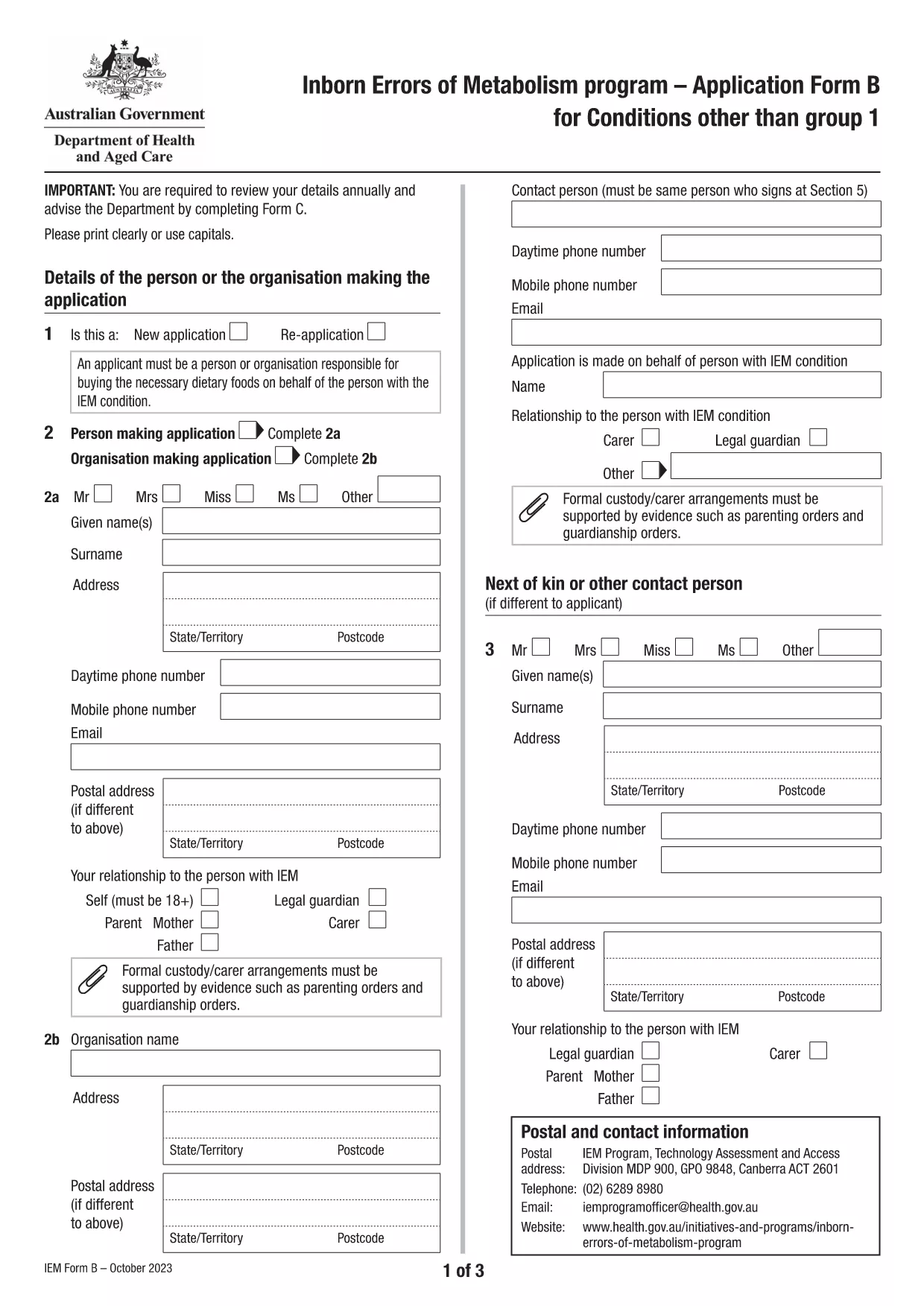
Application Form B is the Australian Government’s official form for individuals with Inborn Errors of Metabolism (excluding Group 1 conditions) who are applying for financial assistance. The form is now available as a fillable PDF that can be completed directly in your browser using the Formize PDF Filler app.

What is Application Form B?

This form collects detailed medical, demographic, and financial information required to assess eligibility for the Inborn Errors of Metabolism (IEM) program. It replaces the older paper‑only version, allowing faster processing and reduced errors.

Who Needs to Use This Form?

  • Patients diagnosed with any IEM condition listed under "Conditions other than Group 1" (e.g., Maple Syrup Urine Disease, Homocystinuria, etc.).
  • Parents or legal guardians applying on behalf of a minor.
  • Healthcare providers assisting a client with the application.

How to Complete the Form Online with Formize

Instead of downloading the PDF and opening a separate editor, simply click the "Fill out this form" button on this page. The Formize PDF Filler will load in a secure window, letting you type directly into each field.

Common Mistakes to Avoid

  • Leaving required fields blank – the filler highlights missing information before you can submit.
  • Using outdated medical terminology – refer to the latest diagnosis code provided by your specialist.
  • Submitting unsigned forms – the digital signature field must be completed before saving.

Download the Fillable PDF

If you prefer the traditional method, you can still download the original PDF from the Australian Department of Health. The file is fully searchable and printable.

Download Application Form B (PDF)

FAQ
  • What conditions are covered by Application Form B?

    Form B is for all Inborn Errors of Metabolism except Group 1 conditions (DHPR, hyperphenylalaninemia, and PKU). A full list is provided on the form itself.

  • Can I submit the form electronically?

    Yes. After completing the fillable PDF with Formize, you can save it and upload the file through the Department of Health’s online portal.

  • Do I need a doctor’s signature?

    A medical practitioner must sign the "Medical Officer’s Confirmation" section. This can be done digitally if the practitioner has a compatible e‑signature tool.

  • How often must I re‑apply?

    Eligibility is reviewed annually. You must submit a new Application Form B each year to continue receiving assistance.

  • Is there a fee to use Formize?

    No. Formize’s online filler is free for all public government PDFs, including Application Form B.

  • What should I do if I make a mistake after saving?

    Open the saved PDF again with Formize, correct the error, and re‑save. Avoid editing the file with non‑fillable PDF editors to prevent corruption.

COMMENT

Comment remplir Application Form B gratuitement, en ligne en 5 étapes simples :

  1. 1
    Open the online filler
    Click the "Fill out this form" button on the page. The Formize PDF Filler app will open in a new tab.
  2. 2
    Enter your information
    Type directly into each highlighted field. Use the navigation bar at the top to jump between sections.
  3. 3
    Add digital signatures
    When you reach the signature section, click the signature box and follow the prompts to create a secure digital signature.
  4. 4
    Review and save
    Use the built‑in validator to check for missing or incorrect data, then click "Save" to download a completed copy.
  5. 5
    Submit your application
    Print the saved PDF (if required) and mail it to the address listed on the form, or upload it via the Department of Health portal.
Formize l'application PDF Filler
À PROPOS

modèle Application Form B

Avec l'ensemble traditionnel de fonctionnalités pour afficher et remplir un document PDF, combiné aux avantages d'une application Web et d'une mise en page réactive, vous pouvez compléter Application Form B en quelques minutes.

CARACTÉRISTIQUES

Remplisseur de PDF

Le moyen le plus simple de remplir des formulaires PDF en ligne

  • Remplissez rapidement Application Form B
    Vous cherchez un moyen de remplir rapidement Application Form B en ligne ? Avec notre remplisseur de formulaire PDF gratuit en ligne, vous saurez comment éditer et remplir ce document pdf en moins d'une minute.
  • Éditeur PDF en ligne facile à utiliser
    Vous en avez assez d'imprimer des fichiers PDF pour pouvoir les modifier avant de les renumériser et de les renvoyer ? Modifiez des documents PDF gratuitement en ligne. Utilisez notre éditeur de pdf en ligne pour gagner du temps et du papier.
  • Excellents outils, toutes plateformes
    Vous vous demandez comment remplir Application Form B sur un Mac, ou peut-être comment utiliser un remplisseur PDF gratuit ? Nos outils PDF en ligne fonctionnent sur toutes les plateformes.
  • Stockage de fichiers sécurisé
    Les fichiers "Application Form B" terminés sont stockés dans une base de données sécurisée gérée par l'hébergement Amazon Cloud. Vous pouvez supprimer vos fichiers de notre système à tout moment. Dans tous les cas, ces fichiers sont automatiquement supprimés après 24 heures.
  • Discutez avec Application Form B
    Discutez avec "Application Form B" sur Chatize qui est un assistant de lecture PDF gratuit. Posez des questions et obtenez des réponses de "Application Form B". Cliquez simplement sur le bouton Discuter avec un document ci-dessus.

Supprimer la session de remplissage

Supprimer la session de remplissage sélectionnée ? Dans ce cas, votre progression dans le remplissage du formulaire sera perdue.

Supprimer la session d'édition

Supprimer la session de modification sélectionnée ? Dans ce cas, votre progression dans la création et la modification du formulaire sera perdue.