Choisir la langue

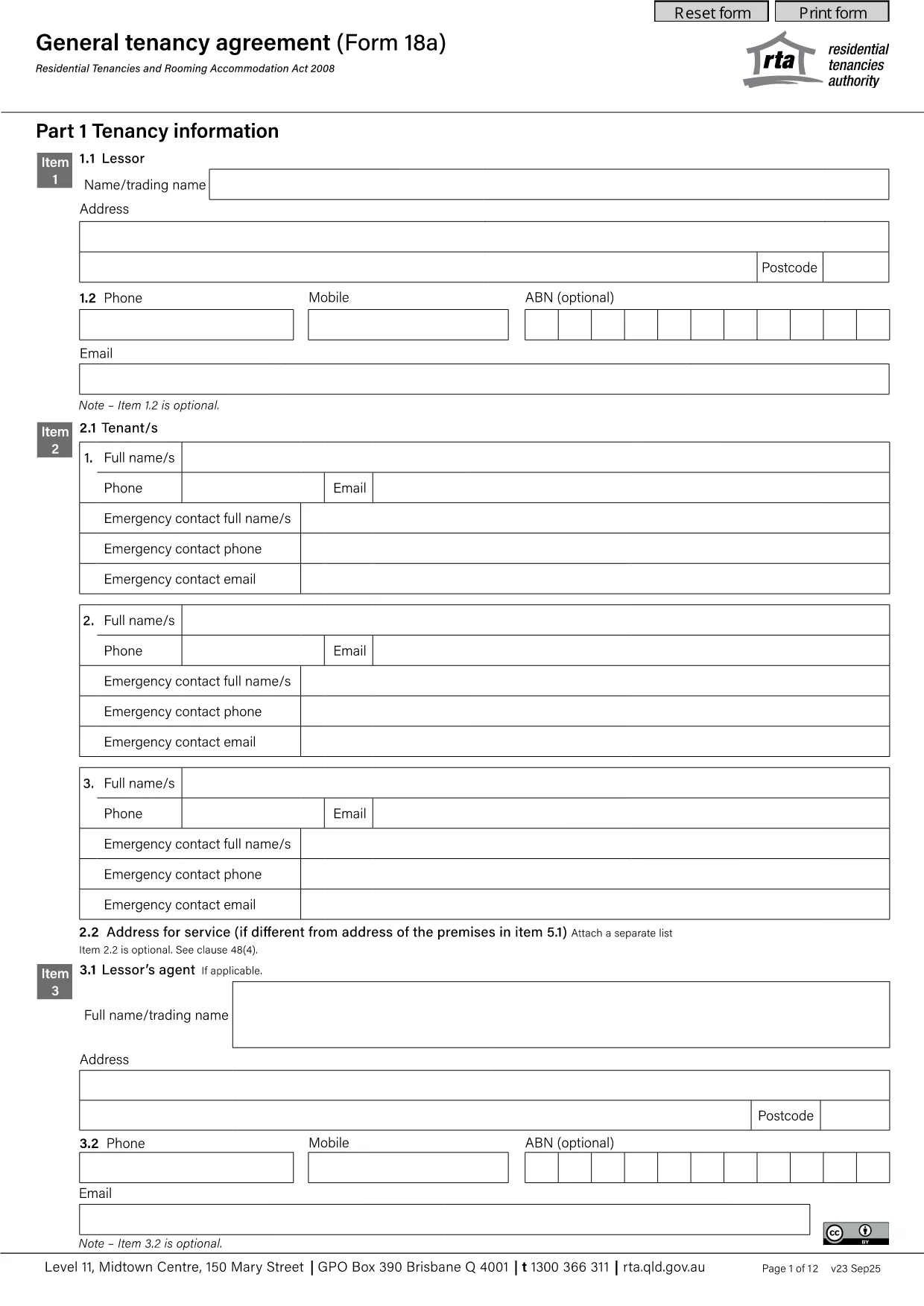
General Tenancy Agreement (Form 18a) – Fillable PDF

  1. Langue Anglais
  2. De campagne Australie
  3. département Housing
  4. Activité Tenancy Agreements
Remplissez ce formulaire
General Tenancy Agreement (Form 18a) – Fillable PDF

Looking for a reliable agreement format PDF for a residential lease in Queensland? The General Tenancy Agreement (Form 18a) is the standard contract used by landlords and tenants across the state. With Formize you can download the official PDF and complete it instantly—no extra software required.

Why Use This Tenancy Agreement?

This form complies with the Queensland Residential Tenancies and Rooming Accommodation Act, ensuring both parties have clear rights and obligations. It covers rent, bond, repair responsibilities, termination notices, and more, making it a comprehensive template for any rental situation.

How to Fill the PDF Online

Instead of printing, signing, and scanning, simply click the "Fill out this form" button on this page. The Formize PDF Filler app will load in seconds, letting you type directly into each field, add dates, and sign electronically.

Key Sections of the Agreement

  • Parties & Property Details – Names, address, and description of the premises.
  • Rent & Payment Terms – Amount, due date, and accepted payment methods.
  • Bond & Condition Report – Amount of bond and requirement to complete a condition report.
  • Maintenance & Repairs – Who is responsible for repairs and how they are reported.
  • Termination & Notice Periods – Rules for ending the tenancy early or at the end of the lease.

Common Mistakes to Avoid

Even a simple form can cause headaches if filled incorrectly. Keep these tips in mind:

  • Double‑check dates—an incorrect start date can affect rent calculations.
  • Enter the full legal names of all tenants; nicknames are not accepted.
  • Make sure the bond amount matches the amount you actually receive.
  • Read the “Special Conditions” section carefully; it overrides standard clauses.

Download & Save Your Completed Form

Once you’ve filled every field, click **Save** to download a completed PDF. Store it securely and provide a copy to the other party. The digital version is legally binding when signed electronically.

Start now—your Queensland tenancy agreement is just a click away.

FAQ
  • Is the General Tenancy Agreement (Form 18a) legally binding in Queensland?

    Yes. When completed and signed by both landlord and tenant, Form 18a complies with the Residential Tenancies and Rooming Accommodation Act and is enforceable in court.

  • Can I edit the PDF on a mobile device?

    Absolutely. The Formize PDF Filler works on smartphones and tablets, allowing you to fill, sign, and save the form from any device.

  • Do I need to print the form to make it official?

    No. An electronic signature is accepted under Queensland law, so the digital version is fully valid.

  • What should I do if I make a mistake while filling the form?

    Use the "Undo" button in the Formize editor or clear the specific field and re‑enter the correct information before saving.

  • How many copies of the agreement do I need?

    Both parties should retain at least one signed copy. You can also keep a digital backup in your cloud storage for extra security.

  • Is there a fee to download or fill the PDF?

    No. The PDF download and the online filler are completely free on Formize.

COMMENT

Comment remplir tenancy agreement pdf gratuitement, en ligne en 4 étapes simples :

  1. 1
    Open the Fillable Form
    Click the "Fill out this form" button on the page. The Formize PDF Filler will open in a new tab.
  2. 2
    Enter All Required Information
    Type directly into each highlighted field—names, dates, rent amount, and bond details.
  3. 3
    Review and Sign
    Use the built‑in e‑signature tool to sign the agreement. Verify that all fields are complete.
  4. 4
    Save or Download
    Click "Save" to download the completed PDF. Keep a copy for your records and share one with the other party.
Formize l'application PDF Filler
À PROPOS

modèle tenancy agreement pdf

Avec l'ensemble traditionnel de fonctionnalités pour afficher et remplir un document PDF, combiné aux avantages d'une application Web et d'une mise en page réactive, vous pouvez compléter tenancy agreement pdf en quelques minutes.

CARACTÉRISTIQUES

Remplisseur de PDF

Le moyen le plus simple de remplir des formulaires PDF en ligne

  • Remplissez rapidement tenancy agreement pdf
    Vous cherchez un moyen de remplir rapidement tenancy agreement pdf en ligne ? Avec notre remplisseur de formulaire PDF gratuit en ligne, vous saurez comment éditer et remplir ce document pdf en moins d'une minute.
  • Éditeur PDF en ligne facile à utiliser
    Vous en avez assez d'imprimer des fichiers PDF pour pouvoir les modifier avant de les renumériser et de les renvoyer ? Modifiez des documents PDF gratuitement en ligne. Utilisez notre éditeur de pdf en ligne pour gagner du temps et du papier.
  • Excellents outils, toutes plateformes
    Vous vous demandez comment remplir tenancy agreement pdf sur un Mac, ou peut-être comment utiliser un remplisseur PDF gratuit ? Nos outils PDF en ligne fonctionnent sur toutes les plateformes.
  • Stockage de fichiers sécurisé
    Les fichiers "tenancy agreement pdf" terminés sont stockés dans une base de données sécurisée gérée par l'hébergement Amazon Cloud. Vous pouvez supprimer vos fichiers de notre système à tout moment. Dans tous les cas, ces fichiers sont automatiquement supprimés après 24 heures.
  • Discutez avec tenancy agreement pdf
    Discutez avec "tenancy agreement pdf" sur Chatize qui est un assistant de lecture PDF gratuit. Posez des questions et obtenez des réponses de "tenancy agreement pdf". Cliquez simplement sur le bouton Discuter avec un document ci-dessus.

Supprimer la session de remplissage

Supprimer la session de remplissage sélectionnée ? Dans ce cas, votre progression dans le remplissage du formulaire sera perdue.

Supprimer la session d'édition

Supprimer la session de modification sélectionnée ? Dans ce cas, votre progression dans la création et la modification du formulaire sera perdue.