
Choisir la langue

Application Form No – Fillable PDF for NSW Transport

  1. Langue Anglais
  2. De campagne Australie
  3. département Transport for NSW
  4. Activité Immatriculation des véhicules
Remplissez ce formulaire
Application Form No – Fillable PDF for NSW Transport

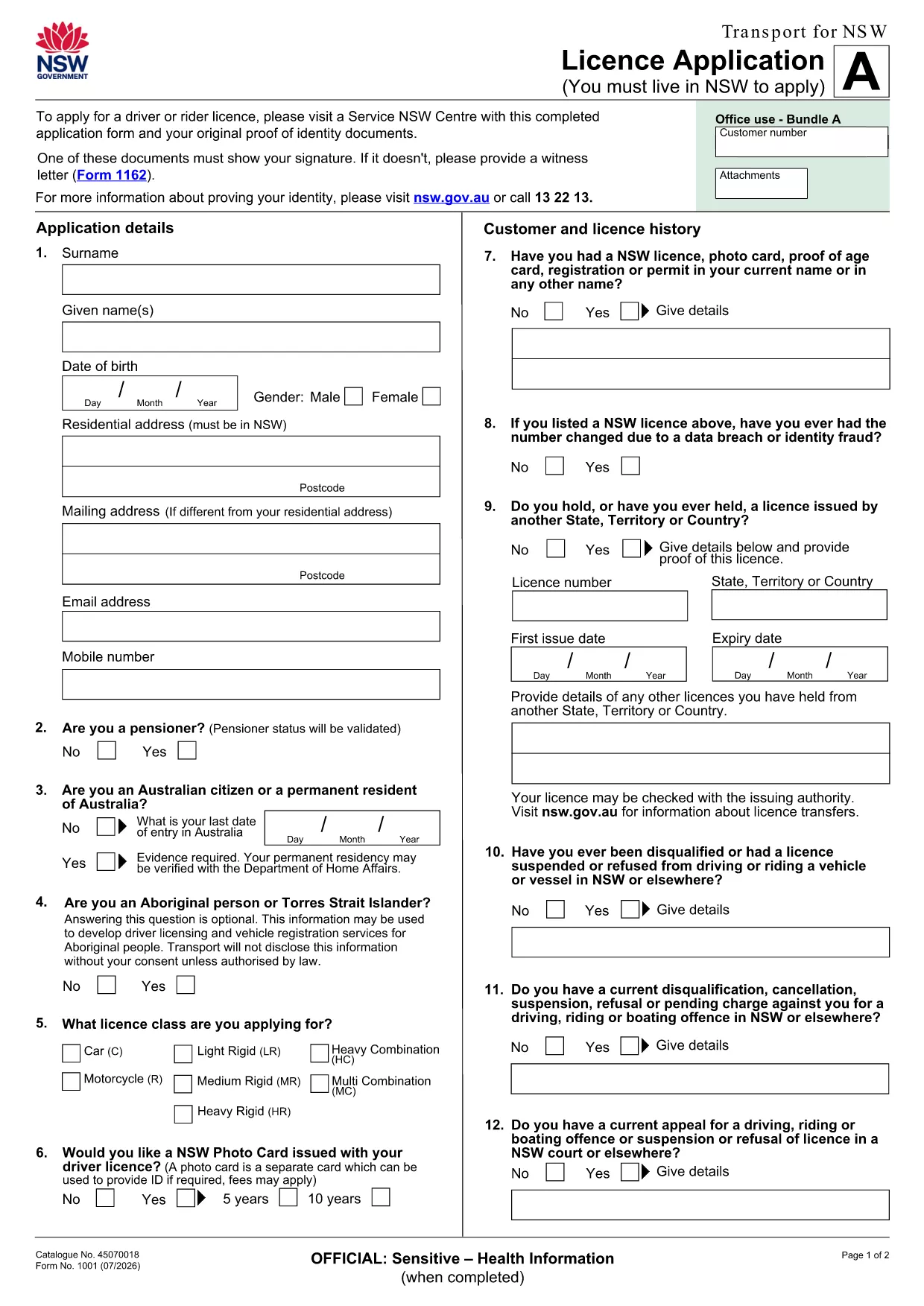
If you’re looking for the official Application Form No used by Transport for NSW, you’ve come to the right place. This page provides a direct link to the fillable PDF, step‑by‑step online instructions, and tips to ensure your submission is error‑free.

What is the Application Form No?

The Application Form No is the standard licence application used by the New South Wales transport authority. It collects personal details, licence preferences, and supporting documentation required for a new or renewed driver licence.

How to Fill the Form Online with Formize

Instead of downloading the PDF to a desktop editor, simply click the "Fill out this form" button on this page. The Formize PDF Filler app will load in your browser, letting you type directly into the fields, save progress, and export a completed PDF.

Key Sections and Required Information

  • Personal Details: Full name, address, date of birth, and contact numbers.
  • Licence Choice: Select the appropriate licence class and any endorsements.
  • Identity Verification: Upload a scanned ID or provide a reference number.
  • Signature: Use the digital signature tool in Formize to sign securely.

Common Mistakes to Avoid

  • Leaving required fields blank – the filler will highlight missing data before you submit.
  • Using non‑standard fonts or special characters in names – stick to plain text.
  • Uploading files that exceed the size limit (5 MB per file).
  • Forgetting to sign the form digitally; an unsigned form is rejected.

Download the Fillable PDF

The original, printable version of the form is available for download if you need a hard copy. Download the PDF

Ready to start? Click the button below, fill the form online, and submit it directly to Transport for NSW.

FAQ
  • Do I need Adobe Acrobat to fill this form?

    No. The Formize PDF Filler works in any modern browser, so you can complete the form without installing any software.

  • Can I print the filled form after completing it online?

    Yes. After you finish, click the "Download" button to save a PDF that you can print or email.

  • What if I make a mistake while filling the form?

    Use the "Undo" button or simply edit the field again. The filler saves changes in real time.

  • Is my personal data secure?

    Formize uses SSL encryption for all data transmitted between your browser and our servers. Your information is not stored longer than needed for the submission.

  • Do I still need to sign the form with a pen?

    A digital signature accepted by Transport for NSW is sufficient. Print‑and‑sign is only required if you choose to submit a hard copy.

  • Can I save the form and finish it later?

    Yes. Click "Save" to download a partially completed PDF, then reopen it later in Formize to continue.

  • What file formats are accepted for supporting documents?

    PDF, JPG, and PNG files up to 5 MB each are accepted.

COMMENT

Comment remplir application form no gratuitement, en ligne en 5 étapes simples :

  1. 1
    Open the Form
    Click the "Fill out this form" button on this page. The Formize PDF Filler will open in a new browser tab.
  2. 2
    Enter Your Information
    Type directly into each highlighted field. Use the tab key to move quickly between sections.
  3. 3
    Add Supporting Documents
    Upload scanned copies of your ID or proof of address using the upload icons inside the form.
  4. 4
    Sign Digitally
    Select the signature field and draw or type your signature using the built‑in tool.
  5. 5
    Save and Submit
    Click "Save" to download a copy for your records, then press "Submit" to send the completed form to Transport for NSW.
Formize l'application PDF Filler
À PROPOS

Formulaires d'immatriculation des véhicules

Si vous possédez ou louez un véhicule à moteur, une remorque ou un bateau, vous devez respecter certaines obligations pour garder votre véhicule légalement immatriculé et sécuritaire.

application form no est l'un des formulaires d'immatriculation des véhicules qui sont des documents utilisés pour immatriculer un véhicule à moteur auprès de l'autorité nationale ou provinciale compétente. Ces formulaires sont généralement requis lorsqu'une personne achète un véhicule neuf ou d'occasion ou lorsqu'elle déménage dans un nouvel état ou une nouvelle province avec un véhicule.

Les exigences exactes et les formulaires nécessaires à l'immatriculation du véhicule peuvent varier selon le lieu, mais généralement, le processus implique de fournir des informations sur le véhicule, le propriétaire et tout privilège sur le véhicule.

Une fois les formulaires d'enregistrement et les frais soumis, l'autorité de l'État ou de la province délivrera un certificat d'immatriculation ou une plaque d'immatriculation au propriétaire du véhicule. Cette immatriculation permet au véhicule d'être légalement exploité sur les voies publiques et les autoroutes.

CARACTÉRISTIQUES

Remplisseur de PDF

Le moyen le plus simple de remplir des formulaires PDF en ligne

  • Remplissez rapidement application form no
    Vous cherchez un moyen de remplir rapidement application form no en ligne ? Avec notre remplisseur de formulaire PDF gratuit en ligne, vous saurez comment éditer et remplir ce document pdf en moins d'une minute.
  • Éditeur PDF en ligne facile à utiliser
    Vous en avez assez d'imprimer des fichiers PDF pour pouvoir les modifier avant de les renumériser et de les renvoyer ? Modifiez des documents PDF gratuitement en ligne. Utilisez notre éditeur de pdf en ligne pour gagner du temps et du papier.
  • Excellents outils, toutes plateformes
    Vous vous demandez comment remplir application form no sur un Mac, ou peut-être comment utiliser un remplisseur PDF gratuit ? Nos outils PDF en ligne fonctionnent sur toutes les plateformes.
  • Stockage de fichiers sécurisé
    Les fichiers "application form no" terminés sont stockés dans une base de données sécurisée gérée par l'hébergement Amazon Cloud. Vous pouvez supprimer vos fichiers de notre système à tout moment. Dans tous les cas, ces fichiers sont automatiquement supprimés après 24 heures.
  • Discutez avec application form no
    Discutez avec "application form no" sur Chatize qui est un assistant de lecture PDF gratuit. Posez des questions et obtenez des réponses de "application form no". Cliquez simplement sur le bouton Discuter avec un document ci-dessus.

Supprimer la session de remplissage

Supprimer la session de remplissage sélectionnée ? Dans ce cas, votre progression dans le remplissage du formulaire sera perdue.

Supprimer la session d'édition

Supprimer la session de modification sélectionnée ? Dans ce cas, votre progression dans la création et la modification du formulaire sera perdue.