Choisir la langue

Application Form Image – Fillable PDF Online

  1. Langue Anglais
  2. De campagne Australie
  3. département Transport
  4. Activité Camera Image Request
Remplissez ce formulaire
Application Form Image – Fillable PDF Online

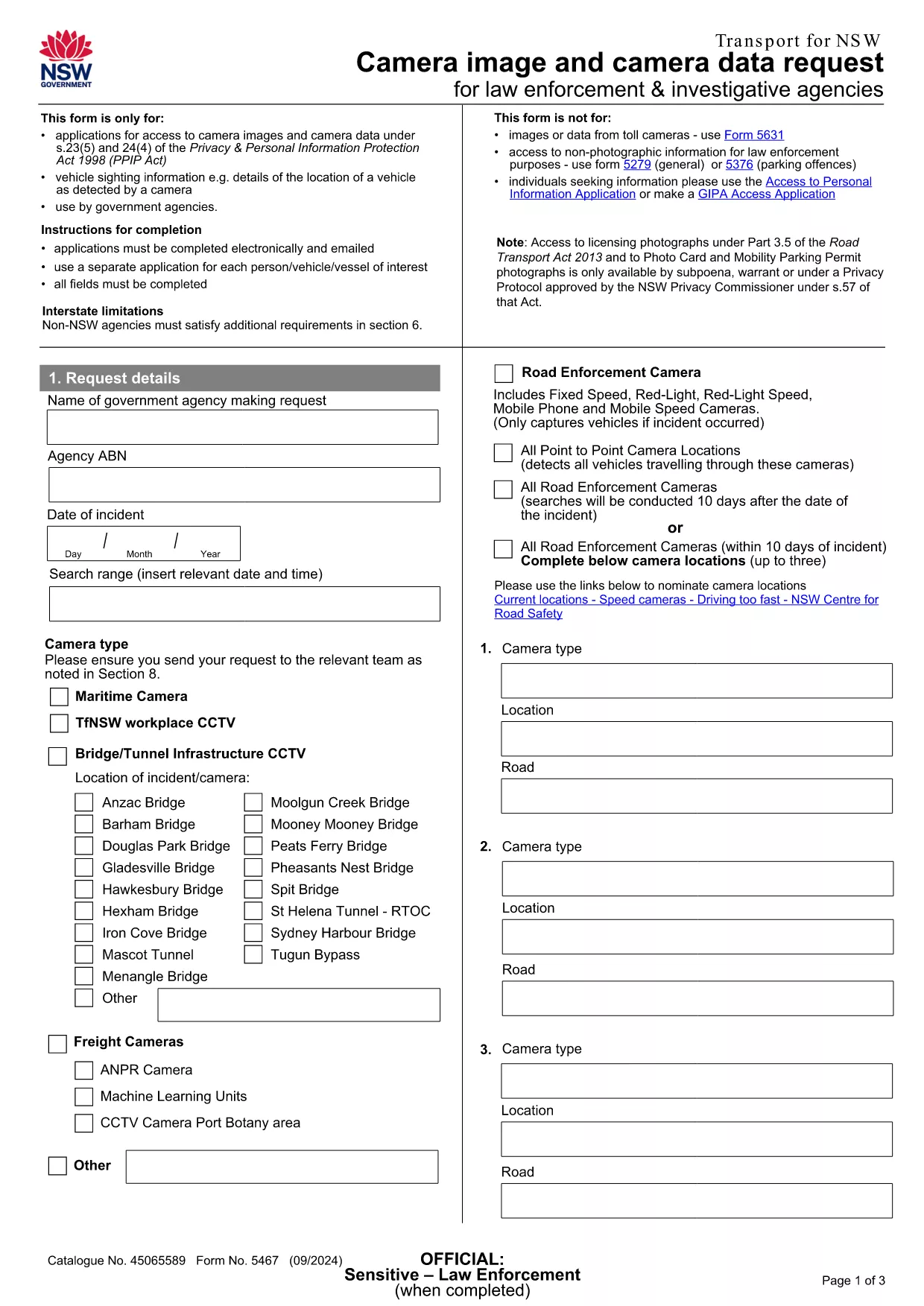
Looking for a quick way to submit an Application Form Image to Transport NSW? Our fillable PDF version lets you enter all required details directly in your browser, eliminating the hassle of printing, scanning, or emailing a static document.

This form is officially used for camera‑image requests, road‑transport enforcement sightings, and related inquiries. By using Formize’s online PDF filler, you benefit from real‑time validation, auto‑save, and a secure submission process.

Below you’ll find everything you need to know about the form, step‑by‑step instructions, and tips to avoid common errors.

Why Choose This Fillable PDF Form

  • Fully editable fields – no PDF editor required.
  • Instant validation helps you avoid missing or incorrect information.
  • All data is saved securely in the cloud until you submit.
  • Compatible with any device – desktop, tablet, or mobile.

How to Complete the Application Form Image

Simply click the “Fill out this form” button on this page. The Formize PDF Filler app will load, presenting you with a clean, user‑friendly interface. Fill in each field, attach any supporting images, and click **Submit** when you’re ready.

Common Mistakes to Avoid

  • Leaving mandatory fields blank – the filler will highlight them in red.
  • Uploading images in unsupported formats (only JPG, PNG, and PDF are accepted).
  • Entering incorrect dates – use the calendar picker to ensure the right format.
  • Submitting before reviewing – use the “Preview” button to double‑check your entries.

Where to Submit Your Completed Form

After you click **Submit**, your application is automatically routed to the Transport NSW Customer Resolution Team at compliance.operations@transport.nsw.gov.au. You’ll receive a confirmation email with a reference number for future follow‑up.

Need help? Review the FAQ section below or contact the NSW Transport support email directly.

FAQ
  • Do I need Adobe Acrobat to fill this form?

    No. The Formize PDF Filler works entirely in your browser, so no extra software is required.

  • Can I save my progress and return later?

    Yes. The filler automatically saves your entries. When you reopen the form, you’ll be prompted to continue where you left off.

  • What file types are accepted for image attachments?

    Only JPG, PNG, and PDF files are accepted. Each file must be under 5 MB.

  • Will my personal data be kept confidential?

    All data is encrypted in transit and stored securely on Formize’s servers until it is forwarded to Transport NSW.

  • How long does it take for Transport NSW to respond?

    Typically, you’ll receive a confirmation email within minutes and a formal response within 5‑7 business days.

  • What if I make a mistake after submitting?

    Contact the Customer Resolution Team at compliance.operations@transport.nsw.gov.au with your reference number to request a correction.

COMMENT

Comment remplir application form image gratuitement, en ligne en 3 étapes simples :

  1. 1
    Open the Fillable Form
    Click the bright “Fill out this form” button on the page. The Formize PDF Filler app will launch in a new tab.
  2. 2
    Enter Your Information
    Complete each field, attach any required images, and use the built‑in validation to correct errors as they appear.
  3. 3
    Submit Securely
    When all fields are filled, click the “Submit” button. Your data is encrypted and sent directly to Transport NSW’s processing team.
Formize l'application PDF Filler
À PROPOS

modèle application form image

Avec l'ensemble traditionnel de fonctionnalités pour afficher et remplir un document PDF, combiné aux avantages d'une application Web et d'une mise en page réactive, vous pouvez compléter application form image en quelques minutes.

CARACTÉRISTIQUES

Remplisseur de PDF

Le moyen le plus simple de remplir des formulaires PDF en ligne

  • Remplissez rapidement application form image
    Vous cherchez un moyen de remplir rapidement application form image en ligne ? Avec notre remplisseur de formulaire PDF gratuit en ligne, vous saurez comment éditer et remplir ce document pdf en moins d'une minute.
  • Éditeur PDF en ligne facile à utiliser
    Vous en avez assez d'imprimer des fichiers PDF pour pouvoir les modifier avant de les renumériser et de les renvoyer ? Modifiez des documents PDF gratuitement en ligne. Utilisez notre éditeur de pdf en ligne pour gagner du temps et du papier.
  • Excellents outils, toutes plateformes
    Vous vous demandez comment remplir application form image sur un Mac, ou peut-être comment utiliser un remplisseur PDF gratuit ? Nos outils PDF en ligne fonctionnent sur toutes les plateformes.
  • Stockage de fichiers sécurisé
    Les fichiers "application form image" terminés sont stockés dans une base de données sécurisée gérée par l'hébergement Amazon Cloud. Vous pouvez supprimer vos fichiers de notre système à tout moment. Dans tous les cas, ces fichiers sont automatiquement supprimés après 24 heures.
  • Discutez avec application form image
    Discutez avec "application form image" sur Chatize qui est un assistant de lecture PDF gratuit. Posez des questions et obtenez des réponses de "application form image". Cliquez simplement sur le bouton Discuter avec un document ci-dessus.

Supprimer la session de remplissage

Supprimer la session de remplissage sélectionnée ? Dans ce cas, votre progression dans le remplissage du formulaire sera perdue.

Supprimer la session d'édition

Supprimer la session de modification sélectionnée ? Dans ce cas, votre progression dans la création et la modification du formulaire sera perdue.