Choisir la langue

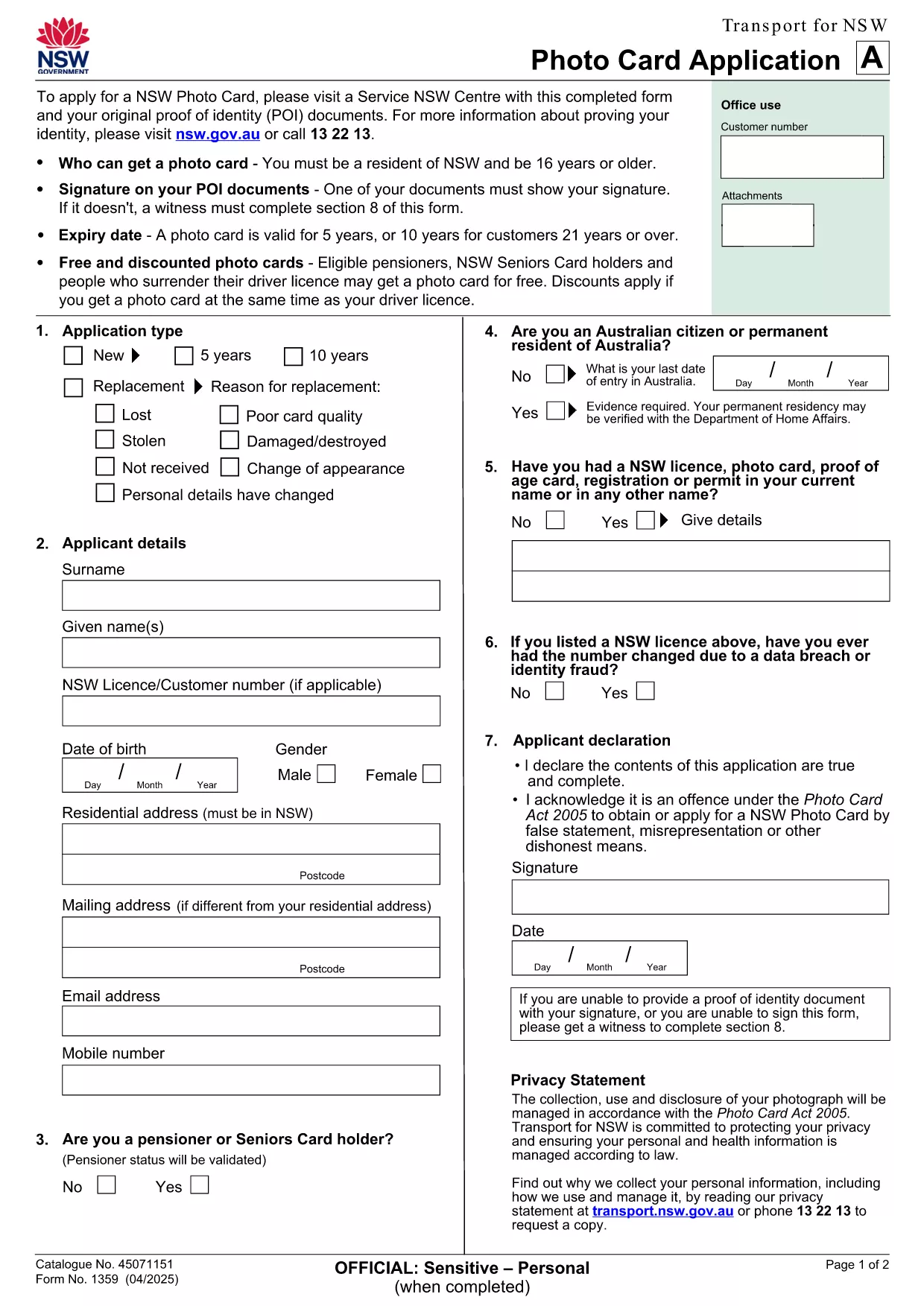
NSW Photo Card Application Form – Fillable PDF with Photo

  1. De campagne Australie
  2. Langue Anglais
  3. Activité Identification
  4. département Transport
Remplissez ce formulaire
NSW Photo Card Application Form – Fillable PDF with Photo

Looking for a fast, secure way to apply for a NSW Photo Card? This page gives you direct access to the official NSW Photo Card application form that includes a dedicated photo field. Whether you prefer to download the PDF or fill it out instantly online, Formize makes the process simple.

Why You Need a NSW Photo Card

A NSW Photo Card is an accepted form of identification for residents aged 16 and over who don’t have a driver licence. It displays your name, address, date of birth and a recent photo, and is valid for up to 10 years for eligible customers.

Key Features of the Fillable PDF Form

  • Built‑in photo placeholder – attach a passport‑style picture directly in the form.
  • Editable text fields for personal details, address, and signature.
  • Auto‑calculation of fees based on eligibility and concessions.
  • Compliant with Transport for NSW security standards.

How to Complete the Form Online with Formize

Instead of downloading the PDF and using a separate editor, simply click the "Fill out this form" button on this page. The Formize PDF Filler app loads in seconds, letting you type, upload a photo, and sign electronically.

Common Mistakes to Avoid

  • Uploading a photo that doesn’t meet the NSW guidelines (e.g., glasses glare, incorrect background).
  • Leaving any mandatory field blank – the filler will highlight missing information.
  • Submitting an outdated address proof; always use a current utility bill or bank statement.

Where to Submit Your Application

After completing the form, print it (if required) and visit any Service NSW Centre. Bring your original identity documents, the signed form, and the photo you uploaded. Cash, card, or EFTPOS payments are accepted.

Need extra help? Review the official Service NSW guide for detailed photo requirements and eligibility criteria.

FAQ
  • Do I need a driver licence to apply for a NSW Photo Card?

    No. The Photo Card is intended for residents who do not have a driver licence or whose licence has expired.

  • What photo specifications are required?

    The photo must be a clear, front‑facing headshot with a plain background, no glasses glare, and a size of 35mm × 45mm.

  • Can I submit the form entirely online?

    You can fill the form online with Formize, but the final submission must be in person at a Service NSW Centre to have your photo taken and verify identity documents.

  • How long is the Photo Card valid?

    The card is valid for 5 years for most applicants, or 10 years for eligible customers aged 21 and over.

  • Are there any fees or concessions?

    Fees vary based on whether you hold a driver licence and your eligibility for concessions (e.g., seniors, pensioners, carers).

  • What should I do if I cannot attend a Service NSW Centre?

    Eligible applicants with medical reasons can use a photo kit and mail the completed form, as outlined on the Service NSW website.

COMMENT

Comment remplir application form with photo gratuitement, en ligne en 5 étapes simples :

  1. 1
    Open the Fillable Form
    Click the "Fill out this form" button on the page. The Formize PDF Filler loads in a new window.
  2. 2
    Enter Your Details
    Type your name, address, date of birth, and any other required information into the highlighted fields.
  3. 3
    Upload Your Photo
    Use the photo placeholder to upload a recent passport‑style picture that meets NSW guidelines.
  4. 4
    Add Your Signature
    Draw or upload a digital signature in the signature field.
  5. 5
    Review & Submit
    Check all fields for completeness, then click "Save & Download" to get a printable copy. Bring the printed form to a Service NSW Centre.
Formize l'application PDF Filler
À PROPOS

modèle application form with photo

Avec l'ensemble traditionnel de fonctionnalités pour afficher et remplir un document PDF, combiné aux avantages d'une application Web et d'une mise en page réactive, vous pouvez compléter application form with photo en quelques minutes.

CARACTÉRISTIQUES

Remplisseur de PDF

Le moyen le plus simple de remplir des formulaires PDF en ligne

  • Remplissez rapidement application form with photo
    Vous cherchez un moyen de remplir rapidement application form with photo en ligne ? Avec notre remplisseur de formulaire PDF gratuit en ligne, vous saurez comment éditer et remplir ce document pdf en moins d'une minute.
  • Éditeur PDF en ligne facile à utiliser
    Vous en avez assez d'imprimer des fichiers PDF pour pouvoir les modifier avant de les renumériser et de les renvoyer ? Modifiez des documents PDF gratuitement en ligne. Utilisez notre éditeur de pdf en ligne pour gagner du temps et du papier.
  • Excellents outils, toutes plateformes
    Vous vous demandez comment remplir application form with photo sur un Mac, ou peut-être comment utiliser un remplisseur PDF gratuit ? Nos outils PDF en ligne fonctionnent sur toutes les plateformes.
  • Stockage de fichiers sécurisé
    Les fichiers "application form with photo" terminés sont stockés dans une base de données sécurisée gérée par l'hébergement Amazon Cloud. Vous pouvez supprimer vos fichiers de notre système à tout moment. Dans tous les cas, ces fichiers sont automatiquement supprimés après 24 heures.
  • Discutez avec application form with photo
    Discutez avec "application form with photo" sur Chatize qui est un assistant de lecture PDF gratuit. Posez des questions et obtenez des réponses de "application form with photo". Cliquez simplement sur le bouton Discuter avec un document ci-dessus.

Supprimer la session de remplissage

Supprimer la session de remplissage sélectionnée ? Dans ce cas, votre progression dans le remplissage du formulaire sera perdue.

Supprimer la session d'édition

Supprimer la session de modification sélectionnée ? Dans ce cas, votre progression dans la création et la modification du formulaire sera perdue.