Choisir la langue

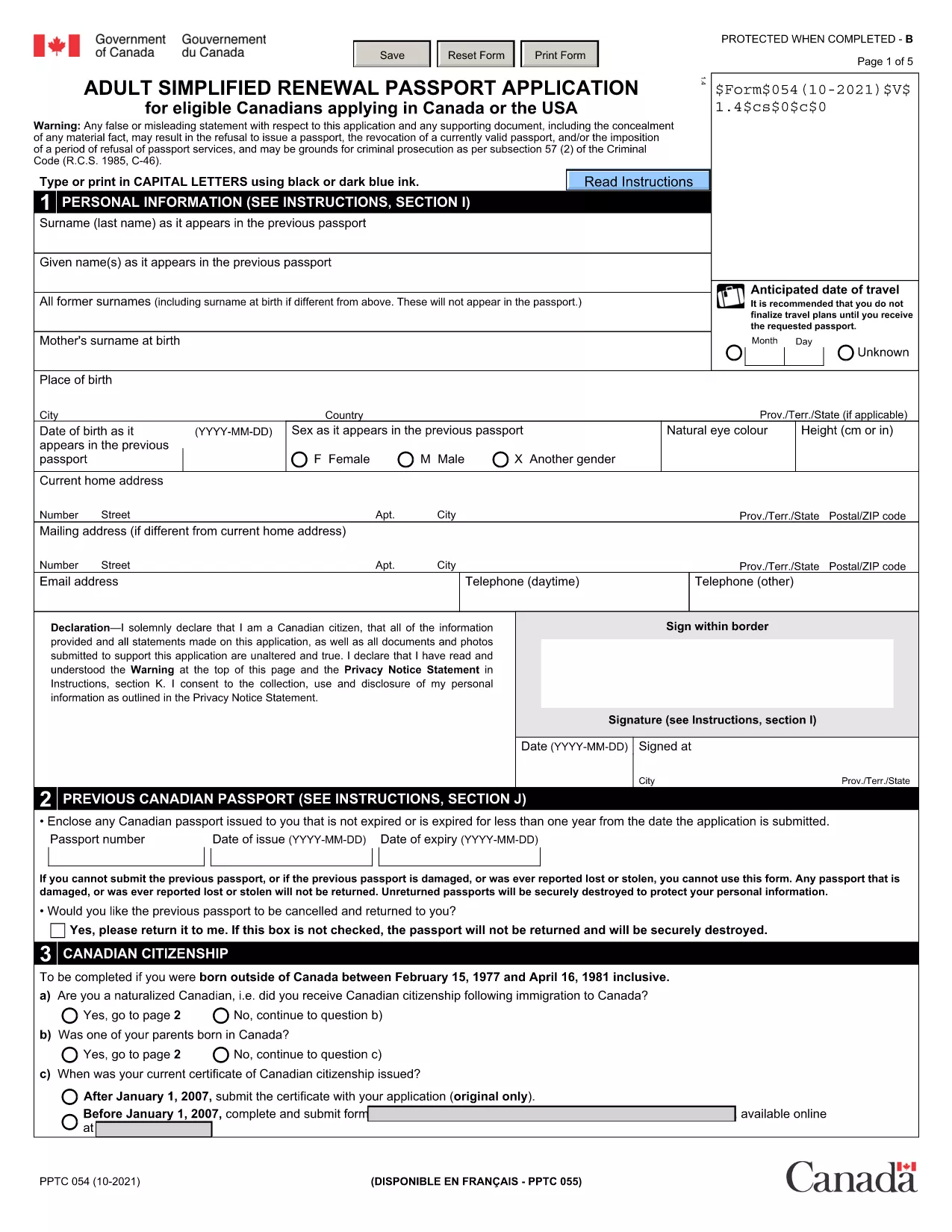
Fillable Canadian Passport Renewal Form (PPTC‑054)

  1. Langue Anglais
  2. De campagne Canada
  3. département Immigration, Refugees and Citizenship Canada
  4. Activité Passport Renewal
Fillable Canadian Passport Renewal Form (PPTC‑054)

Need to renew your Canadian passport quickly? The Adult Simplified Renewal Passport Application (form PPTC‑054) is the official, government‑approved document for eligible Canadians. With Formize you can open the fillable PDF directly in your browser, complete it, and download a signed copy—no extra software required.

What Is the PPTC‑054 Renewal Form?

PPTC‑054 is the streamlined renewal form used by Canadian citizens whose passports have expired or are about to expire. It collects personal details, travel history, and a guarantor’s signature, then forwards the information to Immigration, Refugees and Citizenship Canada (IRCC) for processing.

Who Can Use This Simplified Application?

  • Canadian adults (18 years or older) with a previously issued passport.
  • Applicants whose most recent passport is still valid or has expired within the last 12 months.
  • Those who meet the eligibility criteria listed on the form (no name change, no lost passport, etc.).

How to Complete the Form Online with Formize

Follow these three easy steps and you’ll have a completed, printable PDF in minutes:

  1. Click the "Fill out this form" button on this page.
  2. Wait a few seconds while the Formize PDF Filler app loads the fillable version of PPTC‑054.
  3. Enter your information, add a digital signature, and click Download to save the finished form.

Common Mistakes to Avoid

  • Leaving required fields blank – the form will not submit if any mandatory section is empty.
  • Using an invalid guarantor – the guarantor must meet the IRCC criteria (Canadian citizen, 18 + years old, known for at least 2 years).
  • Incorrect passport number format – double‑check the series of letters and numbers on your current passport.

Where to Submit Your Completed Application

After downloading the filled PDF, include it with your passport photos, payment receipt, and any supporting documents, then mail or deliver the package to the nearest Passport Canada Office or a participating Service Canada centre. For detailed mailing addresses, visit the IRCC website.

Ready to start? Click the button below and let Formize handle the heavy lifting.

FAQ
  • Do I need to print the form before filling it out?

    No. With Formize you fill the PDF directly in your browser and download the completed version.

  • Can I use this form if my passport was lost or stolen?

    No. PPTC‑054 is only for standard renewals. Lost or stolen passports require a different application (PPTC 040).

  • How long does the renewal process take after I submit?

    Processing typically takes 10‑20 business days for standard service; express service may be faster for an additional fee.

  • What payment methods are accepted for the passport fee?

    Accepted methods include credit/debit cards, money orders, and certified checks. Check the IRCC website for the most current list.

  • Is the digital signature legally valid?

    Yes. Formize creates a compliant electronic signature that meets Canadian e‑signing standards for passport applications.

  • Can I save my progress and finish later?

    The Formize app allows you to download a partially completed PDF, which you can reopen later to finish.

  • Do I need a guarantor for this renewal?

    A guarantor is required unless you qualify for the “no‑guarantor” option listed on the form (e.g., certain diplomatic applicants).

  • Where can I find passport photos that meet IRCC standards?

    Use a professional photo studio that follows IRCC guidelines, or follow the online photo specifications on the IRCC website.

COMMENT

Comment remplir Canadian passport renewal form gratuitement, en ligne en 3 étapes simples :

  1. 1
    Click the Fill‑out Button
    Press the “Fill out this form” button on the page to launch the Formize PDF Filler.
  2. 2
    Wait for the Filler to Load
    The fillable version of PPTC‑054 loads in a few seconds—no download required.
  3. 3
    Enter Your Details and Sign
    Complete each field, add your digital signature, then click Download to save the finished PDF.
Formize l'application PDF Filler
À PROPOS

modèle Canadian passport renewal form

Avec l'ensemble traditionnel de fonctionnalités pour afficher et remplir un document PDF, combiné aux avantages d'une application Web et d'une mise en page réactive, vous pouvez compléter Canadian passport renewal form en quelques minutes.

CARACTÉRISTIQUES

Remplisseur de PDF

Le moyen le plus simple de remplir des formulaires PDF en ligne

  • Remplissez rapidement Canadian passport renewal form
    Vous cherchez un moyen de remplir rapidement Canadian passport renewal form en ligne ? Avec notre remplisseur de formulaire PDF gratuit en ligne, vous saurez comment éditer et remplir ce document pdf en moins d'une minute.
  • Éditeur PDF en ligne facile à utiliser
    Vous en avez assez d'imprimer des fichiers PDF pour pouvoir les modifier avant de les renumériser et de les renvoyer ? Modifiez des documents PDF gratuitement en ligne. Utilisez notre éditeur de pdf en ligne pour gagner du temps et du papier.
  • Excellents outils, toutes plateformes
    Vous vous demandez comment remplir Canadian passport renewal form sur un Mac, ou peut-être comment utiliser un remplisseur PDF gratuit ? Nos outils PDF en ligne fonctionnent sur toutes les plateformes.
  • Stockage de fichiers sécurisé
    Les fichiers "Canadian passport renewal form" terminés sont stockés dans une base de données sécurisée gérée par l'hébergement Amazon Cloud. Vous pouvez supprimer vos fichiers de notre système à tout moment. Dans tous les cas, ces fichiers sont automatiquement supprimés après 24 heures.
  • Discutez avec Canadian passport renewal form
    Discutez avec "Canadian passport renewal form" sur Chatize qui est un assistant de lecture PDF gratuit. Posez des questions et obtenez des réponses de "Canadian passport renewal form". Cliquez simplement sur le bouton Discuter avec un document ci-dessus.

Supprimer la session de remplissage

Supprimer la session de remplissage sélectionnée ? Dans ce cas, votre progression dans le remplissage du formulaire sera perdue.

Supprimer la session d'édition

Supprimer la session de modification sélectionnée ? Dans ce cas, votre progression dans la création et la modification du formulaire sera perdue.