
Choisir la langue

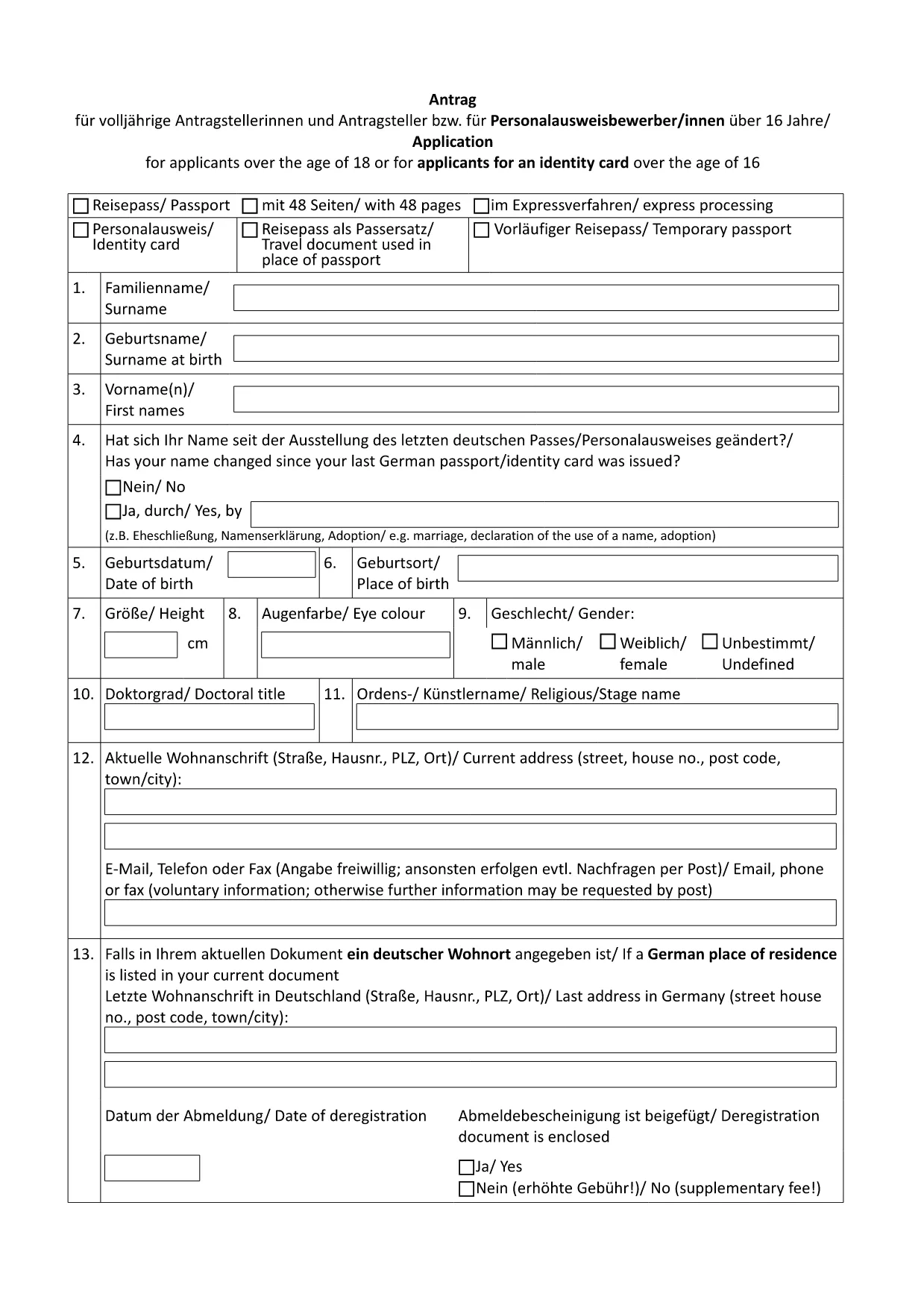
German Passport Application Form (Fillable PDF)

  1. De campagne Allemagne
  2. Langue Anglais
  3. département Federal Foreign Office
  4. Activité Passports
Remplissez ce formulaire
German Passport Application Form (Fillable PDF)

Applying for a German passport can feel overwhelming, especially when you need to gather the right paperwork and fill out a lengthy application. With Formize’s fillable PDF solution, you can complete the official German passport application form directly in your browser, avoid transcription errors, and save a printable copy for your embassy appointment.

Why Use a Fillable PDF for Your German Passport?

  • Accuracy: Fields are validated in real time, reducing the risk of missing or incorrect information.
  • Speed: No more printing, writing, and re‑typing. Fill, save, and download instantly.
  • Secure storage: Your data stays within the Formize app until you choose to export it.
  • Eco‑friendly: Reduce paper waste by printing only the final, completed form.

How to Complete the German Passport Application Online

Follow these simple steps (see the How‑To section below for a detailed guide):

  1. Click the "Fill out this form" button on this page.
  2. Wait for the Formize PDF Filler to load.
  3. Enter your personal data, passport details, and supporting information.
  4. Review the form for completeness and correctness.
  5. Save the PDF and print a hard copy for your appointment.

Required Documents and Common Mistakes

Before you start, gather the following original documents:

  • Completed application form (the PDF you will fill out).
  • Two recent biometric passport photos.
  • Birth certificate or proof of German citizenship.
  • Current passport or ID card.
  • Proof of residence (e.g., utility bill, driver’s license).
  • Marriage or divorce certificates if applicable.

Common pitfalls to avoid:

  • Leaving any mandatory field blank.
  • Using photos that are not biometric or are cropped incorrectly.
  • Submitting outdated or non‑original documents.
  • Forgetting a name declaration when your current surname differs from the one in your previous passport.

Download & Print the Official Form

The PDF linked below is the exact form used by German embassies and consulates worldwide. Click the button, fill it online, then print a single copy for your scheduled appointment.

Download German Passport Application Form (PDF)

FAQ – German Passport Application

Find quick answers to the most common questions below. If you need further assistance, contact your local German mission.

FAQ
  • Do I need to print the form after filling it online?

    Yes. German embassies require a printed, signed copy of the completed application together with original supporting documents.

  • Can I submit the application by mail?

    No. Since November 2007, all German passport applications must be submitted in person at an embassy, consulate, or honorary consul.

  • What biometric photo specifications are required?

    Two identical, recent biometric photos (35 mm × 45 mm), with a plain background and no glasses. The Formize filler does not embed photos; attach them separately.

  • How long does processing take?

    Typical processing time is six to eight weeks. If a name declaration is needed, it may take longer.

  • Is the form available in English?

    The official form is in German. However, you can fill it out using Formize and refer to the English guidance on this page.

  • What if I make a mistake after saving the PDF?

    Open the saved PDF again in the Formize filler, correct the error, and re‑save. Do not hand‑write changes on the printed form.

  • Do I need to bring my old passport?

    Yes. Bring the data page of your current or most recent passport, even if it is expired.

  • Are there fees for the application?

    Passport fees vary by age and type. Check the fee schedule on the website of the German mission where you will apply.

COMMENT

Comment remplir German passport application gratuitement, en ligne en 5 étapes simples :

  1. 1
    Click the Fill‑out Button
    On this page, click the "Fill out this form" button to launch the Formize PDF Filler.
  2. 2
    Wait for the Formizer to Load
    The online filler will open in a new tab. Allow a few seconds for all fields to become interactive.
  3. 3
    Enter Your Information
    Complete each section – personal data, passport details, and supporting information – using the keyboard or drop‑down menus.
  4. 4
    Validate and Save
    Use the built‑in validation to check for missing fields, then click "Save" to download the completed PDF to your device.
  5. 5
    Print for Your Appointment
    Print a single copy of the filled form and bring it, along with the required documents, to your embassy or consulate appointment.
Formize l'application PDF Filler
À PROPOS

modèle German passport application

Avec l'ensemble traditionnel de fonctionnalités pour afficher et remplir un document PDF, combiné aux avantages d'une application Web et d'une mise en page réactive, vous pouvez compléter German passport application en quelques minutes.

CARACTÉRISTIQUES

Remplisseur de PDF

Le moyen le plus simple de remplir des formulaires PDF en ligne

  • Remplissez rapidement German passport application
    Vous cherchez un moyen de remplir rapidement German passport application en ligne ? Avec notre remplisseur de formulaire PDF gratuit en ligne, vous saurez comment éditer et remplir ce document pdf en moins d'une minute.
  • Éditeur PDF en ligne facile à utiliser
    Vous en avez assez d'imprimer des fichiers PDF pour pouvoir les modifier avant de les renumériser et de les renvoyer ? Modifiez des documents PDF gratuitement en ligne. Utilisez notre éditeur de pdf en ligne pour gagner du temps et du papier.
  • Excellents outils, toutes plateformes
    Vous vous demandez comment remplir German passport application sur un Mac, ou peut-être comment utiliser un remplisseur PDF gratuit ? Nos outils PDF en ligne fonctionnent sur toutes les plateformes.
  • Stockage de fichiers sécurisé
    Les fichiers "German passport application" terminés sont stockés dans une base de données sécurisée gérée par l'hébergement Amazon Cloud. Vous pouvez supprimer vos fichiers de notre système à tout moment. Dans tous les cas, ces fichiers sont automatiquement supprimés après 24 heures.
  • Discutez avec German passport application
    Discutez avec "German passport application" sur Chatize qui est un assistant de lecture PDF gratuit. Posez des questions et obtenez des réponses de "German passport application". Cliquez simplement sur le bouton Discuter avec un document ci-dessus.

Supprimer la session de remplissage

Supprimer la session de remplissage sélectionnée ? Dans ce cas, votre progression dans le remplissage du formulaire sera perdue.

Supprimer la session d'édition

Supprimer la session de modification sélectionnée ? Dans ce cas, votre progression dans la création et la modification du formulaire sera perdue.