
Choisir la langue

Punjab Surrender of COVs – Fillable Driver’s License Form (DL‑100)

  1. Langue Anglais hindi
  2. De campagne Inde
  3. État Pendjab
  4. département Ministère des Transports
Remplissez ce formulaire
Punjab Surrender of COVs – Fillable Driver’s License Form (DL‑100)

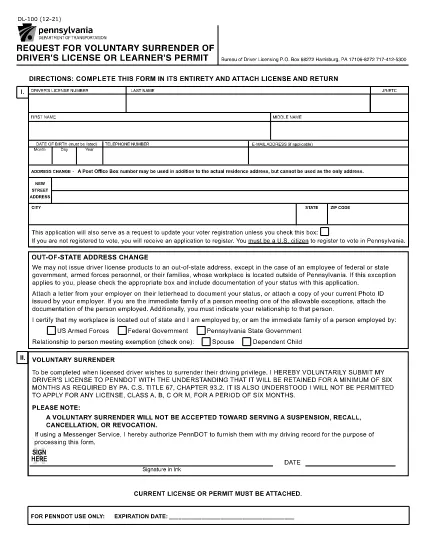
If you need to voluntarily surrender your driver’s license or learner’s permit in Punjab, the DL‑100 – Request for Voluntary Surrender of Driver's License or Learner's Permit is the official form you’ll use. This fillable PDF is now available directly on Formize, so you can complete it without downloading any software.

What Is the Punjab COVs Surrender Form?

The DL‑100 form is issued by the Department of Transportation and is required when you want to give up your license for any reason – such as moving out of state, changing your name, or surrendering a Commercial Vehicle Operator’s (COV) credential. The form captures essential details like personal information, license number, and the reason for surrender.

How to Fill Out the Form Online with Formize

Using Formize’s PDF Filler makes the process quick and secure. Follow the steps below:

  • Click the "Fill out this form" button on the page.
  • Wait a few seconds while the Formize PDF Filler app loads.
  • Enter your information directly into the highlighted fields.
  • Review each entry for accuracy.
  • When finished, click Submit to download a completed PDF or print it for mailing.

Common Mistakes to Avoid

  • Using the wrong ink color: When printing, use black or blue ink only.
  • Leaving required fields blank: The form will not accept an incomplete submission.
  • Signing the wrong section: Sign where the form specifically asks for your signature.
  • Forgetting to attach supporting documents: Include a copy of your current license if the agency requests it.

Where to Submit the Completed Form

After you have filled and signed the form, mail it to the address listed on the PDF (usually the Bureau of Driver Licensing or the state Department of Transportation). Some jurisdictions also accept a scanned copy via email – check your local office for details.

Frequently Asked Questions

Below are the most common questions people ask about the Punjab surrender of COVs form.

FAQ
  • Can I submit the DL‑100 form electronically?

    Most states still require a hard‑copy signature, so you should print the completed PDF and mail it. Some jurisdictions accept a scanned copy via email – verify with your local office.

  • Do I need to attach my current driver’s license?

    If the agency requests proof of the surrendered license, attach a photocopy of the front and back of the license with your submission.

  • Is there a fee to surrender my license?

    Voluntary surrender is typically free, but if you are canceling a commercial endorsement (COV), a processing fee may apply.

  • How long does it take for the surrender to be processed?

    Processing times vary by state, but most departments complete the surrender within 7‑10 business days after receiving the form.

  • Can I use a mobile device to fill out the form?

    Yes. The Formize PDF Filler works on smartphones and tablets, allowing you to complete the form on any device with an internet connection.

  • What should I do if I make a mistake after submitting?

    Contact the Department of Transportation’s licensing bureau immediately. They may require you to submit a corrected form or provide a written amendment.

  • Is the DL‑100 form the same for all U.S. states?

    The DL‑100 is specific to Pennsylvania, but many states use a similar voluntary surrender form. Check your local DMV for the exact version required in your state.

COMMENT

Comment remplir driver's license surrender form gratuitement, en ligne en 5 étapes simples :

  1. 1
    Open the Fillable Form
    Click the "Fill out this form" button on the page to launch the Formize PDF Filler.
  2. 2
    Load the PDF Filler
    Wait a few seconds while the Formize app loads the DL‑100 PDF in your browser.
  3. 3
    Enter Your Information
    Type your details into each highlighted field – name, address, license number, and reason for surrender.
  4. 4
    Review and Sign
    Double‑check all entries, then use the built‑in signature tool to sign the form.
  5. 5
    Download or Print
    Click "Submit" to download the completed PDF or print it directly for mailing to the Department of Transportation.
Formize l'application PDF Filler
À PROPOS

Formulaires de candidature du ministère des Affaires extérieures

driver's license surrender form est l'un des formulaires de candidature du ministère des Affaires extérieures. Le ministère indien des Affaires étrangères propose différents formulaires de candidature pour différents services liés aux affaires extérieures et aux relations internationales. Certains formulaires de candidature courants incluent :

Demande de passeport : ce formulaire est utilisé pour demander un passeport indien. Il collecte des informations personnelles telles que le nom, l'adresse, la date de naissance et la nationalité.

Demande de citoyenneté indienne à l'étranger (OCI) : ce formulaire est utilisé pour demander le statut OCI, qui permet aux personnes d'origine indienne de vivre et de travailler indéfiniment en Inde. Il collecte des données personnelles, notamment des preuves d'origine indienne.

Demande de visa : ce formulaire est utilisé pour demander un visa pour voyager dans un pays étranger. Il collecte des données personnelles, des informations de voyage et le but du voyage.

Demande d'autorisation d'émigration : ce formulaire est utilisé par les personnes qui recherchent une autorisation d'émigration pour un emploi dans certains pays. Il collecte des informations personnelles et des détails sur l'emploi.

Demande d'attestation : ce formulaire est utilisé pour demander l'attestation de divers documents, tels que les certificats d'études, les certificats de mariage et les documents commerciaux. Il recueille les détails du document à attester et l'objet de l'attestation.

Demande de services consulaires : ce formulaire est utilisé pour divers services consulaires, notamment la délivrance de certificats d'urgence, l'assistance aux ressortissants indiens à l'étranger et l'enregistrement des ressortissants indiens. Les précisions requises dépendent de la nature du service demandé.

CARACTÉRISTIQUES

Remplisseur de PDF

Le moyen le plus simple de remplir des formulaires PDF en ligne

  • Remplissez rapidement driver's license surrender form
    Vous cherchez un moyen de remplir rapidement driver's license surrender form en ligne ? Avec notre remplisseur de formulaire PDF gratuit en ligne, vous saurez comment éditer et remplir ce document pdf en moins d'une minute.
  • Éditeur PDF en ligne facile à utiliser
    Vous en avez assez d'imprimer des fichiers PDF pour pouvoir les modifier avant de les renumériser et de les renvoyer ? Modifiez des documents PDF gratuitement en ligne. Utilisez notre éditeur de pdf en ligne pour gagner du temps et du papier.
  • Excellents outils, toutes plateformes
    Vous vous demandez comment remplir driver's license surrender form sur un Mac, ou peut-être comment utiliser un remplisseur PDF gratuit ? Nos outils PDF en ligne fonctionnent sur toutes les plateformes.
  • Stockage de fichiers sécurisé
    Les fichiers "driver's license surrender form" terminés sont stockés dans une base de données sécurisée gérée par l'hébergement Amazon Cloud. Vous pouvez supprimer vos fichiers de notre système à tout moment. Dans tous les cas, ces fichiers sont automatiquement supprimés après 24 heures.
  • Discutez avec driver's license surrender form
    Discutez avec "driver's license surrender form" sur Chatize qui est un assistant de lecture PDF gratuit. Posez des questions et obtenez des réponses de "driver's license surrender form". Cliquez simplement sur le bouton Discuter avec un document ci-dessus.

Supprimer la session de remplissage

Supprimer la session de remplissage sélectionnée ? Dans ce cas, votre progression dans le remplissage du formulaire sera perdue.

Supprimer la session d'édition

Supprimer la session de modification sélectionnée ? Dans ce cas, votre progression dans la création et la modification du formulaire sera perdue.