
Choisir la langue

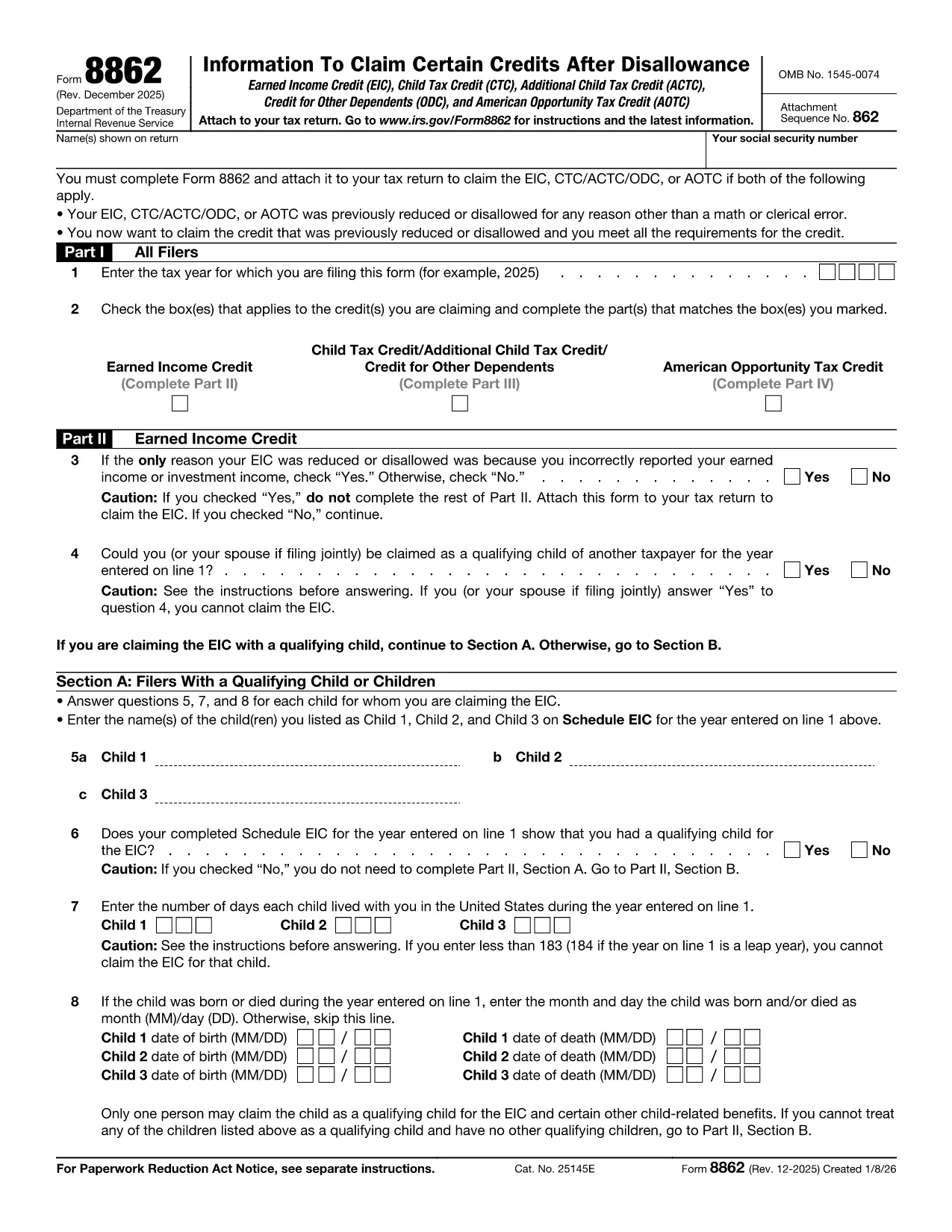
Fillable IRS Form 8862 – Claim for Earned Income Credit

  1. De campagne Etats-Unis
  2. Langue Anglais
  3. Activité Impôts
  4. département Service des recettes internes
Remplissez ce formulaire
Fillable IRS Form 8862 – Claim for Earned Income Credit

Form 8862, Claim for Earned Income Credit (EIC), is required when the IRS disallows your Earned Income Credit in a prior year and you want to claim it again. Our fillable PDF version lets you enter data directly in the browser, eliminates printing, and reduces errors.

What Is IRS Form 8862?

Form 8862 is an IRS document used to verify that you meet the eligibility criteria for the Earned Income Credit after a previous denial. It collects information about your filing status, qualifying children, and earned income. The form must be attached to your tax return (Form 1040) when you re‑claim the credit.

How to Complete Form 8862 Online

  • Click the "Fill out this form" button on this page.
  • Wait a few seconds while the Formize PDF Filler app loads securely in your browser.
  • Enter the required information in each field – the app highlights required fields and validates numbers.
  • When finished, click Save & Download to get a completed PDF ready to attach to your tax return.

Common Mistakes to Avoid

Even with a fillable form, certain errors can still cause delays:

  • Incorrect Social Security numbers for you or your qualifying children.
  • Misreporting earned income – double‑check wages, self‑employment, and farm income.
  • Leaving any required field blank. The Formize filler will flag missing data before you submit.
  • Using the wrong tax year version – always download the latest PDF (2024 edition at the link below).

Where to Find Help and Resources

If you need guidance, the official IRS instructions for Form 8862 are available on the IRS website. You can also consult a qualified tax professional for complex situations such as multiple qualifying children or prior EIC recapture.

Ready to start? Click the button and let Formize handle the rest.

Instructions

FAQ
  • Do I need to file Form 8862 every year?

    You only need to file Form 8862 when the IRS has previously denied your Earned Income Credit and you are claiming it again.

  • Can I submit Form 8862 electronically?

    Yes. After completing the fillable PDF, you can attach the PDF to your e‑filed tax return using most tax software.

  • What happens if I make a mistake on Form 8862?

    Mistakes can delay processing of your credit. The Formize filler highlights required fields and checks numeric entries to reduce errors.

  • Is there a fee to use the Formize PDF filler?

    No. The filler is free for all IRS forms hosted on Formize, including Form 8862.

  • Where can I find the official IRS instructions for Form 8862?

    The official instructions are available on the IRS website at https://www.irs.gov/instructions/i8862.

  • Can I print the completed Form 8862 after filling it online?

    Absolutely. After saving the PDF, you can print it or keep the digital copy for electronic filing.

  • Do I need a signature on Form 8862?

    Yes. The form requires your signature. You can sign the PDF digitally after downloading it.

  • What qualifies as earned income for the EIC?

    Earned income includes wages, salaries, tips, self‑employment income, and certain disability payments. Refer to IRS guidelines for full details.

COMMENT

Comment remplir Form 8862 gratuitement, en ligne en 4 étapes simples :

  1. 1
    Click the Fill Out Button
    Press the "Fill out this form" button on this page to launch the Formize PDF Filler.
  2. 2
    Wait for the Filler to Load
    The secure filler app loads in a few seconds – no download or installation required.
  3. 3
    Enter Your Information
    Complete each highlighted field. The app validates entries and alerts you to any missing required data.
  4. 4
    Save and Download
    When all fields are filled, click "Save & Download" to obtain a completed PDF ready for attachment to your tax return.
Formize l'application PDF Filler
À PROPOS

Les formulaires d'impôt

Form 8862 est l'un des formulaires fiscaux qui sont des documents utilisés pour déclarer des informations relatives aux impôts à l'autorité fiscale compétente. Il existe différents types de formulaires fiscaux, y compris les formulaires fiscaux fédéraux, étatiques et locaux, qui peuvent varier en fonction de la situation et de l'emplacement du contribuable.

CARACTÉRISTIQUES

Remplisseur de PDF

Le moyen le plus simple de remplir des formulaires PDF en ligne

  • Remplissez rapidement Form 8862
    Vous cherchez un moyen de remplir rapidement Form 8862 en ligne ? Avec notre remplisseur de formulaire PDF gratuit en ligne, vous saurez comment éditer et remplir ce document pdf en moins d'une minute.
  • Éditeur PDF en ligne facile à utiliser
    Vous en avez assez d'imprimer des fichiers PDF pour pouvoir les modifier avant de les renumériser et de les renvoyer ? Modifiez des documents PDF gratuitement en ligne. Utilisez notre éditeur de pdf en ligne pour gagner du temps et du papier.
  • Excellents outils, toutes plateformes
    Vous vous demandez comment remplir Form 8862 sur un Mac, ou peut-être comment utiliser un remplisseur PDF gratuit ? Nos outils PDF en ligne fonctionnent sur toutes les plateformes.
  • Stockage de fichiers sécurisé
    Les fichiers "Form 8862" terminés sont stockés dans une base de données sécurisée gérée par l'hébergement Amazon Cloud. Vous pouvez supprimer vos fichiers de notre système à tout moment. Dans tous les cas, ces fichiers sont automatiquement supprimés après 24 heures.
  • Discutez avec Form 8862
    Discutez avec "Form 8862" sur Chatize qui est un assistant de lecture PDF gratuit. Posez des questions et obtenez des réponses de "Form 8862". Cliquez simplement sur le bouton Discuter avec un document ci-dessus.

Supprimer la session de remplissage

Supprimer la session de remplissage sélectionnée ? Dans ce cas, votre progression dans le remplissage du formulaire sera perdue.

Supprimer la session d'édition

Supprimer la session de modification sélectionnée ? Dans ce cas, votre progression dans la création et la modification du formulaire sera perdue.