
Choisir la langue

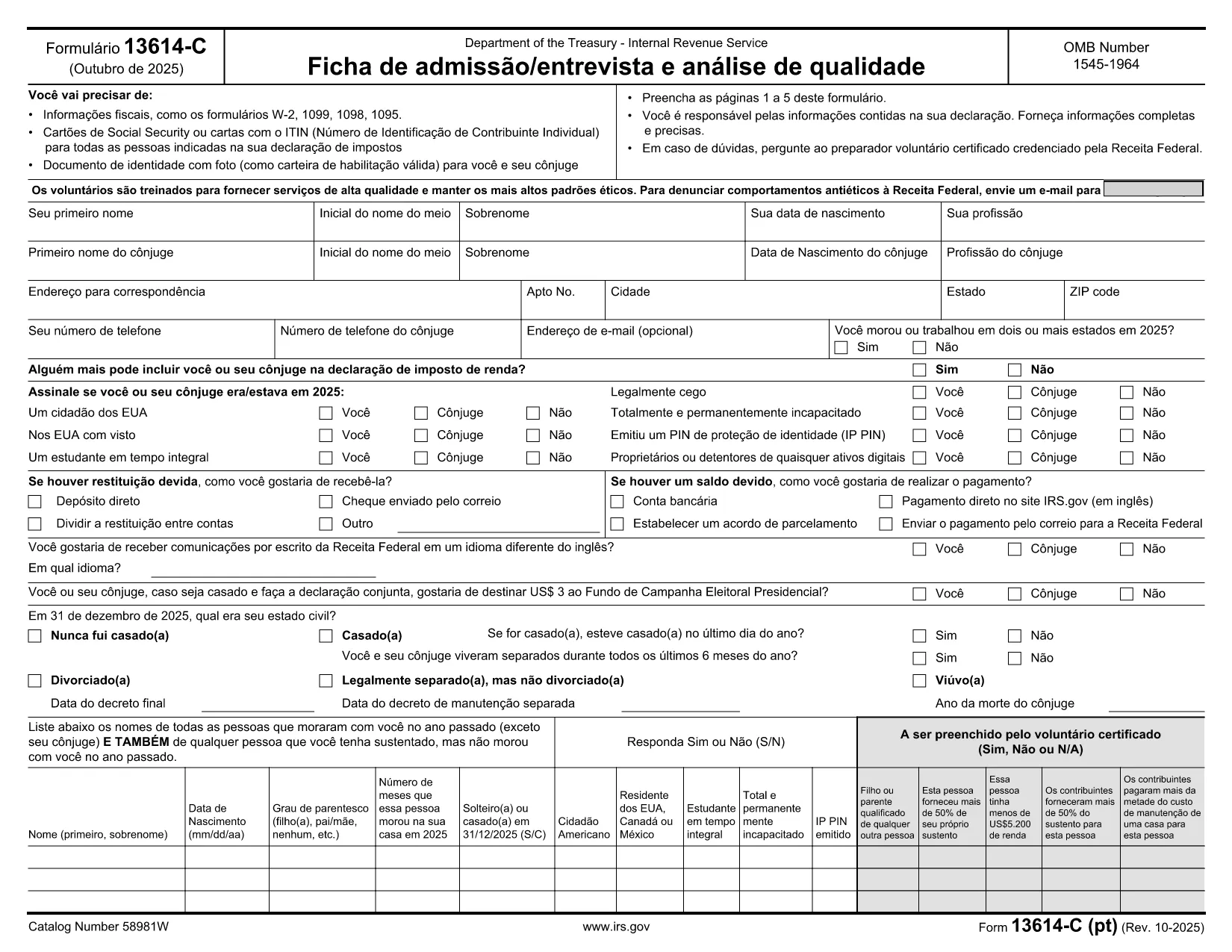
Form 13614-C (PT) – Fillable PDF for IRS Income Tax Interview

  1. De campagne Etats-Unis
  2. Langue Portugais
  3. Activité Impôts
  4. département Service des recettes internes
Form 13614-C (PT) – Fillable PDF for IRS Income Tax Interview

The IRS Form 13614-C (PT) is the Portuguese version of the Intake/Interview & Quality Review Sheet. Volunteers and tax preparers use it to collect personal information, income details, and eligibility for tax credits during the interview process.

What Is Form 13614-C (PT)?

This form is part of the Volunteer Income Tax Assistance (VITA) program and is required for taxpayers who prefer to complete their interview in Portuguese. It captures the same data as the English version, but all field labels and instructions are translated.

How to Fill the Form Online with Formize

Instead of downloading the PDF and editing it in a separate program, simply click the "Fill out this form" button on this page. The Formize PDF Filler app will load the fillable document directly in your browser.

  • All fields are interactive – just click and type.
  • Use the navigation pane to jump between sections quickly.
  • When you’re done, save a copy to your device or email it directly to the taxpayer.

Common Mistakes to Avoid

  • Leaving required fields blank: The filler highlights missing information in red.
  • Entering numbers in text fields: Follow the format shown in the example boxes.
  • Using the wrong tax year: Verify the year at the top of the form before starting.

Download & Print Options

If you prefer a hard‑copy version, you can still download the PDF using the link below. Print it on standard 8.5" × 11" paper and fill it out by hand.

Where to Submit the Completed Form

After completing the interview, submit the signed Form 13614-C (PT) to your VITA site or attach it to the electronic return you are preparing. The IRS does not require you to mail the form separately unless instructed by a tax professional.

Download the official fillable PDF (Portuguese)

FAQ
  • Is Form 13614-C (PT) the same as the English version?

    Yes, it contains identical fields and data requirements; only the labels and instructions are translated into Portuguese.

  • Can I edit the PDF on my phone?

    The Formize PDF Filler works on most modern mobile browsers, allowing you to complete the form on a smartphone or tablet.

  • Do I need to print the form after filling it online?

    Printing is optional. You can submit the digital PDF directly to your VITA site, but a printed copy is acceptable if required.

  • What if I make a mistake while filling the form?

    Use the "Undo" button in the Formize toolbar or simply click the field again and correct the entry before saving.

  • Is the fillable PDF free to use?

    Yes, the official IRS PDF is free, and Formize provides the online filler at no cost.

  • How do I submit the completed form to the IRS?

    Typically you give the completed form to the volunteer or tax preparer handling your return; they will attach it to the electronic filing or mail it if required.

  • Can I save my progress and finish later?

    The Formize filler allows you to download a partially completed PDF, which you can reopen later to finish.

COMMENT

Comment remplir Form 13614-C PT gratuitement, en ligne en 5 étapes simples :

  1. 1
    Click the Fill Button
    Press the "Fill out this form" button on the page to launch the Formize PDF Filler.
  2. 2
    Wait for the Filler to Load
    The online filler loads the fillable PDF directly in your browser—no download needed.
  3. 3
    Complete Each Section
    Enter the requested information in each field. Required fields are marked with an asterisk.
  4. 4
    Save or Export
    When finished, click "Save" to download a copy to your computer or choose "Email" to send it directly.
  5. 5
    Submit to the IRS
    Provide the completed PDF to your VITA volunteer or attach it to the electronic return you are filing.
Formize l'application PDF Filler
À PROPOS

Les formulaires d'impôt

Form 13614-C PT est l'un des formulaires fiscaux qui sont des documents utilisés pour déclarer des informations relatives aux impôts à l'autorité fiscale compétente. Il existe différents types de formulaires fiscaux, y compris les formulaires fiscaux fédéraux, étatiques et locaux, qui peuvent varier en fonction de la situation et de l'emplacement du contribuable.

CARACTÉRISTIQUES

Remplisseur de PDF

Le moyen le plus simple de remplir des formulaires PDF en ligne

  • Remplissez rapidement Form 13614-C PT
    Vous cherchez un moyen de remplir rapidement Form 13614-C PT en ligne ? Avec notre remplisseur de formulaire PDF gratuit en ligne, vous saurez comment éditer et remplir ce document pdf en moins d'une minute.
  • Éditeur PDF en ligne facile à utiliser
    Vous en avez assez d'imprimer des fichiers PDF pour pouvoir les modifier avant de les renumériser et de les renvoyer ? Modifiez des documents PDF gratuitement en ligne. Utilisez notre éditeur de pdf en ligne pour gagner du temps et du papier.
  • Excellents outils, toutes plateformes
    Vous vous demandez comment remplir Form 13614-C PT sur un Mac, ou peut-être comment utiliser un remplisseur PDF gratuit ? Nos outils PDF en ligne fonctionnent sur toutes les plateformes.
  • Stockage de fichiers sécurisé
    Les fichiers "Form 13614-C PT" terminés sont stockés dans une base de données sécurisée gérée par l'hébergement Amazon Cloud. Vous pouvez supprimer vos fichiers de notre système à tout moment. Dans tous les cas, ces fichiers sont automatiquement supprimés après 24 heures.
  • Discutez avec Form 13614-C PT
    Discutez avec "Form 13614-C PT" sur Chatize qui est un assistant de lecture PDF gratuit. Posez des questions et obtenez des réponses de "Form 13614-C PT". Cliquez simplement sur le bouton Discuter avec un document ci-dessus.

Supprimer la session de remplissage

Supprimer la session de remplissage sélectionnée ? Dans ce cas, votre progression dans le remplissage du formulaire sera perdue.

Supprimer la session d'édition

Supprimer la session de modification sélectionnée ? Dans ce cas, votre progression dans la création et la modification du formulaire sera perdue.