
Choisir la langue

Fillable IRS Form 4684 – Casualties and Thefts

  1. De campagne Etats-Unis
  2. Langue Anglais
  3. Activité Impôts
  4. département Service des recettes internes
Fillable IRS Form 4684 – Casualties and Thefts

What Is Form 4684?

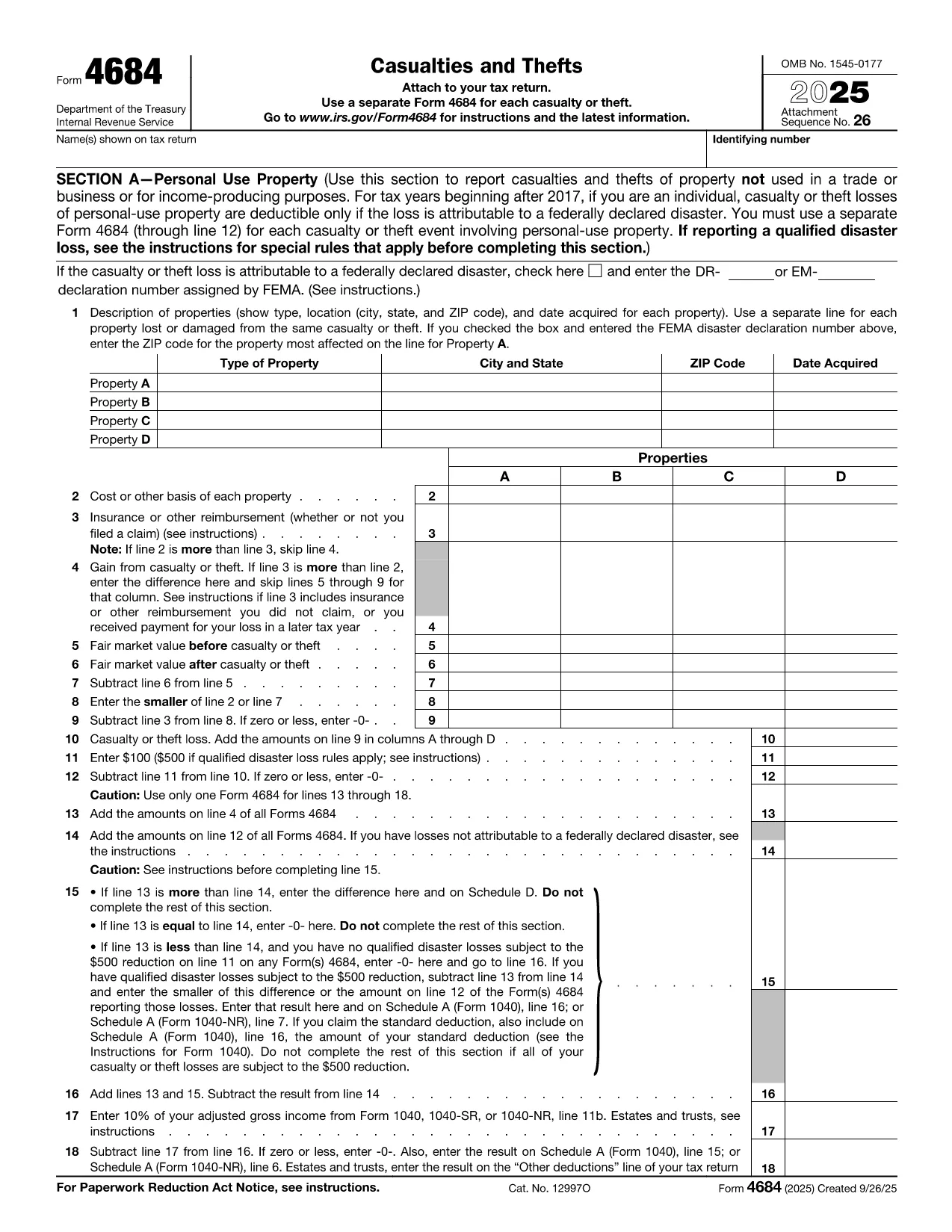
IRS Form 4684, Casualties and Thefts, is used to report losses from property damage, natural disasters, or theft. The form allows individuals and businesses to claim a deductible loss on their federal tax return.

How to Complete Form 4684 Online

With Formize’s built‑in PDF filler you can fill out Form 4684 directly in your browser—no download, print, or manual entry required.

  1. Click the "Fill out this form" button on this page.
  2. Wait a few seconds while the Formize PDF Filler app loads the fillable version of Form 4684.
  3. Enter your personal information, loss details, and insurance reimbursements exactly as the instructions describe.
  4. Review the calculated deductible loss that appears automatically.
  5. Save the completed PDF or download it to attach to your tax return.

Common Mistakes to Avoid

  • Skipping the disaster declaration check: For personal‑use property, a loss is only deductible if it results from a federally declared disaster.
  • Incorrect basis calculation: Use the original cost or adjusted basis, not the current market value.
  • Omitting insurance reimbursements: All insurance or other reimbursements must be reported on Line 3.
  • Failing to attach supporting documents: Receipts, police reports, and insurance statements should accompany the form.

Download the Fillable PDF

If you prefer the traditional method, you can download the official fillable PDF from the IRS. The file is fully compatible with Formize’s online editor.

Download IRS Form 4684 (PDF)

FAQs About Form 4684

Below are the most common questions taxpayers have about Form 4684.

Instructions

FAQ
  • When is Form 4684 required?

    You must file Form 4684 to claim a casualty or theft loss on your federal tax return. Personal‑use losses are only deductible for federally declared disasters.

  • Can I use Form 4684 for business property?

    Yes. Section B of the form is dedicated to business and income‑producing property losses.

  • Do I need to attach supporting documents?

    Yes. Attach receipts, police reports, insurance statements, and any other documentation that verifies the loss.

  • What if my loss exceeds my insurance reimbursement?

    Enter the difference on Line 4 (Gain from casualty or theft) or continue to the loss calculation sections to determine the deductible amount.

  • Is the online fillable version the same as the PDF from the IRS?

    The fillable version uses the exact IRS layout and fields, so the information you enter matches the official PDF perfectly.

  • How long do I have to file Form 4684?

    Form 4684 is filed with your annual tax return, typically due by April 15. Extensions apply if you file for an extension on your return.

  • Can I edit a completed Form 4684 later?

    Yes. With Formize you can reopen the saved PDF, make corrections, and re‑download the updated version before filing.

COMMENT

Comment remplir IRS Form 4684 gratuitement, en ligne en 5 étapes simples :

  1. 1
    Open the Fillable Form
    Click the "Fill out this form" button on the page. The Formize PDF Filler will load the fillable version of Form 4684 in your browser.
  2. 2
    Enter Your Information
    Fill in your name, SSN, and loss details exactly as the IRS instructions require. The online fields guide you line‑by‑line.
  3. 3
    Add Insurance & Reimbursements
    Record any insurance payouts or other reimbursements on Line 3. The calculator will automatically adjust the deductible loss.
  4. 4
    Review & Save
    Check the automatically calculated loss for accuracy, then click "Save" to download the completed PDF or store it in your Formize account.
  5. 5
    Attach to Your Tax Return
    Include the saved PDF with your Form 1040 when you file, either electronically or by mail.
Formize l'application PDF Filler
À PROPOS

Les formulaires d'impôt

IRS Form 4684 est l'un des formulaires fiscaux qui sont des documents utilisés pour déclarer des informations relatives aux impôts à l'autorité fiscale compétente. Il existe différents types de formulaires fiscaux, y compris les formulaires fiscaux fédéraux, étatiques et locaux, qui peuvent varier en fonction de la situation et de l'emplacement du contribuable.

CARACTÉRISTIQUES

Remplisseur de PDF

Le moyen le plus simple de remplir des formulaires PDF en ligne

  • Remplissez rapidement IRS Form 4684
    Vous cherchez un moyen de remplir rapidement IRS Form 4684 en ligne ? Avec notre remplisseur de formulaire PDF gratuit en ligne, vous saurez comment éditer et remplir ce document pdf en moins d'une minute.
  • Éditeur PDF en ligne facile à utiliser
    Vous en avez assez d'imprimer des fichiers PDF pour pouvoir les modifier avant de les renumériser et de les renvoyer ? Modifiez des documents PDF gratuitement en ligne. Utilisez notre éditeur de pdf en ligne pour gagner du temps et du papier.
  • Excellents outils, toutes plateformes
    Vous vous demandez comment remplir IRS Form 4684 sur un Mac, ou peut-être comment utiliser un remplisseur PDF gratuit ? Nos outils PDF en ligne fonctionnent sur toutes les plateformes.
  • Stockage de fichiers sécurisé
    Les fichiers "IRS Form 4684" terminés sont stockés dans une base de données sécurisée gérée par l'hébergement Amazon Cloud. Vous pouvez supprimer vos fichiers de notre système à tout moment. Dans tous les cas, ces fichiers sont automatiquement supprimés après 24 heures.
  • Discutez avec IRS Form 4684
    Discutez avec "IRS Form 4684" sur Chatize qui est un assistant de lecture PDF gratuit. Posez des questions et obtenez des réponses de "IRS Form 4684". Cliquez simplement sur le bouton Discuter avec un document ci-dessus.

Supprimer la session de remplissage

Supprimer la session de remplissage sélectionnée ? Dans ce cas, votre progression dans le remplissage du formulaire sera perdue.

Supprimer la session d'édition

Supprimer la session de modification sélectionnée ? Dans ce cas, votre progression dans la création et la modification du formulaire sera perdue.