
Choisir la langue

Form 720‑CS Fillable PDF – Bulk Transport Excise Tax Return

  1. De campagne Etats-Unis
  2. Langue Anglais
  3. Activité Impôts
  4. département Service des recettes internes
Form 720‑CS Fillable PDF – Bulk Transport Excise Tax Return

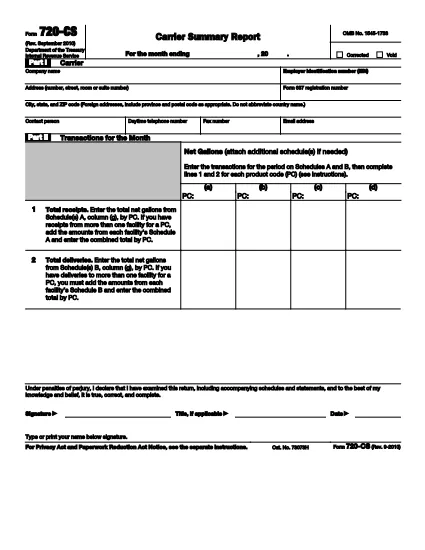
The IRS Form 720‑CS is the official quarterly report used by bulk‑transport carriers, pipelines, and barge owners to disclose receipts and disbursements of liquid products. With Formize’s online PDF filler, you can fill, sign, and save the form without printing a single page.

What Is Form 720‑CS?

Form 720‑CS provides detailed guidance for reporting excise tax obligations on liquid product transportation. It is required for carriers that have designated storage locations and Facility Control Numbers (FCNs). The form must be filed electronically through the Excise Summary Terminal Activity Reporting System (ExSTARS).

How to Complete the Fillable 720‑CS Form

Follow the simple steps below to finish the form online. All fields are interactive, and validation helps you avoid errors.

  • Click the **"Fill out this form"** button on this page.
  • Wait a few seconds while the Formize PDF Filler app loads.
  • Enter the required information in each highlighted field (e.g., EIN, FCN, monthly receipts).
  • Use the built‑in calculator to total your tax liability.
  • Save, download, or e‑sign the form directly within the app.

Common Mistakes to Avoid

  • Hand‑written entries: The form must be typed; handwritten PDFs are rejected.
  • Missing FCN: Verify your Facility Control Number before you start.
  • Incorrect quarter: Double‑check the quarter‑ending date; the IRS rejects mismatched periods.
  • Forgot to sign: Use Formize’s e‑signature feature to make the filing legally binding.

Where to Submit Your Completed Form

After you finish, submit the form through the IRS’s ExSTARS portal. Keep a copy of the confirmation receipt for your records. If you need to mail a paper copy, follow the instructions in the PDF’s “Submission” section.

FAQ
  • Who must file Form 720‑CS?

    Any bulk‑transport carrier, pipeline, or barge owner that handles liquid products and has a Facility Control Number (FCN) is required to file Form 720‑CS each quarter.

  • Can I file Form 720‑CS on paper?

    Paper filing is allowed only as a backup method. The IRS strongly encourages electronic filing through ExSTARS for faster processing.

  • Is the Formize filler free to use?

    Yes, Formize offers a free online filler for IRS PDFs. You can fill, sign, and download the form at no cost.

  • What happens if I make a mistake on the form?

    Mistakes can delay processing and may result in penalties. Use the validation checks in Formize and review the PDF’s instruction sheet before submitting.

  • How long should I keep a copy of my filed Form 720‑CS?

    Retain the completed form and the electronic receipt for at least three years, as required by IRS record‑keeping rules.

  • Do I need a digital signature for the form?

    Yes. An electronic signature is legally binding for Form 720‑CS when using a certified PDF filler like Formize.

  • Where can I find the official instructions for Form 720‑CS?

    The official instructions are included in the PDF linked below and are also available on the IRS website.

COMMENT

Comment remplir Form 720‑CS gratuitement, en ligne en 4 étapes simples :

  1. 1
    Open the Fillable Form
    Click the **"Fill out this form"** button on the page. The Formize PDF Filler will open in a new window.
  2. 2
    Load the PDF
    Wait a few seconds while the fillable PDF loads. All fields become editable automatically.
  3. 3
    Enter Your Information
    Complete each section—EIN, FCN, quarterly receipts, and tax calculations—using the on‑screen prompts.
  4. 4
    Sign and Save
    Use the built‑in e‑signature tool, then download or save the completed form to your device.
Formize l'application PDF Filler
À PROPOS

Les formulaires d'impôt

Form 720‑CS est l'un des formulaires fiscaux qui sont des documents utilisés pour déclarer des informations relatives aux impôts à l'autorité fiscale compétente. Il existe différents types de formulaires fiscaux, y compris les formulaires fiscaux fédéraux, étatiques et locaux, qui peuvent varier en fonction de la situation et de l'emplacement du contribuable.

CARACTÉRISTIQUES

Remplisseur de PDF

Le moyen le plus simple de remplir des formulaires PDF en ligne

  • Remplissez rapidement Form 720‑CS
    Vous cherchez un moyen de remplir rapidement Form 720‑CS en ligne ? Avec notre remplisseur de formulaire PDF gratuit en ligne, vous saurez comment éditer et remplir ce document pdf en moins d'une minute.
  • Éditeur PDF en ligne facile à utiliser
    Vous en avez assez d'imprimer des fichiers PDF pour pouvoir les modifier avant de les renumériser et de les renvoyer ? Modifiez des documents PDF gratuitement en ligne. Utilisez notre éditeur de pdf en ligne pour gagner du temps et du papier.
  • Excellents outils, toutes plateformes
    Vous vous demandez comment remplir Form 720‑CS sur un Mac, ou peut-être comment utiliser un remplisseur PDF gratuit ? Nos outils PDF en ligne fonctionnent sur toutes les plateformes.
  • Stockage de fichiers sécurisé
    Les fichiers "Form 720‑CS" terminés sont stockés dans une base de données sécurisée gérée par l'hébergement Amazon Cloud. Vous pouvez supprimer vos fichiers de notre système à tout moment. Dans tous les cas, ces fichiers sont automatiquement supprimés après 24 heures.
  • Discutez avec Form 720‑CS
    Discutez avec "Form 720‑CS" sur Chatize qui est un assistant de lecture PDF gratuit. Posez des questions et obtenez des réponses de "Form 720‑CS". Cliquez simplement sur le bouton Discuter avec un document ci-dessus.

Supprimer la session de remplissage

Supprimer la session de remplissage sélectionnée ? Dans ce cas, votre progression dans le remplissage du formulaire sera perdue.

Supprimer la session d'édition

Supprimer la session de modification sélectionnée ? Dans ce cas, votre progression dans la création et la modification du formulaire sera perdue.