
Choisir la langue

IRS Form 8879‑C – Fillable Corporate E‑File Signature Authorization

  1. De campagne Etats-Unis
  2. Langue Anglais
  3. Activité Impôts
  4. département Service des recettes internes
IRS Form 8879‑C – Fillable Corporate E‑File Signature Authorization

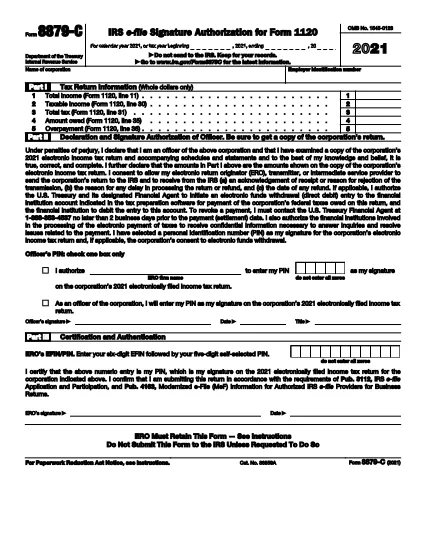
Form 8879‑C, IRS E‑File Signature Authorization for Corporations, is the official document that authorizes the IRS to accept an electronically filed corporate income‑tax return (Form 1120, 1120‑S, 1120‑F, etc.). Instead of mailing a paper signature, corporations can sign electronically using this fillable PDF, saving time and reducing errors.

What is Form 8879‑C?

The form serves as a written declaration that the corporate officer signing the return has reviewed the return, the information is accurate, and the corporation authorizes the IRS to process the e‑filed return. It must be signed by an authorized officer (president, treasurer, or other corporate officer) and attached to the electronic filing.

How to Fill Out Form 8879‑C with Formize

Instead of downloading the PDF and opening a separate editor, simply click the "Fill out this form" button on this page. The Formize PDF Filler app will load instantly, letting you complete every field directly in your browser.

  • Step 1: Click the orange "Fill out this form" button.
  • Step 2: Wait a few seconds for the Formize app to load.
  • Step 3: Enter the corporation’s name, EIN, tax year, and other required data.
  • Step 4: Add the electronic signature of the authorized officer.
  • Step 5: Click "Save" to download the completed PDF, then attach it to your e‑filed return.

Common Mistakes & Tips for a Smooth Submission

  • Incorrect EIN: Double‑check the nine‑digit Employer Identification Number; a typo will cause the return to be rejected.
  • Wrong Tax Year: Use the calendar year or fiscal year that matches the corporate tax return you are filing.
  • Missing Signature: The form is invalid without a clear electronic signature. Use the built‑in signature field—do not draw a signature in a comment box.
  • Unsigned Attachments: If you file multiple returns (e.g., Form 1120‑S and Schedule K‑1), each must have its own Form 8879‑C signed.
  • Saving Errors: After completing the form, click "Download" to store a copy on your computer. Do not rely solely on the browser’s temporary cache.

Where to Find Help and Additional Resources

For detailed instructions, see the IRS Instructions for Form 8879‑C. If you have questions about eligibility, signing authority, or e‑file technical issues, visit the IRS Help & Resources page or contact your tax professional.

FAQ
  • Who must sign Form 8879‑C?

    An officer of the corporation who is authorized to sign the tax return (e.g., president, treasurer, CEO) must sign Form 8879‑C.

  • Can I use a handwritten signature on the fillable PDF?

    Yes, you can draw a handwritten signature using the PDF filler’s signature tool, but the signature must be clear and legible.

  • Is Form 8879‑C required for every corporate e‑file?

    Yes, any corporation that files its income‑tax return electronically must submit a signed Form 8879‑C as the electronic signature authorization.

  • What is the deadline for submitting Form 8879‑C?

    Form 8879‑C must be signed and attached before the corporate tax return is transmitted electronically to the IRS, typically by the filing deadline (usually March 15 for calendar‑year corporations).

  • What should I do if I make a mistake after signing?

    Correct the error on a new copy of Form 8879‑C, have the authorized officer re‑sign, and attach the updated form to the e‑filed return.

  • Do I need a separate Form 8879‑C for each state return?

    State tax authorities may have their own signature forms. Form 8879‑C is only for the federal corporate return.

  • Is there a fee to use Formize’s PDF filler?

    Formize offers a free, no‑cost option for filling out and downloading IRS forms like 8879‑C.

  • Where can I find the official instructions for Form 8879‑C?

    The official IRS instructions are available at https://www.irs.gov/instructions/i8879c.

COMMENT

Comment remplir Form 8879-C gratuitement, en ligne en 5 étapes simples :

  1. 1
    Open the Fillable Form
    Click the orange "Fill out this form" button on this page. The Formize PDF Filler will load in a new window.
  2. 2
    Enter Required Information
    Complete the corporation’s name, EIN, tax year, and any other fields shown in the form.
  3. 3
    Add Your Electronic Signature
    Use the built‑in signature field to sign as the authorized corporate officer.
  4. 4
    Save and Download
    After all fields are filled, click "Save" to download the completed PDF to your computer.
  5. 5
    Attach to Your E‑File
    Upload the saved Form 8879‑C PDF with your e‑filed corporate tax return (Form 1120, 1120‑S, etc.).
Formize l'application PDF Filler
À PROPOS

Formulaires fiscaux fédéraux

Form 8879-C est l'un des formulaires fiscaux fédéraux qui sont des documents utilisés pour déclarer et déposer les impôts fédéraux sur le revenu auprès de l'Internal Revenue Service (IRS) aux États-Unis. Ces formulaires sont utilisés par les particuliers, les entreprises et les organisations pour déclarer leurs revenus, déductions et autres informations pertinentes nécessaires au calcul de leur obligation fiscale fédérale.

Le formulaire fiscal fédéral le plus couramment utilisé est le formulaire 1040, qui est utilisé par les contribuables individuels pour déclarer leur impôt sur le revenu des personnes physiques. D'autres formulaires couramment utilisés incluent le Formulaire 1065 pour les partenariats, le Formulaire 1120 pour les sociétés et le Formulaire 990 pour les organisations exonérées d'impôt.

Les formulaires fiscaux fédéraux exigent généralement que les contribuables déclarent diverses sources de revenus, telles que les salaires, les traitements et les pourboires, ainsi que les revenus provenant des investissements, des immeubles locatifs et d'autres sources. Les formulaires permettent également aux contribuables de demander des déductions et des crédits pour diverses dépenses, telles que les contributions caritatives, les intérêts hypothécaires et les dépenses de santé.

Il est important de produire les formulaires fiscaux fédéraux avec précision et à temps, car ne pas le faire peut entraîner des pénalités et des frais d'intérêt de la part de l'IRS.

CARACTÉRISTIQUES

Remplisseur de PDF

Le moyen le plus simple de remplir des formulaires PDF en ligne

  • Remplissez rapidement Form 8879-C
    Vous cherchez un moyen de remplir rapidement Form 8879-C en ligne ? Avec notre remplisseur de formulaire PDF gratuit en ligne, vous saurez comment éditer et remplir ce document pdf en moins d'une minute.
  • Éditeur PDF en ligne facile à utiliser
    Vous en avez assez d'imprimer des fichiers PDF pour pouvoir les modifier avant de les renumériser et de les renvoyer ? Modifiez des documents PDF gratuitement en ligne. Utilisez notre éditeur de pdf en ligne pour gagner du temps et du papier.
  • Excellents outils, toutes plateformes
    Vous vous demandez comment remplir Form 8879-C sur un Mac, ou peut-être comment utiliser un remplisseur PDF gratuit ? Nos outils PDF en ligne fonctionnent sur toutes les plateformes.
  • Stockage de fichiers sécurisé
    Les fichiers "Form 8879-C" terminés sont stockés dans une base de données sécurisée gérée par l'hébergement Amazon Cloud. Vous pouvez supprimer vos fichiers de notre système à tout moment. Dans tous les cas, ces fichiers sont automatiquement supprimés après 24 heures.
  • Discutez avec Form 8879-C
    Discutez avec "Form 8879-C" sur Chatize qui est un assistant de lecture PDF gratuit. Posez des questions et obtenez des réponses de "Form 8879-C". Cliquez simplement sur le bouton Discuter avec un document ci-dessus.

Supprimer la session de remplissage

Supprimer la session de remplissage sélectionnée ? Dans ce cas, votre progression dans le remplissage du formulaire sera perdue.

Supprimer la session d'édition

Supprimer la session de modification sélectionnée ? Dans ce cas, votre progression dans la création et la modification du formulaire sera perdue.