
Choisir la langue

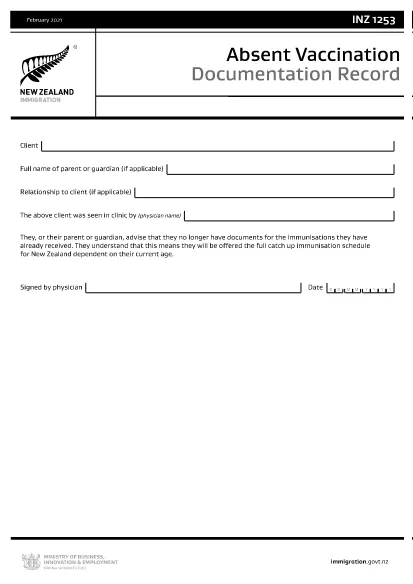
INZ1253 – Absent Vaccination Documentation Record (Fillable PDF)

  1. Langue Anglais
  2. De campagne Nouvelle-Zélande
  3. Activité Santé
Remplissez ce formulaire
INZ1253 – Absent Vaccination Documentation Record (Fillable PDF)

The INZ1253 is the official Absent Vaccination Documentation Record used by Immigration New Zealand when an applicant cannot produce proof of previously received immunisations. This form allows the applicant (or a parent/guardian) to declare the missing records and request the appropriate catch‑up vaccination schedule.

What is the INZ1253 Form?

The form is required for anyone applying for a New Zealand visa or residency who does not have the original vaccination certificates. By completing INZ1253 you acknowledge that you will follow the full catch‑up immunisation schedule based on your age.

How to Complete the INZ1253 Online

Instead of downloading, printing, and scanning, you can fill out the form directly on our site:

  • Click the “Fill out this form” button below.
  • Wait a few seconds while the Formize PDF Filler app loads.
  • Enter the required information in the fillable fields (personal details, reason for missing records, etc.).
  • Save the completed PDF to your device or submit it directly to Immigration New Zealand.

Common Mistakes to Avoid

  • Leaving mandatory fields blank – the system will highlight any missing information before you can save.
  • Using an outdated version – always use the latest INZ1253 PDF provided below.
  • Incorrect date formats – follow the DD/MM/YYYY format as shown in the example.
  • Not signing the form – the electronic signature field must be completed before submission.

Where to Submit the Completed Form

After you have saved the filled PDF, attach it to your visa or residency application through the Immigration New Zealand online portal. If you are applying by paper, include the printed form with your supporting documents.

Need help? Review the FAQs below or contact Immigration New Zealand directly.

FAQ
  • Do I need to print the INZ1253 form after filling it online?

    No. The Formize filler creates a fully signed PDF that can be uploaded directly to the Immigration New Zealand portal.

  • Can I edit the form after I have saved it?

    Yes. Open the saved PDF again with the Formize filler to make any changes, then re‑save.

  • What if I don’t have any vaccination records at all?

    Select “No records available” in the form and provide a brief explanation. You will be scheduled for the full catch‑up immunisation program.

  • Is the electronic signature legally accepted?

    Immigration New Zealand accepts electronic signatures on the INZ1253 when the form is completed using a certified PDF filler like Formize.

  • How long does it take for Immigration New Zealand to process the form?

    Processing times vary, but most applicants receive a response within 5‑10 business days after submission.

COMMENT

Comment remplir INZ1253 gratuitement, en ligne en 4 étapes simples :

  1. 1
    Open the Fillable Form
    Click the “Fill out this form” button on the page. The Formize PDF Filler will launch in your browser.
  2. 2
    Enter Your Details
    Complete each highlighted field – personal information, reason for missing vaccination records, and any additional notes.
  3. 3
    Save or Submit
    When all required fields are filled, click “Save PDF” to download the completed form or use the built‑in “Submit” button to send it directly to Immigration New Zealand.
  4. 4
    Confirm Receipt
    Check your email or the immigration portal for a confirmation that the form has been received.
Formize l'application PDF Filler
À PROPOS

Formulaires de demande d'assurance-maladie

Donnez aux gens un moyen simple et rapide de demander des prestations d'assurance-maladie. Avec l'aide de modèles de formulaires d'assurance-maladie en ligne, les procédures telles que la création d'un nouveau dossier patient ou en savoir plus sur les antécédents médicaux de votre patient sont désormais beaucoup plus simples.

CARACTÉRISTIQUES

Remplisseur de PDF

Le moyen le plus simple de remplir des formulaires PDF en ligne

  • Remplissez rapidement INZ1253
    Vous cherchez un moyen de remplir rapidement INZ1253 en ligne ? Avec notre remplisseur de formulaire PDF gratuit en ligne, vous saurez comment éditer et remplir ce document pdf en moins d'une minute.
  • Éditeur PDF en ligne facile à utiliser
    Vous en avez assez d'imprimer des fichiers PDF pour pouvoir les modifier avant de les renumériser et de les renvoyer ? Modifiez des documents PDF gratuitement en ligne. Utilisez notre éditeur de pdf en ligne pour gagner du temps et du papier.
  • Excellents outils, toutes plateformes
    Vous vous demandez comment remplir INZ1253 sur un Mac, ou peut-être comment utiliser un remplisseur PDF gratuit ? Nos outils PDF en ligne fonctionnent sur toutes les plateformes.
  • Stockage de fichiers sécurisé
    Les fichiers "INZ1253" terminés sont stockés dans une base de données sécurisée gérée par l'hébergement Amazon Cloud. Vous pouvez supprimer vos fichiers de notre système à tout moment. Dans tous les cas, ces fichiers sont automatiquement supprimés après 24 heures.
  • Discutez avec INZ1253
    Discutez avec "INZ1253" sur Chatize qui est un assistant de lecture PDF gratuit. Posez des questions et obtenez des réponses de "INZ1253". Cliquez simplement sur le bouton Discuter avec un document ci-dessus.

Supprimer la session de remplissage

Supprimer la session de remplissage sélectionnée ? Dans ce cas, votre progression dans le remplissage du formulaire sera perdue.

Supprimer la session d'édition

Supprimer la session de modification sélectionnée ? Dans ce cas, votre progression dans la création et la modification du formulaire sera perdue.