
Choisir la langue

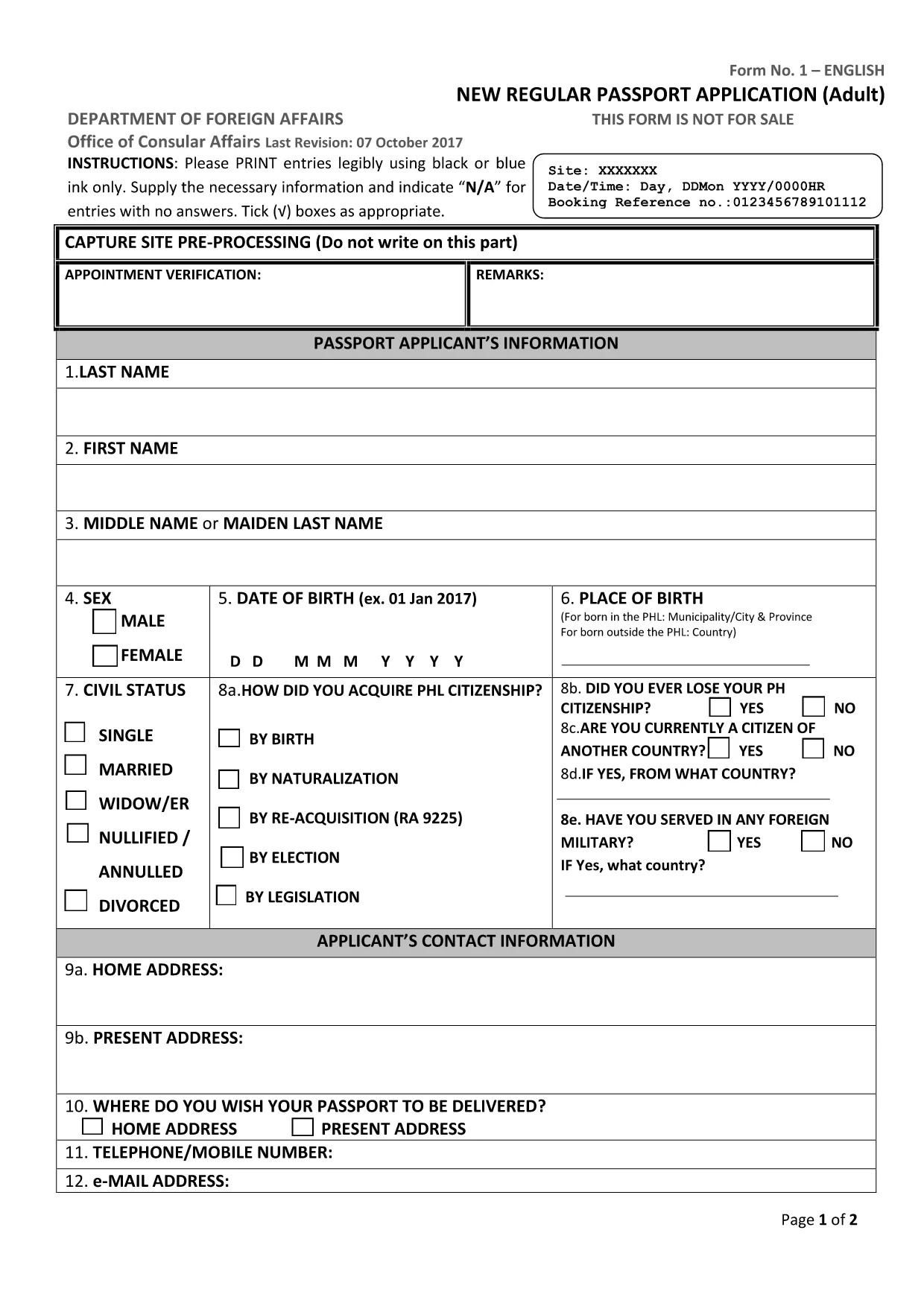
Philippine Passport Application Form (Fillable PDF)

  1. Langue Anglais
  2. De campagne Philippines
  3. département Department of Foreign Affairs
  4. Activité Travel Documents
Remplissez ce formulaire
Philippine Passport Application Form (Fillable PDF)

Applying for a Philippine passport? The first step is a correctly filled application form. Our fillable PDF matches the official DFA document, so you can complete it online, print it, and bring it to your appointment without any hassle.

Why Use a Fillable PDF Form?

  • Fast & accurate: Type directly into the fields – no messy handwriting.
  • Save time: Edit, review, and correct entries before printing.
  • Secure: Your data stays on your device until you choose to print or submit.
  • Compatible with Formize: Click “Fill out this form” and the Formize PDF Filler loads instantly.

Step‑by‑Step Guide to Complete the Application

Follow these simple steps to finish your passport application using the Formize PDF Filler:

  1. Click the Fill out this form button on the page.
  2. Wait a few seconds while the Formize PDF Filler app loads.
  3. Enter your personal information in each field (use black or blue ink if you print later).
  4. Upload a digital photo that meets DFA specifications.
  5. Review every entry for accuracy – the filler highlights required fields.
  6. Save the completed form to your device or print it directly from the app.
  7. Bring the printed form, along with the required IDs and supporting documents, to your DFA appointment.

Common Mistakes to Avoid

  • Leaving required fields blank – the form will not save until they are filled.
  • Using a handwritten font in the PDF – type directly to keep the layout clean.
  • Submitting an outdated photo – follow the latest DFA photo guidelines.
  • Writing “N/A” in the wrong format – use capital letters without punctuation.

Where to Submit Your Completed Form

After printing, bring the accomplished form to the Department of Foreign Affairs (DFA) office where you booked your appointment. The DFA staff will verify the form, collect your fees, and process your passport.

Need a quick reminder of the required supporting documents? Check the DFA website or your appointment confirmation email.

FAQ
  • Is the PDF form official and up‑to‑date?

    Yes. The linked PDF is the current adult new‑application form used by the DFA as of 2024.

  • Can I fill out the form on a mobile device?

    The Formize PDF Filler works on most smartphones and tablets. For best results, use a larger screen when adding a photo.

  • Do I need to print the form after filling it online?

    The DFA requires a printed copy with your signature. Print the completed PDF on A4 paper before your appointment.

  • What if I make a mistake after printing?

    Minor errors can be corrected by crossing out the entry, writing “N/A” where needed, and signing the correction. For major errors, refill the PDF and re‑print.

  • How long does the Formize PDF Filler take to load?

    Typically 2–5 seconds on a standard broadband connection.

  • Is there a fee to use the Formize PDF Filler?

    No. Formize provides the filler for free; you only pay the DFA passport processing fees.

  • Can I save a partially completed form?

    Yes. Use the “Save” button in the filler to download a draft and return to it later.

  • What file format do I receive after completing the form?

    The completed document is saved as a standard PDF, ready for printing or electronic submission if required.

COMMENT

Comment remplir philippine passport application form gratuitement, en ligne en 5 étapes simples :

  1. 1
    Open the Fillable Form
    Click the “Fill out this form” button on the page. The Formize PDF Filler loads in a new window.
  2. 2
    Enter Your Information
    Type your details into each field. Use black or blue text if you plan to print the form later.
  3. 3
    Add Your Photo
    Upload a digital passport‑size photo that complies with DFA specifications.
  4. 4
    Review and Save
    Check every entry, then save the completed PDF to your device or print it directly.
  5. 5
    Submit at DFA
    Bring the printed form and required IDs to your scheduled DFA appointment.
Formize l'application PDF Filler
À PROPOS

modèle philippine passport application form

Avec l'ensemble traditionnel de fonctionnalités pour afficher et remplir un document PDF, combiné aux avantages d'une application Web et d'une mise en page réactive, vous pouvez compléter philippine passport application form en quelques minutes.

CARACTÉRISTIQUES

Remplisseur de PDF

Le moyen le plus simple de remplir des formulaires PDF en ligne

  • Remplissez rapidement philippine passport application form
    Vous cherchez un moyen de remplir rapidement philippine passport application form en ligne ? Avec notre remplisseur de formulaire PDF gratuit en ligne, vous saurez comment éditer et remplir ce document pdf en moins d'une minute.
  • Éditeur PDF en ligne facile à utiliser
    Vous en avez assez d'imprimer des fichiers PDF pour pouvoir les modifier avant de les renumériser et de les renvoyer ? Modifiez des documents PDF gratuitement en ligne. Utilisez notre éditeur de pdf en ligne pour gagner du temps et du papier.
  • Excellents outils, toutes plateformes
    Vous vous demandez comment remplir philippine passport application form sur un Mac, ou peut-être comment utiliser un remplisseur PDF gratuit ? Nos outils PDF en ligne fonctionnent sur toutes les plateformes.
  • Stockage de fichiers sécurisé
    Les fichiers "philippine passport application form" terminés sont stockés dans une base de données sécurisée gérée par l'hébergement Amazon Cloud. Vous pouvez supprimer vos fichiers de notre système à tout moment. Dans tous les cas, ces fichiers sont automatiquement supprimés après 24 heures.
  • Discutez avec philippine passport application form
    Discutez avec "philippine passport application form" sur Chatize qui est un assistant de lecture PDF gratuit. Posez des questions et obtenez des réponses de "philippine passport application form". Cliquez simplement sur le bouton Discuter avec un document ci-dessus.

Supprimer la session de remplissage

Supprimer la session de remplissage sélectionnée ? Dans ce cas, votre progression dans le remplissage du formulaire sera perdue.

Supprimer la session d'édition

Supprimer la session de modification sélectionnée ? Dans ce cas, votre progression dans la création et la modification du formulaire sera perdue.