
Choisir la langue

MV2548 Wisconsin Handicap Parking Permit Application (Fillable PDF)

  1. Langue Anglais
  2. De campagne Etats-Unis
  3. Activité Immatriculation des véhicules
  4. département Ministère des Transports
MV2548 Wisconsin Handicap Parking Permit Application (Fillable PDF)

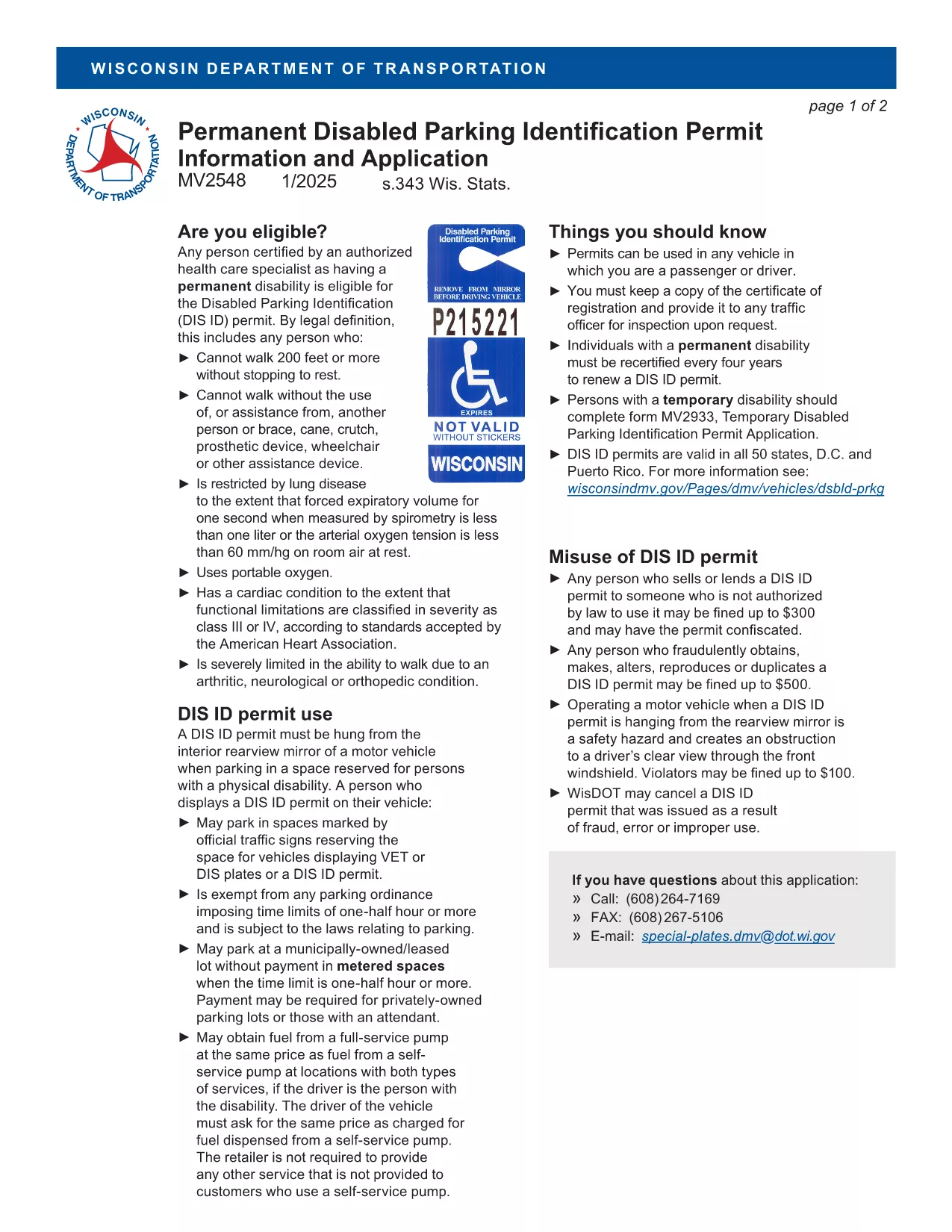
The MV2548 is the official Wisconsin Department of Transportation application for a disabled parking placard or license plate. Whether you need a permanent placard, a temporary pass, or a disability license plate, this fillable PDF lets you complete the entire process online with the Formize PDF Filler.

Who Is Eligible for the MV2548 Permit?

To qualify, you must have a permanent or temporary disability certified by a licensed health‑care professional. Typical qualifying conditions include:

  • Inability to walk 200 feet without resting
  • Use of a wheelchair, walker, or other assistive device
  • Severe lung disease, cardiac condition, or other medical condition that limits mobility

Eligibility is determined by the physician, advanced practice nurse, podiatrist, chiropractor, physician assistant, public health nurse, or Christian Science practitioner who completes the medical certification section.

How to Complete the MV2548 Form Online

Follow these simple steps to fill out the MV2548 form directly on our site:

  1. Click the "Fill out this form" button below.
  2. Wait a few seconds while the Formize PDF Filler app loads.
  3. Enter all required information, including personal details, vehicle data, and medical certification.
  4. Review the completed form for accuracy.
  5. Save, print, or submit the form according to the instructions at the end of the PDF.

Common Mistakes to Avoid When Filling MV2548

  • Leaving the medical certification blank: The form is invalid without a completed physician’s section.
  • Mismatching vehicle information: Ensure the VIN, make, model, and year match the registration.
  • Incorrect signatures: Both the applicant and the medical professional must sign electronically or on print‑out.
  • Using an outdated form: Always use the latest MV2548 PDF – the link below points to the current version.

Where to Submit Your Completed Form

After you finish, you can either:

  • Print the completed form and mail it to the Wisconsin Department of Transportation, Division of Motor Vehicles, 500 W. St. Paul Ave., Madison, WI 53707.
  • Take the printed form to any DMV office for in‑person processing.
  • Upload the PDF through the online DMV portal if you have a registered account.

Remember to include the required fee (if applicable) and any supporting medical documentation.

Frequently Asked Questions

Below are the most common queries about the MV2548 form and how to use it.

FAQ
  • Who can apply for a Wisconsin handicap parking placard?

    Anyone with a permanent or temporary disability certified by a licensed health‑care professional, such as an inability to walk 200 feet without resting, qualifies.

  • Is there a fee for the MV2548 application?

    Permanent placards are free, while temporary placards cost a nominal fee (currently $6). Disability license plates have separate fees based on vehicle type.

  • How long is a permanent placard valid?

    A permanent placard is valid for four years. You must submit a new MV2548 form with an updated medical certification before the expiration date.

  • Can I fill out the MV2548 form on a mobile device?

    Yes. The Formize PDF Filler works on most smartphones and tablets, allowing you to complete the form anywhere with an internet connection.

  • What should I do if my medical certification is missing a signature?

    The form will be rejected. Contact your health‑care provider to obtain the required signature before submitting the application.

  • Do I need to attach additional documents?

    Attach a copy of the signed medical certification page. If applying for a license plate, include a copy of your vehicle registration.

  • How do I renew my handicap placard?

    Complete a new MV2548 form, obtain a fresh medical certification, and submit it with the renewal fee (if applicable) before your current placard expires.

  • Can out‑of‑state visitors use a Wisconsin placard?

    Visitors may use their home‑state placard while in Wisconsin, but they cannot obtain a Wisconsin placard unless they become a resident.

COMMENT

Comment remplir MV2548 gratuitement, en ligne en 5 étapes simples :

  1. 1
    Open the Fillable Form
    Click the "Fill out this form" button on the page. The Formize PDF Filler will open in a new window.
  2. 2
    Load the PDF Filler
    Wait a few seconds while the app loads the MV2548 PDF. No download or extra software is required.
  3. 3
    Enter Your Information
    Complete each section—personal details, vehicle data, and medical certification—using the on‑screen fields.
  4. 4
    Review and Sign
    Double‑check all entries for accuracy, then add your electronic signature and the medical professional’s signature.
  5. 5
    Save or Submit
    Save the completed PDF to your device, print it, and mail or bring it to a Wisconsin DMV office, or upload it via the online portal.
Formize l'application PDF Filler
À PROPOS

Formulaires d'immatriculation des véhicules

Si vous possédez ou louez un véhicule à moteur, une remorque ou un bateau, vous devez respecter certaines obligations pour garder votre véhicule légalement immatriculé et sécuritaire.

MV2548 est l'un des formulaires d'immatriculation des véhicules qui sont des documents utilisés pour immatriculer un véhicule à moteur auprès de l'autorité nationale ou provinciale compétente. Ces formulaires sont généralement requis lorsqu'une personne achète un véhicule neuf ou d'occasion ou lorsqu'elle déménage dans un nouvel état ou une nouvelle province avec un véhicule.

Les exigences exactes et les formulaires nécessaires à l'immatriculation du véhicule peuvent varier selon le lieu, mais généralement, le processus implique de fournir des informations sur le véhicule, le propriétaire et tout privilège sur le véhicule.

Une fois les formulaires d'enregistrement et les frais soumis, l'autorité de l'État ou de la province délivrera un certificat d'immatriculation ou une plaque d'immatriculation au propriétaire du véhicule. Cette immatriculation permet au véhicule d'être légalement exploité sur les voies publiques et les autoroutes.

CARACTÉRISTIQUES

Remplisseur de PDF

Le moyen le plus simple de remplir des formulaires PDF en ligne

  • Remplissez rapidement MV2548
    Vous cherchez un moyen de remplir rapidement MV2548 en ligne ? Avec notre remplisseur de formulaire PDF gratuit en ligne, vous saurez comment éditer et remplir ce document pdf en moins d'une minute.
  • Éditeur PDF en ligne facile à utiliser
    Vous en avez assez d'imprimer des fichiers PDF pour pouvoir les modifier avant de les renumériser et de les renvoyer ? Modifiez des documents PDF gratuitement en ligne. Utilisez notre éditeur de pdf en ligne pour gagner du temps et du papier.
  • Excellents outils, toutes plateformes
    Vous vous demandez comment remplir MV2548 sur un Mac, ou peut-être comment utiliser un remplisseur PDF gratuit ? Nos outils PDF en ligne fonctionnent sur toutes les plateformes.
  • Stockage de fichiers sécurisé
    Les fichiers "MV2548" terminés sont stockés dans une base de données sécurisée gérée par l'hébergement Amazon Cloud. Vous pouvez supprimer vos fichiers de notre système à tout moment. Dans tous les cas, ces fichiers sont automatiquement supprimés après 24 heures.
  • Discutez avec MV2548
    Discutez avec "MV2548" sur Chatize qui est un assistant de lecture PDF gratuit. Posez des questions et obtenez des réponses de "MV2548". Cliquez simplement sur le bouton Discuter avec un document ci-dessus.

Supprimer la session de remplissage

Supprimer la session de remplissage sélectionnée ? Dans ce cas, votre progression dans le remplissage du formulaire sera perdue.

Supprimer la session d'édition

Supprimer la session de modification sélectionnée ? Dans ce cas, votre progression dans la création et la modification du formulaire sera perdue.