
Choisir la langue

Missouri Form 4201 – Assignment of Securities (Fillable PDF)

  1. Langue Anglais
  2. De campagne Etats-Unis
  3. Activité Permis de conduire
  4. État Missouri
Remplissez ce formulaire
Missouri Form 4201 – Assignment of Securities (Fillable PDF)

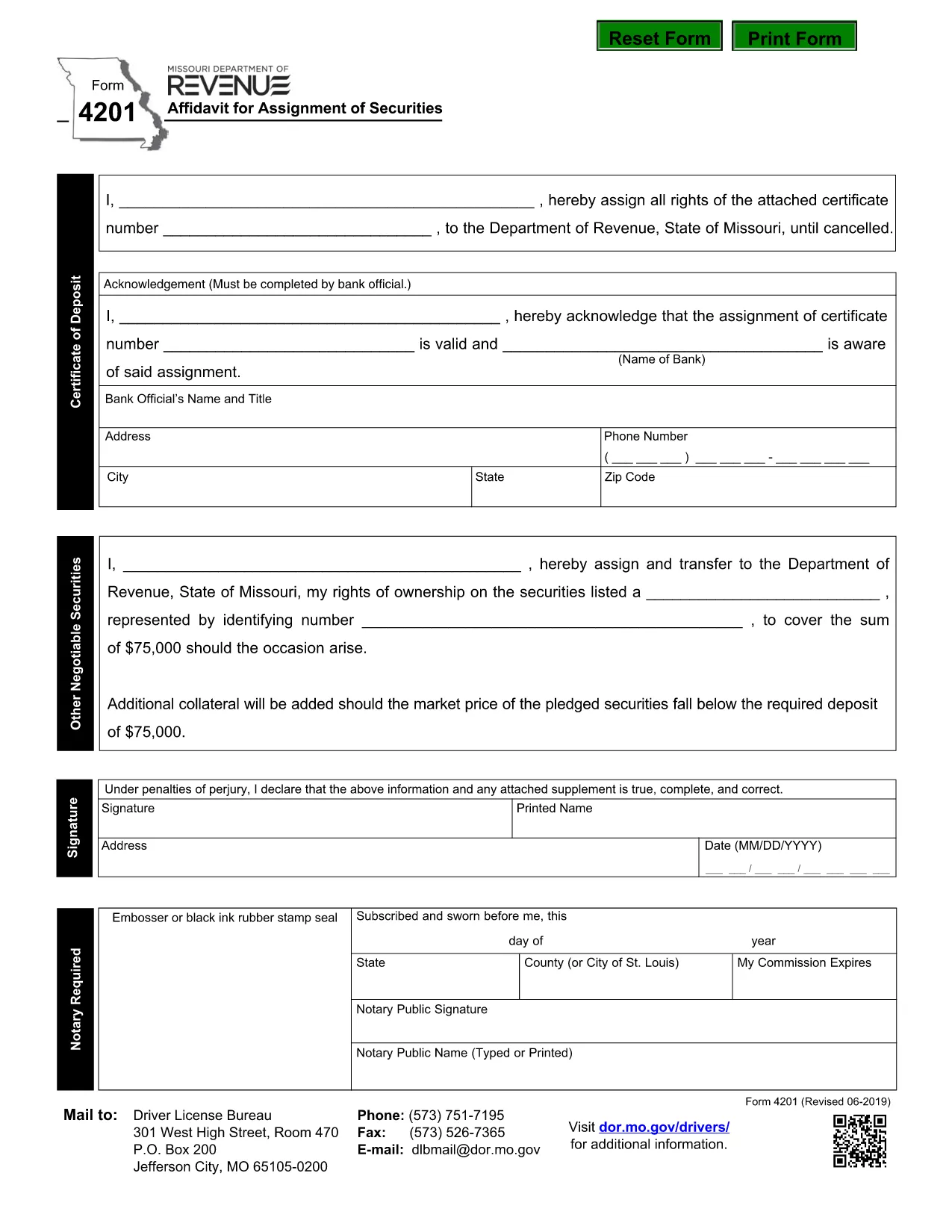
Form 4201 is the Missouri Department of Revenue’s official Affidavit for Assignment of Securities. This fillable PDF lets you complete the form online, save a copy, and submit it without printing.

What Is Form 4201?

Form 4201 records the transfer of securities (such as stocks, bonds, or other financial instruments) from one party to another for tax purposes. The Missouri Department of Revenue uses it to verify the assignment and ensure proper reporting.

Who Needs to File Form 4201?

  • Individuals or entities assigning securities that are subject to Missouri tax.
  • Trustees, executors, or legal representatives handling a transfer.
  • Businesses that need to document a securities assignment on their state tax return.

How to Complete the Fillable PDF

Instead of downloading the PDF and opening a separate editor, simply click the "Fill out this form" button on this page. The Formize PDF Filler app will load directly in your browser.

  1. Click Fill out this form.
  2. Wait a few seconds for the Formize PDF Filler to appear.
  3. Enter the required information in each highlighted field.
  4. Use the built‑in validation to check for missing or incorrect entries.
  5. When finished, click Download Completed PDF or Submit as instructed.

Common Mistakes & Tips

  • Missing signatures: The form requires a signature from the assignor; the filler lets you type a digital signature.
  • Incorrect dates: Use the format MM/DD/YYYY.
  • Wrong security description: Provide the full legal name and identification number.
  • Double‑check the “Assignment Amount” field for accuracy before saving.

Where to Submit the Completed Form

After saving the completed PDF, mail or fax it to the Missouri Department of Revenue address shown on the form, or upload it through the department’s online portal if you have an account.

Need help? Review the instructions on the form itself or contact the Missouri Department of Revenue directly.

FAQ
  • What is the purpose of Missouri Form 4201?

    Form 4201 documents the assignment of securities for tax reporting. It ensures the Missouri Department of Revenue records the transfer correctly.

  • Who is required to file Form 4201?

    Anyone assigning securities that are subject to Missouri tax—individuals, trusts, executors, or businesses—must file this form.

  • Can I file Form 4201 electronically?

    Yes. Use the Formize fillable PDF to complete the form online, then download and upload it through the Missouri Department of Revenue’s electronic portal.

  • Is a handwritten signature still needed?

    A digital signature entered in the fillable PDF is accepted. If you print the form, you must sign it manually.

  • What happens if I make a mistake on the form?

    Correct the error in the Formize filler before downloading. If you submit a printed copy with errors, you may need to file an amended form.

  • Where do I send the completed Form 4201?

    Mail or fax the completed PDF to the address listed on the form, or upload it via the Missouri Department of Revenue’s online portal.

COMMENT

Comment remplir Form 4201 gratuitement, en ligne en 5 étapes simples :

  1. 1
    Open the Fillable Form
    Click the "Fill out this form" button on the page. The Formize PDF Filler will open in a new browser window.
  2. 2
    Load the Form
    Wait a few seconds while the fillable PDF loads. All fields will be highlighted for easy entry.
  3. 3
    Enter Your Information
    Type the required data into each field. Use the built‑in validation to correct any errors.
  4. 4
    Review & Save
    Check the completed form for accuracy, then click "Download Completed PDF" to save a copy or "Submit" to send it directly.
  5. 5
    Submit or Print
    Print and mail the form, fax it, or upload it through the Missouri Department of Revenue portal as instructed.
Formize l'application PDF Filler
À PROPOS

Formulaires de demande de permis de conduire

Dans la plupart des pays, il est obligatoire d'avoir un permis de conduire avant de pouvoir prendre la route. L'obtention du permis de conduire est une étape importante pour quiconque souhaite conduire une voiture.

Form 4201 est l'un des formulaires de demande de permis de conduire qui sont des documents utilisés pour recueillir des informations auprès des personnes qui souhaitent demander un permis de conduire. Il contient généralement des champs pour le nom du demandeur, sa date de naissance, son numéro d'identification, ses coordonnées, ainsi que l'historique et l'expérience de son permis de conduire.

CARACTÉRISTIQUES

Remplisseur de PDF

Le moyen le plus simple de remplir des formulaires PDF en ligne

  • Remplissez rapidement Form 4201
    Vous cherchez un moyen de remplir rapidement Form 4201 en ligne ? Avec notre remplisseur de formulaire PDF gratuit en ligne, vous saurez comment éditer et remplir ce document pdf en moins d'une minute.
  • Éditeur PDF en ligne facile à utiliser
    Vous en avez assez d'imprimer des fichiers PDF pour pouvoir les modifier avant de les renumériser et de les renvoyer ? Modifiez des documents PDF gratuitement en ligne. Utilisez notre éditeur de pdf en ligne pour gagner du temps et du papier.
  • Excellents outils, toutes plateformes
    Vous vous demandez comment remplir Form 4201 sur un Mac, ou peut-être comment utiliser un remplisseur PDF gratuit ? Nos outils PDF en ligne fonctionnent sur toutes les plateformes.
  • Stockage de fichiers sécurisé
    Les fichiers "Form 4201" terminés sont stockés dans une base de données sécurisée gérée par l'hébergement Amazon Cloud. Vous pouvez supprimer vos fichiers de notre système à tout moment. Dans tous les cas, ces fichiers sont automatiquement supprimés après 24 heures.
  • Discutez avec Form 4201
    Discutez avec "Form 4201" sur Chatize qui est un assistant de lecture PDF gratuit. Posez des questions et obtenez des réponses de "Form 4201". Cliquez simplement sur le bouton Discuter avec un document ci-dessus.

Supprimer la session de remplissage

Supprimer la session de remplissage sélectionnée ? Dans ce cas, votre progression dans le remplissage du formulaire sera perdue.

Supprimer la session d'édition

Supprimer la session de modification sélectionnée ? Dans ce cas, votre progression dans la création et la modification du formulaire sera perdue.