
Choisir la langue

Visual Examination Report – Fillable PDF for Washington State Drivers

  1. Langue Anglais
  2. De campagne Etats-Unis
  3. Activité Permis de conduire
  4. État Washington
Remplissez ce formulaire
Visual Examination Report – Fillable PDF for Washington State Drivers

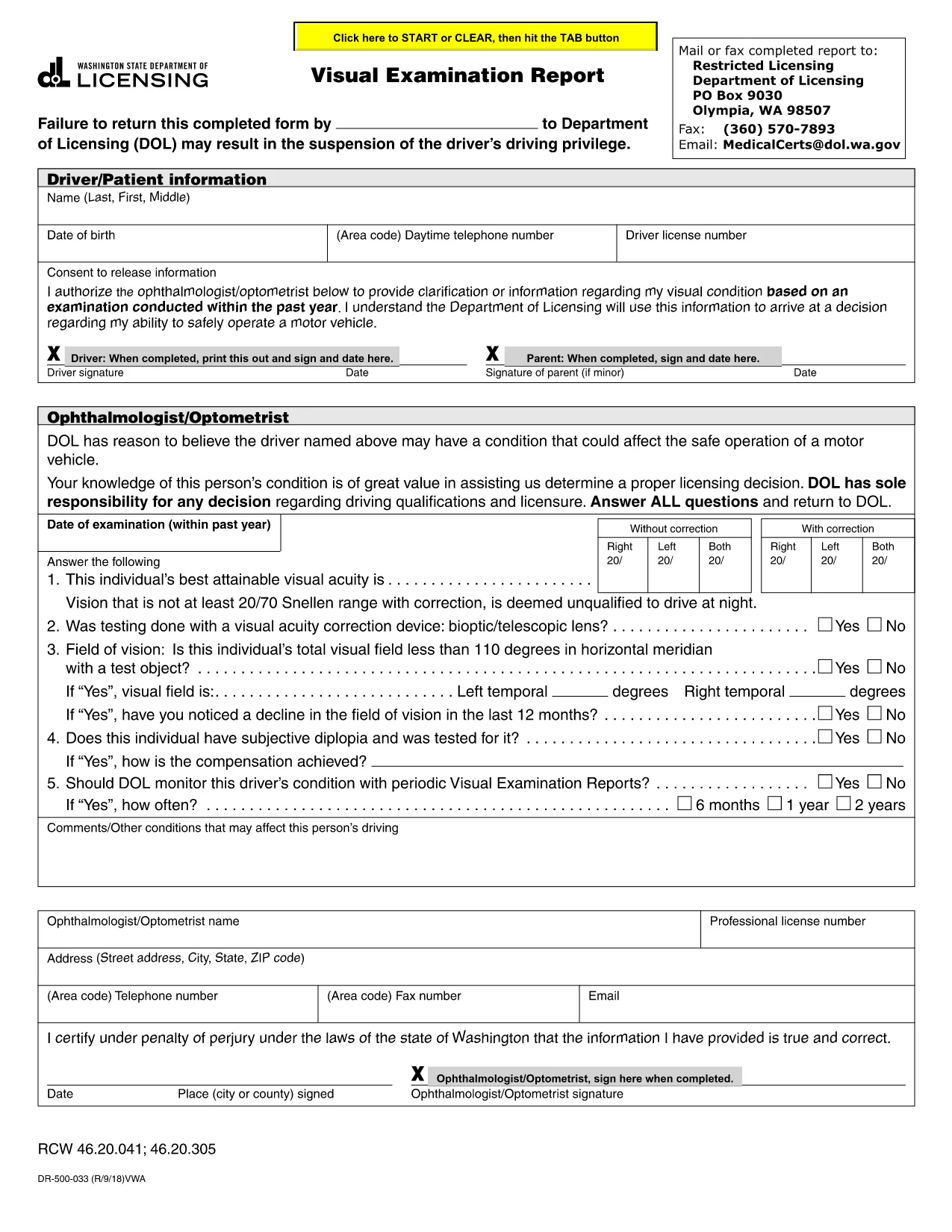
The Visual Examination Report is a mandatory medical form used by the Washington State Department of Licensing (DOL) to verify that a driver meets the vision standards required for a valid driver’s license. Historically, drivers had to print, fill out by hand, and mail the form, but with Formize’s fillable PDF you can complete it online in minutes.

What Is the Visual Examination Report?

This form collects essential information about a driver’s visual acuity, field of vision, and any corrective lenses required. A licensed physician, optometrist, or ophthalmologist must sign the report, confirming that the driver meets the state’s vision requirements.

Why Use a Fillable PDF Form?

  • Fast & secure: No printing or scanning required.
  • Auto‑save: Your progress is saved as you type.
  • Built‑in validation: Prevents missing or incorrect entries.
  • Direct submission: Download the completed PDF and upload it to the DOL portal or attach it to an email.

Step‑by‑Step Guide to Completing the Report

Follow the simple steps below to finish the Visual Examination Report using Formize’s PDF filler.

Common Mistakes to Avoid

  • Leaving the physician’s signature section blank.
  • Entering vision numbers without the required units (e.g., 20/40 instead of 20/40).
  • Submitting an outdated form version – always use the latest PDF provided below.

Where to Submit Your Completed Form

After you download the filled PDF, you can:

  • Upload it directly to the Washington DOL online portal.
  • Mail it to the address listed on the form.
  • Bring a printed copy to your nearest licensing office.

Need help? Review the FAQs below or contact your eye‑care professional for clarification.

FAQ
  • Who can complete the Visual Examination Report?

    Only a licensed physician, optometrist, or ophthalmologist authorized to practice in Washington can fill out and sign the report.

  • Do I need to print the form after filling it online?

    No. You can download the completed PDF and upload it directly to the DOL website, or email it to the licensing office.

  • What vision standards must I meet?

    Washington requires a visual acuity of at least 20/40 in each eye, with or without corrective lenses, and a normal field of vision.

  • Can I use a scanned copy of a handwritten form?

    A scanned handwritten form is accepted but may cause processing delays. Using the fillable PDF ensures faster review.

  • How long is the Visual Examination Report valid?

    The report is valid for 12 months from the date of the physician’s signature. After that, a new exam is required.

  • What should I do if I make a mistake while filling the form?

    Use the “Reset” button in the Formize filler to clear the field, or simply edit the incorrect entry before downloading.

  • Is there a fee to submit the Visual Examination Report?

    There is no separate fee for the report itself, but the Washington DOL may charge a processing fee for license renewal or replacement.

COMMENT

Comment remplir visual examination report gratuitement, en ligne en 5 étapes simples :

  1. 1
    Open the Fillable Form
    Click the “Fill out this form” button on the page. The Formize PDF Filler app will open in a new tab.
  2. 2
    Wait for the Filler to Load
    The app loads the visual examination report automatically. This may take a few seconds depending on your connection.
  3. 3
    Enter the Required Information
    Complete each field – driver details, vision test results, and physician’s certification. Use the drop‑down menus where provided.
  4. 4
    Review and Sign
    Double‑check all entries for accuracy. The physician can add a digital signature directly in the filler.
  5. 5
    Download or Submit
    When finished, click “Download PDF” to save a copy or use the “Submit” button to send it straight to the Washington DOL portal.
Formize l'application PDF Filler
À PROPOS

Formulaires de demande de permis de conduire

Dans la plupart des pays, il est obligatoire d'avoir un permis de conduire avant de pouvoir prendre la route. L'obtention du permis de conduire est une étape importante pour quiconque souhaite conduire une voiture.

visual examination report est l'un des formulaires de demande de permis de conduire qui sont des documents utilisés pour recueillir des informations auprès des personnes qui souhaitent demander un permis de conduire. Il contient généralement des champs pour le nom du demandeur, sa date de naissance, son numéro d'identification, ses coordonnées, ainsi que l'historique et l'expérience de son permis de conduire.

CARACTÉRISTIQUES

Remplisseur de PDF

Le moyen le plus simple de remplir des formulaires PDF en ligne

  • Remplissez rapidement visual examination report
    Vous cherchez un moyen de remplir rapidement visual examination report en ligne ? Avec notre remplisseur de formulaire PDF gratuit en ligne, vous saurez comment éditer et remplir ce document pdf en moins d'une minute.
  • Éditeur PDF en ligne facile à utiliser
    Vous en avez assez d'imprimer des fichiers PDF pour pouvoir les modifier avant de les renumériser et de les renvoyer ? Modifiez des documents PDF gratuitement en ligne. Utilisez notre éditeur de pdf en ligne pour gagner du temps et du papier.
  • Excellents outils, toutes plateformes
    Vous vous demandez comment remplir visual examination report sur un Mac, ou peut-être comment utiliser un remplisseur PDF gratuit ? Nos outils PDF en ligne fonctionnent sur toutes les plateformes.
  • Stockage de fichiers sécurisé
    Les fichiers "visual examination report" terminés sont stockés dans une base de données sécurisée gérée par l'hébergement Amazon Cloud. Vous pouvez supprimer vos fichiers de notre système à tout moment. Dans tous les cas, ces fichiers sont automatiquement supprimés après 24 heures.
  • Discutez avec visual examination report
    Discutez avec "visual examination report" sur Chatize qui est un assistant de lecture PDF gratuit. Posez des questions et obtenez des réponses de "visual examination report". Cliquez simplement sur le bouton Discuter avec un document ci-dessus.

Supprimer la session de remplissage

Supprimer la session de remplissage sélectionnée ? Dans ce cas, votre progression dans le remplissage du formulaire sera perdue.

Supprimer la session d'édition

Supprimer la session de modification sélectionnée ? Dans ce cas, votre progression dans la création et la modification du formulaire sera perdue.