
Choisir la langue

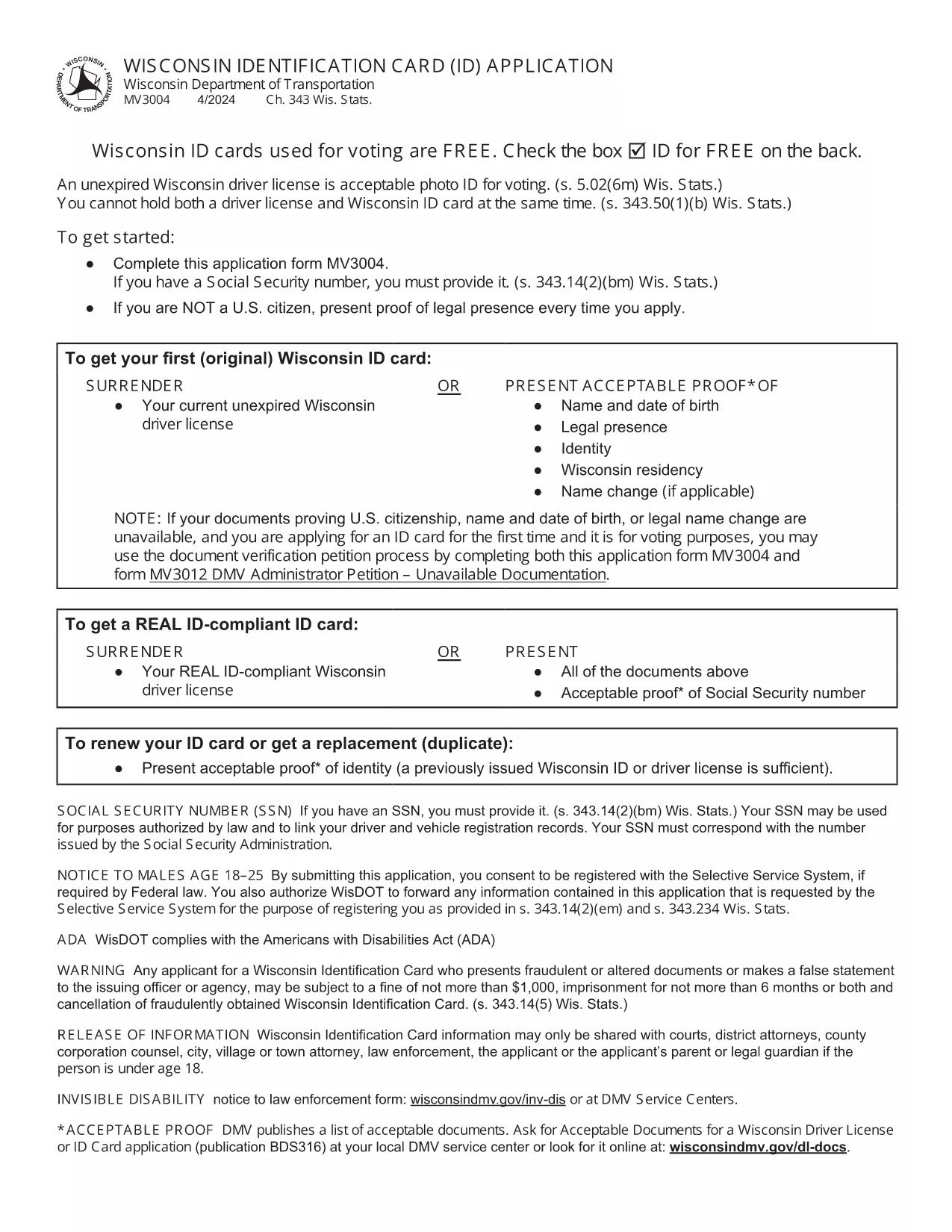
Wisconsin Identification Card Application (Form MV3004) – Fillable PDF

  1. Langue Anglais
  2. De campagne Etats-Unis
  3. Activité Permis de conduire
  4. État Wisconsin
Wisconsin Identification Card Application (Form MV3004) – Fillable PDF

Form MV3004 is the official Wisconsin Identification Card (ID) application issued by the Wisconsin Department of Transportation (DOT). Whether you need an ID for voting, travel, or everyday identification, this fillable PDF lets you complete the entire request from the comfort of your home.

What Is Form MV3004?

The MV3004 form collects personal details, proof‑of‑citizenship documents, and a photo consent statement. It is required for first‑time applicants, name changes, or renewals when a new photo is needed.

How to Complete the MV3004 Online

Instead of downloading and editing the PDF manually, simply click the "Fill out this form" button on this page. The Formize PDF Filler app will load directly in your browser, allowing you to type, select, and sign without any extra software.

  • Step 1: Click the button and wait for the Formize PDF Filler to appear.
  • Step 2: Enter your name, address, date of birth, and other required information.
  • Step 3: Upload scanned copies of your citizenship and name‑change documents.
  • Step 4: Review the completed form for accuracy.
  • Step 5: Submit the form electronically or print it for mailing.

Common Mistakes to Avoid

  • Leaving any required field blank – the online filler will highlight missing data.
  • Uploading blurry or non‑PDF supporting documents – use clear, high‑resolution scans.
  • Signing with a stylus that does not create a vector signature – use the built‑in signature tool.
  • Mismatching the name on your ID with the name on supporting documents – ensure exact spelling.

Where to Submit Your Completed Form

After you finish, you have two options:

  • Electronic submission: Save the completed PDF and email it to your local DMV office (check the Wisconsin DOT contact page for the correct address).
  • Mail submission: Print the form, attach your original documents or certified copies, and mail everything to the address listed on the form.

Processing typically takes 7‑10 business days. Keep a copy of the submitted PDF for your records.

FAQ
  • Who needs to fill out Form MV3004?

    Anyone applying for a Wisconsin state identification card for the first time, changing their legal name, or needing a new photo on an existing ID.

  • Can I submit the form online?

    Yes. After completing the fillable PDF, you can email the file to your local DMV office. Check the Wisconsin DOT website for the correct email address.

  • What documents must I attach?

    Proof of U.S. citizenship (e.g., birth certificate or passport), a legal name‑change document if applicable, and a recent head‑shot photo if a new picture is required.

  • How long does processing take?

    Standard processing is 7‑10 business days after the DMV receives a complete application and supporting documents.

  • Is there a fee for the Wisconsin ID card?

    Yes. As of 2026, the fee is $30 for a standard ID card. Check the latest fee schedule on the Wisconsin DOT website.

  • What if I make a mistake on the form?

    If you notice an error after submission, contact your local DMV office immediately. In most cases, you can submit a corrected form without paying an additional fee.

  • Do I need a notarized signature?

    No. The electronic signature created in the Formize PDF Filler is accepted for the MV3004 application.

  • Can I use a mobile device to fill out MV3004?

    Yes. The Formize PDF Filler works on modern smartphones and tablets, but a larger screen makes it easier to review scanned documents.

COMMENT

Comment remplir MV3004 gratuitement, en ligne en 5 étapes simples :

  1. 1
    Open the Fillable Form
    Click the "Fill out this form" button on the page. The Formize PDF Filler loads instantly in your browser.
  2. 2
    Enter Your Information
    Type your personal details into each field. Use the dropdown menus for state, gender, and document types.
  3. 3
    Upload Supporting Documents
    Attach clear PDF or JPEG scans of your citizenship proof, name‑change documents, and a recent photo if required.
  4. 4
    Review and Sign
    Double‑check every entry, then use the built‑in signature tool to add your electronic signature.
  5. 5
    Submit or Print
    Save the completed PDF. You can either email it directly to your local DMV office or print it for postal submission.
Formize l'application PDF Filler
À PROPOS

Formulaires de demande de permis de conduire

Dans la plupart des pays, il est obligatoire d'avoir un permis de conduire avant de pouvoir prendre la route. L'obtention du permis de conduire est une étape importante pour quiconque souhaite conduire une voiture.

MV3004 est l'un des formulaires de demande de permis de conduire qui sont des documents utilisés pour recueillir des informations auprès des personnes qui souhaitent demander un permis de conduire. Il contient généralement des champs pour le nom du demandeur, sa date de naissance, son numéro d'identification, ses coordonnées, ainsi que l'historique et l'expérience de son permis de conduire.

CARACTÉRISTIQUES

Remplisseur de PDF

Le moyen le plus simple de remplir des formulaires PDF en ligne

  • Remplissez rapidement MV3004
    Vous cherchez un moyen de remplir rapidement MV3004 en ligne ? Avec notre remplisseur de formulaire PDF gratuit en ligne, vous saurez comment éditer et remplir ce document pdf en moins d'une minute.
  • Éditeur PDF en ligne facile à utiliser
    Vous en avez assez d'imprimer des fichiers PDF pour pouvoir les modifier avant de les renumériser et de les renvoyer ? Modifiez des documents PDF gratuitement en ligne. Utilisez notre éditeur de pdf en ligne pour gagner du temps et du papier.
  • Excellents outils, toutes plateformes
    Vous vous demandez comment remplir MV3004 sur un Mac, ou peut-être comment utiliser un remplisseur PDF gratuit ? Nos outils PDF en ligne fonctionnent sur toutes les plateformes.
  • Stockage de fichiers sécurisé
    Les fichiers "MV3004" terminés sont stockés dans une base de données sécurisée gérée par l'hébergement Amazon Cloud. Vous pouvez supprimer vos fichiers de notre système à tout moment. Dans tous les cas, ces fichiers sont automatiquement supprimés après 24 heures.
  • Discutez avec MV3004
    Discutez avec "MV3004" sur Chatize qui est un assistant de lecture PDF gratuit. Posez des questions et obtenez des réponses de "MV3004". Cliquez simplement sur le bouton Discuter avec un document ci-dessus.

Supprimer la session de remplissage

Supprimer la session de remplissage sélectionnée ? Dans ce cas, votre progression dans le remplissage du formulaire sera perdue.

Supprimer la session d'édition

Supprimer la session de modification sélectionnée ? Dans ce cas, votre progression dans la création et la modification du formulaire sera perdue.