Choisir la langue

Joint Venture Agreement Form (Fillable PDF)

  1. De campagne Etats-Unis
  2. Langue Anglais
  3. département Legal
  4. Activité Contracts
Remplissez ce formulaire
Joint Venture Agreement Form (Fillable PDF)

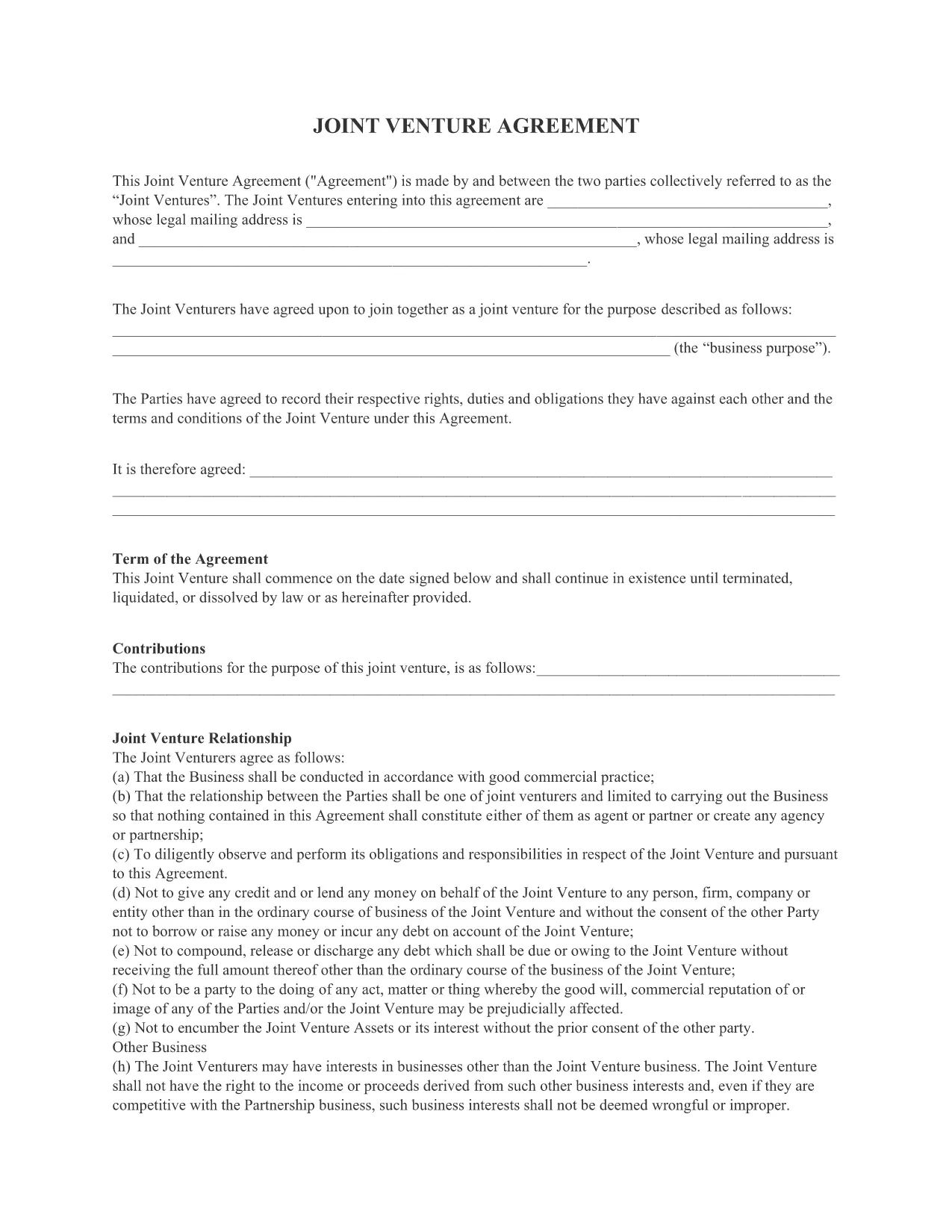
A joint venture agreement is a legally binding contract between two parties who want to combine resources for a specific business purpose. Our free, fillable Joint Venture Agreement PDF lets you create a professional partnership contract in minutes.

This template covers all essential clauses—purpose, contributions, profit sharing, management, and termination—so you can focus on growing your venture instead of drafting legal language.

What Is a Joint Venture Agreement?

A joint venture (JV) is a collaborative business arrangement where each party contributes assets, expertise, or capital to achieve a shared goal while remaining separate legal entities. The agreement outlines each party's rights, responsibilities, and how profits or losses will be divided.

Key Sections of the Form

  • Parties Identification: Names and addresses of both entities.
  • Purpose & Scope: Description of the project or business activity.
  • Capital Contributions: What each party is providing (money, equipment, IP).
  • Profit & Loss Allocation: How earnings and expenses are shared.
  • Management & Decision‑Making: Governance structure and voting rights.
  • Term & Termination: Duration of the JV and exit procedures.
  • Confidentiality & Non‑Compete: Protection of sensitive information.

How to Fill Out the Form Online

Instead of downloading and opening the PDF in a separate editor, simply click the "Fill out this form" button on this page. The Formize PDF Filler app will load the document directly in your browser, allowing you to type, check boxes, and sign instantly.

Common Mistakes to Avoid

  • Leaving any required field blank – the filler will highlight missing information.
  • Using vague descriptions for contributions or profit sharing.
  • Forgetting to include a termination clause, which can cause disputes later.
  • Not having both parties sign the final PDF before distribution.

When you’re done, download the completed PDF, print it for signatures, or share it electronically with your partner.

FAQ
  • Is this joint venture agreement legally binding?

    Yes, once both parties sign the completed PDF, it becomes a legally enforceable contract, provided it complies with state law.

  • Do I need Adobe Acrobat to edit the form?

    No. The Formize PDF Filler works in any modern browser, so you can edit the form without installing any software.

  • Can I customize the agreement for my specific industry?

    Absolutely. The form includes editable text fields where you can add industry‑specific clauses or modify existing language.

  • Is my data safe when using the Formize PDF Filler?

    Formize uses SSL encryption, and all data is processed locally in your browser. Nothing is stored on our servers unless you choose to save it.

  • What if I need help understanding a clause?

    While we don’t provide legal advice, you can consult an attorney to review the completed agreement before signing.

  • Can I save a partially completed form and finish later?

    Yes. Use the "Save" button in the filler to download a draft PDF, then reopen it later to continue editing.

  • Is there a limit on how many times I can use this PDF?

    No. The template is free and can be used unlimited times for different joint venture projects.

COMMENT

Comment remplir joint venture agreement pdf gratuitement, en ligne en 3 étapes simples :

  1. 1
    Click the Fill‑out Button
    Press the "Fill out this form" button on the page to launch the Formize PDF Filler.
  2. 2
    Complete the Fields
    Enter the required information, select checkboxes, and add signatures directly in your browser. The filler saves your changes automatically.
  3. 3
    Download or Share
    When the form is complete, click "Download" to save a copy or use the "Email" option to send the filled agreement to your partner.
Formize l'application PDF Filler
À PROPOS

modèle joint venture agreement pdf

Avec l'ensemble traditionnel de fonctionnalités pour afficher et remplir un document PDF, combiné aux avantages d'une application Web et d'une mise en page réactive, vous pouvez compléter joint venture agreement pdf en quelques minutes.

CARACTÉRISTIQUES

Remplisseur de PDF

Le moyen le plus simple de remplir des formulaires PDF en ligne

  • Remplissez rapidement joint venture agreement pdf
    Vous cherchez un moyen de remplir rapidement joint venture agreement pdf en ligne ? Avec notre remplisseur de formulaire PDF gratuit en ligne, vous saurez comment éditer et remplir ce document pdf en moins d'une minute.
  • Éditeur PDF en ligne facile à utiliser
    Vous en avez assez d'imprimer des fichiers PDF pour pouvoir les modifier avant de les renumériser et de les renvoyer ? Modifiez des documents PDF gratuitement en ligne. Utilisez notre éditeur de pdf en ligne pour gagner du temps et du papier.
  • Excellents outils, toutes plateformes
    Vous vous demandez comment remplir joint venture agreement pdf sur un Mac, ou peut-être comment utiliser un remplisseur PDF gratuit ? Nos outils PDF en ligne fonctionnent sur toutes les plateformes.
  • Stockage de fichiers sécurisé
    Les fichiers "joint venture agreement pdf" terminés sont stockés dans une base de données sécurisée gérée par l'hébergement Amazon Cloud. Vous pouvez supprimer vos fichiers de notre système à tout moment. Dans tous les cas, ces fichiers sont automatiquement supprimés après 24 heures.
  • Discutez avec joint venture agreement pdf
    Discutez avec "joint venture agreement pdf" sur Chatize qui est un assistant de lecture PDF gratuit. Posez des questions et obtenez des réponses de "joint venture agreement pdf". Cliquez simplement sur le bouton Discuter avec un document ci-dessus.

Supprimer la session de remplissage

Supprimer la session de remplissage sélectionnée ? Dans ce cas, votre progression dans le remplissage du formulaire sera perdue.

Supprimer la session d'édition

Supprimer la session de modification sélectionnée ? Dans ce cas, votre progression dans la création et la modification du formulaire sera perdue.