
Choisir la langue

Pennsylvania MV-150 Vehicle Registration Form – Fillable PDF

  1. Langue Anglais
  2. De campagne Etats-Unis
  3. département PennDOT
  4. Activité Immatriculation des véhicules
Pennsylvania MV-150 Vehicle Registration Form – Fillable PDF

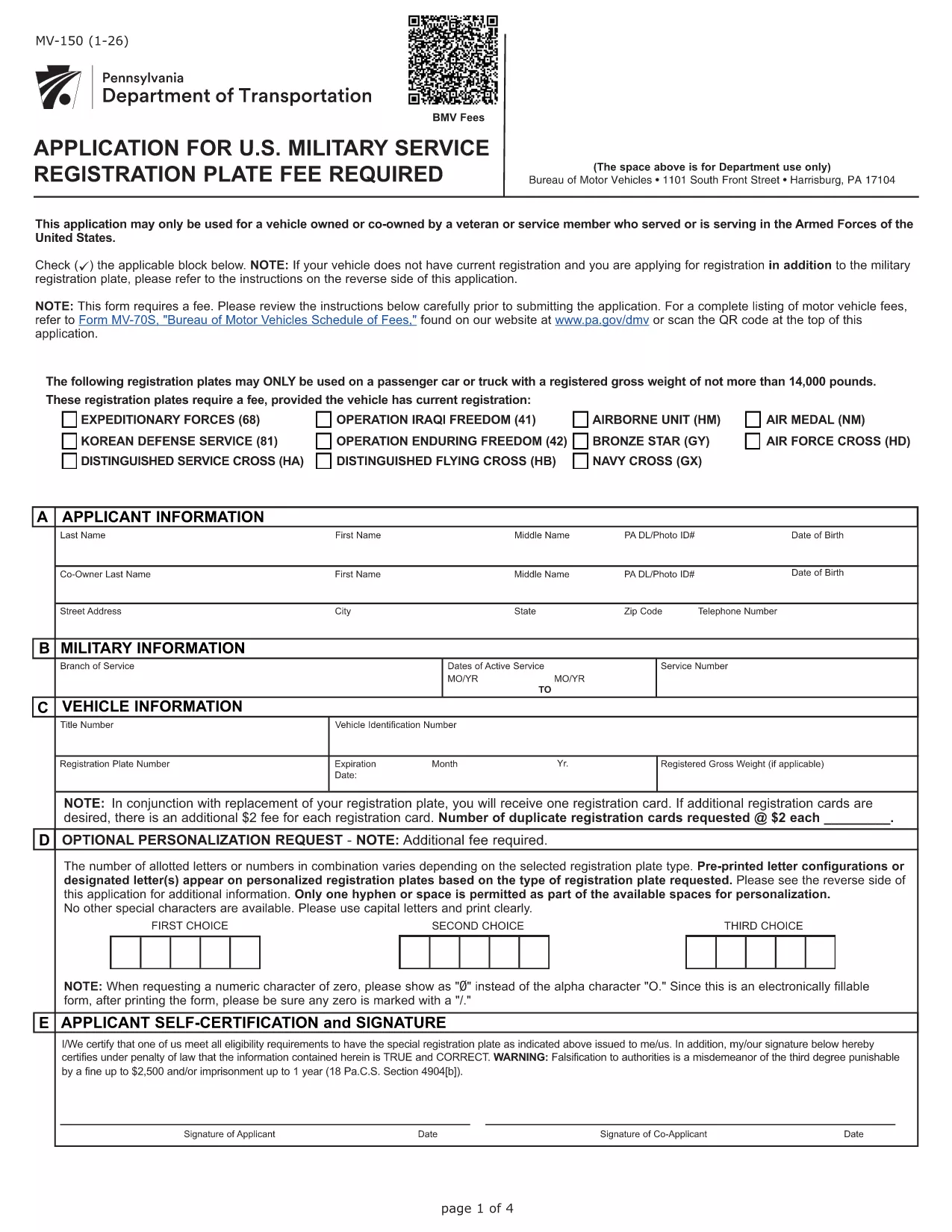
The MV-150 is Pennsylvania’s official vehicle registration application used by the Department of Transportation (PennDOT). Whether you are registering a new vehicle, renewing a plate, or updating ownership information, the MV-150 must be completed accurately and submitted with the appropriate fee.

What Is the MV-150 Form?

The MV-150 collects essential details about the vehicle, the owner, and any lienholders. It is required for:

  • Initial registration of a newly purchased vehicle
  • Renewal of an existing registration
  • Transfer of ownership
  • Adding or removing a license plate

How to Complete the MV-150 Online with Formize

Instead of downloading the PDF and editing it with a separate program, you can fill it out directly on our page using the Formize PDF Filler app:

  1. Click the "Fill out this form" button below the description.
  2. Wait a few seconds while the Formize PDF Filler loads the MV-150.
  3. Enter your information in each fillable field – the interface is intuitive and saves your progress automatically.
  4. Review the entered data, then click Submit to download the completed PDF.
  5. Print the filled PDF and attach it to your payment (check or money order) before mailing it to PennDOT.

Common Mistakes & Tips for a Smooth Submission

  • Incorrect VIN or Plate Number: Double‑check the Vehicle Identification Number (VIN) and license plate details before submitting.
  • Missing Signature: The owner’s signature is required; use the signature field in Formize or print and sign the downloaded PDF.
  • Wrong Fee Amount: Verify the current registration fee on the PennDOT website; attaching an incorrect payment may delay processing.
  • Incomplete Owner Information: Provide full name, address, and phone number; partial entries cause the form to be returned.

Where to Submit Your Completed MV-150

After filling out the form, mail the printed PDF together with your payment to:

Pennsylvania Department of Transportation
Bureau of Motor Vehicles
1101 North Front Street
Harrisburg, PA 17120

For faster processing, you may also take the completed form to any PennDOT Driver & Vehicle Service Center.

Frequently Asked Questions

Below are answers to the most common questions about the MV-150.

FAQ
  • Do I need a PennDOT account to use the Formize filler?

    No. The Formize filler works directly in your browser without any login or account.

  • Can I save my progress and finish the form later?

    Yes. The filler automatically stores your entries locally. When you return, click "Load saved data" to continue.

  • Is the MV-150 form free to download?

    The PDF itself is provided by PennDOT at no cost. You only pay the registration fee when you submit the form.

  • What if I make a mistake after downloading the PDF?

    Print a new copy using the Formize filler, correct the error, and submit the updated version. Avoid hand‑editing the PDF with external editors.

  • How long does it take for PennDOT to process my MV-150?

    Processing typically takes 7‑10 business days after receipt, provided all information and payment are correct.

  • Can I submit the MV-150 electronically?

    PennDOT currently requires a printed, signed form with payment. Electronic submission is not accepted for this form.

  • What fee should I include with my MV-150?

    Visit the PennDOT fee schedule page for the latest registration fees based on vehicle type and weight.

  • Do I need to attach the MV-140 with the MV-150?

    If you are renewing registration, you must also submit the MV-140 (Request for Registration) along with the MV-150.

COMMENT

Comment remplir MV-150 gratuitement, en ligne en 5 étapes simples :

  1. 1
    Open the Fillable Form
    Click the "Fill out this form" button on the page. The Formize PDF Filler will load the MV-150 automatically.
  2. 2
    Enter Your Information
    Fill in each field – owner details, vehicle data, and lienholder information if applicable. The app saves your entries in real time.
  3. 3
    Review and Download
    Check all entries for accuracy, then click the "Download Completed PDF" button to get a printable version of the filled form.
  4. 4
    Print and Sign
    Print the completed PDF, sign where required, and attach it to your payment.
  5. 5
    Mail to PennDOT
    Send the package to the PennDOT address listed on the page or bring it to a local Driver & Vehicle Service Center.
Formize l'application PDF Filler
À PROPOS

Formulaires d'immatriculation des véhicules

Si vous possédez ou louez un véhicule à moteur, une remorque ou un bateau, vous devez respecter certaines obligations pour garder votre véhicule légalement immatriculé et sécuritaire.

MV-150 est l'un des formulaires d'immatriculation des véhicules qui sont des documents utilisés pour immatriculer un véhicule à moteur auprès de l'autorité nationale ou provinciale compétente. Ces formulaires sont généralement requis lorsqu'une personne achète un véhicule neuf ou d'occasion ou lorsqu'elle déménage dans un nouvel état ou une nouvelle province avec un véhicule.

Les exigences exactes et les formulaires nécessaires à l'immatriculation du véhicule peuvent varier selon le lieu, mais généralement, le processus implique de fournir des informations sur le véhicule, le propriétaire et tout privilège sur le véhicule.

Une fois les formulaires d'enregistrement et les frais soumis, l'autorité de l'État ou de la province délivrera un certificat d'immatriculation ou une plaque d'immatriculation au propriétaire du véhicule. Cette immatriculation permet au véhicule d'être légalement exploité sur les voies publiques et les autoroutes.

CARACTÉRISTIQUES

Remplisseur de PDF

Le moyen le plus simple de remplir des formulaires PDF en ligne

  • Remplissez rapidement MV-150
    Vous cherchez un moyen de remplir rapidement MV-150 en ligne ? Avec notre remplisseur de formulaire PDF gratuit en ligne, vous saurez comment éditer et remplir ce document pdf en moins d'une minute.
  • Éditeur PDF en ligne facile à utiliser
    Vous en avez assez d'imprimer des fichiers PDF pour pouvoir les modifier avant de les renumériser et de les renvoyer ? Modifiez des documents PDF gratuitement en ligne. Utilisez notre éditeur de pdf en ligne pour gagner du temps et du papier.
  • Excellents outils, toutes plateformes
    Vous vous demandez comment remplir MV-150 sur un Mac, ou peut-être comment utiliser un remplisseur PDF gratuit ? Nos outils PDF en ligne fonctionnent sur toutes les plateformes.
  • Stockage de fichiers sécurisé
    Les fichiers "MV-150" terminés sont stockés dans une base de données sécurisée gérée par l'hébergement Amazon Cloud. Vous pouvez supprimer vos fichiers de notre système à tout moment. Dans tous les cas, ces fichiers sont automatiquement supprimés après 24 heures.
  • Discutez avec MV-150
    Discutez avec "MV-150" sur Chatize qui est un assistant de lecture PDF gratuit. Posez des questions et obtenez des réponses de "MV-150". Cliquez simplement sur le bouton Discuter avec un document ci-dessus.

Supprimer la session de remplissage

Supprimer la session de remplissage sélectionnée ? Dans ce cas, votre progression dans le remplissage du formulaire sera perdue.

Supprimer la session d'édition

Supprimer la session de modification sélectionnée ? Dans ce cas, votre progression dans la création et la modification du formulaire sera perdue.