
Choisir la langue

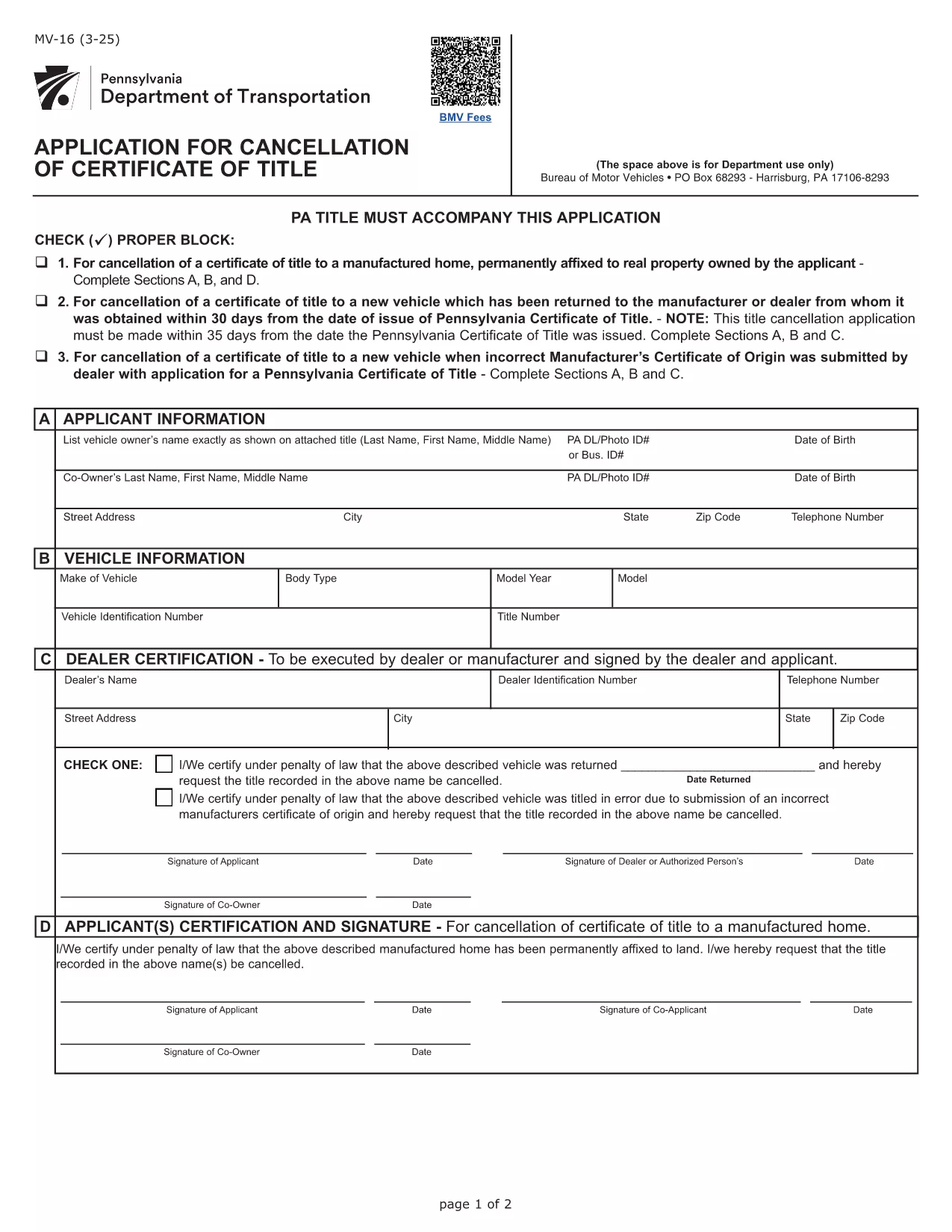
Form MV-16 – Certificate of Title Application (Fillable PDF)

  1. Langue Anglais
  2. De campagne Etats-Unis
  3. Activité Immatriculation des véhicules
  4. département Pennsylvania Department of Transportation
Remplissez ce formulaire
Form MV-16 – Certificate of Title Application (Fillable PDF)

Form MV-16 is the official Pennsylvania application used to obtain a Certificate of Title for a motor vehicle. Whether you’re transferring ownership, correcting a title error, or applying for a new title, this fillable PDF lets you complete the process quickly and accurately.

What is Form MV-16?

The MV-16 form is issued by the Pennsylvania Department of Transportation (PennDOT). It collects vital information such as the vehicle identification number (VIN), owner details, lienholder information, and the type of title request. The form must be signed by the owner (or authorized representative) and, when applicable, the lienholder.

How to Fill Form MV-16 Online

Instead of downloading the PDF and editing it manually, simply click the "Fill out this form" button on this page. The Formize PDF Filler app will load the MV-16 PDF directly in your browser, allowing you to:

  • Enter text into each field with a mouse click.
  • Upload required supporting documents.
  • Save your progress and return later.
  • Download a completed, printable PDF.

Common Mistakes to Avoid

  • Incorrect VIN: Double‑check the Vehicle Identification Number; a single digit error can delay processing.
  • Missing signatures: All required signatures must be electronic or printed and signed before submission.
  • Out‑of‑date addresses: Ensure the mailing address matches the one on file with PennDOT.
  • Unclear lienholder information: Provide the full legal name and address of the lienholder if a loan exists.

Where to Submit the Completed Form

After filling out and saving the PDF, you can submit it in one of three ways:

  1. Mail the printed form to your local PennDOT office.
  2. Upload the PDF through PennDOT’s online portal (if you have an account).
  3. Deliver it in person at a Pennsylvania Department of Revenue (DOR) office.

Following these steps will help ensure a smooth title issuance process.

FAQ
  • What is the purpose of Form MV-16?

    Form MV-16 is used to apply for a new or corrected Certificate of Title for a vehicle registered in Pennsylvania.

  • Can I submit the MV-16 form electronically?

    Yes. After filling the form with Formize, you can upload the completed PDF to PennDOT’s online portal or email it if the agency allows electronic submissions.

  • Do I need a notary for the MV-16 form?

    A notary is not required unless a lienholder or another party specifically requests notarization. Check the instructions on the form for any special cases.

  • How long does it take to receive a new title after submitting MV-16?

    Processing times vary by office, but most PennDOT locations issue a new title within 7‑14 business days after receiving a complete application.

  • What supporting documents are required with MV-16?

    You’ll typically need a valid driver’s license, proof of ownership (bill of sale or previous title), and any lien release documents if applicable.

  • Is there a fee to file Form MV-16?

    Yes. PennDOT charges a title fee, which is listed on the form’s fee schedule. Payment can be made by check, money order, or credit card when submitting.

COMMENT

Comment remplir Form MV-16 gratuitement, en ligne en 5 étapes simples :

  1. 1
    Click the Fill button
    Press the "Fill out this form" button on this page. The Formize PDF Filler will open the MV-16 PDF directly in your browser.
  2. 2
    Enter all required information
    Complete each field—VIN, owner name, address, lienholder details, and the purpose of the title request. Use dropdowns and checkboxes where provided.
  3. 3
    Review and sign
    Double‑check for errors, then add your electronic signature or print, sign, and scan the document if a handwritten signature is required.
  4. 4
    Save or download
    Click "Save" to store the filled form in your account, or download the completed PDF to your computer.
  5. 5
    Submit to PennDOT
    Print and mail, upload through PennDOT’s portal, or deliver in person as described in the submission section.
Formize l'application PDF Filler
À PROPOS

Formulaires d'immatriculation des véhicules

Si vous possédez ou louez un véhicule à moteur, une remorque ou un bateau, vous devez respecter certaines obligations pour garder votre véhicule légalement immatriculé et sécuritaire.

Form MV-16 est l'un des formulaires d'immatriculation des véhicules qui sont des documents utilisés pour immatriculer un véhicule à moteur auprès de l'autorité nationale ou provinciale compétente. Ces formulaires sont généralement requis lorsqu'une personne achète un véhicule neuf ou d'occasion ou lorsqu'elle déménage dans un nouvel état ou une nouvelle province avec un véhicule.

Les exigences exactes et les formulaires nécessaires à l'immatriculation du véhicule peuvent varier selon le lieu, mais généralement, le processus implique de fournir des informations sur le véhicule, le propriétaire et tout privilège sur le véhicule.

Une fois les formulaires d'enregistrement et les frais soumis, l'autorité de l'État ou de la province délivrera un certificat d'immatriculation ou une plaque d'immatriculation au propriétaire du véhicule. Cette immatriculation permet au véhicule d'être légalement exploité sur les voies publiques et les autoroutes.

CARACTÉRISTIQUES

Remplisseur de PDF

Le moyen le plus simple de remplir des formulaires PDF en ligne

  • Remplissez rapidement Form MV-16
    Vous cherchez un moyen de remplir rapidement Form MV-16 en ligne ? Avec notre remplisseur de formulaire PDF gratuit en ligne, vous saurez comment éditer et remplir ce document pdf en moins d'une minute.
  • Éditeur PDF en ligne facile à utiliser
    Vous en avez assez d'imprimer des fichiers PDF pour pouvoir les modifier avant de les renumériser et de les renvoyer ? Modifiez des documents PDF gratuitement en ligne. Utilisez notre éditeur de pdf en ligne pour gagner du temps et du papier.
  • Excellents outils, toutes plateformes
    Vous vous demandez comment remplir Form MV-16 sur un Mac, ou peut-être comment utiliser un remplisseur PDF gratuit ? Nos outils PDF en ligne fonctionnent sur toutes les plateformes.
  • Stockage de fichiers sécurisé
    Les fichiers "Form MV-16" terminés sont stockés dans une base de données sécurisée gérée par l'hébergement Amazon Cloud. Vous pouvez supprimer vos fichiers de notre système à tout moment. Dans tous les cas, ces fichiers sont automatiquement supprimés après 24 heures.
  • Discutez avec Form MV-16
    Discutez avec "Form MV-16" sur Chatize qui est un assistant de lecture PDF gratuit. Posez des questions et obtenez des réponses de "Form MV-16". Cliquez simplement sur le bouton Discuter avec un document ci-dessus.

Supprimer la session de remplissage

Supprimer la session de remplissage sélectionnée ? Dans ce cas, votre progression dans le remplissage du formulaire sera perdue.

Supprimer la session d'édition

Supprimer la session de modification sélectionnée ? Dans ce cas, votre progression dans la création et la modification du formulaire sera perdue.