Choisir la langue

USCIS Form I‑129 – Fillable PDF Online

  1. De campagne Etats-Unis
  2. Langue Anglais
  3. département Services Américains de la Citoyenneté et de l'Immigration
USCIS Form I‑129 – Fillable PDF Online

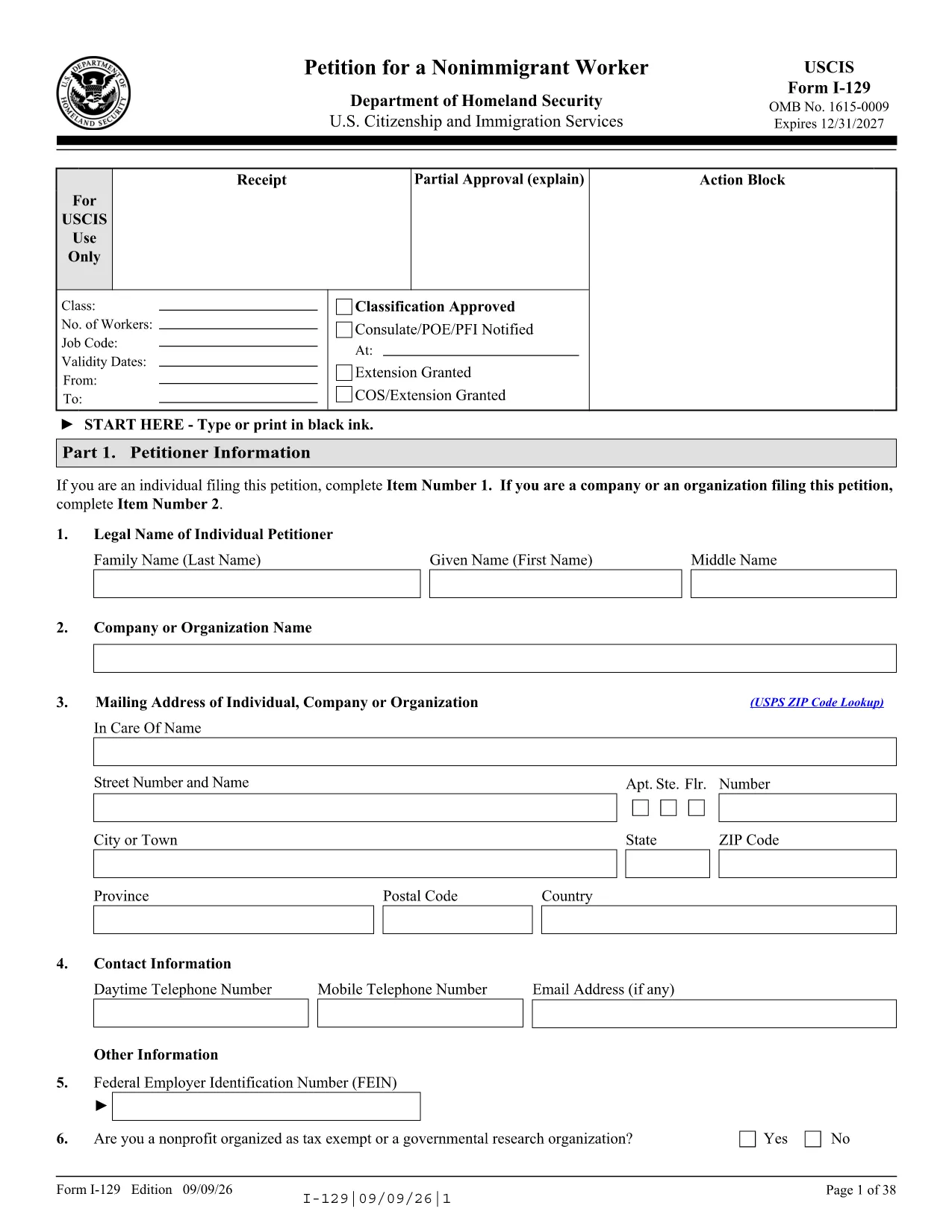
The USCIS Form I‑129 (Petition for a Nonimmigrant Worker) is the official document used by employers to request a visa for foreign workers in categories such as H‑1B, L‑1, O‑1, and many others. Formize makes this government form available as a secure, fillable PDF that you can complete directly in your browser—no extra software required.

Our online Formize PDF Filler loads the exact edition of the form published by USCIS, ensuring that every field, page number, and edition date matches the official version. This helps you avoid costly re‑submission delays.

Below you’ll find a quick overview of the form, step‑by‑step instructions for completing it online, and tips to keep your petition error‑free.

What Is Form I‑129?

Form I‑129 is used to petition for:

  • Temporary workers (H‑1B, H‑2A, H‑2B, H‑3)
  • Intracompany transferees (L‑1A, L‑1B)
  • Individuals with extraordinary ability (O‑1, O‑2)
  • Artists, athletes, and entertainers (P‑1, P‑2, P‑3)
  • Religious workers (R‑1)

The form also serves to request extensions, changes of status, or a new classification for an existing employee.

How to Fill Out Form I‑129 Online

Simply click the "Fill out this form" button on this page. The Formize PDF Filler app will load the official I‑129 PDF. Follow the on‑screen prompts, save your progress, and download the completed file when you’re finished.

Common Mistakes to Avoid

  • Using the wrong edition – USCIS only accepts the edition dated 09/09/26 after November 9 2026. Our PDF is always the current edition.
  • Missing signatures – Every petitioner and, where required, the beneficiary must sign the appropriate sections.
  • Incorrect fee amounts – Verify the latest fee schedule (Form I‑129 includes a biometric fee for H‑1B/L‑1 petitions).
  • Illegible handwriting – Fillable fields ensure clear, machine‑readable text.

Submission & Filing Instructions

After completing the form, download the PDF and print it if you are filing by mail. Attach the required supporting documents and send it to the USCIS filing address that matches your petition category. If you are filing electronically, upload the PDF directly through your USCIS online account.

Need the official PDF? You can also download it directly from USCIS using the link below.

FAQ
  • What edition of Form I‑129 should I use?

    USCIS accepts the 09/09/26 edition after November 9 2026. Our online PDF always reflects the current accepted edition.

  • Can I edit the PDF after I download it?

    Yes, but the fillable version provided by Formize eliminates the need for additional editing tools. All fields are editable before you download the final copy.

  • Do I need a digital signature for Form I‑129?

    USCIS requires a handwritten signature on the printed form for mailed petitions. For electronic filing, you can sign using the USCIS online signature process.

  • How do I know which filing address to use?

    The filing address depends on the visa category and the beneficiary’s location. Refer to the USCIS Direct Filing Addresses page for the most up‑to‑date locations.

  • What fee should I include with my I‑129 petition?

    Fees vary by classification and may include a biometric entry‑exit fee for H‑1B and L‑1 petitions. Check the latest fee schedule on the USCIS website before submitting.

  • Is there a size limit for the PDF when filing online?

    USCIS allows PDF files up to 25 MB for online submission. The fillable I‑129 PDF is well under this limit.

  • Can I use this form for a change of status?

    Yes. Form I‑129 is also used to request a change or extension of status for eligible nonimmigrant categories.

  • What should I do if I make a mistake after filing?

    Submit a corrected Form I‑129 with a cover letter explaining the error. Include the receipt number of the original petition.

COMMENT

Comment remplir USCIS Form I-129 gratuitement, en ligne en 5 étapes simples :

  1. 1
    Open the Fillable Form
    Click the "Fill out this form" button on this page. The Formize PDF Filler loads the official USCIS I‑129 PDF in your browser.
  2. 2
    Enter Your Information
    Complete each field using the on‑screen prompts. The fillable fields ensure correct formatting and prevent stray marks.
  3. 3
    Save Your Progress
    Use the "Save" button anytime to download a backup copy. You can return later without losing data.
  4. 4
    Download the Completed PDF
    When all sections are filled, click "Download" to save the final PDF. Print it if you are filing by mail, or upload it to your USCIS online account.
  5. 5
    Submit Your Petition
    Attach the completed I‑129 PDF with the required supporting documents and send it to the correct USCIS filing address or upload it electronically.
Formize l'application PDF Filler
À PROPOS

modèle USCIS Form I-129

Avec l'ensemble traditionnel de fonctionnalités pour afficher et remplir un document PDF, combiné aux avantages d'une application Web et d'une mise en page réactive, vous pouvez compléter USCIS Form I-129 en quelques minutes.

CARACTÉRISTIQUES

Remplisseur de PDF

Le moyen le plus simple de remplir des formulaires PDF en ligne

  • Remplissez rapidement USCIS Form I-129
    Vous cherchez un moyen de remplir rapidement USCIS Form I-129 en ligne ? Avec notre remplisseur de formulaire PDF gratuit en ligne, vous saurez comment éditer et remplir ce document pdf en moins d'une minute.
  • Éditeur PDF en ligne facile à utiliser
    Vous en avez assez d'imprimer des fichiers PDF pour pouvoir les modifier avant de les renumériser et de les renvoyer ? Modifiez des documents PDF gratuitement en ligne. Utilisez notre éditeur de pdf en ligne pour gagner du temps et du papier.
  • Excellents outils, toutes plateformes
    Vous vous demandez comment remplir USCIS Form I-129 sur un Mac, ou peut-être comment utiliser un remplisseur PDF gratuit ? Nos outils PDF en ligne fonctionnent sur toutes les plateformes.
  • Stockage de fichiers sécurisé
    Les fichiers "USCIS Form I-129" terminés sont stockés dans une base de données sécurisée gérée par l'hébergement Amazon Cloud. Vous pouvez supprimer vos fichiers de notre système à tout moment. Dans tous les cas, ces fichiers sont automatiquement supprimés après 24 heures.
  • Discutez avec USCIS Form I-129
    Discutez avec "USCIS Form I-129" sur Chatize qui est un assistant de lecture PDF gratuit. Posez des questions et obtenez des réponses de "USCIS Form I-129". Cliquez simplement sur le bouton Discuter avec un document ci-dessus.

Supprimer la session de remplissage

Supprimer la session de remplissage sélectionnée ? Dans ce cas, votre progression dans le remplissage du formulaire sera perdue.

Supprimer la session d'édition

Supprimer la session de modification sélectionnée ? Dans ce cas, votre progression dans la création et la modification du formulaire sera perdue.