Choisir la langue

I-485A Supplement A – Fillable PDF Form

  1. De campagne Etats-Unis
  2. Langue Anglais
  3. département Services Américains de la Citoyenneté et de l'Immigration
Remplissez ce formulaire
I-485A Supplement A – Fillable PDF Form

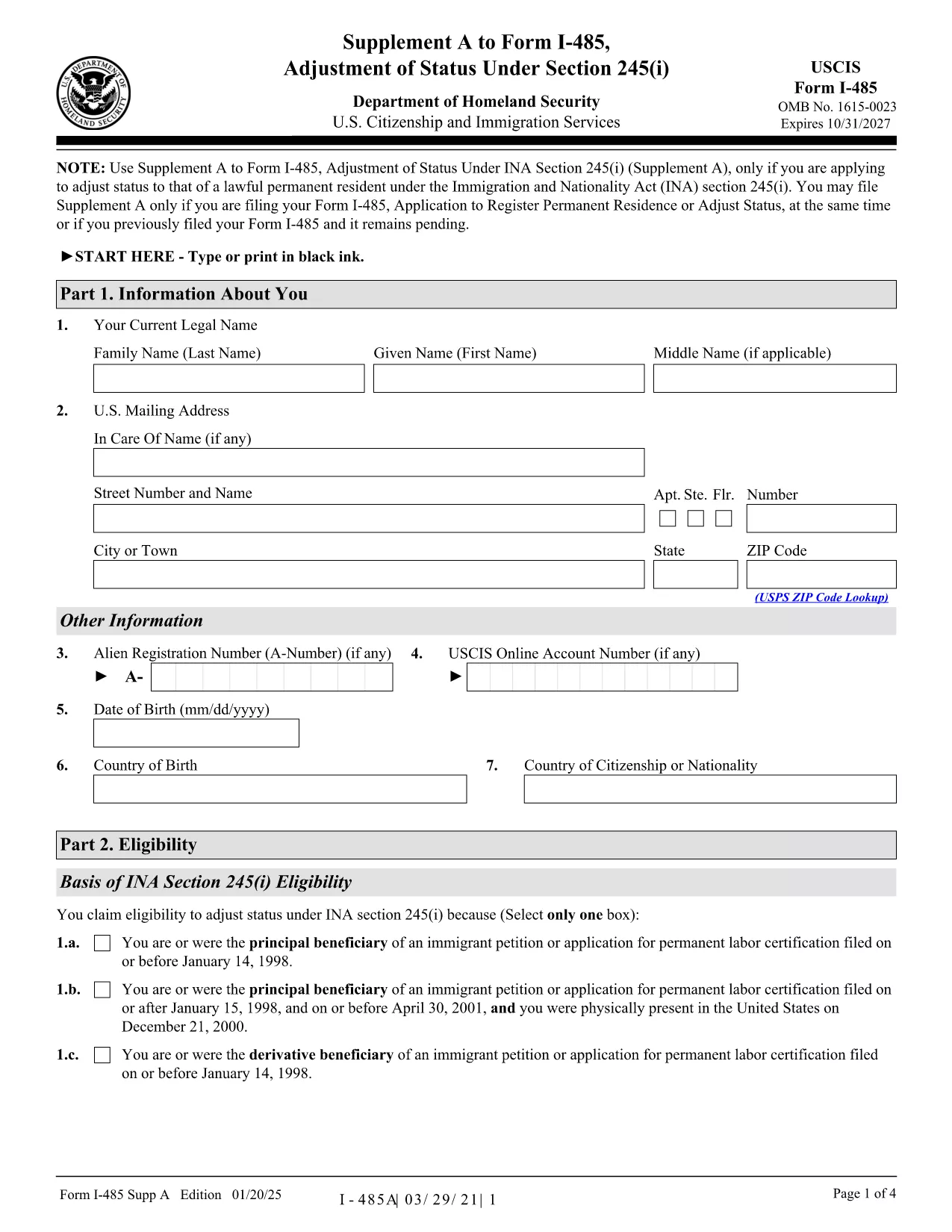
Form I-485A, Supplement A to Form I-485, is required when you are applying for Adjustment of Status under section 245(i) of the Immigration and Nationality Act. This supplement collects additional information about your eligibility for the 245(i) waiver.

What Is Form I-485A Supplement A?

The supplement is a short, one‑page document that must be filed together with the main Form I-485 (Application to Register Permanent Residence or Adjust Status). It asks for details such as the date you first entered the United States, the basis of your 245(i) eligibility, and any prior immigration petitions.

How to Complete the Fillable I-485A Supplement A Online

Instead of downloading, printing, and scanning the PDF, you can fill it out directly in your browser using Formize’s PDF Filler app. Follow these simple steps:

  • Click the "Fill out this form" button below.
  • Wait a few seconds while the Formize PDF Filler loads.
  • Enter all required information in the fillable fields.
  • Review the data, then click Save & Download to get a completed PDF.
  • Print or attach the PDF to your I-485 filing package.

Common Mistakes to Avoid

  • Missing Signature: The form is rejected if not signed.
  • Incorrect Edition Date: Use the most recent edition (01/20/25) – see the bottom of each page.
  • Wrong Filing Address: Check the current USCIS Direct Filing Addresses for Form I-485.
  • Leaving Blank Fields: If a question does not apply, write "N/A" rather than leaving it blank.

Where to Submit Your Completed Form

You can file Supplement A together with Form I-485 by mail, or submit it online through your USCIS account. If you already have a pending I-485 (receipt number starting with IOE), you may upload Supplement A alone.

Helpful Resources and Links

Ready to start? Click the button below to open the fillable version instantly.

FAQ
  • Do I need to file Form I-485A Supplement A if I’m not applying under 245(i)?

    No. Supplement A is only required for applicants seeking adjustment of status under section 245(i). If you’re not using a 245(i) waiver, you can skip this form.

  • Can I submit a printed version of Supplement A instead of the fillable PDF?

    Yes, you may print the PDF, fill it by hand, and mail it with your I-485. However, using the fillable version reduces errors and speeds up processing.

  • What edition of the form should I use?

    Always use the latest edition dated 01/20/25. The edition date is shown at the bottom of each page of the PDF.

  • Is there a filing fee for Supplement A?

    Supplement A itself has no separate fee; the fee is included in the I-485 filing fee. Pay the I-485 fee as directed on the USCIS Fee Schedule.

  • Can I file Supplement A online if my I-485 is already pending?

    Yes. If you have a pending I-485 with a receipt number that begins with IOE, you can upload Supplement A alone through your USCIS online account.

  • What should I do if I make a mistake on the form after submitting?

    Submit a corrected Supplement A with a brief cover letter explaining the error, and reference your I-485 receipt number.

  • Do I need to sign the electronic version of Supplement A?

    Yes. After completing the form online, use the "Add Signature" tool in the Formize PDF Filler or print, sign, and scan the document before filing.

  • Where can I find the official instructions for Supplement A?

    The official USCIS instructions are available on the USCIS website or directly via the PDF link provided on this page.

COMMENT

Comment remplir I-485A gratuitement, en ligne en 5 étapes simples :

  1. 1
    Click the Fill Out Button
    Press the "Fill out this form" button on the page to launch Formize’s PDF Filler.
  2. 2
    Wait for the Filler to Load
    The fillable PDF will appear in your browser within a few seconds.
  3. 3
    Enter Your Information
    Complete each field carefully. Use "N/A" for any question that does not apply.
  4. 4
    Save and Download
    When finished, click "Save & Download" to get a completed PDF you can print or attach to your I-485 package.
  5. 5
    Submit with Your I-485
    Include the filled Supplement A with your Form I-485 filing, either by mail or through your USCIS online account.
Formize l'application PDF Filler
À PROPOS

modèle I-485A

Avec l'ensemble traditionnel de fonctionnalités pour afficher et remplir un document PDF, combiné aux avantages d'une application Web et d'une mise en page réactive, vous pouvez compléter I-485A en quelques minutes.

CARACTÉRISTIQUES

Remplisseur de PDF

Le moyen le plus simple de remplir des formulaires PDF en ligne

  • Remplissez rapidement I-485A
    Vous cherchez un moyen de remplir rapidement I-485A en ligne ? Avec notre remplisseur de formulaire PDF gratuit en ligne, vous saurez comment éditer et remplir ce document pdf en moins d'une minute.
  • Éditeur PDF en ligne facile à utiliser
    Vous en avez assez d'imprimer des fichiers PDF pour pouvoir les modifier avant de les renumériser et de les renvoyer ? Modifiez des documents PDF gratuitement en ligne. Utilisez notre éditeur de pdf en ligne pour gagner du temps et du papier.
  • Excellents outils, toutes plateformes
    Vous vous demandez comment remplir I-485A sur un Mac, ou peut-être comment utiliser un remplisseur PDF gratuit ? Nos outils PDF en ligne fonctionnent sur toutes les plateformes.
  • Stockage de fichiers sécurisé
    Les fichiers "I-485A" terminés sont stockés dans une base de données sécurisée gérée par l'hébergement Amazon Cloud. Vous pouvez supprimer vos fichiers de notre système à tout moment. Dans tous les cas, ces fichiers sont automatiquement supprimés après 24 heures.
  • Discutez avec I-485A
    Discutez avec "I-485A" sur Chatize qui est un assistant de lecture PDF gratuit. Posez des questions et obtenez des réponses de "I-485A". Cliquez simplement sur le bouton Discuter avec un document ci-dessus.

Supprimer la session de remplissage

Supprimer la session de remplissage sélectionnée ? Dans ce cas, votre progression dans le remplissage du formulaire sera perdue.

Supprimer la session d'édition

Supprimer la session de modification sélectionnée ? Dans ce cas, votre progression dans la création et la modification du formulaire sera perdue.