Choisir la langue

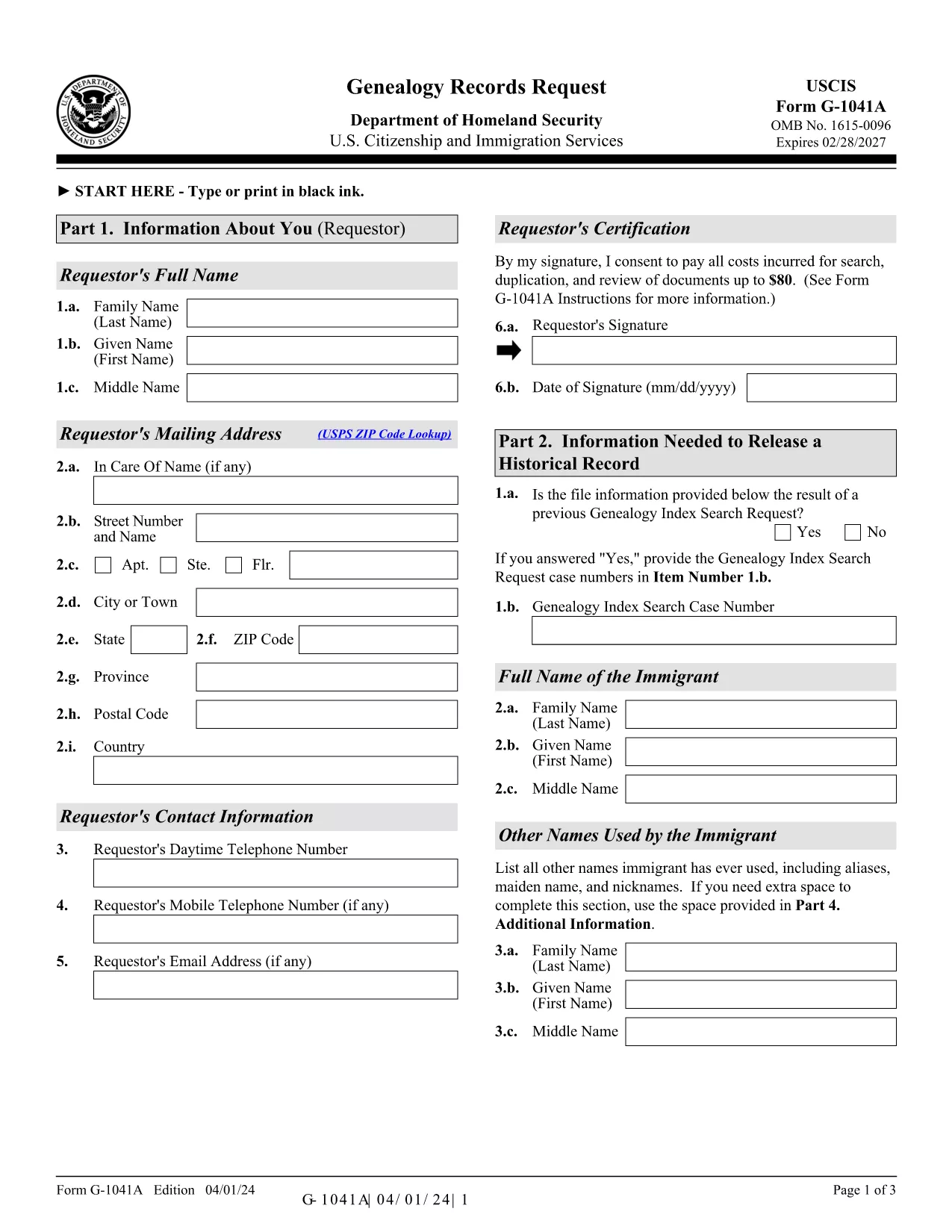
G-1041A – Genealogy Records Request (Fillable PDF)

  1. De campagne Etats-Unis
  2. Langue Anglais
  3. Activité Immigration Records
  4. département USCIS
Remplissez ce formulaire
G-1041A – Genealogy Records Request (Fillable PDF)

The G-1041A is the official USCIS Genealogy Records Request form. It lets you obtain copies of historical immigration records for yourself or a relative. Instead of printing, scanning, and mailing a static PDF, you can fill the form directly on our site using the Formize PDF Filler – a secure, browser‑based editor that saves you time and eliminates formatting errors.

What Is the G-1041A Form?

G-1041A is used when you need full copies of an immigrant’s USCIS file, such as birth certificates, naturalization records, or travel documents. It is different from Form G-1041, which only requests an index search.

How to Complete the G-1041A with Formize

Follow the simple steps below to fill out the form online and download a completed PDF ready for mailing.

Common Mistakes & Tips for a Successful Submission

  • Use the latest edition – the form edition date is 04/01/24. Our filler always loads the current version.
  • Sign the form – the signature field is required; you can type your name and add a digital signature.
  • Provide English translations for any foreign‑language documents.
  • Do not send original documents unless specifically requested.

Where to Send Your Completed Request

After you download the filled PDF, mail it with the required fee to the USCIS Chicago Lockbox:

USCIS Attn: Genealogy Program
P.O. Box 805925
Chicago, IL 60680‑4188

For faster processing, you can also submit the request online through the USCIS Genealogy Program portal, but the fillable PDF remains the most reliable method for complex cases.

Need help? Review the official USCIS instructions or contact the USCIS Customer Service Center.

FAQ
  • What is the difference between G-1041 and G-1041A?

    Form G-1041 requests an index search of USCIS records, while G-1041A requests full copies of the records once the index is located.

  • Can I submit the G-1041A online instead of by mail?

    Yes, USCIS offers an online portal for genealogy requests, but the fillable PDF is required for many detailed or complex cases.

  • How much does the genealogy request cost?

    USCIS charges a fee for each copy of a document requested (up to $80 per document). Check the current fee schedule on the USCIS website.

  • Do I need to provide proof of death for the person I’m requesting?

    If the record holder is deceased and under 100 years old, you must include a death certificate or other acceptable proof of death.

  • What should I do if I receive a rejection notice?

    Review the notice for missing signatures, incorrect edition dates, or incomplete supporting documents. Correct the issue and resend the form.

  • Is the Formize filler secure for personal data?

    Yes. Formize uses SSL encryption and does not store your data on our servers after the PDF is generated.

COMMENT

Comment remplir G-1041A gratuitement, en ligne en 5 étapes simples :

  1. 1
    Open the Fillable Form
    Click the “Fill out this form” button on the page. The Formize PDF Filler app loads directly in your browser.
  2. 2
    Enter Your Information
    Complete each field – name, date of birth, alien registration number, and the relationship to the record holder. Use the Tab key to move quickly.
  3. 3
    Add a Digital Signature
    Type your full name in the signature field or upload a scanned signature image. The app validates the signature format automatically.
  4. 4
    Review & Download
    Click “Review” to check for missing fields. When everything looks correct, press “Download Completed PDF” to save the file to your computer.
  5. 5
    Mail the Request
    Print the downloaded PDF, attach the required fee, and mail it to the USCIS Chicago Lockbox address provided above.
Formize l'application PDF Filler
À PROPOS

modèle G-1041A

Avec l'ensemble traditionnel de fonctionnalités pour afficher et remplir un document PDF, combiné aux avantages d'une application Web et d'une mise en page réactive, vous pouvez compléter G-1041A en quelques minutes.

CARACTÉRISTIQUES

Remplisseur de PDF

Le moyen le plus simple de remplir des formulaires PDF en ligne

  • Remplissez rapidement G-1041A
    Vous cherchez un moyen de remplir rapidement G-1041A en ligne ? Avec notre remplisseur de formulaire PDF gratuit en ligne, vous saurez comment éditer et remplir ce document pdf en moins d'une minute.
  • Éditeur PDF en ligne facile à utiliser
    Vous en avez assez d'imprimer des fichiers PDF pour pouvoir les modifier avant de les renumériser et de les renvoyer ? Modifiez des documents PDF gratuitement en ligne. Utilisez notre éditeur de pdf en ligne pour gagner du temps et du papier.
  • Excellents outils, toutes plateformes
    Vous vous demandez comment remplir G-1041A sur un Mac, ou peut-être comment utiliser un remplisseur PDF gratuit ? Nos outils PDF en ligne fonctionnent sur toutes les plateformes.
  • Stockage de fichiers sécurisé
    Les fichiers "G-1041A" terminés sont stockés dans une base de données sécurisée gérée par l'hébergement Amazon Cloud. Vous pouvez supprimer vos fichiers de notre système à tout moment. Dans tous les cas, ces fichiers sont automatiquement supprimés après 24 heures.
  • Discutez avec G-1041A
    Discutez avec "G-1041A" sur Chatize qui est un assistant de lecture PDF gratuit. Posez des questions et obtenez des réponses de "G-1041A". Cliquez simplement sur le bouton Discuter avec un document ci-dessus.

Supprimer la session de remplissage

Supprimer la session de remplissage sélectionnée ? Dans ce cas, votre progression dans le remplissage du formulaire sera perdue.

Supprimer la session d'édition

Supprimer la session de modification sélectionnée ? Dans ce cas, votre progression dans la création et la modification du formulaire sera perdue.