
Choisir la langue

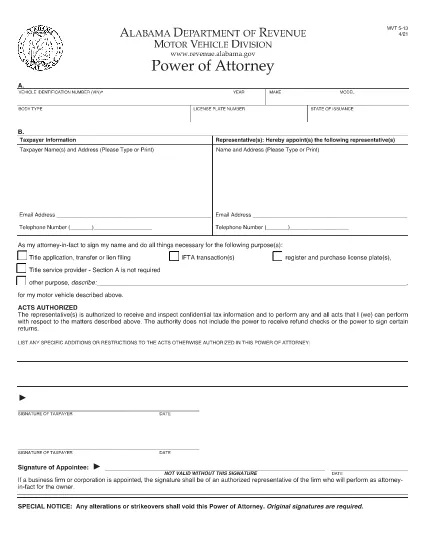
Alabama Motor Vehicle Power of Attorney (Form MVT‑5‑13)

  1. Langue Anglais
  2. De campagne Etats-Unis
  3. Activité Immatriculation des véhicules
  4. État Alabama
Remplissez ce formulaire
Alabama Motor Vehicle Power of Attorney (Form MVT‑5‑13)

The Alabama Motor Vehicle Power of Attorney (Form MVT‑5‑13) lets a vehicle owner authorize another person—called the appointee or attorney‑in‑fact—to perform specific vehicle‑related tasks such as registration, title transfer, or sale. This form is required whenever the owner cannot be present at the Alabama Department of Revenue or a local licensing office.

What Is Form MVT‑5‑13?

Form MVT‑5‑13 is a short, state‑approved document that grants limited authority to a trusted representative. It is used for:

  • Transferring a vehicle title
  • Registering or renewing a vehicle
  • Submitting a bill of sale
  • Handling lien releases
The form must be signed by both the vehicle owner (taxpayer) and the appointed representative.

How to Fill the MVT‑5‑13 Online

Instead of downloading the PDF and editing it in a separate program, simply click the "Fill out this form" button on this page. The Formize PDF Filler app will load instantly, allowing you to complete every field directly in your browser.

Signing Requirements & Notarization

Alabama law requires:

  • Both the owner and the representative to sign and date the form.
  • A notary public is not mandatory, but a notarized signature adds credibility and is often requested by the licensing office.
If you choose notarization, bring a valid ID and the completed form to a notary.

Common Mistakes to Avoid

  • Leaving sections blank: Every field marked with an asterisk (*) is required.
  • Incorrect VIN: Double‑check the Vehicle Identification Number; a single digit error can delay processing.
  • Mismatched signatures: The signatures on the PDF must match the printed names exactly.
  • Using an expired form: Ensure you are using the latest version (the link below is the current 2021 revision).

Where to Submit the Completed Form

After filling and signing, you can:

  • Bring the printed form to any Alabama Department of Revenue office.
  • Mail it to the appropriate Vehicle Licensing Office.
  • Upload a scanned copy through the online portal if the agency permits electronic submissions.
Having a clean, correctly completed Form MVT‑5‑13 speeds up title transfers and registration renewals.

Download the official PDF version of Form MVT‑5‑13 for reference or offline use.

FAQ
  • Who can be appointed as an attorney‑in‑fact on Form MVT‑5‑13?

    Any adult individual you trust – a family member, friend, attorney, or title‑service representative – can be appointed, as long as they are willing to sign the form.

  • Is notarization required for the MVT‑5‑13?

    Alabama law does not require notarization, but many licensing offices prefer or require a notarized signature for added security.

  • Can I use the same Form MVT‑5‑13 for multiple vehicles?

    No. Each vehicle requires its own completed Form MVT‑5‑13 with the specific VIN, make, model, and year.

  • How long is the power of attorney valid?

    The form remains effective until the vehicle transaction is completed, or until you submit a written revocation to the Department of Revenue.

  • What should I do if I make a mistake after signing?

    Correct the error by crossing out the mistake, initialing the change, and having both the owner and representative sign again. For major errors, submit a new Form MVT‑5‑13.

  • Can I submit the form electronically?

    Some county offices accept scanned copies via their online portals. Check with your local licensing office for electronic submission policies.

  • Do I need to provide additional documents with the POA?

    Typically you’ll need the vehicle’s current title, a valid photo ID for both parties, and any applicable fees for the transaction you’re performing.

  • Is there a fee to download the PDF?

    No. The PDF is provided free of charge; you only pay any notary or filing fees required by the Department of Revenue.

COMMENT

Comment remplir MVT-5-13 gratuitement, en ligne en 5 étapes simples :

  1. 1
    Click the Fill Button
    Press the “Fill out this form” button on the page. The Formize PDF Filler app loads instantly in your browser.
  2. 2
    Enter All Required Information
    Complete each field – vehicle details, owner information, and representative details. Required fields are marked with an asterisk (*).
  3. 3
    Review and Sign
    Double‑check the entered data, then use the built‑in signature tool to sign as the owner and as the appointee.
  4. 4
    Download or Email the Completed Form
    When you’re satisfied, click “Save & Download” to get a copy, or choose “Email” to send the filled PDF directly to the licensing office.
  5. 5
    Print and Notarize (if needed)
    Print the saved PDF, bring it to a notary public for notarization if your local office requires it, then submit the final document.
Formize l'application PDF Filler
À PROPOS

Formulaires d'immatriculation des véhicules

Si vous possédez ou louez un véhicule à moteur, une remorque ou un bateau, vous devez respecter certaines obligations pour garder votre véhicule légalement immatriculé et sécuritaire.

MVT-5-13 est l'un des formulaires d'immatriculation des véhicules qui sont des documents utilisés pour immatriculer un véhicule à moteur auprès de l'autorité nationale ou provinciale compétente. Ces formulaires sont généralement requis lorsqu'une personne achète un véhicule neuf ou d'occasion ou lorsqu'elle déménage dans un nouvel état ou une nouvelle province avec un véhicule.

Les exigences exactes et les formulaires nécessaires à l'immatriculation du véhicule peuvent varier selon le lieu, mais généralement, le processus implique de fournir des informations sur le véhicule, le propriétaire et tout privilège sur le véhicule.

Une fois les formulaires d'enregistrement et les frais soumis, l'autorité de l'État ou de la province délivrera un certificat d'immatriculation ou une plaque d'immatriculation au propriétaire du véhicule. Cette immatriculation permet au véhicule d'être légalement exploité sur les voies publiques et les autoroutes.

CARACTÉRISTIQUES

Remplisseur de PDF

Le moyen le plus simple de remplir des formulaires PDF en ligne

  • Remplissez rapidement MVT-5-13
    Vous cherchez un moyen de remplir rapidement MVT-5-13 en ligne ? Avec notre remplisseur de formulaire PDF gratuit en ligne, vous saurez comment éditer et remplir ce document pdf en moins d'une minute.
  • Éditeur PDF en ligne facile à utiliser
    Vous en avez assez d'imprimer des fichiers PDF pour pouvoir les modifier avant de les renumériser et de les renvoyer ? Modifiez des documents PDF gratuitement en ligne. Utilisez notre éditeur de pdf en ligne pour gagner du temps et du papier.
  • Excellents outils, toutes plateformes
    Vous vous demandez comment remplir MVT-5-13 sur un Mac, ou peut-être comment utiliser un remplisseur PDF gratuit ? Nos outils PDF en ligne fonctionnent sur toutes les plateformes.
  • Stockage de fichiers sécurisé
    Les fichiers "MVT-5-13" terminés sont stockés dans une base de données sécurisée gérée par l'hébergement Amazon Cloud. Vous pouvez supprimer vos fichiers de notre système à tout moment. Dans tous les cas, ces fichiers sont automatiquement supprimés après 24 heures.
  • Discutez avec MVT-5-13
    Discutez avec "MVT-5-13" sur Chatize qui est un assistant de lecture PDF gratuit. Posez des questions et obtenez des réponses de "MVT-5-13". Cliquez simplement sur le bouton Discuter avec un document ci-dessus.

Supprimer la session de remplissage

Supprimer la session de remplissage sélectionnée ? Dans ce cas, votre progression dans le remplissage du formulaire sera perdue.

Supprimer la session d'édition

Supprimer la session de modification sélectionnée ? Dans ce cas, votre progression dans la création et la modification du formulaire sera perdue.