
Choisir la langue

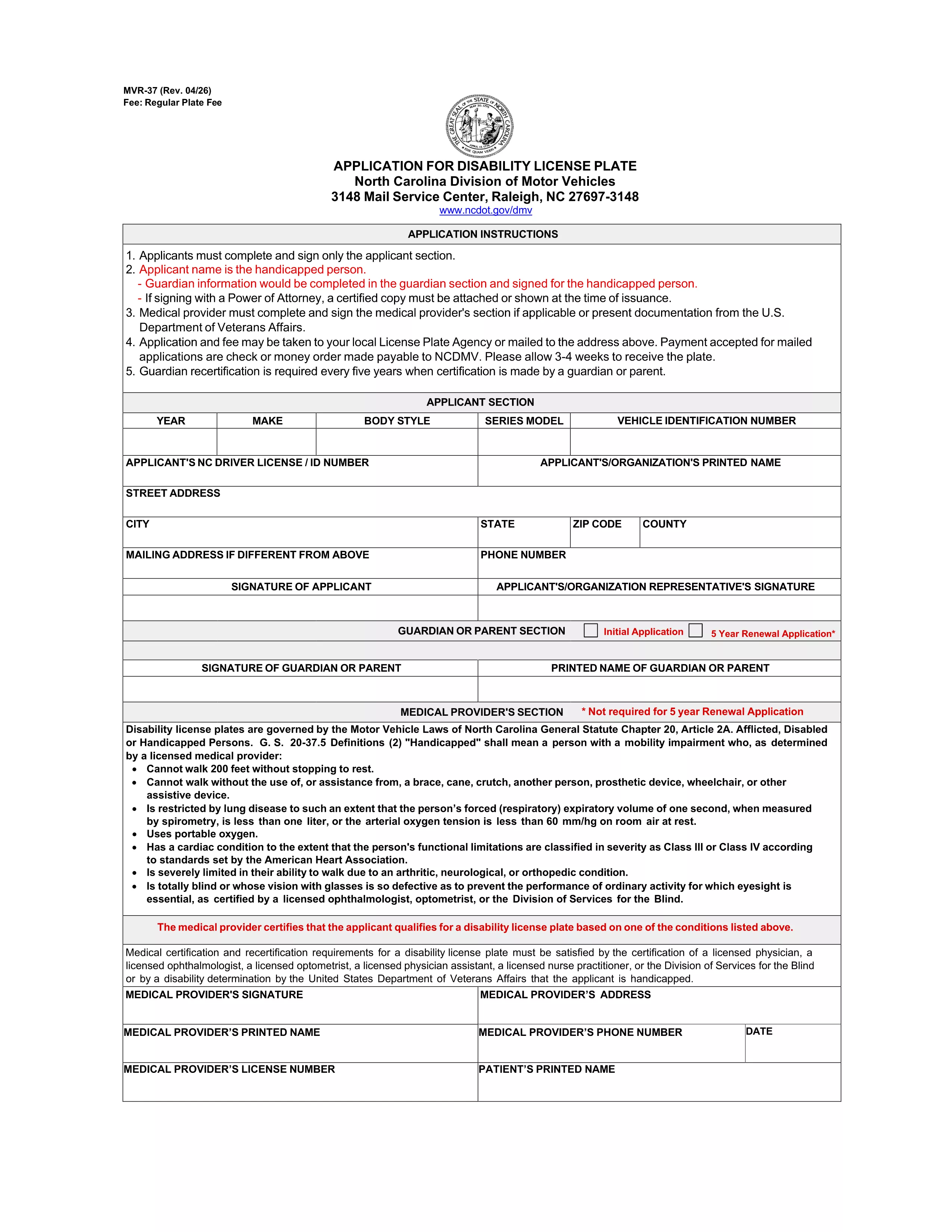
MVR-37 Application for Handicap Driver Registration Plate (North Carolina)

  1. Langue Anglais
  2. De campagne Etats-Unis
  3. Activité Immatriculation des véhicules
  4. État Caroline du Nord
MVR-37 Application for Handicap Driver Registration Plate (North Carolina)

The MVR-37 is the official North Carolina Department of Transportation (NCDOT) application for a handicap driver registration plate. This plate allows qualified drivers to park in designated disabled parking spaces and enjoy other accessibility benefits.

Formize.com hosts a fillable PDF version of the MVR-37, so you can complete the entire application online without printing, scanning, or using a separate PDF editor.

What Is the MVR-37 Form?

The MVR-37 is used to request a permanent or temporary disability license plate. It must be signed by the applicant (or guardian) and a licensed medical professional who verifies the qualifying disability.

How to Complete the MVR-37 Online

Follow these simple steps to fill out the form directly on our site:

  • Click the "Fill out this form" button below.
  • Wait for the Formize PDF Filler app to load (usually a few seconds).
  • Enter the required information in each field, upload the medical certification, and add your electronic signature.
  • Review the completed form, then download or email it to the North Carolina DMV.

Eligibility & Required Documents

To qualify for a handicap driver registration plate, you must meet one of the following criteria:

  • Possess a disability that limits your ability to walk or stand for extended periods.
  • Have a visual impairment certified by an optometrist, ophthalmologist, or a Division of Services for the Blind representative.

Required documents include:

  • Completed MVR-37 form.
  • Medical certification signed by a qualified provider.
  • Proof of identity (driver’s license, state ID, or passport).
  • Payment of the $36 plate fee (or $5 per placard if you’re applying for a placard instead).

Common Mistakes to Avoid

  • Leaving any required field blank – the PDF filler will highlight missing information.
  • Submitting an unsigned medical certification – the physician’s signature is mandatory.
  • Using an outdated version of the form – always use the latest PDF provided by the NCDOT.
  • Forgetting to attach the fee payment receipt when mailing the application.

Where to Submit Your Application

You can submit the completed MVR-37 by mail or in person at any North Carolina DMV license‑plate office. The mailing address is printed on the last page of the form.

Need help? Review the North Carolina DMV handicap services page for additional guidance.

FAQ
  • What is the purpose of the MVR-37 form?

    The MVR-37 is used to apply for a handicap driver registration plate in North Carolina, granting access to disabled parking spaces.

  • Can I fill out the MVR-37 on a mobile device?

    Yes. The Formize fillable PDF works on smartphones and tablets as long as you have a modern browser.

  • Do I need a doctor’s signature on the form?

    A licensed physician, optometrist, ophthalmologist, or a Division of Services for the Blind representative must sign the medical certification section.

  • How much does a handicap license plate cost?

    The fee for a permanent handicap driver registration plate is $36. Temporary plates and placards have separate fees.

  • Where do I mail the completed MVR-37?

    Mail the completed form, medical certification, proof of identity, and payment to the address printed on the last page of the PDF.

  • Can I submit the form online directly to the DMV?

    North Carolina currently requires a mailed or in‑person submission, but you can email the completed PDF to the DMV if they approve it.

COMMENT

Comment remplir MVR-37 gratuitement, en ligne en 4 étapes simples :

  1. 1
    Click the Fill Out Button
    On this page, click the "Fill out this form" button to launch the Formize PDF Filler.
  2. 2
    Wait for the Filler to Load
    The Formize PDF Filler app will open in a new window. Allow a few seconds for all fields to become interactive.
  3. 3
    Enter Your Information
    Complete each required field, upload your physician’s certification, and add your electronic signature.
  4. 4
    Review, Download, and Submit
    Double‑check the form for errors, then download the completed PDF or email it directly to the North Carolina DMV.
Formize l'application PDF Filler
À PROPOS

Formulaires d'immatriculation des véhicules

Si vous possédez ou louez un véhicule à moteur, une remorque ou un bateau, vous devez respecter certaines obligations pour garder votre véhicule légalement immatriculé et sécuritaire.

MVR-37 est l'un des formulaires d'immatriculation des véhicules qui sont des documents utilisés pour immatriculer un véhicule à moteur auprès de l'autorité nationale ou provinciale compétente. Ces formulaires sont généralement requis lorsqu'une personne achète un véhicule neuf ou d'occasion ou lorsqu'elle déménage dans un nouvel état ou une nouvelle province avec un véhicule.

Les exigences exactes et les formulaires nécessaires à l'immatriculation du véhicule peuvent varier selon le lieu, mais généralement, le processus implique de fournir des informations sur le véhicule, le propriétaire et tout privilège sur le véhicule.

Une fois les formulaires d'enregistrement et les frais soumis, l'autorité de l'État ou de la province délivrera un certificat d'immatriculation ou une plaque d'immatriculation au propriétaire du véhicule. Cette immatriculation permet au véhicule d'être légalement exploité sur les voies publiques et les autoroutes.

CARACTÉRISTIQUES

Remplisseur de PDF

Le moyen le plus simple de remplir des formulaires PDF en ligne

  • Remplissez rapidement MVR-37
    Vous cherchez un moyen de remplir rapidement MVR-37 en ligne ? Avec notre remplisseur de formulaire PDF gratuit en ligne, vous saurez comment éditer et remplir ce document pdf en moins d'une minute.
  • Éditeur PDF en ligne facile à utiliser
    Vous en avez assez d'imprimer des fichiers PDF pour pouvoir les modifier avant de les renumériser et de les renvoyer ? Modifiez des documents PDF gratuitement en ligne. Utilisez notre éditeur de pdf en ligne pour gagner du temps et du papier.
  • Excellents outils, toutes plateformes
    Vous vous demandez comment remplir MVR-37 sur un Mac, ou peut-être comment utiliser un remplisseur PDF gratuit ? Nos outils PDF en ligne fonctionnent sur toutes les plateformes.
  • Stockage de fichiers sécurisé
    Les fichiers "MVR-37" terminés sont stockés dans une base de données sécurisée gérée par l'hébergement Amazon Cloud. Vous pouvez supprimer vos fichiers de notre système à tout moment. Dans tous les cas, ces fichiers sont automatiquement supprimés après 24 heures.
  • Discutez avec MVR-37
    Discutez avec "MVR-37" sur Chatize qui est un assistant de lecture PDF gratuit. Posez des questions et obtenez des réponses de "MVR-37". Cliquez simplement sur le bouton Discuter avec un document ci-dessus.

Supprimer la session de remplissage

Supprimer la session de remplissage sélectionnée ? Dans ce cas, votre progression dans le remplissage du formulaire sera perdue.

Supprimer la session d'édition

Supprimer la session de modification sélectionnée ? Dans ce cas, votre progression dans la création et la modification du formulaire sera perdue.