
Choisir la langue

MVR‑37A Fillable PDF – North Carolina Disability Parking Placard Application

  1. Langue Anglais
  2. De campagne Etats-Unis
  3. Activité Immatriculation des véhicules
  4. État Caroline du Nord
Remplissez ce formulaire
MVR‑37A Fillable PDF – North Carolina Disability Parking Placard Application

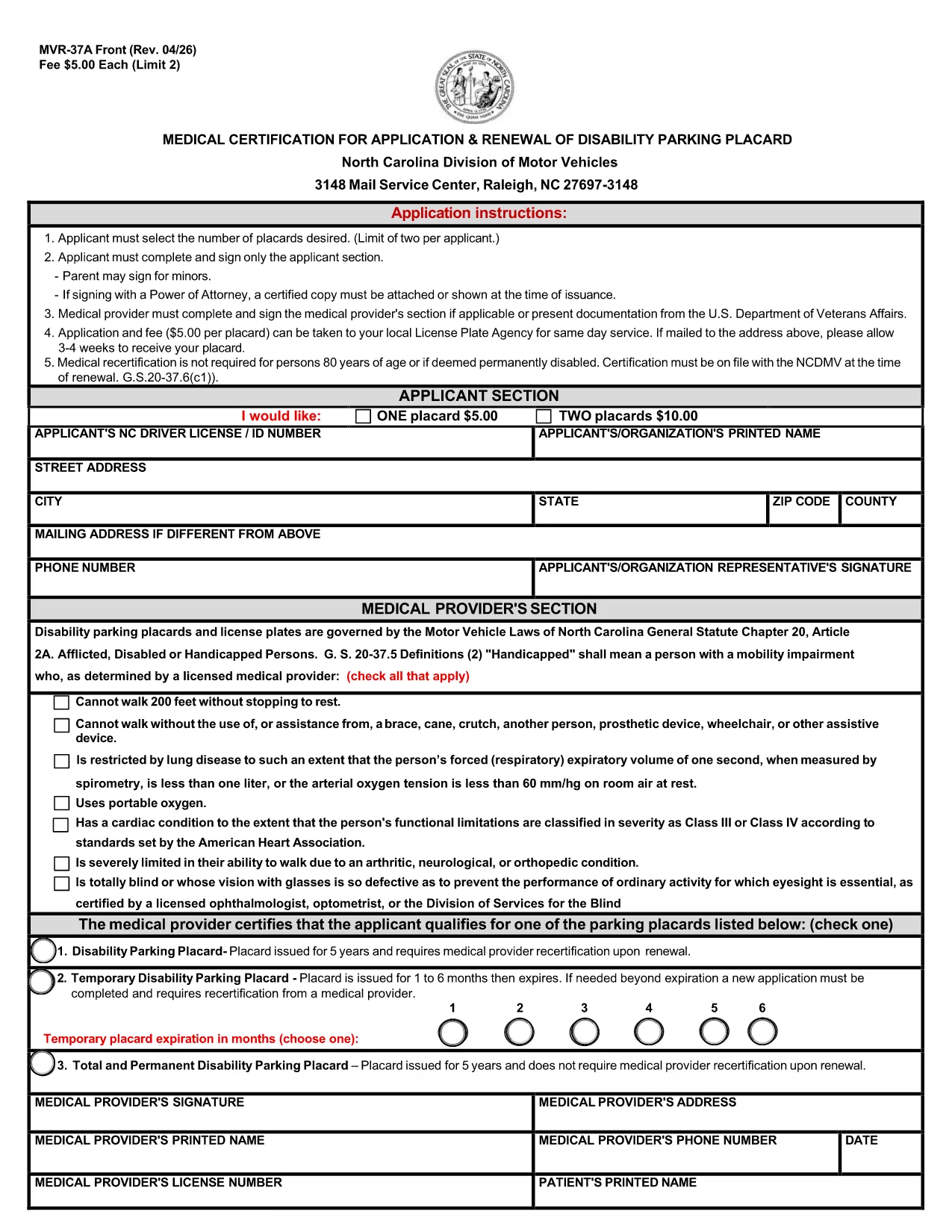
The MVR‑37A is the official medical certification required by the North Carolina Division of Motor Vehicles (DMV) to apply for or renew a disability parking placard. This fillable PDF lets you complete the entire application online, eliminating the need for printing, scanning, or hand‑writing.

What Is the MVR‑37A Form?

The form collects personal details, vehicle information, and a medical provider’s certification that you meet the state’s eligibility criteria. It is used for three types of placards:

  • Standard Disability Parking Placard
  • Temporary Disability Parking Placard
  • Total and Permanent Disability Placard

Who Needs a Disability Parking Placard in NC?

Anyone who has a qualifying medical condition that limits mobility may apply. Typical qualifying conditions include, but are not limited to, loss of limb function, severe arthritis, spinal cord injury, and certain cardiovascular or respiratory disorders.

Step‑by‑Step Guide to Fill the Form Online

Instead of downloading and opening the PDF in a separate editor, simply click the "Fill out this form" button on the page. The Formize PDF Filler app will load instantly, allowing you to:

  1. Select the number of placards you need (maximum two per applicant).
  2. Enter your personal and contact information.
  3. Provide your NC driver’s license or ID number.
  4. Have your medical provider complete the certification section.
  5. Electronically sign the applicant and provider sections.
  6. Save, download, or directly email the completed form to the DMV.

Common Mistakes to Avoid

  • Leaving the provider section blank: The DMV will reject any form without a completed medical certification.
  • Incorrect placard count: Only two placards are allowed per applicant; ordering more will cause delays.
  • Missing signature: Both the applicant and the medical provider must sign electronically.
  • Wrong address format: Use the exact mailing address as it appears on official documents.

Where to Submit Your Application

After completing the form, you can:

  • Mail the PDF to the NC DMV address listed on the form.
  • Submit it in person at your local DMV office.
  • Upload it through the NC DMV’s online portal if you have an account.

The processing time is typically 4‑6 weeks. Include the appropriate fee ($5 per placard) with a check or money order payable to the "North Carolina Division of Motor Vehicles."

FAQ
  • How many disability parking placards can I request?

    A maximum of two placards per applicant is allowed. Each placard costs $5.

  • Do I need a medical provider’s signature?

    Yes. The form is invalid without a completed and signed medical certification section.

  • Can I fill out the MVR‑37A online without printing?

    Absolutely. Use the Formize PDF Filler on this page to complete, sign, and save the form electronically.

  • What is the processing time after I submit the form?

    The North Carolina DMV typically processes applications within 4‑6 weeks.

  • What if I lose my placard after it’s issued?

    Report the loss to the NC DMV immediately and submit a new MVR‑37A form with a $5 replacement fee.

  • Is there a fee for a temporary disability placard?

    Yes, the same $5 fee applies for a temporary placard, which is valid for up to 90 days.

  • Can a parent sign the form for a minor?

    A parent or legal guardian may sign on behalf of a minor applicant and must indicate their relationship on the form.

COMMENT

Comment remplir MVR-37A gratuitement, en ligne en 5 étapes simples :

  1. 1
    Open the Fillable Form
    Click the "Fill out this form" button on the page. The Formize PDF Filler will open in a new tab.
  2. 2
    Wait for the Formize App to Load
    Allow a few seconds for the online editor to initialize. No download is required.
  3. 3
    Complete All Required Fields
    Enter your personal details, select the number of placards, and have your medical provider fill out the certification section.
  4. 4
    Add Electronic Signatures
    Use your mouse, trackpad, or touchscreen to sign the applicant and provider sections.
  5. 5
    Save and Submit
    Click "Save" to download the completed PDF, then mail or upload it to the NC DMV as instructed on the form.
Formize l'application PDF Filler
À PROPOS

Formulaires d'immatriculation des véhicules

Si vous possédez ou louez un véhicule à moteur, une remorque ou un bateau, vous devez respecter certaines obligations pour garder votre véhicule légalement immatriculé et sécuritaire.

MVR-37A est l'un des formulaires d'immatriculation des véhicules qui sont des documents utilisés pour immatriculer un véhicule à moteur auprès de l'autorité nationale ou provinciale compétente. Ces formulaires sont généralement requis lorsqu'une personne achète un véhicule neuf ou d'occasion ou lorsqu'elle déménage dans un nouvel état ou une nouvelle province avec un véhicule.

Les exigences exactes et les formulaires nécessaires à l'immatriculation du véhicule peuvent varier selon le lieu, mais généralement, le processus implique de fournir des informations sur le véhicule, le propriétaire et tout privilège sur le véhicule.

Une fois les formulaires d'enregistrement et les frais soumis, l'autorité de l'État ou de la province délivrera un certificat d'immatriculation ou une plaque d'immatriculation au propriétaire du véhicule. Cette immatriculation permet au véhicule d'être légalement exploité sur les voies publiques et les autoroutes.

CARACTÉRISTIQUES

Remplisseur de PDF

Le moyen le plus simple de remplir des formulaires PDF en ligne

  • Remplissez rapidement MVR-37A
    Vous cherchez un moyen de remplir rapidement MVR-37A en ligne ? Avec notre remplisseur de formulaire PDF gratuit en ligne, vous saurez comment éditer et remplir ce document pdf en moins d'une minute.
  • Éditeur PDF en ligne facile à utiliser
    Vous en avez assez d'imprimer des fichiers PDF pour pouvoir les modifier avant de les renumériser et de les renvoyer ? Modifiez des documents PDF gratuitement en ligne. Utilisez notre éditeur de pdf en ligne pour gagner du temps et du papier.
  • Excellents outils, toutes plateformes
    Vous vous demandez comment remplir MVR-37A sur un Mac, ou peut-être comment utiliser un remplisseur PDF gratuit ? Nos outils PDF en ligne fonctionnent sur toutes les plateformes.
  • Stockage de fichiers sécurisé
    Les fichiers "MVR-37A" terminés sont stockés dans une base de données sécurisée gérée par l'hébergement Amazon Cloud. Vous pouvez supprimer vos fichiers de notre système à tout moment. Dans tous les cas, ces fichiers sont automatiquement supprimés après 24 heures.
  • Discutez avec MVR-37A
    Discutez avec "MVR-37A" sur Chatize qui est un assistant de lecture PDF gratuit. Posez des questions et obtenez des réponses de "MVR-37A". Cliquez simplement sur le bouton Discuter avec un document ci-dessus.

Supprimer la session de remplissage

Supprimer la session de remplissage sélectionnée ? Dans ce cas, votre progression dans le remplissage du formulaire sera perdue.

Supprimer la session d'édition

Supprimer la session de modification sélectionnée ? Dans ce cas, votre progression dans la création et la modification du formulaire sera perdue.